
ELOOP E14
ELOOP E14 Power Bank User Manual
Model: E14 | Brand: ELOOP
1. Introduction
Thank you for choosing the ELOOP E14 Power Bank. This portable charger is designed to provide reliable and high-capacity power for your mobile devices, ensuring you stay connected wherever you go. With its 20000mAh Lithium Polymer battery, compact design, and dual USB output ports, the E14 is an ideal companion for daily use and travel.
Important Safety Information
- Do not disassemble, open, or shred the battery pack.
- Do not expose the power bank to heat or fire. Avoid storage in direct sunlight.
- Do not short-circuit the power bank.
- Keep the power bank dry and away from moisture.
- Keep out of reach of children.
- Dispose of the power bank according to local regulations.
2. Product Overview
The ELOOP E14 Power Bank features a sleek design with essential components for efficient charging.
Package Contents:
- ELOOP E14 Power Bank
- Micro USB Cable
- Travel Pouch
- User Manual

Image: All components included with the ELOOP E14 Power Bank: the power bank itself, a Micro USB cable, a user manual, the product packaging, and a protective travel pouch.
Component Identification:
- USB Output Ports (x2): For charging your devices.
- Micro USB Input Port: For recharging the power bank.
- LED Indicators (x4): Display the remaining battery level.
- Power Button: To check battery level or initiate charging.

Image: A close-up view of the ELOOP E14 Power Bank's side, showing the two USB output ports and the four small LED indicator lights that display the battery status.
3. Setup
Initial Charging of the Power Bank:
- Connect the Micro USB cable to the power bank's input port.
- Connect the other end of the USB cable to a USB wall charger (not included) or a computer's USB port.
- The LED indicators will light up, indicating the charging progress. All four LEDs will be solid when fully charged.
- For optimal performance, fully charge the power bank before first use.

Image: The ELOOP E14 Power Bank in blue, shown connected to a charging cable, with graphics indicating its ability to recharge faster with a 2.1A AC charger compared to 1A or 2A chargers.
4. Operating Instructions
Charging Your Devices:
- Connect your device's charging cable to one of the ELOOP E14's USB output ports.
- Connect the other end of the cable to your device.
- The power bank will automatically begin charging your device. If not, press the power button once.
- You can charge up to two devices simultaneously.
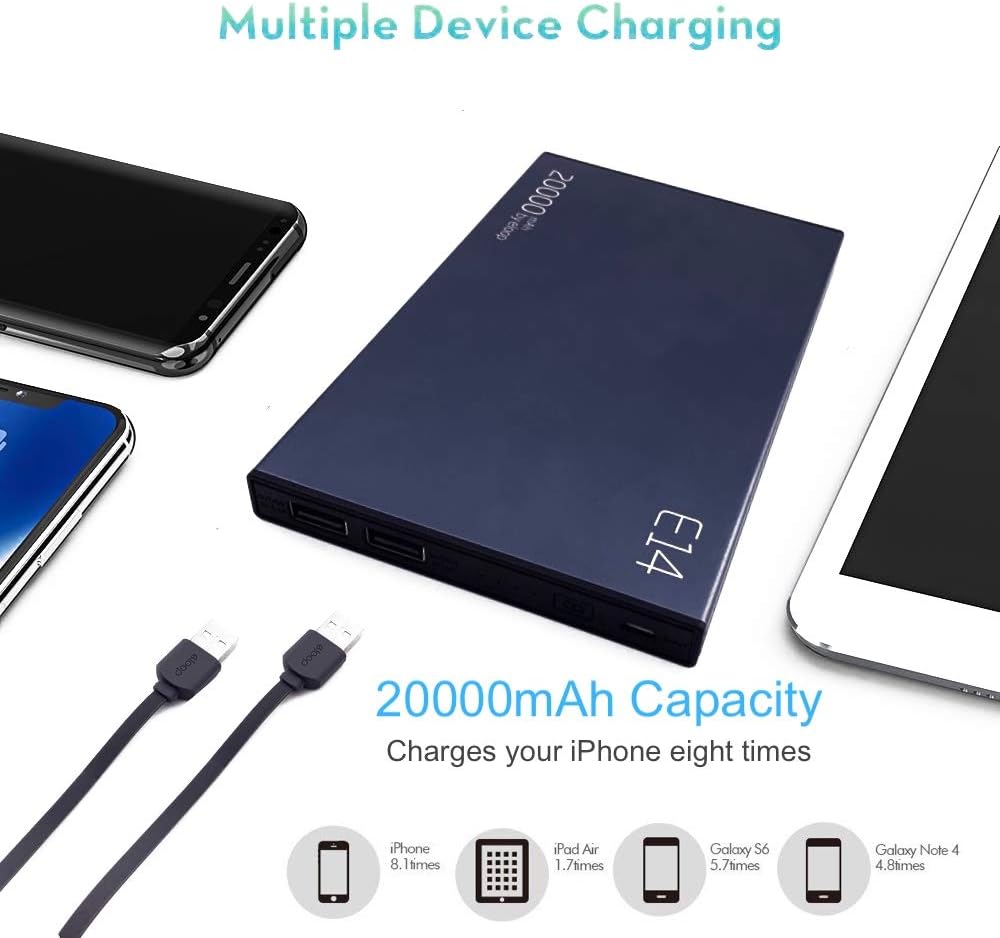
Image: A blue ELOOP E14 Power Bank shown charging multiple devices, with an infographic illustrating its 20000mAh capacity can charge an iPhone eight times, an iPad Air 1.7 times, a Galaxy S6 5.7 times, and a Galaxy Note 4 4.8 times.
Checking Battery Level:
Press the power button once to check the remaining battery level. The four LED indicators will light up to show the charge status:
- 1 LED: 0-25% charge remaining
- 2 LEDs: 25-50% charge remaining
- 3 LEDs: 50-75% charge remaining
- 4 LEDs: 75-100% charge remaining
5. Maintenance
Cleaning:
Wipe the power bank with a soft, dry cloth. Do not use harsh chemicals or abrasive materials.
Storage:
Store the power bank in a cool, dry place away from direct sunlight and extreme temperatures. If storing for extended periods, charge the power bank to approximately 50% every three months to maintain battery health.
6. Troubleshooting
| Problem | Possible Cause | Solution |
|---|---|---|
| Power bank not charging | Cable issue, charger issue, power bank depleted | Try a different Micro USB cable. Use a different USB wall charger. Ensure the power bank is connected to a working power source. |
| Device not charging from power bank | Cable issue, power bank depleted, device not compatible | Ensure the power bank is charged. Try a different charging cable for your device. Press the power button on the power bank. |
| Slow charging | Low output current, cable quality | Ensure you are using a high-quality cable. Some devices may charge slower due to their input requirements. |
| LED indicators not working | Power bank completely depleted or fault | Try charging the power bank for an extended period. If issue persists, contact customer support. |
7. Specifications
| Feature | Detail |
|---|---|
| Model | E14 |
| Battery Capacity | 20000 mAh |
| Battery Cell Composition | Lithium-Polymer |
| Input | Micro-USB |
| Output | 2 USB Ports |
| Amperage | 2.1 Ampere |
| Voltage | 5 Volt |
| Item Weight | 407 Grams |
| Product Dimensions | 16 x 10 x 1.2 cm |
| Color | Gold |
8. Warranty and Support
ELOOP provides a 12-month warranty for the E14 Power Bank, covering manufacturing defects from the date of purchase. This warranty ensures peace of mind regarding the quality and performance of your product.
For any questions, technical assistance, or warranty claims, please contact our friendly customer service. As a UK company, ELOOP is committed to providing excellent support to our customers.
Please retain your proof of purchase for warranty validation.
Ask a question about this manual
Ask about setup, troubleshooting, compatibility, parts, safety, or missing instructions. Manuals+ will review the question and use this page’s manual context to help answer it.