
auna 388-BT
auna 388-BT Stereo System
User Manual
Important Safety Instructions
Please read these instructions carefully before operating the unit and retain them for future reference. Adhere to all warnings and instructions provided with the product.
- Power Source: Connect the unit only to a power supply of the type described in the operating instructions or as marked on the appliance.
- Ventilation: Ensure proper ventilation. Do not block any ventilation openings. Install in accordance with the manufacturer's instructions.
- Water and Moisture: Do not use this apparatus near water or in damp environments.
- Cleaning: Clean only with a dry cloth. Unplug the unit from the wall outlet before cleaning.
- Heat: Do not install near any heat sources such as radiators, heat registers, stoves, or other apparatus (including amplifiers) that produce heat.
- Power Cord Protection: Protect the power cord from being walked on or pinched, particularly at plugs, convenience receptacles, and the point where they exit from the apparatus.
- Servicing: Do not attempt to service this product yourself as opening or removing covers may expose you to dangerous voltage or other hazards. Refer all servicing to qualified service personnel.
- Object and Liquid Entry: Never push objects of any kind into this product through openings as they may touch dangerous voltage points or short-out parts that could result in a fire or electric shock. Never spill liquid of any kind on the product.
Product Overview
The auna 388-BT is a versatile stereo system designed to play various audio formats, including vinyl records, CDs, cassette tapes, and digital audio via USB, SD card, and Bluetooth. It features an integrated FM radio tuner and includes two external speakers for stereo sound.

Figure 1: Front view of the auna 388-BT stereo system with turntable, main unit, and two external speakers.
Main Components:
- Main Unit: Houses the turntable, CD player, cassette decks, radio tuner, and control panel.
- External Speakers (x2): Provide stereo audio output.
- Remote Control: For convenient operation from a distance.
- Dust Cover: Protects the turntable from dust.
Front Panel Controls and Features:

Figure 2: Detailed view of the main unit's front panel, showing the display, control buttons, and input ports.
- Power Button: Turns the unit on or off.
- Function/Source Selector: Switches between Phono/BT, Tape, CD/USB/SD, and Tuner modes.
- Volume Control: Adjusts the overall audio output level.
- LCD Display: Shows current mode, track information, radio frequency, etc.
- USB Port: For connecting USB flash drives.
- SD/MMC Card Slot: For inserting SD or MMC memory cards.
- Headphone Jack (3.5mm): For private listening.
- CD Tray: For inserting audio CDs and MP3-CDs.
- Cassette Decks (Deck 1 & Deck 2): For playing and recording cassette tapes.
- Playback Controls: Play, Pause, Stop, Fast Forward, Rewind, Skip Track.
- Record Button: Initiates recording to cassette or USB.
Rear Panel Connections:

Figure 3: Rear panel of the main unit, displaying speaker outputs, line out, and power input.
- Speaker Outputs (RCA): Connect the included external speakers.
- Line Out (RCA): For connecting to an external amplifier or powered speakers.
- FM Antenna: Integrated wire antenna for radio reception.
- AC Power Input: Connect the power cord.
- Auto Stop Switch: For turntable auto-stop function.
Setup
1. Unpacking and Placement:
- Carefully remove all components from the packaging.
- Place the main unit on a stable, flat surface, away from direct sunlight, heat sources, and excessive dust or moisture.
- Ensure there is adequate space around the unit for ventilation.
2. Connecting the Speakers:
The auna 388-BT comes with two external speakers. Connect them to the main unit using the provided speaker cables.

Figure 4: Rear view of the external speakers, showing the integrated audio cables for connection to the main unit.
- Locate the RCA speaker output jacks on the rear of the main unit.
- Connect the RCA plugs from the speaker cables into the corresponding speaker output jacks (Left and Right) on the main unit.
- Position the speakers to the left and right of the main unit for optimal stereo separation.
3. Power Connection:
- Ensure the unit's power switch is in the "OFF" position.
- Plug the AC power cord into the AC power input on the rear of the main unit.
- Plug the other end of the power cord into a standard AC wall outlet (230V, 50Hz).
Operating Instructions
General Operation:
- Power On/Off: Press the POWER button on the front panel or remote control to turn the unit on or off.
- Volume Adjustment: Rotate the VOLUME knob on the front panel or use the VOL+ / VOL- buttons on the remote control.
- Source Selection: Press the FUNCTION button repeatedly on the front panel or use the dedicated source buttons on the remote control (PHONO/BT, TAPE, CD/USB/SD, TUNER) to select the desired audio source.
Turntable Operation:
- Lift the dust cover.
- Place a vinyl record on the turntable platter.
- Select the appropriate speed (33 or 45 RPM) using the speed selector switch. For 45 RPM records, place the included adapter on the spindle.
- Move the tone arm from its rest and gently place the stylus on the desired groove of the record. The platter will start spinning automatically.
- To stop playback, lift the tone arm and return it to its rest. The platter will stop spinning.
- The AUTO STOP switch on the rear panel controls whether the turntable stops automatically at the end of a record.
CD Player Operation:
- Press the CD/USB/SD button to select CD mode.
- Press the OPEN/CLOSE button to open the CD tray.
- Place a CD (audio CD or MP3-CD) with the label side facing up into the tray.
- Press OPEN/CLOSE again to close the tray. The unit will read the disc and begin playback automatically.
- Use the PLAY/PAUSE, STOP, SKIP FORWARD, and SKIP BACKWARD buttons for playback control.
- Program Play: Refer to the detailed instructions in the full manual for programming specific track orders.
Cassette Player/Recorder Operation:
- Press the TAPE button to select cassette mode.
- Open the cassette deck door (Deck 1 or Deck 2) and insert a cassette tape.
- Use the playback controls (PLAY, STOP/EJECT, FAST FORWARD, REWIND) to control tape playback.
- Recording: To record from the radio or turntable to a cassette, select the desired source (TUNER or PHONO), then press the RECORD button on the cassette deck. Ensure a blank tape is inserted.
- High-Speed Dubbing: Use Deck 1 for playback and Deck 2 for recording to dub tapes at high speed.
Radio (FM) Operation:
- Press the TUNER button to select radio mode.
- Extend the FM wire antenna on the rear of the unit for better reception.
- Use the TUNING knob or TUNE+ / TUNE- buttons on the remote to manually tune to a station.
- Auto Scan: Press and hold the PLAY/PAUSE button (or similar on remote) to automatically scan and save available stations.
Bluetooth Operation:
- Press the PHONO/BT button to select Bluetooth mode. The display will show "BT" and flash, indicating it's in pairing mode.
- Enable Bluetooth on your external device (smartphone, tablet, etc.) and search for "auna 388-BT" or similar.
- Select the unit from the list of available devices to pair. Once connected, the "BT" indicator will stop flashing.
- You can now play audio from your Bluetooth device through the stereo system. Use your device's controls for playback.
USB/SD Playback and Digitalization:
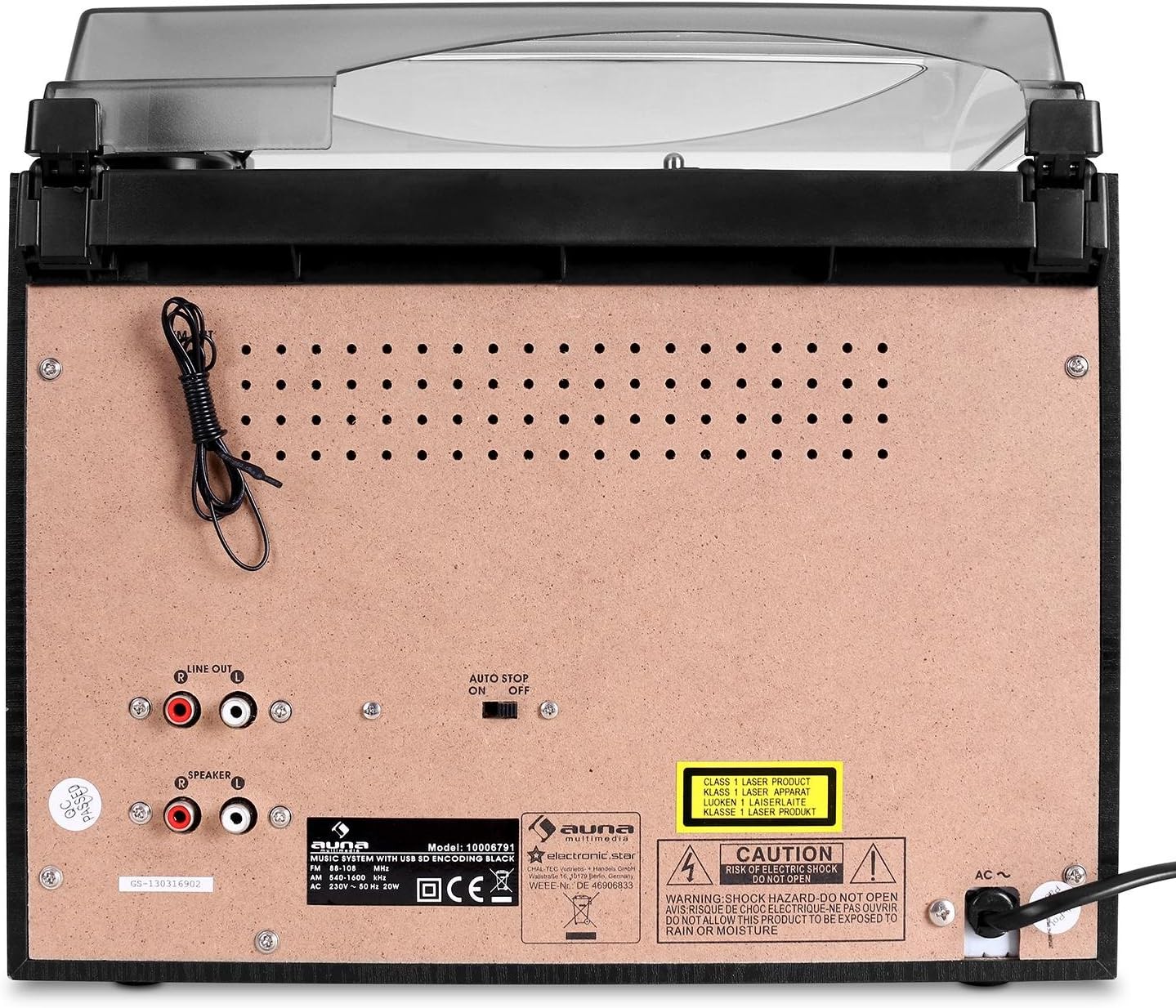
Figure 5: Detailed view of the USB port and SD/MMC card slot on the front panel.
- Insert a USB flash drive into the USB port or an SD/MMC card into the card slot.
- Press the CD/USB/SD button to select USB or SD mode. The unit will automatically detect and begin playing MP3 files.
- Use the playback controls to navigate tracks.
- Digitalization (Recording to USB/SD):
- Select the source you wish to record from (Turntable, CD, or Radio).
- Ensure a USB drive or SD card is inserted.
- Begin playback of the source material.
- Press the RECORD button on the main unit. The recording indicator will light up.
- Press RECORD again to stop recording. The recorded audio will be saved as an MP3 file on the USB drive or SD card.
Maintenance
- Cleaning the Unit:
- Always unplug the unit from the power outlet before cleaning.
- Use a soft, dry cloth to wipe the exterior surfaces.
- Do not use abrasive cleaners, waxes, or solvents as they may damage the finish.
- Stylus Care:
- Gently clean the stylus tip periodically with a soft brush, brushing from back to front.
- Avoid touching the stylus with your fingers.
- Replace the stylus when sound quality deteriorates or if the stylus is visibly damaged.
- Dust Cover: Keep the dust cover closed when the turntable is not in use to prevent dust accumulation.
- CD/Cassette Care: Handle CDs and cassettes by their edges. Store them in their cases to prevent scratches and dust.
Troubleshooting
| Problem | Possible Cause | Solution |
|---|---|---|
| No power | Power cord not connected; Power outlet not active. | Ensure power cord is securely plugged in. Check if the power outlet is working. |
| No sound from speakers | Volume too low; Speakers not connected; Incorrect source selected. | Increase volume. Check speaker connections to the main unit. Select the correct audio source. |
| Turntable not spinning or distorted sound | Speed setting incorrect; Stylus dirty or damaged; Auto Stop switch off. | Check if 33/45 RPM switch matches the record. Clean or replace stylus. Ensure Auto Stop switch is set correctly. |
| CD skipping or not playing | CD is dirty or scratched; CD inserted incorrectly. | Clean the CD with a soft cloth. Ensure the CD is inserted label-side up. Try another CD. |
| Bluetooth not connecting | Unit not in pairing mode; Device too far; Bluetooth disabled on external device. | Ensure unit is in Bluetooth pairing mode (BT flashing). Move device closer. Enable Bluetooth on your device. |
| USB/SD not recognized or playing | Incorrect file format; USB/SD card corrupted; Card inserted incorrectly. | Ensure files are MP3 format. Try reformatting the USB/SD card (backup data first). Reinsert the card correctly. |
Specifications
| Brand: | auna |
| Model: | 388-BT |
| Power Supply: | AC 230V, 50Hz |
| Power Consumption: | 25W |
| Main Unit Dimensions (W x H x D): | 31.8 x 28.5 x 28.5 cm |
| Speaker Dimensions (W x H x D): | 14.7 x 22.5 x 14.2 cm |
| Main Unit Weight: | Approx. 3.8 kg |
| Speaker Weight (each): | Approx. 950 g |
| Connectivity: | Bluetooth, USB, SD/MMC, Stereo RCA Line In, Stereo RCA Line Out, 3.5mm Headphone Jack |
| Supported Media: | Vinyl Records (33/45 RPM), Audio CD, MP3-CD, Cassette Tapes, MP3 (USB/SD) |
| Speaker Output Power: | 2 x 5W / 4 ohms |
| Digitalization Format: | MP3 (128 kbps, 44.1 kHz) |
Warranty and Support
This product is covered by a manufacturer's warranty. Please refer to the warranty card included with your purchase or contact your retailer for specific warranty terms and conditions.
For technical support or service inquiries, please contact the auna customer service department or your local distributor. Contact information can typically be found on the manufacturer's website or your purchase documentation.
Related documents388-BT


Ask a question about this manual
Ask about setup, troubleshooting, compatibility, parts, safety, or missing instructions. Manuals+ will review the question and use this page’s manual context to help answer it.