
1. Introduction
This manual provides comprehensive instructions for the installation, operation, and maintenance of your Modern Forms Axis FH-W1803-52L-35-MW 52-inch Smart Ceiling Fan. This contemporary ceiling fan features a matte white finish, a 52-inch blade span, and an integrated 3500K White LED light. Designed for both indoor and outdoor use, it incorporates a 6-speed brushless DC motor for quiet and efficient operation, along with smart home capabilities for enhanced control.

A top-down view of the Modern Forms Axis 52-inch Smart Ceiling Fan, featuring three matte white blades and an integrated LED light kit, designed for modern interiors.
2. Safety Information
WARNING: To reduce the risk of fire, electric shock, or personal injury, always follow these safety guidelines.
- Ensure the main power supply is disconnected at the circuit breaker before installation or maintenance.
- All electrical wiring must be performed by a qualified electrician and comply with local and national electrical codes.
- The mounting structure must be capable of supporting a minimum of 35 lbs (15.9 kg).
- Do not operate the fan with damaged blades or any visible defects.
- Keep hands, clothing, and other objects clear of the fan blades during operation.
- This fan is rated for wet locations. However, ensure all connections are properly sealed and protected from direct water exposure.
3. Package Contents
Verify that all components are present and undamaged before beginning installation. If any parts are missing or damaged, contact customer support.
- Ceiling Fan Motor Housing (Matte White)
- Fan Blades (3, Matte White)
- LED Light Kit
- Mounting Bracket
- Remote Control with Wall Cradle
- Hardware Pack (screws, wire nuts, etc.)
- Instruction Manual

The Modern Forms Axis 52-inch Smart Ceiling Fan shown alongside its sleek, white remote control, highlighting the fan's contemporary design and control options.
4. Setup and Installation
Professional installation is recommended for optimal safety and performance. Refer to the detailed wiring diagrams and mounting instructions provided in the included manual. Ensure all electrical connections are secure and the fan is properly balanced after assembly.
4.1 Mounting the Fan
- Secure the mounting bracket to the ceiling junction box.
- Carefully lift the fan assembly and connect the electrical wiring according to the provided diagram.
- Attach the fan housing to the mounting bracket.
4.2 Attaching the Blades
The fan blades are designed for easy attachment. Secure each blade to the motor housing using the provided screws. Ensure they are firmly attached to prevent wobbling.
4.3 Installing the LED Light Kit
Connect the LED light kit wiring to the fan's internal wiring. Secure the light kit cover to the fan housing.
4.4 Remote Control Wall Cradle
The remote control includes a magnetic wall cradle for convenient storage. Mount the cradle in an easily accessible location using the provided hardware.
5. Operating Instructions
Your Modern Forms smart fan offers multiple control methods for convenience.
5.1 Remote Control Operation
The included remote control allows direct adjustment of fan speed, light brightness, and fan direction. The fan features 6 speeds and an audible beep to confirm button presses, which is particularly useful in low-light conditions.
- Fan Speed: Use the fan speed buttons to cycle through 6 different speed settings.
- Light Control: Turn the LED light on or off, and adjust brightness levels.
- Fan Direction: Change the direction of blade rotation for summer (downward airflow) or winter (upward airflow) modes.

An image displaying both the handheld remote control and the wall-mounted control unit for Modern Forms smart fans, offering local control options.
5.2 Mobile App Control
Download the Modern Forms app from the App Store or Google Play to control your fan via Wi-Fi. The app allows you to adjust fan speed, light brightness, set schedules, and access advanced smart features from anywhere.
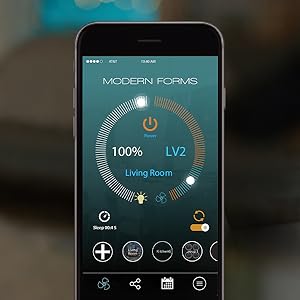
A screenshot of the Modern Forms mobile application, showing the intuitive interface for controlling fan speed, light brightness, and other smart features from a smartphone.
5.3 Voice Control and Smart Home Integration
The fan is compatible with popular smart home systems, including Amazon Alexa, Google Assistant, Ecobee, and Samsung SmartThings. This allows for voice-activated control and integration into your existing smart home ecosystem.
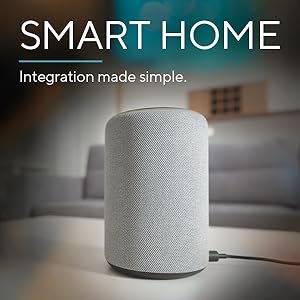
An Amazon Alexa smart speaker, illustrating compatibility with Modern Forms smart fans for voice-activated control.
5.4 Official Product Video
An official video from Modern Forms showcasing the key features and benefits of their smart fans, including wet rating, LED lighting, DC motor efficiency, and smart home integration.
6. Maintenance
Regular maintenance ensures the longevity and optimal performance of your ceiling fan.
- Cleaning: Use a soft, damp cloth to clean the fan blades and motor housing. Avoid abrasive cleaners that may damage the finish.
- Blade Inspection: Periodically check the fan blades for any signs of damage or warping. Replace damaged blades immediately.
- Tighten Screws: Over time, screws may loosen. Periodically check and tighten all screws on the fan assembly and mounting bracket.
- Light Kit: The integrated LED light kit is designed for long life and does not require bulb replacement.
7. Troubleshooting
If you encounter issues with your fan, refer to the following common solutions:
| Problem | Possible Cause | Solution |
|---|---|---|
| Fan does not operate | No power, loose wiring, remote not paired. | Check circuit breaker. Ensure all wiring connections are secure. Re-pair the remote control according to the pairing instructions in the full manual. |
| Fan wobbles | Loose blades, unbalanced blades, loose mounting. | Ensure all blade screws are tight. Use the included balancing kit if necessary. Verify the mounting bracket is securely fastened to the ceiling. |
| Light does not work | Loose wiring, light kit connection issue. | Check wiring connections to the light kit. Ensure the light kit is properly seated. |
| Remote/App not responding | Battery low, Wi-Fi connectivity issue, pairing lost. | Replace remote batteries. Check Wi-Fi router and signal strength. Re-pair the remote or re-connect the app to the fan. |
8. Specifications
- Brand: Modern Forms
- Model Name: FH-W1803-52L-35-MW
- Color: Matte White
- Electric Fan Design: Ceiling Fan
- Power Source: AC/DC
- Style: 3500K White LED
- Product Dimensions: 52"D x 52"W x 11.5"H
- Blade Span: 52 inches
- Number of Blades: 3
- Air Flow Capacity: 5187 Cubic Feet Per Minute
- Noise Level: 15 Decibels
- Wattage: 51.5 watts
- Voltage: 120 Volts
- Special Features: 6 Speed Brushless Silent and Energy Star Certified Efficient DC Motor, App Operable, Indoor/Outdoor Usage, Smart Home Enabled (Works with Amazon Alexa, Google Assistant, Ecobee, Samsung Smart Things)
- Safety Rating: ETL & cETL, Wet Listed
- UPC: 790576695778

A detailed diagram illustrating the precise measurements of the Modern Forms Axis 52-inch Smart Ceiling Fan, including blade span, height, and motor housing dimensions.

The Energy Star Most Efficient 2020 certification logo, indicating the fan's high energy efficiency and environmental performance.
9. Warranty and Support
Modern Forms provides the following warranty for the FH-W1803-52L-35-MW Smart Ceiling Fan:
- LED Components: 5-year warranty
- Motor: Lifetime warranty
- All Other Parts: 1-year warranty
For technical support, troubleshooting assistance, or warranty claims, please contact Modern Forms customer service through their official website or the contact information provided with your purchase documentation.


