
1. Introduction
Thank you for choosing the TECHBREY Industrial Silent Ceiling Fan with DC Motor. This manual provides essential information for the safe installation, operation, and maintenance of your new ceiling fan. Please read these instructions thoroughly before installation and keep them for future reference.
This ceiling fan features a silent DC motor, 6 adjustable speeds, and an integrated LED light with three color temperature options (3000K Warm White, 4000K Neutral White, 5500K Cool White). It is designed for efficient air circulation and lighting in various indoor environments.
2. Safety Instructions
WARNING: To reduce the risk of fire, electric shock, or personal injury, always follow these basic precautions:
- Installation must be performed by a qualified electrician in accordance with all local and national electrical codes.
- Disconnect power at the main circuit breaker or fuse box before beginning installation or performing any maintenance.
- Ensure the installation site can support the fan's weight (approximately 6 kg).
- Mount the fan to a ceiling joist or a suitable support structure capable of supporting a moving fan.
- Ensure there is adequate clearance between the fan blades and any obstacles (walls, furniture, etc.). A minimum clearance of 2.3 meters (7.5 feet) from the floor to the bottom of the blades is recommended.
- Do not insert objects into the path of the fan blades.
- Do not attempt to repair or modify the fan yourself. Contact qualified service personnel for repairs.
- This appliance is not intended for use by persons (including children) with reduced physical, sensory or mental capabilities, or lack of experience and knowledge, unless they have been given supervision or instruction concerning use of the appliance by a person responsible for their safety.
- Children should be supervised to ensure that they do not play with the appliance.
3. Package Contents
Carefully unpack all components and check against the list below. If any items are missing or damaged, contact your retailer immediately.
- Motor Housing Assembly
- Fan Blades (x3)
- Downrod and Canopy
- Mounting Bracket
- LED Light Kit
- Remote Control with Wall Mount
- Hardware Pack (screws, washers, wire nuts)
- Instruction Manual

Figure 1: Main product view of the TECHBREY Industrial Silent Ceiling Fan. This image shows the complete fan assembly, including the motor housing, three blades, and the integrated LED light fixture at the bottom.
4. Setup & Installation
Important: Before starting installation, ensure the power supply is disconnected at the circuit breaker. Professional installation is highly recommended.
- Mounting Bracket Installation: Secure the mounting bracket to a ceiling joist or an approved outlet box using the provided hardware. Ensure it is firmly attached and can support the fan's weight.
- Downrod Assembly: Insert the downrod through the canopy and connect it to the motor housing. Secure with pins and screws as instructed.
- Wiring: Carefully connect the fan's electrical wires to the household wiring according to the wiring diagram in the full manual. Ensure all connections are secure and properly insulated with wire nuts.
- Hanging the Fan: Lift the fan assembly and hang it onto the mounting bracket.
- Blade Attachment: Attach the fan blades to the motor housing using the provided screws. Ensure all blades are securely fastened.
- Light Kit Installation: Connect the LED light kit to the fan's wiring and secure it to the bottom of the motor housing.
- Canopy Installation: Slide the canopy up to the ceiling and secure it to cover the mounting bracket and wiring.

Figure 2: Close-up view of the ceiling fan's canopy and downrod connection to the ceiling. This illustrates the upper part of the fan assembly where it attaches to the ceiling, highlighting the secure mounting.

Figure 3: Detailed view of the fan blades attached to the motor housing. This image emphasizes the connection points and the design of the blades.
5. Operating Instructions
Your TECHBREY ceiling fan is operated using the included remote control.

Figure 4: A hand holding the remote control, with the ceiling fan visible in the background. This image demonstrates the primary method of controlling the fan and its light.
5.1. Fan Speed Control
The fan offers 6 selectable speeds:
- Speed 1: 100 RPM (Revolutions Per Minute) - Lowest speed, quiet operation.
- Speed 2: 120 RPM
- Speed 3: 140 RPM
- Speed 4: 160 RPM
- Speed 5: 180 RPM
- Speed 6: 200 RPM - Highest speed, maximum airflow.
Use the speed buttons on the remote control to adjust the fan's rotation speed.
5.2. Light Control
The integrated LED light provides three color temperature options:
- 3000K: Warm White light, ideal for a cozy atmosphere.
- 4000K: Neutral White light, suitable for general illumination.
- 5500K: Cool White light, best for task lighting or a brighter environment.
Use the light button on the remote control to cycle through the color temperatures and to turn the light on/off. The light is also dimmable; refer to the remote control's specific buttons for dimming functionality.

Figure 5: The ceiling fan with its integrated LED light turned on, providing illumination. This highlights the lighting functionality of the product.
5.3. Summer/Winter Mode (Reversible Function)
The fan features a reversible motor for year-round comfort:
- Summer Mode (Counter-clockwise rotation): Creates a downward airflow, producing a cooling effect.
- Winter Mode (Clockwise rotation): Circulates warm air trapped near the ceiling downwards, helping to distribute heat more evenly and improve heating efficiency.
Switch between modes using the dedicated button on the remote control. Ensure the fan is completely stopped before changing direction.

Figure 6: The ceiling fan installed and operating in a modern living room setting. This image shows the fan in its intended environment, demonstrating its aesthetic integration.

Figure 7: The ceiling fan installed in a living room, with the blades stationary. This view allows for a clear appreciation of the fan's design when not in operation.
6. Maintenance
Regular maintenance ensures optimal performance and extends the lifespan of your fan.
- Cleaning: Periodically clean the fan blades and motor housing with a soft, damp cloth. Do not use abrasive cleaners or solvents. Ensure the fan is turned off and power is disconnected before cleaning.
- Tightening Screws: Check all screws and connections annually to ensure they are secure. Loose connections can cause noise and instability.
- Blade Balance: If the fan wobbles, check that all blades are securely attached and that their weights are evenly distributed. A balancing kit (not included) may be used if necessary.
- Light Source: The integrated LED light source is designed for a long lifespan (approximately 40,000 hours). It is not user-replaceable. If the light fails, contact customer support.
7. Troubleshooting
Before contacting customer support, refer to the following common issues and solutions:
| Problem | Possible Cause | Solution |
|---|---|---|
| Fan does not start | No power supply; Loose wiring; Remote control battery low. | Check circuit breaker; Verify all wire connections; Replace remote control batteries. |
| Fan wobbles | Loose blades or mounting hardware; Unbalanced blades. | Ensure all screws are tight; Check blade balance and adjust if necessary. |
| Fan is noisy | Loose screws; Motor issues; Blades hitting an obstruction. | Tighten all screws; Ensure no obstructions are in the blade path; If noise persists, contact support. |
| Light does not work | No power to light kit; Loose wiring; LED module failure. | Check power supply; Verify light kit wiring; Contact support if LED module is faulty. |
| Remote control not working | Low battery; Incorrect pairing; Obstruction between remote and receiver. | Replace batteries; Re-pair remote with fan (refer to full manual for pairing instructions); Ensure clear line of sight. |
8. Specifications
| Feature | Detail |
|---|---|
| Brand | TECHBREY |
| Model | 12175_36394 |
| Color | Silver (Fan Body), (3000K - 4000K - 5500K) (Light) |
| Diameter | 91 cm |
| Height | 49 cm (Total), 39 cm (from ceiling to blades) |
| Wattage | 40 Watts |
| Voltage | 230 Volts |
| Material | ABS (Blades and Body) |
| Number of Speeds | 6 |
| Noise Level | 25 dB (minimum) - 45 dB (maximum) |
| Special Features | Lightweight, Reversible (Summer/Winter Mode), Dimmable LED Light |
| Item Weight | 6 Kilograms |
| LED Lifespan | 40,000 Hours |
| Energy Efficiency Class | F |

Figure 8: Technical drawing illustrating the dimensions of the ceiling fan, including total height (490 mm), diameter (910 mm), and downrod length (390 mm).
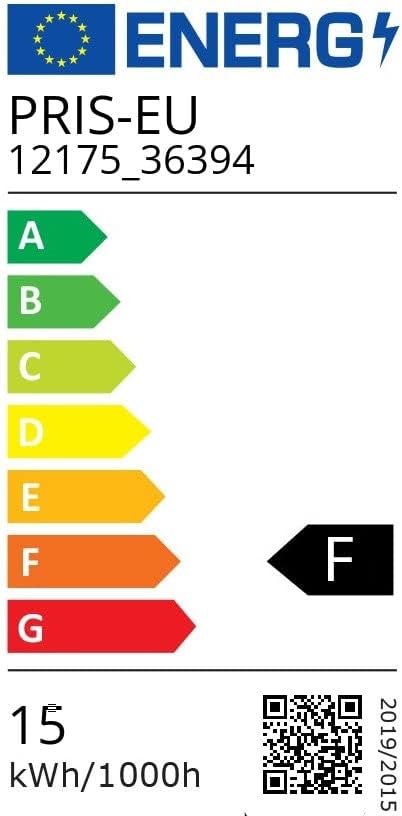
Figure 9: The EU Energy Label for the TECHBREY ceiling fan, indicating an energy efficiency class of F and energy consumption of 15 kWh/1000h. For more details, visit the official EPREL database: EPREL Product Information.
9. Warranty & Support
For warranty information, please refer to the terms and conditions provided at the point of purchase or contact your retailer. TECHBREY products are designed for reliability and performance.
If you encounter any issues not covered in the troubleshooting section or require further assistance, please contact TECHBREY customer support or your authorized dealer. Please have your model number (12175_36394) and purchase date available when contacting support.
You can visit the TECHBREY store for more information: TECHBREY Store.