
HOCO E21
Hoco E21 Razor-Edge Wireless Headset User Manual
Model: E21
Introduction
This manual provides comprehensive instructions for the safe and efficient use of your Hoco E21 Razor-Edge Wireless Headset. Please read this manual thoroughly before using the device and retain it for future reference.
The Hoco E21 is a compact and lightweight wireless headset designed for mobile communication, featuring Bluetooth V4.1 connectivity.
Package Contents
- Hoco E21 Razor-Edge Wireless Headset
- Charging Cable
- User Manual
Note: Specific accessories may vary. Please check the product packaging.
Product Overview
Familiarize yourself with the components of your Hoco E21 headset.
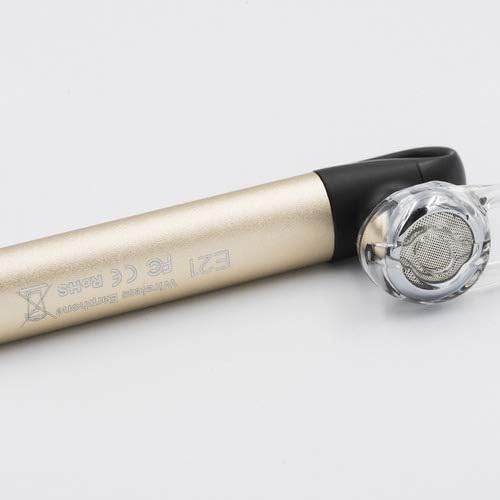
Figure 1: Hoco E21 Razor-Edge Wireless Headset, showing its compact design and gold finish.

Figure 2: Close-up view of the Hoco E21 headset, highlighting the earbud and the "E21" model engraving on the gold body.

Figure 3: Detail of the Hoco E21 headset, showing the "hoco." brand logo and the integrated clip for secure attachment.

Figure 4: Close-up of the charging port located at the end of the Hoco E21 headset, indicating where the charging cable connects.
Setup
1. Charging the Headset
Before first use, fully charge the headset. Connect the charging cable to the headset's charging port and the other end to a USB power source (e.g., computer USB port, USB wall adapter).
- Charging Voltage: DC5V
- Charging Time: Approximately 2 hours
The indicator light will typically show red during charging and turn off or blue when fully charged.
2. Pairing with a Device
The Hoco E21 uses Bluetooth V4.1 for wireless connectivity.
- Ensure the headset is turned off.
- Press and hold the multi-function button (usually the main button) until the indicator light flashes red and blue alternately, indicating pairing mode.
- On your mobile phone or device, enable Bluetooth and search for available devices.
- Select "Hoco E21" (or similar name) from the list of found devices.
- If prompted for a password, enter "0000" (four zeros).
- Once paired, the indicator light will typically flash blue slowly, and you may hear a confirmation tone.
The headset supports protocols such as headset, hands-free, A2DP, and Avrcp.
Operating Instructions
Power On/Off
- Power On: Press and hold the multi-function button for approximately 3 seconds.
- Power Off: Press and hold the multi-function button for approximately 5 seconds.
Call Management
- Answer Call: Short press the multi-function button.
- End Call: Short press the multi-function button during a call.
- Reject Call: Press and hold the multi-function button for 2 seconds during an incoming call.
- Redial Last Number: Double-press the multi-function button.
Music Playback
- Play/Pause: Short press the multi-function button.
The control method is listed as "Touch". Specific touch gestures for next/previous track are not detailed in the product specifications but are typical for such devices.
Maintenance
- Keep the headset dry. Avoid exposure to moisture, rain, or liquids.
- Do not expose the headset to extreme temperatures.
- Clean the headset with a soft, dry cloth. Do not use harsh chemicals or abrasive cleaners.
- Store the headset in a cool, dry place when not in use.
- Avoid dropping or subjecting the headset to strong impacts.
Troubleshooting
| Problem | Possible Cause | Solution |
|---|---|---|
| Headset does not power on. | Low battery. | Charge the headset fully. |
| Cannot pair with device. | Headset not in pairing mode; Bluetooth off on device; device too far. | Ensure headset is in pairing mode (flashing red/blue). Turn on Bluetooth on your device. Move headset closer to device (within 10m). |
| No sound or poor sound quality. | Volume too low; headset not properly connected; interference. | Adjust volume on both headset and device. Re-pair the headset. Move away from sources of interference. |
| Headset disconnects frequently. | Out of range; low battery. | Stay within 10m transmission range. Charge the headset. |
Specifications
| Feature | Detail |
|---|---|
| Model Name | E21 |
| Brand | HOCO |
| Connectivity Technology | Wireless (Bluetooth V4.1) |
| Bluetooth Protocols Supported | Headset, Hands-free, A2DP, Avrcp |
| Transmission Range | 10 meters |
| Transmission Frequency | 2.4GHz |
| Battery Capacity | 45 mAh |
| Charging Voltage | DC5V |
| Charging Time | Approximately 2 hours |
| Product Dimensions | 65 × 13 × 25 mm |
| Package Dimensions | 6.4 x 3.4 x 1.1 cm |
| Package Weight | 60 g |
| Color | Gold |
| Material | Plastic, Rubber |
| Control Method | Touch |
| Compatible Devices | Cellphones |
| Included Components | Ear Cushions, Headband |
| Manufacturer | Hoco |
Warranty and Support
Specific warranty information is not provided in this manual. Please refer to the warranty card included with your product or visit the official HOCO website for detailed warranty terms and conditions.
For technical support or customer service inquiries, please contact your retailer or the HOCO customer support channels as indicated on the product packaging or official website.
Related documentsE21

Ask a question about this manual
Ask about setup, troubleshooting, compatibility, parts, safety, or missing instructions. Manuals+ will review the question and use this page’s manual context to help answer it.