
Introduction
The SanJie DS17 Wireless Door Chime is a versatile contact sensor alarm system designed to alert you when a door or window is opened. Ideal for homes, businesses, offices, or stores, this system provides enhanced awareness and security. It features a long wireless range, multiple chime options, and adjustable volume levels to suit various environments and needs.
Package Contents
Please verify that all components are present in your package:
- 2 x Receivers (Plug-in Chime Units)
- 2 x Sensors (Magnetic Contact Sensors)
- Adhesive Tape (for sensor mounting)
- Screws (for optional sensor mounting)
- Product Manual

Image: Components included in the SanJie Door Chime package, showing two receivers, two sensors, adhesive tape, screws, and the manual.
Video: An overview of the SanJie door chime package contents, demonstrating what is included in the box.
Setup & Installation
1. Receiver Installation
- Plug the receiver unit into a standard electrical outlet in your desired location. The unit will emit a default chime sound upon initial power-up.

Image: A hand plugging the receiver unit into a wall socket, illustrating the first step of installation.
2. Sensor Installation
The door sensor consists of two parts: a main sensor unit and a smaller magnetic unit. These two parts must be aligned closely (less than 0.4 inches apart) when the door/window is closed.
- Ensure the sensor unit is switched ON (if applicable, some models have an on/off switch).
- Attach the two parts of the door sensor onto your door/window and its frame using either the provided double-sided adhesive tape or screws. Ensure the main sensor unit is on the fixed frame and the magnetic unit is on the moving part (door/window).
- Verify that the gap between the two sensor parts is less than 0.4 inches (approximately 1 cm) when the door/window is closed. When the door/window opens, the two parts separate, triggering the chime.

Image: A step-by-step visual guide on how to install the SanJie door chime sensor using adhesive tape, showing proper alignment and gap requirements.
Video: Demonstration of how the wireless door chimes when a door opens, showing the sensor being triggered.
Operating Instructions
Adjusting Volume
The receiver unit has 5 adjustable volume levels, ranging from mute to 110dB. Press the Volume +/- buttons on the side of the receiver to cycle through the volume options.
Changing Chimes
The system offers 26 different chimes. Use the Forward and Back buttons on the receiver to select your preferred ringtone. The receiver has a memory function that retains the last selected tune even after being unplugged.
Pairing Additional Sensors/Receivers
Your units come pre-paired. If you wish to pair additional sensors or receivers, or re-pair existing ones:
- Plug in the receiver unit.
- Press and hold the Volume (Set) button on the receiver until the LED light emits a ding to enter pairing mode.
- Quickly separate the door sensor from its magnetic counterpart. The door sensor indicator light will flash, and the receiver will make a "dingding" sound, indicating successful pairing.
- To pair multiple sensors/receivers, repeat the above pairing process for each unit. You can also pair different ringtones to each sensor to identify which door is triggered.
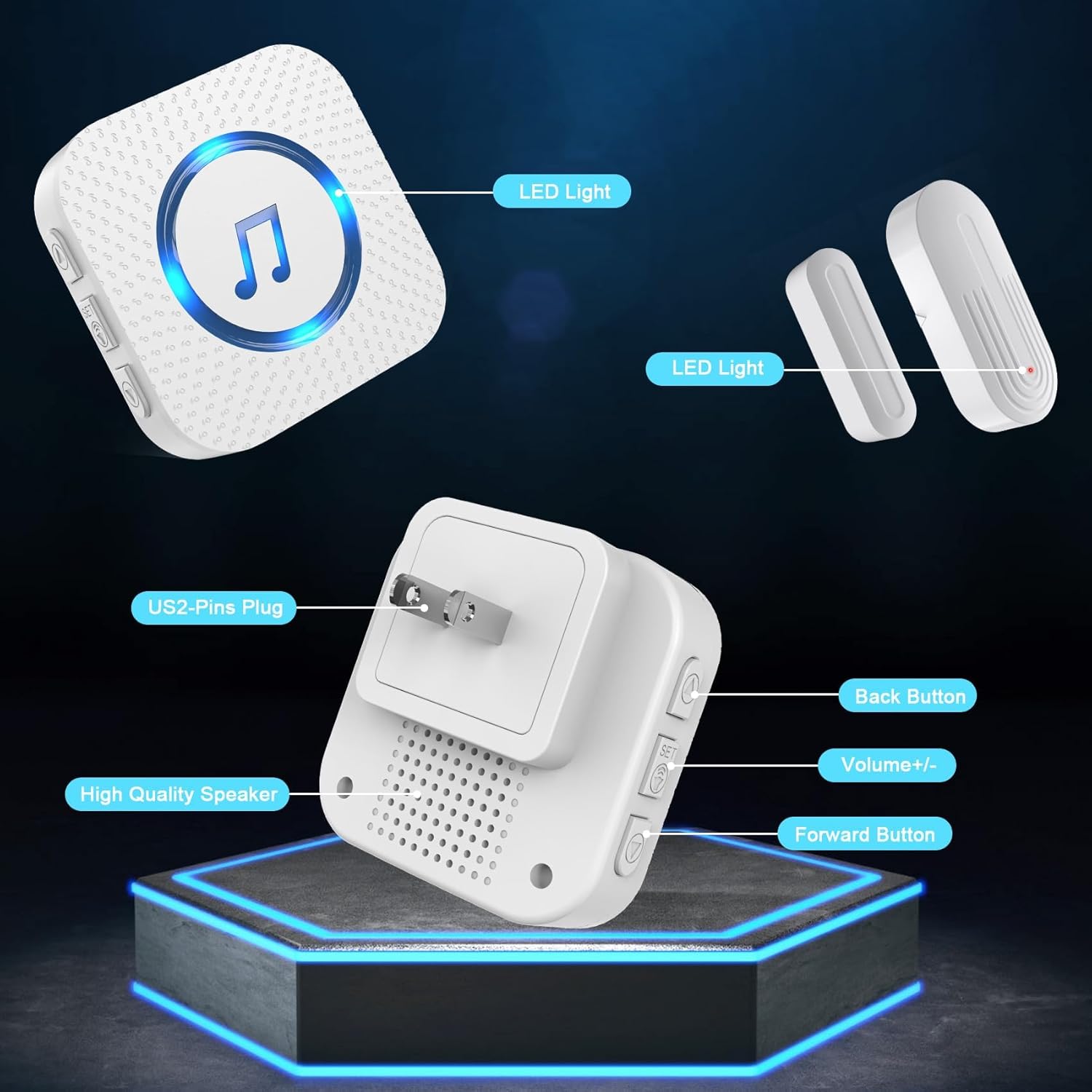
Image: Detailed view of the receiver and sensor, highlighting the LED indicators, volume controls, and chime selection buttons.
Video: Instructions on how to pair SanJie door chime sensors and change ringtones.
Maintenance
Battery Replacement (Sensors)
The sensors require 12V batteries. When the sensor's indicator light no longer flashes or the chime unit does not respond to the sensor, it is time to replace the battery. Use a small screwdriver (often included) to open the sensor casing and replace the battery. The average battery life is approximately 1 year.
Cleaning
Wipe the units with a soft, dry cloth. Do not use abrasive cleaners or solvents.
Troubleshooting
- No chime sound: Ensure the receiver is plugged in and powered on. Check the volume level. Verify the sensor battery is not depleted. Re-pair the sensor and receiver if necessary.
- Short range: Ensure there are no major obstructions (thick walls, large metal objects) between the sensor and receiver. The maximum range is 500 feet in open areas, but indoor range may be reduced.
- False alarms: Check that the sensor parts are securely mounted and the gap is correct when the door/window is closed. Ensure the sensor is not exposed to extreme vibrations.
Specifications
| Feature | Detail |
|---|---|
| Model Number | DS17 |
| Voltage | 120 Volts (AC) |
| Control Method | Remote |
| Noise Level | Up to 110 Decibels |
| Maximum Range | 500 Feet |
| Sensor Technology | Contact Sensor |
| Item Weight | 8.4 ounces (0.24 Kilograms) |
| Product Dimensions | 4.33 x 3.62 x 3.62 inches |
| Material | ABS |
| Installation Method | Self-Adhesive |
| Included Components | Adhesive tape, Product manual, Receiver, Screws, Sensor (battery included) |
| Battery Cell Type | Alkaline (12V batteries required for sensors) |
| Average Battery Life | 1 year |
Warranty & Support
Warranty Information
The SanJie Door Chime comes with a lifetime warranty. For any product issues, please contact customer service through your order details.
Customer Service
For assistance with setup, troubleshooting, or any other inquiries, please refer to the contact information provided with your purchase or on the official SanJie website. Free return and exchange are available within 30 days of purchase.