
1. Introduction
This manual provides comprehensive instructions for the installation, operation, and maintenance of your Tymate RV Tire Pressure Monitoring System (TPMS) M12-3. This system is designed to enhance driving safety by continuously monitoring the pressure and temperature of your RV's tires, alerting you to potential issues in real-time. Please read this manual thoroughly before using the product to ensure proper function and longevity.
2. Product Overview
The Tymate M12-3 TPMS includes a solar-powered monitor, six external sensors, and a signal repeater for extended range. It features multiple alarm modes and an auto sleep/awake function for energy efficiency.

Figure 2.1: Tymate M12-3 TPMS system components.
2.1. Components
- 1 x Solar-Powered Monitor
- 6 x External TPMS Sensors (Pre-labeled for specific tire positions)
- 1 x Signal Repeater
- 1 x USB Charging Cable
- 1 x Hex Wrench (for sensor battery replacement)
- 6 x Anti-theft Hex Nuts
- 6 x Spare O-Rings
- 1 x User Manual

Figure 2.2: System diagram illustrating component placement on an RV.
3. Setup & Installation
3.1. Monitor Setup
- Initial Charge: Fully charge the monitor using the provided USB-C cable before first use.
- Mounting: Use the included 3M adhesive tape to mount the monitor on your windshield or dashboard. Ensure the solar panel faces upwards to receive sunlight for continuous charging. Position the monitor where it does not obstruct your view and is away from other electronic devices (e.g., dash cams, rear cameras) to prevent interference.
- Power On: Press and hold both the left and right arrow buttons simultaneously for 3 seconds to turn on the monitor.

Figure 3.1: Monitor controls for power and settings.

Figure 3.2: Monitor display showing real-time tire data.
3.2. Sensor Installation
- Check Tire Pressure: Ensure all tires are inflated to their recommended cold PSI before installing the sensors.
- Identify Sensors: Each sensor is pre-labeled (RF: Right Front, RR: Right Rear, LF: Left Front, LR: Left Rear, etc.). Match the sensor to the correct tire position.
- Attach Sensors:
- Unscrew the original valve cap from the tire valve.
- Screw on an anti-theft hex nut onto the valve stem.
- Screw the corresponding TPMS sensor onto the valve stem until it is hand-tight.
- Using the provided wrench, tighten the hex nut against the sensor to secure it and prevent theft.
- Activate Sensors: After installation, drive for 5-10 minutes. The sensors require motion activation to transmit data to the monitor.
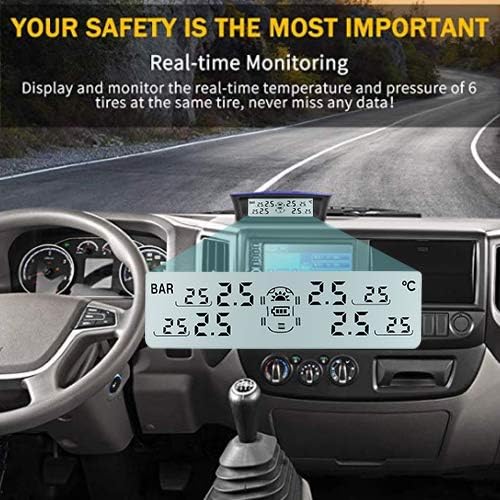
Figure 3.3: External TPMS sensors.
3.3. Repeater Installation
The signal repeater is designed to extend the sensing range beyond 45 feet, which is particularly useful for longer RVs or trailers. Install the repeater on the underside of your RV or trailer, ensuring it is positioned centrally between the monitor and the furthest sensors. Connect it to a 12V or 24V power source. Ensure the repeater is securely mounted and its antennas are not obstructed.
4. Operating Instructions
4.1. Display Modes
The monitor displays real-time tire pressure (PSI or Bar) and temperature (°F or °C). Use the 'M' button to cycle through different display modes or settings.
4.2. Alarm Modes
The system is equipped with five alarm modes to alert you to abnormal tire conditions:
- High Pressure Alarm: Alerts if tire pressure exceeds user-set maximum.
- Low Pressure Alarm: Alerts if tire pressure drops below user-set minimum.
- High Temperature Alarm: Alerts if tire temperature exceeds 158°F (70°C).
- Rapid Air Leakage Alarm: Alerts if there is a sudden and significant drop in tire pressure.
- Sensor Low Battery Alarm: Alerts if a sensor's battery is low.
Alarm values can be customized via the monitor's settings. Refer to the user manual for detailed instructions on setting alarm thresholds.
4.3. Auto Sleep & Awake Mode
The monitor automatically enters an energy-saving sleep mode after 10 minutes of the vehicle being stationary. It will automatically wake up when the vehicle starts moving, ensuring continuous monitoring without manual intervention.
Video 4.1: M12-3 Setup Video. This video demonstrates the initial setup process for the Tymate M12-3 TPMS monitor, including powering on and navigating basic settings.
5. Maintenance
5.1. Sensor Battery Replacement
The external sensors use CR1632 lithium metal batteries, which have a maximum working life of 2 years. When a sensor low battery alarm is triggered, replace the battery:
- Unscrew the sensor from the tire valve.
- Use the provided hex wrench to carefully open the sensor casing.
- Replace the old CR1632 battery with a new one, ensuring correct polarity.
- Close the sensor casing and reattach it to the tire valve, securing with the hex nut.
Video 5.1: Replace Sensor Battery. This video provides a step-by-step guide on how to replace the battery in the Tymate TPMS sensors.
5.2. Monitor Charging
The monitor primarily charges via its integrated solar panel. In conditions with insufficient sunlight, you can charge it using the provided USB cable connected to a 5V USB power source (e.g., car charger, power bank).
6. Troubleshooting
- Intermittent Data Display: If data is displayed intermittently, try moving the monitor away from potential interference sources. If the problem persists, consider installing the signal repeater.
- Tire Blowout/Puncture: The TPMS cannot prevent punctures or monitor instantaneous changes. Regular manual tire inspections are recommended at least monthly.
- No Data Displayed After Installation: After initial installation, drive for 5-10 minutes to allow sensors to activate and transmit data.
- Measurement Error: The system has a tire pressure measurement error value of approximately ±3 PSI.
- Sensor or Monitor Malfunction: If you encounter any other problems with the normal operation of the sensors or monitor, please contact customer service.
Video 6.1: New M12-3 Sensor Pairing Guide Video. This video guides users through the process of pairing new sensors with the M12-3 monitor, which can be helpful for troubleshooting connectivity issues.
7. Specifications
- Brand: Tymate
- Model: M12-3
- Manufacturer: Tymate Shenzhen Huatai Electronics Co.,Ltd AUTOTECH
- Item Weight: 1.01 pounds (0.46 Kilograms)
- Package Dimensions: 7.36 x 5.43 x 2.48 inches
- Batteries: 6 Lithium Metal batteries required (CR1632 for sensors)
- Pressure Range: 0-87 PSI (User-set alarm values: 12-87 PSI)
- Signal Transmission Range: Up to 40ft (with repeater, considering interference)
8. Warranty & Support
For warranty information and customer support, please refer to the last page of the user manual included in your product packaging. Our 24/7 consultant team is available to assist you with any issues or questions.


