
1. Introduction
Thank you for choosing the Walfront AST01 Socket Tester. This device is designed to quickly and accurately detect the wiring status of electrical sockets and perform RCD (Residual Current Device) leakage switch tests. It is an essential tool for electrical maintenance, office electricity safety testing, home improvement electrical safety checks, and general wall socket testing. Please read this manual thoroughly before use to ensure safe and correct operation.

Image 1.1: Walfront AST01 Socket Tester, its packaging, and the included user manual.
2. Safety Information
WARNING: Electrical testing can be hazardous. Always exercise caution and follow safety guidelines.
- This device is intended for use by qualified personnel or under their supervision.
- Do not use the tester if it appears damaged or is not functioning correctly.
- Ensure the socket being tested is within the specified voltage range (220-250V AC for EU Plug model).
- The "Correct" indication on the socket tester means the pole is connected correctly, but it does not guarantee that the earth resistance value meets the standard. Only by performing the RCD (leakage switch) test can you verify if the earth system is functioning correctly.
- For your safety, do not modify the shape of the plug pins to avoid altering the test result.
- Always disconnect power before performing any wiring changes or repairs.
3. Product Overview
The Walfront AST01 Socket Tester is a compact and easy-to-use device featuring LED indicators for various wiring conditions and a dedicated button for RCD testing.
3.1 Components
- LED Indicators: Multiple lights that illuminate in specific patterns to indicate wiring status.
- RCD Test Button: A black button used to initiate the RCD (leakage switch) test.
- Plug Pins: Designed for standard EU sockets (220-250V AC, 50-60Hz).
- Wiring Diagram: A label on the device itself illustrating the LED patterns and their corresponding wiring conditions.
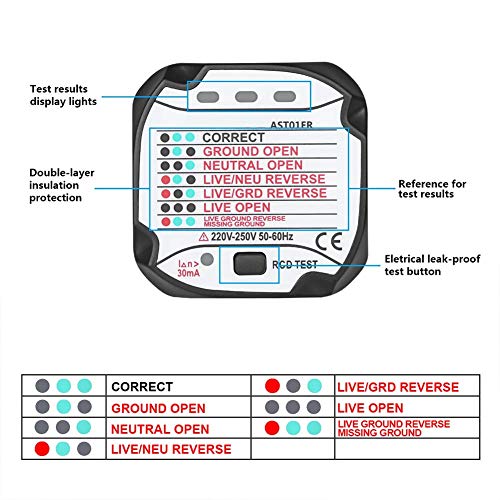
Image 3.1: Detailed view of the AST01 Socket Tester, highlighting its LED indicators and RCD test button.
4. Setup
The Walfront AST01 Socket Tester requires no complex setup. Simply ensure the device is clean and free from damage before use.
- Inspect the tester for any visible damage to the casing or plug pins. Do not use if damaged.
- Ensure the socket you intend to test is a standard 220-250V EU type.
5. Operating Instructions
Using the AST01 Socket Tester is straightforward:
- Plug In: Insert the AST01 Socket Tester directly into the wall socket you wish to test.
- Observe LEDs: Once plugged in, the LED indicators on the tester will light up in a specific pattern. Refer to Section 6, "Interpreting LED Indicators," to understand the wiring status.
- Perform RCD Test (Optional but Recommended): For a comprehensive safety check, press the RCD test button. See Section 5.1 for details.
- Remove: After testing, carefully remove the tester from the socket.
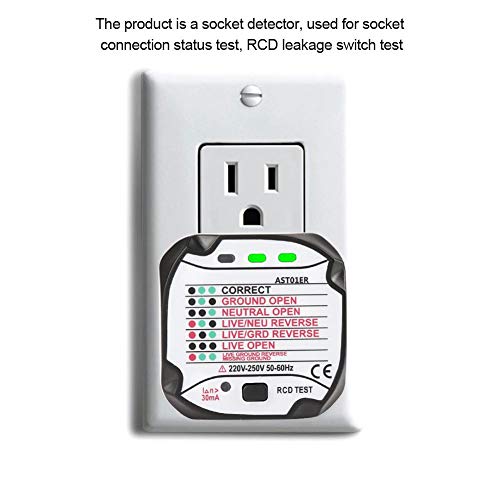
Image 5.1: The socket tester plugged into an outlet, indicating correct wiring.
5.1 RCD Test Procedure
The RCD (Residual Current Device) test function verifies the integrity of your electrical system's earth leakage protection. This test should only be performed on circuits protected by an RCD.
- Plug the AST01 Socket Tester into the socket. Observe the initial LED indication.
- If the wiring is indicated as "Correct" (or another safe configuration), press the black "RCD TEST" button located on the tester.
- A functional RCD should trip, cutting power to the circuit. This indicates the RCD is working correctly.
- If the RCD does not trip, it indicates a potential fault with the RCD or the earthing system. Consult a qualified electrician immediately.
- After the RCD trips, reset your RCD at the consumer unit (fuse box) to restore power.
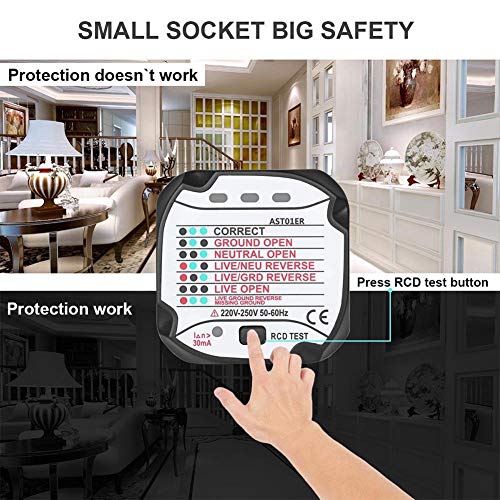
Image 5.2: Performing an RCD test by pressing the dedicated button.
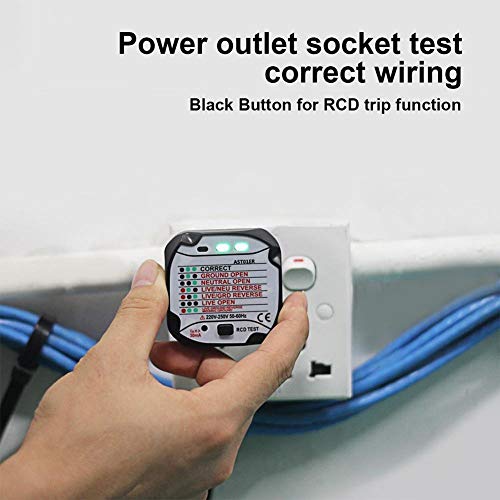
Image 5.3: The RCD test button in action, showing the device plugged into a socket.
6. Interpreting LED Indicators
The AST01 Socket Tester uses a combination of three LED lights (typically green and red) to indicate the wiring status. Refer to the diagram on the device or the table below for interpretation:
| LED Pattern | Wiring Status | Description |
|---|---|---|
| ● ● ● | CORRECT | Live, Neutral, and Earth wires are correctly connected. |
| ● ● ● | GROUND OPEN | The Earth wire is disconnected or not present. |
| ● ● ● | NEUTRAL OPEN | The Neutral wire is disconnected or not present. |
| ● ● ● | LIVE/NEU REVERSE | The Live and Neutral wires are reversed. |
| ● ● ● | LIVE/GRD REVERSE | The Live and Earth wires are reversed. |
| ● ● ● | LIVE OPEN | The Live wire is disconnected or not present. |
| ● ● ● | LIVE GROUND REVERSE MISSING GROUND | Live and Ground are reversed, and the ground connection is missing. |
Note: Any indication other than "CORRECT" suggests a wiring fault that should be addressed by a qualified electrician to ensure electrical safety.
7. Maintenance
The Walfront AST01 Socket Tester is a low-maintenance device. Follow these guidelines to ensure its longevity and accuracy:
- Cleaning: Wipe the device with a dry, soft cloth. Do not use abrasive cleaners or solvents.
- Storage: Store the tester in a cool, dry place, away from direct sunlight and extreme temperatures.
- Inspection: Periodically check the plug pins and casing for any signs of wear or damage.
8. Troubleshooting
If you encounter issues with your AST01 Socket Tester, refer to the following:
- No LEDs light up:
- Check if the socket has power. Use another known working appliance to confirm.
- Ensure the tester is fully inserted into the socket.
- The tester itself might be faulty.
- RCD does not trip during test:
- The RCD itself might be faulty or not present on the circuit.
- There might be a fault in the earthing system.
- Consult a qualified electrician immediately if the RCD fails to trip.
- Inconsistent readings:
- Ensure the tester is firmly seated in the socket.
- Test multiple sockets to determine if the issue is with the tester or a specific socket.
For issues not resolved by these steps, contact customer support or a qualified electrician.
9. Specifications
| Feature | Specification |
|---|---|
| Brand | Walfront |
| Model | AST01ER |
| Standard Plug | EU Plug |
| Rated Voltage (EU) | 220-250V (AC) 50-60Hz |
| Rated Residual Operating Current | 5mA |
| Earth Resistance | Conforms to standard |
| Dimensions (L x W x H) | 58 x 53 x 53 mm (2.28 x 2.09 x 2.09 inches) |
| Weight | 61 Grams |
| Color | Black |
| Safety Standard | IEC 61010-1 |

Image 9.1: Physical dimensions of the AST01 Socket Tester.
10. What's in the Box
The Walfront AST01 Socket Tester package includes:
- 1 x Bside AST01ER Socket Tester
- 1 x English User Manual
11. Warranty and Support
Walfront products are designed for reliability and performance. While specific warranty details are not provided in this manual, please retain your proof of purchase for any warranty claims.
For technical support, troubleshooting assistance, or inquiries regarding your Walfront AST01 Socket Tester, please refer to the retailer where you purchased the product or visit the official Walfront brand store online. You can find more information and contact options at the Walfront Brand Store.