
Introduction
The BYGD 150W Car Power Inverter is designed to convert your vehicle's 12V DC power into standard 110V AC power, along with providing convenient USB charging ports. This device allows you to power and charge various electronic devices on the go, making it ideal for road trips, camping, or daily commutes. It features multiple outlets and advanced safety protections to ensure reliable and secure operation.
Product Overview
The BYGD 150W Car Power Inverter is a compact and durable device equipped with multiple power options. It includes three US standard AC outlets, two 2.4A fast-charging USB ports, and one DC cigarette lighter socket. An ON/OFF switch controls the power flow, and an intelligent silent automatic control cooling fan helps dissipate heat.

Figure 1: Front view of the BYGD 150W Car Power Inverter, showcasing its compact design and various output options.

Figure 2: Product dimensions (9.4x2.4x1.8 inches) and durable ABS fireproof material construction.

Figure 3: Close-up of the inverter's features, including the LED indicator, AC outlets, 2.4A USB ports, smart silent fan, and the 39-inch cigarette lighter plug.
Safety Information
WARNING: DO NOT EXCEED THE POWER RATING OF THE INVERTER.
Exceeding the 150W continuous power or 300W peak power can damage the inverter, your vehicle's electrical system, or the connected devices. Always check the wattage requirements of your devices before connecting them. The inverter includes a multi-protection system against over voltage, low voltage, overload, short circuit, over heat, and over charge. Ensure proper ventilation and avoid operating the inverter in wet conditions or with wet hands.

Figure 4: Visual representation of the inverter's multi-protection system, including safeguards against over voltage, overload, low voltage, overheating, short circuit, and over charge.
Setup
- Vehicle Compatibility: Ensure your vehicle has a 12V DC cigarette lighter socket. The inverter is designed for 12V systems.
- Insert the Plug: Firmly insert the inverter's cigarette lighter plug into your vehicle's 12V DC accessory socket.
- Power On: Press the ON/OFF switch on the inverter. The LED indicator will illuminate, confirming the inverter is powered on and ready for use.
- Placement: Place the inverter in a location that allows for adequate ventilation and does not obstruct driving. The compact size allows it to fit in most cup holders or console areas.
Operating Instructions
- Connecting AC Devices: Plug your 110V AC devices into any of the three standard AC outlets. Ensure the total wattage of connected AC devices does not exceed 150W continuously.
- Connecting USB Devices: Use the two 2.4A USB ports to charge smartphones, tablets, and other USB-powered devices. The smart identification technology delivers optimal charging speed.
- Using the Cigarette Lighter Socket: The inverter also provides an additional DC cigarette lighter socket, allowing you to connect another 12V DC accessory if needed.
- Monitoring: Observe the LED indicator for operational status. If the indicator changes or the device shuts off, refer to the Troubleshooting section.
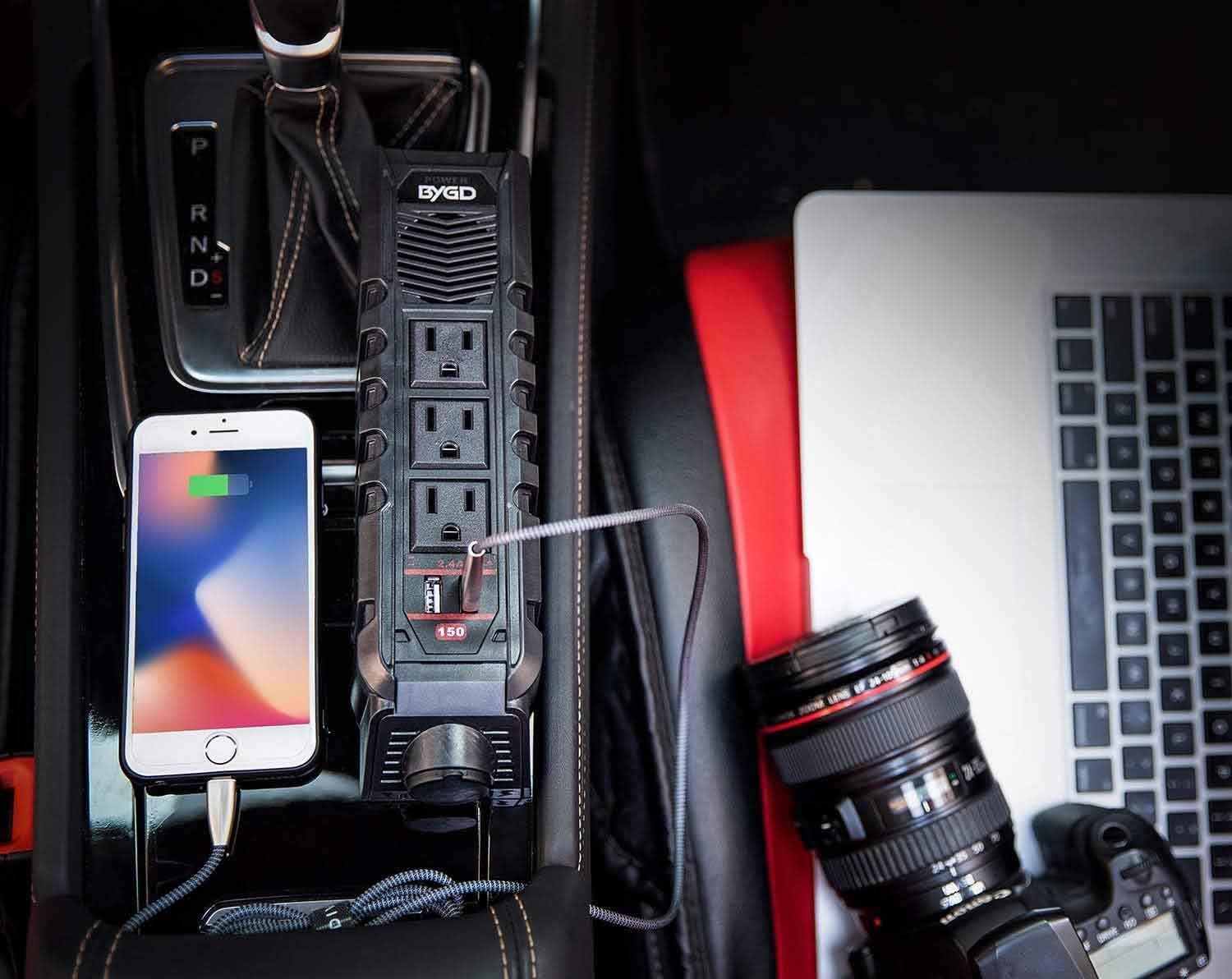
Figure 5: The inverter in a vehicle console, demonstrating simultaneous charging of a smartphone and a laptop.

Figure 6: Examples of devices compatible with the inverter, including cameras, camcorders, speakers, GPS, shavers, power banks, mobile phones, tablets, fans, PSPs, notebooks, and TVs. Note: Do not exceed 150 watts.
Video 1: Official product video from BYGD demonstrating the power inverter's features and usage.
Maintenance
- Cleaning: Keep the inverter clean and free from dust and debris. Use a dry cloth to wipe the exterior.
- Ventilation: Ensure the cooling fan and ventilation openings are not blocked. Proper airflow is crucial for preventing overheating.
- Storage: When not in use, disconnect the inverter from the vehicle's power source and store it in a cool, dry place.
Troubleshooting
| Problem | Possible Cause | Solution |
|---|---|---|
| Inverter not turning on | Loose connection, vehicle ignition off, blown fuse in vehicle or inverter. | Ensure plug is firmly inserted. Turn vehicle ignition on. Check vehicle's fuse box and inverter's internal fuse (if accessible and user-serviceable). |
| Devices not charging | Device power consumption too high, faulty cable, inverter in protection mode. | Verify device wattage is within 150W limit. Try a different charging cable. Disconnect all devices, turn inverter off and on again. |
| Overheating | Blocked ventilation, excessive load. | Clear any obstructions from the fan and vents. Reduce the number or wattage of connected devices. |
| Low voltage warning | Vehicle battery low. | Start the vehicle engine to recharge the battery. |
Specifications
| Feature | Detail |
|---|---|
| Model Name | E8963 |
| Wattage | 150 watts (Continuous), 300 watts (Peak) |
| Power Source | DC to AC |
| Input Voltage | DC 12V |
| Output Voltage | AC 110V |
| AC Outlets | 3 US Standard |
| USB Ports | 2 x 2.4A Fast Charging |
| Cigarette Lighter Socket | 1 |
| Product Dimensions | 9.4 x 2.49 x 1.9 inches |
| Item Weight | 12.8 ounces |
| Cable Length | 39 inches |
| Safety Features | Over Voltage / Low Voltage / Overload / Short Circuit / Over Heat / Over Charge Protection |
Warranty and Support
BYGD provides an 18-month warranty for this product. For any inquiries or assistance, 24/7 customer service is available. Please contact BYGD customer support if you encounter any issues or if the product does not meet your expectations.


