Introduction
Thank you for choosing the LONPOO Portable Boombox CD Player. This versatile audio system combines a CD player, FM radio, Bluetooth connectivity, USB playback, and AUX-IN functionality, offering a wide range of listening options. Its portable design allows for both AC and DC (battery) operation, making it ideal for use at home or on the go. Please read this manual carefully to ensure proper use and to maximize your enjoyment of this product.

Image: Front view of the LONPOO Portable Boombox CD Player, showcasing its main controls and speakers.
What's in the Box
Please check the contents of your package. If any items are missing or damaged, please contact customer support.
- LONPOO Portable Boombox CD Player
- Power cable (UK plug)
- AUX cable
- User manual

Image: Visual representation of the items included in the product package, such as the CD player, power cable, AUX cable, and user manual.
Product Overview and Features
The LONPOO Boombox is designed for versatile audio playback with multiple input options and user-friendly controls.
- Top-Loading CD Player: Supports CD, CD-R, and CD-RW discs, including those with MP3 files. Features repeat and shuffle functions.
- FM Radio: Built-in FM tuner with auto-search and up to 20 station presets.
- Bluetooth Connectivity: Wirelessly stream audio from smartphones, tablets, or laptops.
- USB 2.0 Input: Play MP3/WAV files directly from a USB flash drive.
- AUX-IN Port: Connect external wired audio devices via a 3.5mm audio cable.
- Headphone Output: 3.5mm jack for private listening.
- Stereo Speakers: 2x2W RMS stereo speakers provide clear sound.
- AC/DC Operated: Can be powered by the included AC cable or 4 x UM2-C 1.5V batteries (not included) for portability.
- Intuitive Volume Dial: Large, easy-to-use volume knob with 32 levels.
- EQ Modes: Select from 5 equalizer modes (ROCK/POP/FLAT/CLASS/JAZZ) to optimize sound.
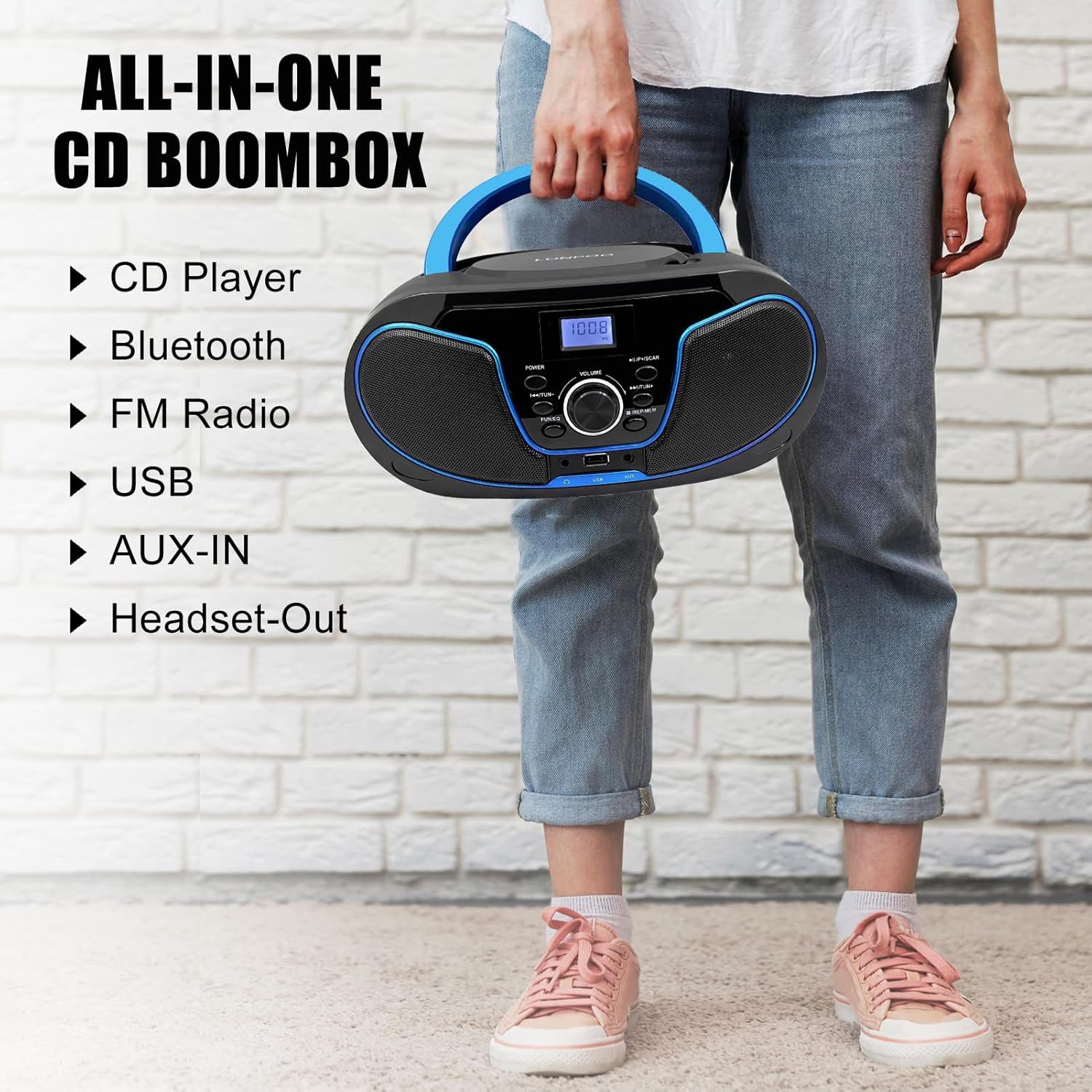
Image: A person holding the portable boombox, illustrating its compact size and listing its key features: CD Player, Bluetooth, FM Radio, USB, AUX-IN, and Headset-Out.

Image: The boombox on a table with headphones and a smartphone, emphasizing its clear stereo sound from full-range 3-inch dual speakers.
Setup
Power Supply
The boombox can be powered by AC mains or batteries.
- AC Power: Insert the included AC power cable into the AC input jack on the back of the unit and plug the other end into a standard wall outlet.
- Battery Power: For portable use, open the battery compartment on the bottom of the unit and insert 4 x UM2-C 1.5V batteries (not included), ensuring correct polarity.
Important: When operating on AC power, it is recommended to remove batteries to prevent drainage, as there is no full power-off when batteries are installed.
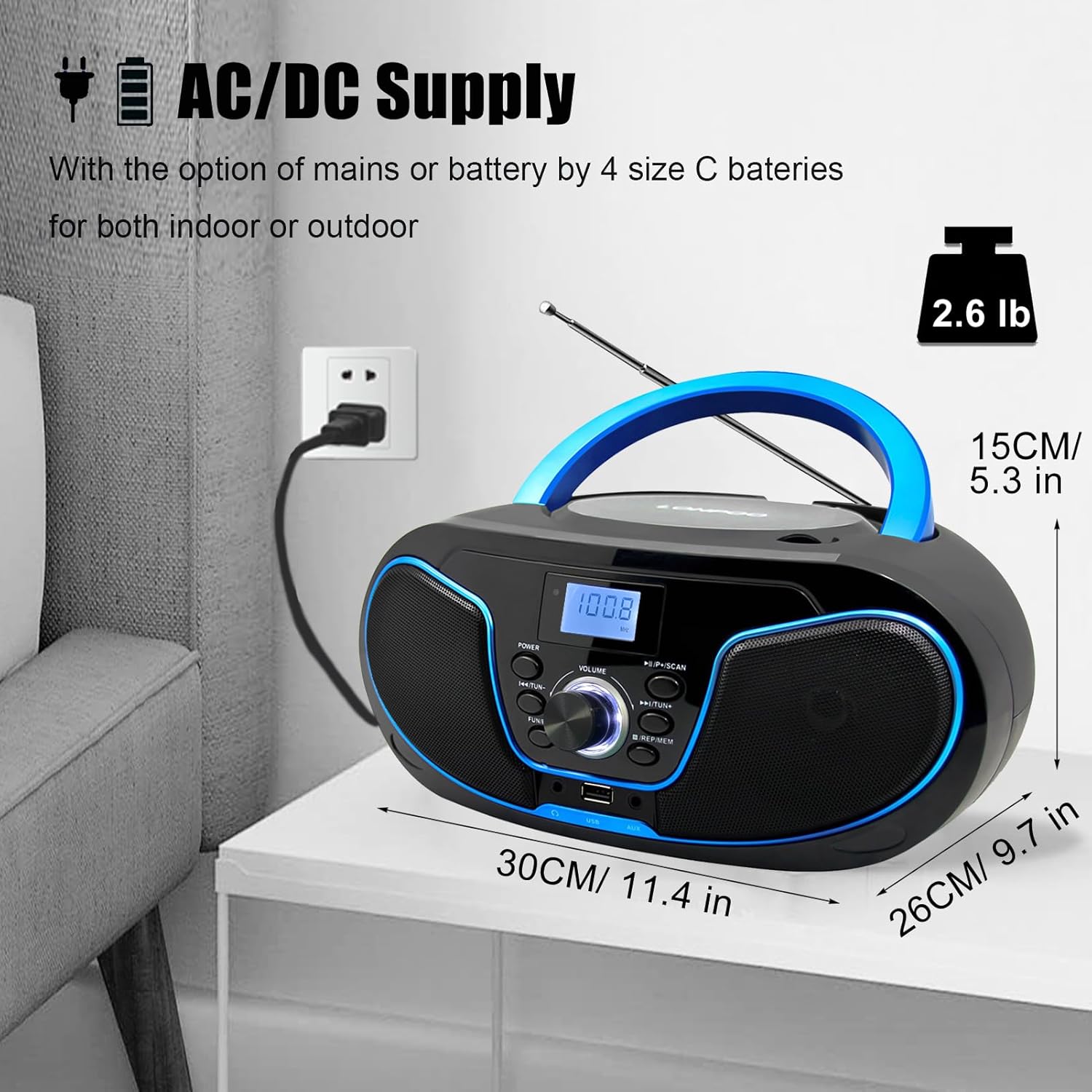
Image: The boombox connected to a wall outlet, illustrating its AC/DC power supply capability and showing its dimensions.
Antenna Setup
For optimal FM radio reception, fully extend the telescopic antenna located on the back of the unit. Adjust its position for the best signal.
Operating Instructions
General Controls
- POWER Button: Press to turn the unit ON or OFF.
- VOLUME Dial: Rotate clockwise to increase volume, counter-clockwise to decrease.
- MODE Button: Press to cycle through available modes: CD, FM Radio, Bluetooth, USB, AUX.
- PLAY/PAUSE Button (►/−): Play or pause playback in CD, USB, or Bluetooth modes.
- PREVIOUS/NEXT Buttons (◀◀/▶▶): Skip to the previous/next track in CD or USB mode. In FM mode, use to tune stations.
- STOP Button (■): Stop playback.
- REP/MEM Button: In CD/USB mode, press to cycle through repeat options (Repeat One, Repeat All). In FM mode, press to save a station preset.
- FUN/EQ Button: Press to cycle through equalizer modes (ROCK, POP, FLAT, CLASS, JAZZ).

Image: Close-up of the top-loading CD compartment and the central intuitive volume dial with blue backlighting.
CD Playback
- Press the MODE button to select CD mode.
- Open the CD compartment lid by gently lifting it.
- Place a CD with the label side facing up onto the spindle.
- Close the CD compartment lid. The player will begin reading the disc and playback will start automatically.
- Use the PREVIOUS/NEXT buttons to skip tracks.
- Press REP/MEM to select repeat options (single track, all tracks, or shuffle).
FM Radio Operation
- Press the MODE button to select FM Radio mode.
- Extend the telescopic antenna for better reception.
- Press and hold the PLAY/PAUSE button to auto-scan and save available FM stations.
- Use the PREVIOUS/NEXT buttons to navigate through saved presets or manually tune.
Bluetooth Pairing
- Press the MODE button to select Bluetooth mode. The display will show "BT" and flash, indicating it's ready for pairing.
- Enable Bluetooth on your external device (smartphone, tablet, etc.).
- Search for "LONPOO" in your device's Bluetooth list and select it to pair.
- Once paired, the "BT" indicator will stop flashing, and you can play audio from your device through the boombox.
USB Playback
- Insert a USB flash drive into the USB port on the front of the unit.
- Press the MODE button to select USB mode. The unit will automatically detect and begin playing compatible audio files (MP3/WAV).
- Use the PREVIOUS/NEXT buttons to skip tracks.
- Press REP/MEM to select repeat options.
AUX-IN Usage
- Connect one end of the included 3.5mm AUX cable to the AUX-IN port on the front of the boombox.
- Connect the other end to the headphone jack or audio output of your external audio device (e.g., MP3 player, older smartphone).
- Press the MODE button to select AUX mode.
- Control playback and volume from your external device.
Headphone Output
- Plug any standard 3.5mm headphones into the Headphone Output jack on the front of the unit.
- Audio will automatically switch from the speakers to the headphones.
- Adjust volume using the boombox's volume dial.

Image: A child and an adult sharing earphones connected to the boombox, demonstrating the 3.5mm earphone support for private listening.
Maintenance
Proper care and maintenance will ensure the longevity of your LONPOO Boombox.
- Cleaning: Wipe the unit with a soft, dry cloth. Do not use abrasive cleaners or solvents.
- CD Lens Care: If CD playback issues occur, use a specialized CD lens cleaner disc to clean the optical lens.
- Storage: When not in use for extended periods, store the unit in a cool, dry place. Remove batteries if storing for a long time to prevent leakage.
- Avoid Moisture: Keep the unit away from water, high humidity, and direct sunlight.
Troubleshooting
| Problem | Possible Cause | Solution |
|---|---|---|
| Unit does not power on. | No power supply; batteries drained or incorrectly inserted; power cable loose. | Check AC power connection; replace batteries or ensure correct polarity. |
| No sound. | Volume too low; incorrect mode selected; headphones connected. | Increase volume; press MODE button to select correct source; unplug headphones. |
| CD not playing/skipping. | CD dirty or scratched; CD inserted incorrectly; unsupported disc format. | Clean or replace CD; ensure label side is up; use supported CD/CD-R/CD-RW. |
| Poor FM radio reception. | Antenna not extended or positioned correctly; weak signal area. | Fully extend and adjust antenna; try moving the unit to a different location. |
| Bluetooth not connecting. | Boombox not in pairing mode; external device Bluetooth off; too far from unit. | Ensure boombox is in BT mode and flashing; enable Bluetooth on device; move closer. |
| USB not playing. | Unsupported file format; USB drive corrupted; USB drive not inserted correctly. | Ensure files are MP3/WAV; try a different USB drive; reinsert USB drive. |
Specifications
| Feature | Detail |
|---|---|
| Model Number | LP-D02 |
| Product Dimensions (L x W x H) | 29 x 24.6 x 13.5 cm |
| Weight | 1.4 kg |
| Power Supply | AC 230V~50Hz or 4 x UM2-C 1.5V Batteries (not included) |
| Speaker Type | Built-in Stereo Speakers |
| Connectivity Technology | Bluetooth, Auxiliary, USB |
| CD Compatibility | CD, CD-R, CD-RW (including MP3 files) |
| USB Compatibility | MP3/WAV files |
| Headphone Output | 3.5mm Stereo Jack |
| Manufacturer | zhongxinguang |
| Country of Origin | China |
Warranty and Support
Your LONPOO Portable Boombox CD Player comes with a 1-Year Guarantee. This covers manufacturing defects and ensures your product functions as intended under normal use.
If you encounter any questions or issues with your product, please do not hesitate to contact our professional technical department. We are committed to providing immediate support and assistance.
For customer service inquiries, please refer to the contact information provided in your product packaging or visit the official LONPOO website.


