
1. Product Overview
The FILA Digital Watch Model 38-171-003 is a robust digital timepiece designed for daily wear and sports activities. It features a durable ABS case, a comfortable PU strap, and a mineral crystal glass. Key functions include time display, date tracking, chronograph, alarm, and hourly chime. The watch is water-resistant up to 10 ATM (100 meters), making it suitable for swimming and water sports.
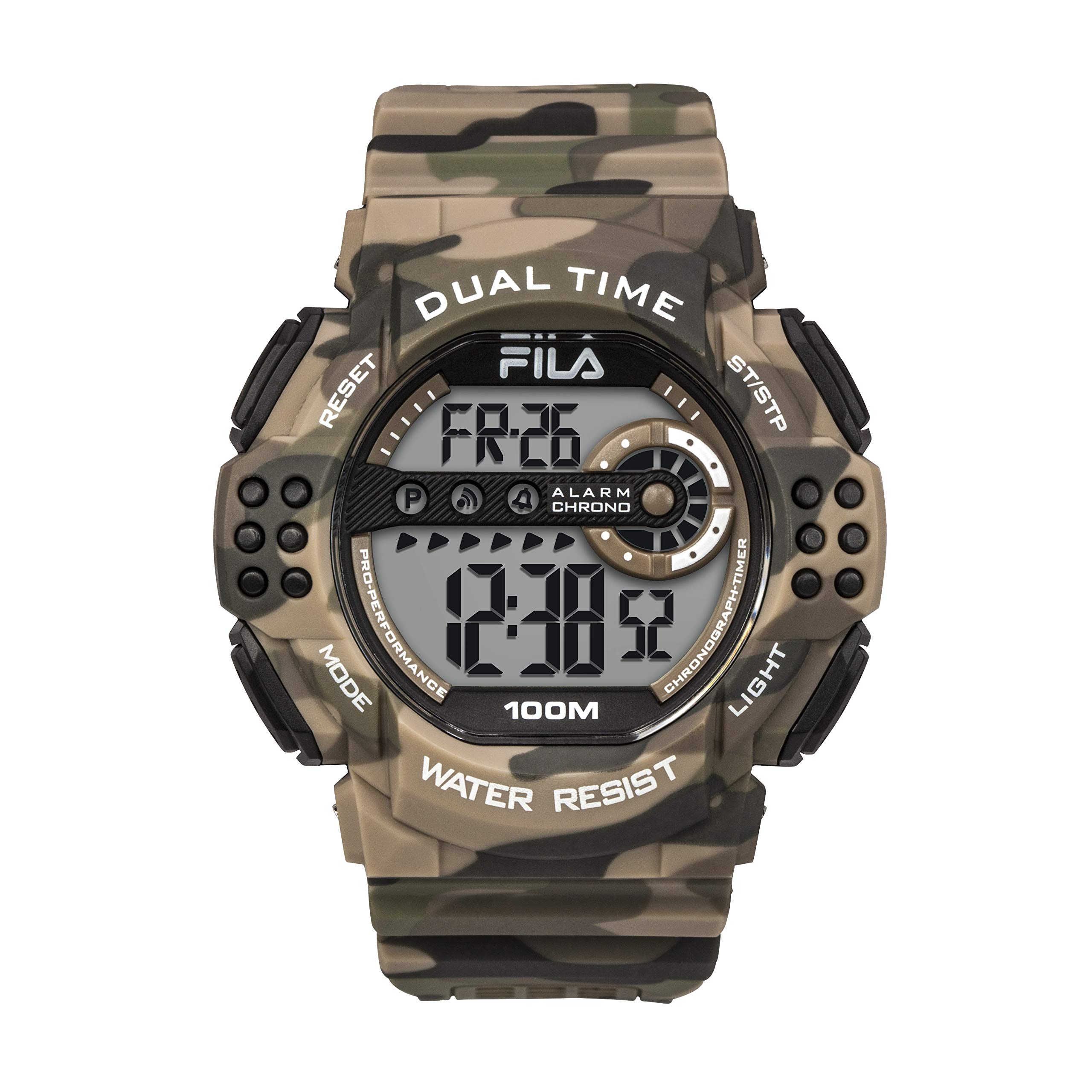
Image 1.1: Front view of the FILA Digital Watch Model 38-171-003, highlighting its chronograph, date tracker, alarm, and 100m water resistance features.

Image 1.2: FILA Digital Watch Model 38-171-003 showing the location of the Reset, Start/Stop, Mode, and Light buttons.
2. Initial Setup
2.1. Battery Installation (if applicable)
The watch comes with a pre-installed Lithium Metal battery. No initial battery installation is typically required. If the display is dim or blank, the battery may need replacement. Please refer to the Maintenance section for battery replacement guidelines.
2.2. Time and Date Setting
- Press the MODE button repeatedly until the time setting mode is displayed (usually indicated by flashing digits).
- Use the RESET button to select the digit or setting you wish to adjust (e.g., hours, minutes, 12/24-hour format, year, month, day).
- Press the ST/STP (Start/Stop) button to increase the selected value. Hold the button to advance rapidly.
- Once all settings are correct, press the MODE button to exit the setting mode and return to the normal time display.
3. Operating Instructions
3.1. Mode Selection
Press the MODE button to cycle through the different functions of the watch. The typical sequence is:
- Normal Time Display
- Chronograph (Stopwatch)
- Alarm Setting
- Time/Date Setting (as described in Section 2.2)
3.2. Chronograph (Stopwatch) Function
- Press MODE until the chronograph display appears (usually showing "00:00:00").
- Press ST/STP to start the stopwatch.
- Press ST/STP again to pause the stopwatch.
- Press RESET to reset the stopwatch to zero while it is paused.
- To resume timing after pausing, press ST/STP.
3.3. Alarm Setting
- Press MODE until the alarm setting display appears (usually indicated by "AL" or an alarm icon).
- Press RESET to select the hour or minute digits to adjust.
- Press ST/STP to change the selected value.
- To activate/deactivate the alarm, press ST/STP while in the alarm setting mode (not adjusting digits). An alarm icon will appear/disappear on the display.
- To activate/deactivate the hourly chime, press RESET while in the alarm setting mode (not adjusting digits). A chime icon will appear/disappear.
- Press MODE to exit the alarm setting mode.
3.4. Backlight Function
Press the LIGHT button to illuminate the watch display for a few seconds, improving visibility in low-light conditions.
4. Maintenance and Care
- Cleaning: Clean the watch regularly with a soft, damp cloth. For stubborn dirt, use mild soap and water. Avoid harsh chemicals or abrasive cleaners.
- Water Resistance: The watch is water-resistant up to 10 ATM (100 meters). This means it is suitable for showering, swimming, and snorkeling. Do not operate buttons underwater to prevent water ingress. Avoid exposing the watch to hot water or steam, as this can compromise the seals.
- Temperature: Avoid exposing the watch to extreme temperatures (hot or cold) for extended periods, as this can affect battery life and watch accuracy.
- Impact: While durable, avoid strong impacts or dropping the watch, which could damage internal components or the crystal.
- Battery Replacement: When the display becomes dim or the watch stops functioning, the battery may need replacement. This watch uses 1 Lithium Metal battery. It is recommended to have battery replacement performed by a qualified watch technician to ensure proper sealing and maintain water resistance.
5. Troubleshooting
| Problem | Possible Cause | Solution |
|---|---|---|
| Watch display is blank or dim. | Low or depleted battery. | Replace the battery. Refer to Section 4. |
| Time is incorrect. | Time needs to be reset after battery change or accidental adjustment. | Adjust the time and date. Refer to Section 2.2. |
| Alarm does not sound. | Alarm is not activated or set incorrectly. | Ensure the alarm is set and activated. Refer to Section 3.3. |
| Water inside the watch. | Buttons operated underwater, or seals compromised. | Immediately take the watch to a qualified technician for inspection and repair. Do not attempt to dry it yourself. |
6. Specifications
- Model: FILA 38-171-003
- Display Type: Digital
- Case Material: ABS Plastic
- Strap Material: PU (Polyurethane)
- Crystal Material: Mineral Glass
- Water Resistance: 10 ATM (100 meters)
- Movement Type: Quartz
- Functions: Time, Date, Chronograph, Alarm, Hourly Chime, Backlight
- Battery Type: 1 Lithium Metal battery (included)
- Case Diameter: 52 mm
- Case Thickness: 15 mm
- Band Width: 26 mm
- Item Weight: 240 Grams
7. Warranty and Support
For warranty information and customer support, please refer to the documentation provided with your purchase or visit the official FILA website. Keep your proof of purchase for warranty claims.
For technical assistance or service, contact FILA customer support through their official channels. Do not attempt to open or repair the watch yourself, as this may void the warranty and compromise water resistance.