
1. Introduction
The Ninja Nutri Auto-IQ Kitchen System BL681C is a versatile appliance designed for various food preparation tasks, including blending, food processing, and dough making. This manual provides essential information for the safe and efficient operation and maintenance of your new kitchen system.
2. Important Safety Information
Please read all instructions carefully before using the appliance. Failure to follow these instructions may result in injury or damage to the appliance.
- Always ensure the appliance is unplugged before assembly, disassembly, or cleaning.
- Do not immerse the motor base in water or other liquids.
- Blades are sharp. Handle with extreme care.
- Ensure lids are securely locked in place before operating the appliance. The appliance will not operate if the lid is not properly secured.
- Keep hands and utensils out of the container while blending to reduce the risk of severe injury to persons or damage to the blender.
- Do not operate any appliance with a damaged cord or plug, or after the appliance malfunctions or has been dropped or damaged in any manner.
3. Package Contents
Your Ninja Nutri Auto-IQ Kitchen System BL681C includes the following components:
- 1500-Watt Motor Base: The main power unit for all attachments.
- 72 oz (9-Cup) Total Crushing Pitcher: Ideal for large batches of smoothies, frozen drinks, and crushing ice. Includes a lid with a pour spout and a stacked blade assembly.
- 64 oz (8-Cup) Food Processor Bowl: For chopping, slicing, shredding, and dough making. Comes with a lid, chopping blade, and dough blade.
- 2 x 24 oz Nutri Ninja Cups: Single-serve cups for personalized smoothies and nutrient extraction. Each includes a Sip & Seal Lid and a Pro Extractor Blade.
- Shredding Disc: For shredding ingredients in the food processor.
- Slicing Disc: For slicing ingredients in the food processor.

Image: All components of the Ninja Nutri Auto-IQ Kitchen System BL681C, including the motor base, large pitcher, food processor bowl, and two single-serve cups.

Image: Two 24 oz Nutri Ninja Cups, each with a Sip & Seal Lid and a Pro Extractor Blade, designed for individual servings.
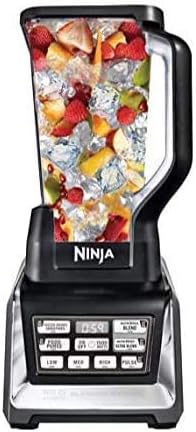
Image: The 64 oz food processor bowl with its lid and chopping blade, ready for food preparation tasks.
4. Setup and Assembly
Proper assembly ensures safe and effective operation of your Ninja Kitchen System.
4.1 Attaching Pitchers/Bowls to the Motor Base
- Place the motor base on a clean, dry, level surface.
- Align the pitcher or bowl with the motor base. Turn clockwise until it clicks into place.
- Ensure the pitcher/bowl handle is aligned with the front of the motor base.
4.2 Securing Lids
- For the 72 oz Pitcher and 64 oz Food Processor Bowl: Place the lid on the container, aligning the arrow on the lid with the arrow on the handle. Press down firmly until you hear a click. The handle must be in the locked position for the appliance to operate.
- For Nutri Ninja Cups: Screw the Pro Extractor Blade assembly onto the cup until tightly sealed. Invert the cup and place it onto the motor base, twisting clockwise until it locks into place.
Video: Demonstration of attaching and detaching the blender pitcher and food processor bowl, along with securing their respective lids. It highlights the importance of aligning arrows and ensuring a secure lock for operation.
5. Operating Instructions
The Ninja Nutri Auto-IQ Kitchen System features intelligent programs and manual controls for precise results.
5.1 Control Panel Overview

Image: Close-up of the Ninja Auto-IQ control panel, showing various preset programs and manual speed options.
- ON/OFF Button: Powers the unit on or off.
- Auto-IQ Programs: One-touch intelligent programs designed for specific tasks:
- FROZEN DRINKS/SMOOTHIES: Perfect for crushing ice and blending frozen ingredients.
- FOOD PUREE: Ideal for creating smooth purees and sauces.
- LOW/DOUGH: Specifically designed for mixing dough in the food processor bowl.
- NUTRI NINJA BLEND / ULTRA BLEND: Optimized for nutrient extraction in the single-serve cups.
- Manual Speed Settings: LOW, MED, HIGH, PULSE for customized control.
5.2 Using the Total Crushing Pitcher
The 72 oz pitcher is designed for large-volume blending and ice crushing.
- Place the stacked blade assembly onto the drive gear in the pitcher.
- Add ingredients, ensuring not to exceed the MAX LIQUID fill line.
- Secure the lid firmly.
- Select an Auto-IQ program (e.g., FROZEN DRINKS/SMOOTHIES) or a manual speed.

Image: The 72 oz blender pitcher in operation, effectively blending fruits and ice into a smooth consistency.
Video: A quick demonstration of making a smoothie using the Ninja Duo blender, showcasing the blending process and the final smooth result.
5.3 Using the Food Processor Bowl
The 64 oz food processor bowl is versatile for chopping, slicing, shredding, and dough.
- Insert the desired blade (chopping blade, dough blade, shredding disc, or slicing disc) onto the drive gear in the bowl.
- Add ingredients.
- Secure the lid firmly.
- Select an Auto-IQ program (e.g., FOOD PUREE, LOW/DOUGH) or a manual speed (e.g., CHOP).

Image: The food processor bowl containing cookie dough, demonstrating its capability for dough mixing.
Video: A user demonstrates how to make oat flour using the food processor attachment, highlighting its efficiency in grinding dry ingredients.
5.4 Using Nutri Ninja Cups
The single-serve cups are perfect for quick, on-the-go beverages.
- Add ingredients to the Nutri Ninja Cup.
- Screw the Pro Extractor Blade assembly onto the cup until tightly sealed.
- Invert the cup and place it onto the motor base, twisting clockwise until it locks into place.
- Select an Auto-IQ program (e.g., NUTRI NINJA BLEND/ULTRA BLEND) or a manual speed.
- Once blending is complete, remove the cup, unscrew the blade assembly, and replace with a Sip & Seal Lid.

Image: A 24 oz Nutri Ninja Cup with its Sip & Seal Lid, ready for on-the-go consumption after blending.
Video: An overview of the Ninja Nutri Auto-IQ Kitchen System, demonstrating the various components including the single-serve cups and their ease of use for quick blending tasks.
6. Maintenance and Cleaning
Regular cleaning will ensure the longevity and optimal performance of your appliance.
- Motor Base: Wipe clean with a damp cloth. Do not immerse in water.
- Pitchers, Bowls, Cups, Lids, and Blades: All removable parts are dishwasher safe (top rack only). Alternatively, wash by hand with warm, soapy water. Use caution when handling blades.
- For thorough cleaning, fill the pitcher/bowl with warm water and a drop of dish soap, then run on a low setting for a few seconds. Rinse thoroughly.
7. Troubleshooting
If your appliance is not functioning as expected, refer to the following common issues:
- Appliance does not turn on: Ensure the power cord is securely plugged into an outlet. Verify that the pitcher/bowl/cup is correctly assembled and the lid is securely locked in place.
- Ingredients are not blending smoothly: Ensure there is enough liquid in the mixture. Use the PULSE function to break down larger pieces, then continue blending.
- Motor stops during operation: The appliance may have overheated. Unplug the unit and allow it to cool down for at least 15 minutes before attempting to use it again. Reduce the load or amount of ingredients.
8. Specifications
| Feature | Specification |
|---|---|
| Brand | Ninja |
| Model | BL681C |
| Color | Black |
| Power | 1500 Watts |
| Voltage | 220 Volts |
| Number of Speeds | 3 (Low, Med, High) + Pulse + Auto-IQ Programs |
| Total Crushing Pitcher Capacity | 72 Fluid Ounces (9 Cups) |
| Food Processor Bowl Capacity | 64 Fluid Ounces (8 Cups) |
| Nutri Ninja Cup Capacity | 24 Fluid Ounces |
| Item Weight | 23.8 pounds |
| Package Dimensions | 17 x 15.9 x 11.5 inches |
9. Warranty and Support
For warranty information, product registration, or customer support, please refer to the documentation included with your purchase or visit the official Ninja website. Keep your purchase receipt as proof of purchase for warranty claims.


