
Sealey AUTOCHARGE650HF
Sealey AUTOCHARGE650HF Compact Auto Smart Charger User Manual
Model No: AUTOCHARGE650HF
6.5A 9-Cycle 6/12V Compact Smart Charger & Maintainer for Lithium and Lead-Acid Batteries
Important Safety Instructions
Read all instructions carefully before using the charger. Failure to follow these instructions may result in electric shock, fire, or serious injury.
- Ensure the charger is disconnected from the mains power supply before making or breaking connections to the battery.
- Use the charger in a well-ventilated area. Do not operate in explosive atmospheres, such as in the presence of flammable liquids, gases, or dust.
- Avoid direct contact with battery acid. Wear appropriate eye protection and gloves.
- Do not charge frozen batteries. Allow them to thaw before charging.
- Keep the charger away from water and moisture.
- Do not attempt to disassemble or modify the charger. Refer all servicing to qualified personnel.
- Ensure the correct voltage and battery type are selected before charging.
- Keep out of reach of children.
Product Overview
The Sealey AUTOCHARGE650HF is a compact, intelligent battery charger and maintainer designed for 6V and 12V lead-acid (STD, AGM, GEL) and Lithium (LiFePO4) batteries. It features a 9-cycle charging program to optimize battery performance and longevity.
Components
- Main Charger Unit
- Battery Clamps (Red for positive, Black for negative)
- AC Power Cord
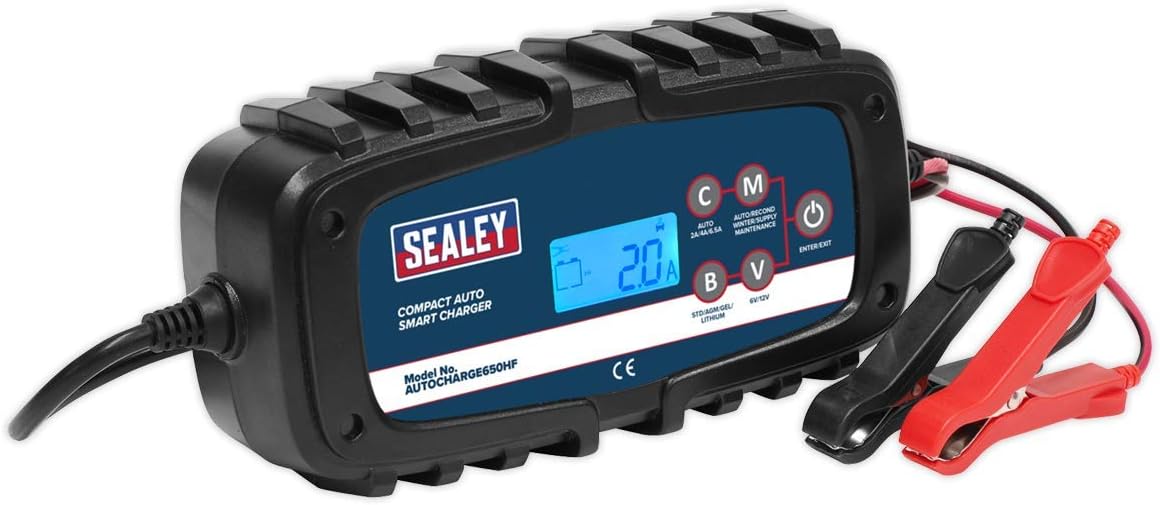
Figure 1: Front view of the Sealey AUTOCHARGE650HF Smart Charger, showing the digital display, mode selection buttons, and battery clamps.

Figure 2: Angled view of the Sealey AUTOCHARGE650HF Smart Charger, highlighting its compact design and robust casing.

Figure 3: Top view of the Sealey AUTOCHARGE650HF Smart Charger, showing the ribbed design for heat dissipation.
Setup
- Preparation: Ensure the battery terminals are clean and free from corrosion. If necessary, clean them with a wire brush.
- Ventilation: Place the charger in a well-ventilated area, away from direct sunlight, heat sources, and moisture.
- Connect to Battery:
- Connect the RED positive (+) clamp to the positive (+) battery terminal.
- Connect the BLACK negative (-) clamp to the negative (-) battery terminal.
- Ensure connections are secure.
- Connect to Power: Plug the AC power cord into a standard electrical outlet. The charger will power on and enter standby mode.
Operating Instructions
Selecting Charging Mode
The AUTOCHARGE650HF offers multiple charging modes. Press the 'MODE' button (labeled 'C' on the unit) to cycle through the available options:
- 6V STD/AGM/GEL: For 6-volt standard, AGM, or Gel lead-acid batteries.
- 12V STD/AGM/GEL: For 12-volt standard, AGM, or Gel lead-acid batteries.
- 12V Lithium (LiFePO4): Specifically for 12-volt Lithium Iron Phosphate batteries.
- 12V Winter/Supply: For charging in cold conditions or for use as a power supply.
Starting the Charging Process
- After connecting the charger to the battery and mains power, the display will show the current battery voltage.
- Press the 'MODE' button (C) repeatedly until the desired charging mode is selected. The selected mode will be indicated on the display.
- The charger will automatically begin the charging cycle. The display will show charging progress, current, and voltage.
- Once charging is complete, the charger will automatically switch to maintenance mode (float charge) to keep the battery optimally charged.
Ending the Charging Process
- Press the 'ENTER/EXIT' button (power symbol) to stop charging and put the unit into standby.
- Disconnect the AC power cord from the mains outlet.
- Disconnect the BLACK negative (-) clamp from the battery terminal.
- Disconnect the RED positive (+) clamp from the battery terminal.
Maintenance
Proper maintenance ensures the longevity and safe operation of your Sealey AUTOCHARGE650HF charger.
- Cleaning: Disconnect the charger from all power sources before cleaning. Wipe the exterior with a soft, damp cloth. Do not use harsh chemicals or abrasive cleaners.
- Storage: Store the charger in a cool, dry place when not in use. Keep the cables neatly coiled to prevent damage.
- Cable Inspection: Periodically inspect the AC power cord and battery clamps for any signs of damage, fraying, or corrosion. Do not use the charger if any part is damaged.
Troubleshooting
| Problem | Possible Cause / Solution |
|---|---|
| Charger does not power on. |
|
| Charger not charging battery. |
|
| Display shows an error code. |
|
| Charger gets warm during operation. |
|
Specifications
| Feature | Detail |
|---|---|
| Model Number | AUTOCHARGE650HF |
| Input Voltage | Standard AC |
| Output Voltage | 6V / 12V DC |
| Output Current | 6.5A (Max) |
| Battery Types Supported | STD, AGM, GEL (Lead-Acid), Lithium (LiFePO4) |
| Charging Cycles | 9-Cycle |
| Item Weight | 2.27 pounds (1.03 Kilograms) |
| Product Dimensions | 5.12 x 10.63 x 4.72 inches |
| Manufacturer | SEALEY |
| Date First Available | March 21, 2019 |
Warranty and Support
Warranty Information
The Sealey AUTOCHARGE650HF Compact Auto Smart Charger comes with a 2-Year Guarantee from the date of purchase. This warranty covers defects in materials and workmanship under normal use. Please retain your proof of purchase for warranty claims. Terms and conditions apply.

Figure 4: Sealey 2 Year Guarantee.
Customer Support
For technical assistance, troubleshooting beyond this manual, or warranty inquiries, please contact Sealey customer support. Visit the official Sealey website for contact details and further resources.
Note: Do not return the product to the place of purchase without prior authorization from Sealey customer service.
Related documentsAUTOCHARGE650HF


Ask a question about this manual
Ask about setup, troubleshooting, compatibility, parts, safety, or missing instructions. Manuals+ will review the question and use this page’s manual context to help answer it.