
1. Introduction
The Edifier S3000Pro Audiophile Active Speakers are designed to deliver high-fidelity audio with versatile connectivity options. Featuring Bluetooth 5.0 with aptX HD, USB audio, planar diaphragm tweeters, and 6.5-inch woofers, these speakers offer a premium listening experience. The innovative KleerNet wireless technology allows for a wire-free connection between the left and right speakers, providing flexible placement without compromising sound quality.
2. Package Contents
Please ensure all items are present in the package:
- Edifier S3000Pro Speakers (1 pair)
- Remote Control
- Power Cable
- USB Cable
- Optical Cable
- RCA to RCA Audio Cable
- 3.5mm to RCA Audio Cable
- User Manual
3. Setup and Connections
The Edifier S3000Pro speakers are designed for easy setup. The left and right speakers connect wirelessly to each other, eliminating the need for a speaker cable between them. Each speaker requires its own power connection.
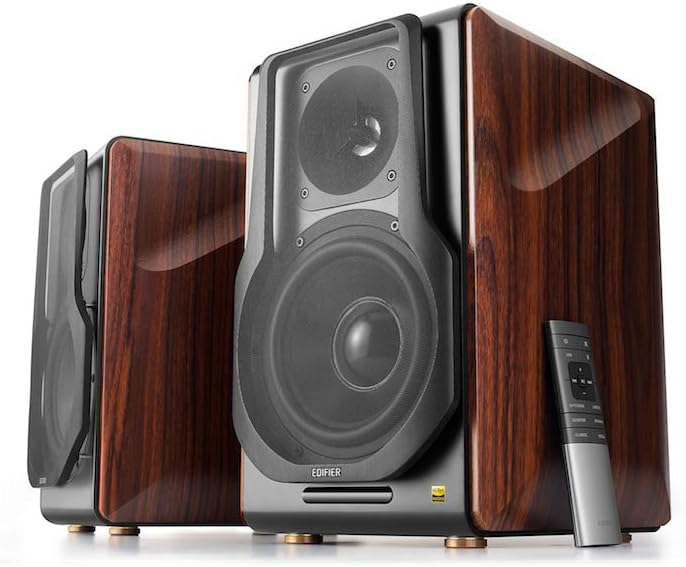
Figure 3.1: Edifier S3000Pro Speakers and Remote Control.
3.1 Speaker Placement
Place the speakers in your desired listening area. Due to their wireless inter-speaker connection, you have flexibility in positioning them. Ensure each speaker is near a power outlet.

Figure 3.2: Example placement of Edifier S3000Pro speakers in a room.
3.2 Power Connection
Connect the included power cables to each speaker and then to a wall outlet. The speakers will automatically attempt to pair with each other upon power-on.
3.3 Audio Input Connections
The active (right) speaker features a variety of input ports:
- Bluetooth 5.0 with aptX HD: For wireless audio streaming from compatible devices.
- USB Audio: Connect directly to a computer for high-resolution audio playback.
- Optical: For digital audio connection from TVs, game consoles, etc.
- Coaxial: Another digital audio input option.
- Line In (RCA): Standard analog input for various audio sources.
- Balanced (XLR): Professional-grade input for balanced audio signals.

Figure 3.3: Rear panel of the active speaker with various input options.
3.4 Wireless Inter-Speaker Connection
The S3000Pro utilizes KleerNet wireless technology for lossless audio transmission between the left and right speakers. This connection is established automatically. If re-pairing is ever needed, refer to the troubleshooting section.
Video 3.1: Official Edifier S3000Pro Audiophile Active Speakers overview, demonstrating key features and connectivity.
4. Operating Instructions
Control your S3000Pro speakers using the included wireless remote or the controls located on the active (right) speaker.
4.1 Remote Control Functions

Figure 4.1: The wireless remote control for Edifier S3000Pro speakers.
- Power Button: Turns the speakers on or off.
- Volume Control: Adjusts the overall volume level.
- Mute: Mutes or unmutes the audio output.
- Input Selection: Dedicated buttons for USB, Bluetooth, Optical/Coaxial, and Line/Balanced inputs.
- Playback Controls: Play/Pause, Skip Forward, Skip Backward (for Bluetooth and USB modes).
- Sound Modes: Buttons for Monitor, Dynamic, Classic, and Vocal sound profiles.
4.2 On-Speaker Controls
The active speaker features rotary knobs for direct control:
- Volume/Input Selection: Rotate to adjust volume; press to cycle through inputs.
- Treble Control: Adjusts the high-frequency output.
- Bass Control: Adjusts the low-frequency output.
5. Features and Design
The S3000Pro speakers are crafted with both acoustic performance and aesthetic appeal in mind.
5.1 Acoustic Design
- Planar Diaphragm Tweeters: Deliver clear, detailed high frequencies.
- 6.5-inch Aluminum Alloy Woofers: Provide powerful and accurate bass response.
- Built-in Amplifier: Each speaker features a 78 watts amplifier, eliminating the need for external amplification.
- Hi-Res Audio: Supports higher bit depth and sample rates (96 kHz or higher) for superior sound quality.
5.2 Construction and Aesthetics
The speaker cabinets are constructed from high-quality MDF (Medium-Density Fiberboard) with a brown wood finish, offering both durability and a classic aesthetic. The front features a matt black finish with removable cloth grilles.

Figure 5.1: Front view highlighting the drivers and finish.

Figure 5.2: Side view showcasing the wood finish.
6. Maintenance
To ensure the longevity and optimal performance of your Edifier S3000Pro speakers, follow these maintenance guidelines:
- Cleaning: Use a soft, dry cloth to wipe down the speaker cabinets. Avoid using abrasive cleaners, waxes, or solvents.
- Dusting: Regularly dust the speaker grilles and drivers with a soft brush or vacuum cleaner with a brush attachment.
- Placement: Avoid placing speakers in direct sunlight, near heat sources, or in areas with high humidity. Ensure adequate ventilation around the speakers.
- Handling: Handle the speakers with care. Avoid pressing on the speaker cones or tweeters.
7. Troubleshooting
If you encounter issues with your S3000Pro speakers, refer to the following common solutions:
- No Sound:
- Ensure both speakers are powered on and connected to an electrical outlet.
- Verify the correct input source is selected on the active speaker or remote.
- Check all audio cables for secure connections.
- Increase the volume on both the speakers and the audio source.
- Speakers Not Pairing Wirelessly:
- Ensure both speakers are powered on. The wireless connection between them is factory-paired and should resume automatically.
- If the wireless connection fails, locate the small "Pair" button on the back panel of both the active (R) and passive (L) speakers. Press and hold the "Pair" button on the active speaker first, then on the passive speaker. The LED indicator on the passive speaker will blink rapidly during pairing.
- Bluetooth Connectivity Issues:
- Ensure the speakers are in Bluetooth input mode.
- Delete the "Edifier S3000Pro" from your device's Bluetooth list and attempt to re-pair.
- Move your Bluetooth device closer to the speakers to reduce interference.
- Distorted Sound:
- Reduce the volume on both the speakers and the audio source.
- Check audio cables for damage or loose connections.
- Ensure the audio source is not overdriving the input.
8. Specifications
| Feature | Specification |
|---|---|
| Brand | Edifier |
| Model Name | S3000PRO |
| Speaker Type | Bookshelf |
| Material | MDF |
| Connectivity Technology | Bluetooth, USB |
| Wireless Communication Technology | Bluetooth |
| Bluetooth Version | 5.0 with aptX HD |
| Woofer Diameter | 6.5 Inches |
| Tweeter Type | Planar Diaphragm |
| Speaker Maximum Output Power | 256 Watts |
| Signal-to-Noise Ratio | 85 dB |
| Product Dimensions | 21.6"D x 13.4"W x 17.3"H |
| Item Weight | 3.3 pounds (1.5 Kilograms) |
| Included Components | product, manual |
9. Warranty and Support
The Edifier S3000Pro speakers come with a full warranty. For detailed warranty information, product registration, or technical support, please visit the official Edifier website or contact their customer service. Keep your purchase receipt for warranty claims.
For further assistance, you may visit the Edifier Store on Amazon.


