
iSpring TDS2
iSpring TDS2 Digital 2-Button TDS Meter Instruction Manual
Model: TDS2
1. Introduction
The iSpring TDS2 Digital 2-Button TDS Meter is designed to measure the Total Dissolved Solids (TDS) in water. TDS refers to the total concentration of dissolved substances in water, including minerals, salts, metals, cations, or anions. This meter provides a quick and accurate way to assess water quality, helping you understand the purity of your drinking water, aquarium water, or water from other sources.

This image displays the iSpring TDS2 Digital 2-Button TDS Meter in its black casing, with the protective cap removed to reveal the electrodes and the digital display. The 'HOLD' and 'ON/OFF' buttons are visible below the screen.
2. Product Features
- Measures the parts per million (ppm) level of dissolved solids in water.
- Features an automatic shut-off function to conserve battery life.
- Includes a 'Hold' button to retain measurement values for convenient reading and recording.
- Aids in testing water for potential contaminants like arsenic, lead, aluminum, and other metals.
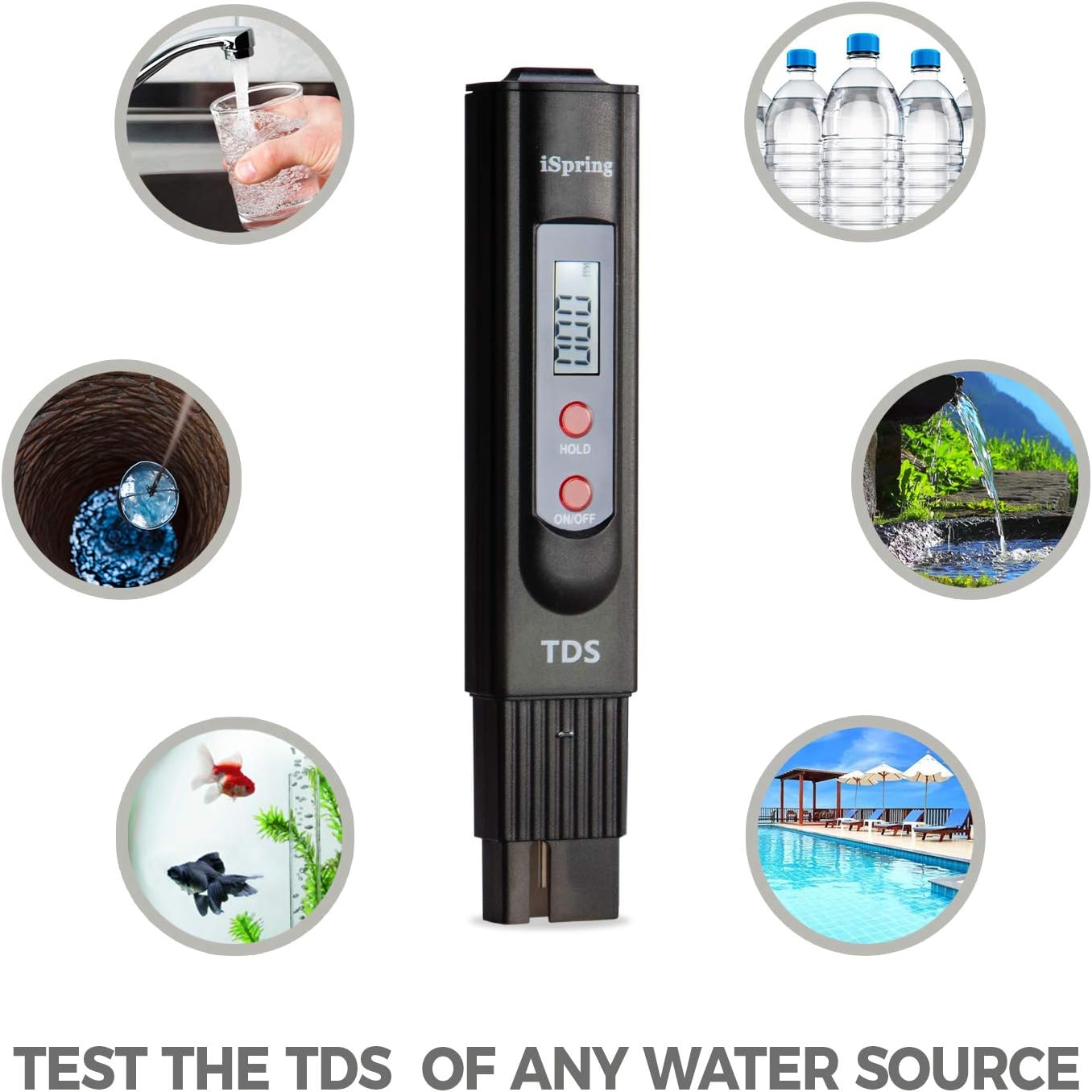
This graphic illustrates the versatility of the iSpring TDS2 meter, depicting its use for testing water from multiple sources such as tap water, bottled water, well water, aquariums, and swimming pools, highlighting its broad applicability for water quality assessment.
3. Package Contents
- 1 x iSpring TDS2 Digital TDS Meter
4. Setup
The iSpring TDS2 meter typically comes with pre-installed batteries. Before first use, ensure the battery compartment is securely closed. No additional setup is required beyond removing the protective cap before testing.
- Remove the protective cap from the bottom of the meter.
- Ensure the battery compartment (located at the top) is sealed.
5. Operating Instructions

A clear diagram of the iSpring TDS2 meter, labeling its key components: the battery compartment, LCD screen, 'HOLD' button, 'ON/OFF' button, and indicating the maximum immersion level for accurate readings. Accompanying text provides step-by-step operating instructions and important notes.
- Prepare for Testing: Remove the protective cap from the bottom of the meter.
- Power On: Press the ON/OFF button to turn on the meter. The display will show "000".
- Immerse the Meter: Submerge the tester into the water sample. Do not immerse beyond the maximum immersion level, which is approximately 2 inches (5 cm). The meter is not designed for hot water.
- Read the Measurement: Wait for the display to stabilize. The meter automatically compensates for temperature variations. Once the readout stabilizes (typically 10-30 seconds), the reading in parts per million (PPM) will be displayed. If the tester displays a flashing "x10" icon, multiply the displayed reading by 10 to get the actual TDS value.
- Use Hold Function: To view the reading out of the water, press the HOLD button. The display will freeze the current measurement. Press HOLD again to release.
- Power Off: Press the ON/OFF button to turn off the tester. The tester will also shut off automatically after 10 minutes of non-use to save energy.
- Clean After Use: After each use, gently shake off any excess water from the electrodes and clean them with a clean tissue. Replace the protective cap.

This image shows the iSpring TDS2 meter being used to test water in a clear glass. The meter is partially immersed, and its digital display shows a reading of '045' parts per million (PPM), demonstrating a typical measurement scenario.
Understanding TDS Readings
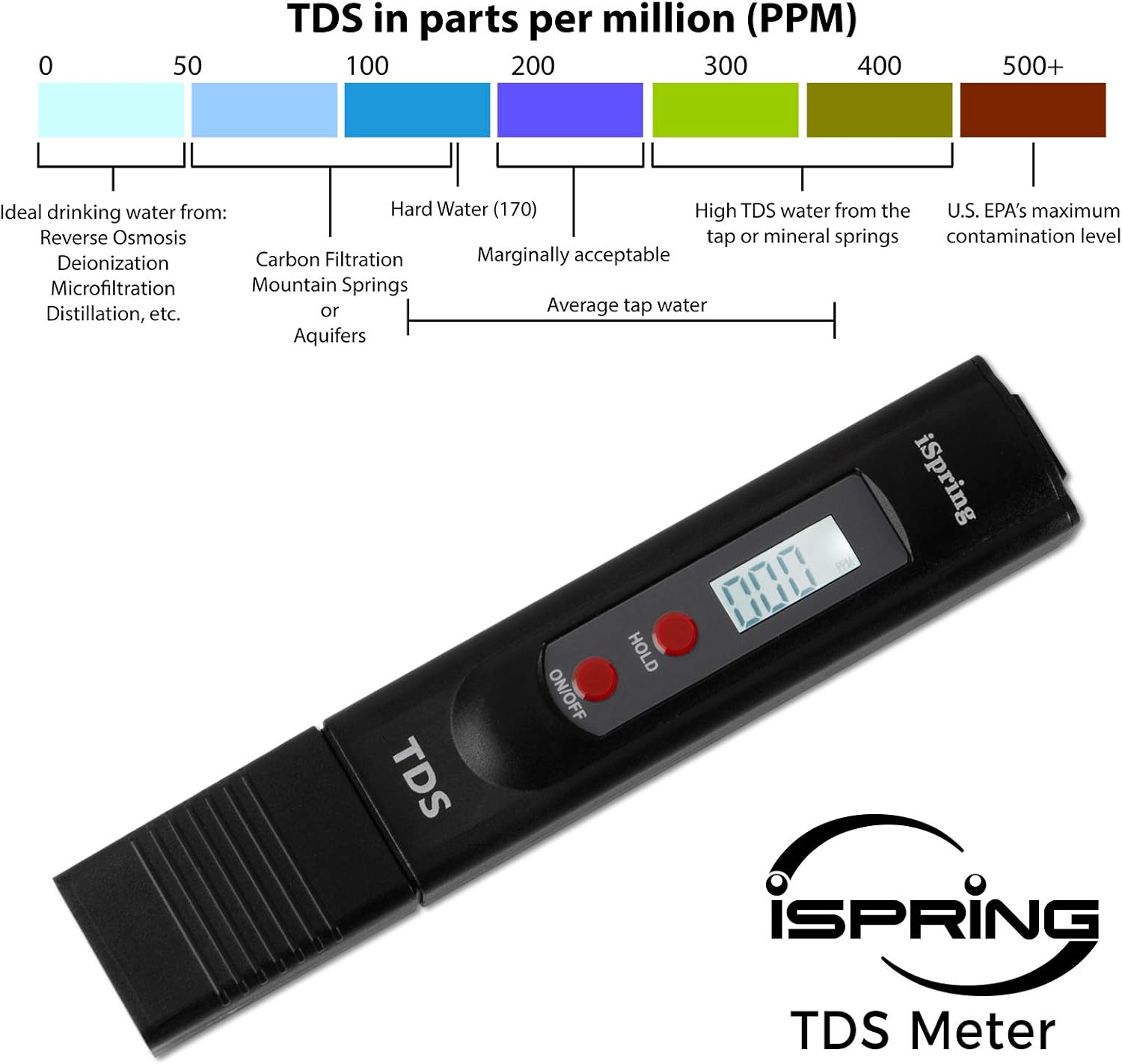
A color-coded chart illustrating Total Dissolved Solids (TDS) levels in parts per million (PPM) and their corresponding water quality classifications. It ranges from 'Ideal drinking water' (0-50 PPM) to 'U.S. EPA's maximum contamination level' (500+ PPM), providing a visual guide for interpreting TDS readings.
TDS levels are often used as an indicator of water quality. Generally, lower TDS levels indicate purer water. However, it's important to note that TDS does not measure specific contaminants like bacteria or heavy metals, but rather the overall concentration of dissolved substances.
Measuring RO System Performance
The iSpring TDS2 meter is an effective tool for evaluating the efficiency of your Reverse Osmosis (RO) water filtration system. A healthy RO membrane should typically reject 90% or more of dissolved solids.

This graphic provides instructions on how to assess the performance of a Reverse Osmosis (RO) water filtration system using the iSpring TDS2 meter. It includes a formula to calculate the 'Percent Rejection' of dissolved solids, with an example calculation provided.
- Step 1: Measure the TDS of your feed/tap water.
- Step 2: Measure the TDS of your RO filtered water.
- Step 3: Calculate the percent rejection using the following formula:
Percent Rejection = ((Tap Water TDS - RO Water TDS) / Tap Water TDS) x 100
Example: If your tap water reads 280 PPM and your RO water reads 15 PPM, the percent rejection is ((280 - 15) / 280) x 100 = 94.6%. This indicates your RO system is functioning effectively.
Note: If your RO system is new or the membrane has just been replaced, do not test the first tank of RO water. The first tank may contain carbon fines from your new filters, which can cause an inaccurate reading.
6. Maintenance
- Cleaning: After each use, rinse the electrodes with clean water and wipe them dry with a soft cloth or tissue. Do not use abrasive materials or harsh chemicals.
- Storage: Store the meter in its protective case in a cool, dry place away from direct sunlight and extreme temperatures.
- Battery Replacement: If the display becomes dim or the meter does not power on, replace the batteries. The iSpring TDS2 uses two 1.5V LR44 button cell batteries.
- Calibration: The meter is factory calibrated. If you suspect inaccurate readings, you can recalibrate it using a TDS calibration solution (e.g., 342 ppm NaCl solution). Refer to the specific calibration instructions provided with your calibration solution, or contact iSpring support for guidance.
7. Troubleshooting
- No Display/Dim Display: Check or replace the batteries. Ensure they are inserted correctly.
- Inaccurate Readings:
- Ensure the electrodes are clean and free of residue.
- Verify the meter is immersed to the correct depth (not beyond 2 inches).
- Allow sufficient time (10-30 seconds) for the reading to stabilize.
- Avoid testing extremely hot water.
- Consider recalibrating the meter if issues persist.
- Flashing "x10" Icon: This indicates the reading needs to be multiplied by 10. This is a feature, not an error.
8. Specifications
| Attribute | Value |
|---|---|
| Manufacturer | iSpring |
| Model Number | TDS2 |
| Item Weight | 2.11 ounces |
| Product Dimensions | 0.79 x 1.18 x 6.17 inches |
| Color | Black |
| Item Package Quantity | 1 |
| Batteries Required? | No (Batteries included/pre-installed) |
| Date First Available | February 27, 2019 |
9. Warranty and Support
The iSpring TDS2 Digital 2-Button TDS Meter comes with a 30-Day Money-Back Guarantee. An extended warranty may be available upon warranty registration. iSpring also provides Lifetime Customer Service and Technical Support from their Atlanta, GA location.
For technical assistance, warranty claims, or general inquiries, please contact iSpring customer support:
- Website: www.ispringfilter.com
- Phone: Refer to iSpring's official website for current contact numbers.
- Email: Refer to iSpring's official website for current contact email.
Please retain your proof of purchase for warranty purposes.
Related documentsTDS2


Ask a question about this manual
Ask about setup, troubleshooting, compatibility, parts, safety, or missing instructions. Manuals+ will review the question and use this page’s manual context to help answer it.