
1. Introduction
This manual provides essential information for the safe and effective installation, operation, and maintenance of the Fenwal 01-018002-000 THERMOSWITCH Thermostat. Please read this manual thoroughly before attempting to install or operate the device. Retain this manual for future reference.
2. Safety Information
WARNING: Risk of Electric Shock. Installation and servicing must be performed by qualified personnel only. Disconnect power before installation or servicing.
- Ensure all local and national electrical codes are followed during installation.
- Verify the power supply voltage matches the thermostat's specifications (120V-AC or 240V-AC).
- Do not operate the thermostat if it appears damaged.
- Avoid exposing the thermostat to environments outside its specified temperature range or to corrosive substances.
3. Product Overview
The Fenwal 01-018002-000 THERMOSWITCH is a robust, precision temperature-sensing and control device designed for industrial and scientific applications. It operates as a temperature-activated switch, opening or closing an electrical circuit based on the ambient temperature at its sensing element. This model is designed to open on temperature rise.
Key Features:
- Temperature Range: -100°F to 600°F
- Voltage (AC): 120V-AC, 240V-AC compatible
- Durable construction for reliable performance
Components:
The THERMOSWITCH consists of a cylindrical sensing element, a threaded mounting section, and two electrical lead wires for connection to the control circuit.
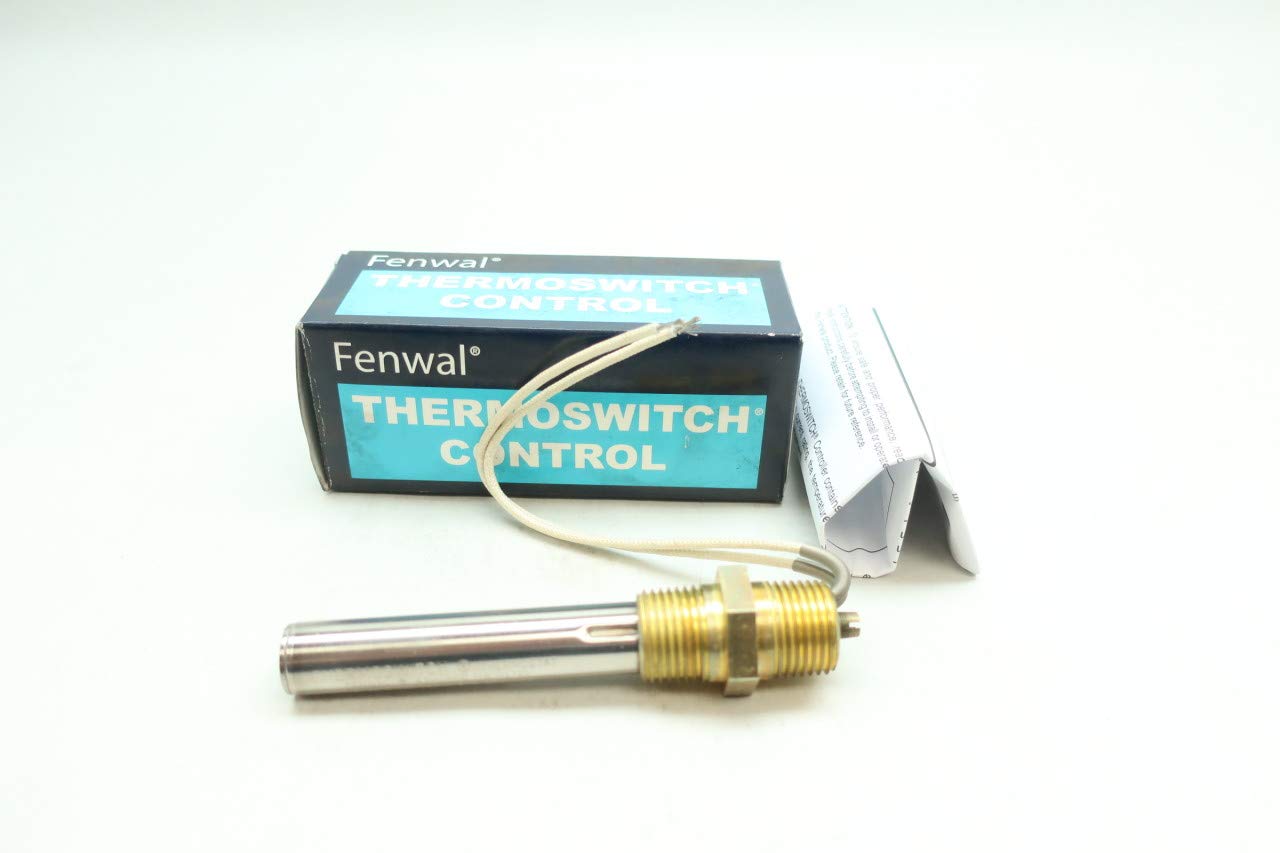
Figure 1: Fenwal 01-018002-000 THERMOSWITCH Thermostat, showing the cylindrical body and lead wires.

Figure 2: Close-up view of the THERMOSWITCH body, indicating a temperature range of -100 to 600 F and Cat. No. 01-018002-000. The marking 'OPEN ON TEMP. RISE' specifies its operational characteristic.
4. Setup and Installation
Proper installation is crucial for the accurate and safe operation of the THERMOSWITCH. This device is designed for wall mounting or integration into a system via its threaded body.
Installation Steps:
- Power Disconnection: Ensure all power to the circuit where the thermostat will be installed is disconnected at the main breaker or fuse box.
- Mounting: Securely mount the THERMOSWITCH in the desired location. The threaded portion of the device allows for direct insertion into a compatible port or fixture. Ensure the sensing element is positioned to accurately measure the target temperature.
- Wiring: Connect the two lead wires from the THERMOSWITCH into your control circuit. As this is a simple switch, it will either complete or break a circuit based on temperature. Refer to your system's wiring diagram for specific connection points. Ensure all connections are secure and insulated.
- Verification: Double-check all wiring and mounting before restoring power.
- Power Restoration: Restore power to the circuit.
5. Operating Instructions
The Fenwal 01-018002-000 THERMOSWITCH operates as a manual temperature control device. Its primary function is to act as a switch that changes state (opens or closes) when a specific temperature is reached. This model is designed to open on temperature rise, meaning the electrical circuit it controls will break (open) when the temperature at the sensing element exceeds its set point.
The thermostat does not have external user-adjustable settings or a display. Its operational temperature set point is factory-calibrated within the -100°F to 600°F range. Operation is automatic once installed and powered, based on the temperature detected by its sensing element.
6. Maintenance
The Fenwal THERMOSWITCH is designed for minimal maintenance. Regular inspection is recommended to ensure continued reliable operation.
- Visual Inspection: Periodically inspect the thermostat for any signs of physical damage, corrosion, or loose connections.
- Cleaning: If necessary, gently clean the exterior of the sensing element to ensure accurate temperature detection. Use a soft, dry cloth. Do not use abrasive cleaners or solvents.
- Connection Check: Ensure all electrical connections remain tight and free from oxidation.
Always disconnect power before performing any maintenance.
7. Troubleshooting
If the THERMOSWITCH is not functioning as expected, consider the following:
| Problem | Possible Cause | Solution |
|---|---|---|
| Device not responding to temperature changes | No power to the circuit Incorrect wiring Sensing element obstructed or damaged Thermostat failure | Check power supply and circuit breaker. Verify wiring against system diagram. Ensure sensing element is clean and exposed to target temperature. Replace thermostat if damaged or faulty. |
| Inaccurate temperature control | Improper placement of sensing element External heat sources/sinks affecting sensor | Relocate the thermostat to a more representative temperature zone. Shield the sensor from unintended thermal influences. |
If issues persist after troubleshooting, contact a qualified technician or Fenwal customer support.
8. Specifications
| Specification | Value |
|---|---|
| Model Number | 01-018002-000 |
| Brand | Fenwal |
| Temperature Range | -100°F to 600°F |
| Voltage (AC) | 120V-AC, 240V-AC |
| Controller Type | Push Button (Internal mechanism) |
| Temperature Control Type | Manual |
| Power Source | Corded Electric |
| Item Weight | 5.6 ounces |
| Mounting Type | Wall Mount / Threaded Insertion |
| Manufacturer | FENWAL |
| Manufacturer Part Number | D666285-01-018002-000 |
| ASIN | B07NDHTY1T |
9. Warranty and Support
Specific warranty information for the Fenwal 01-018002-000 THERMOSWITCH Thermostat should be obtained directly from the manufacturer, Fenwal, or your authorized distributor at the time of purchase. Please retain your proof of purchase for warranty claims.
For technical support or further inquiries, please refer to the contact information provided by your supplier or visit the official Fenwal website.


