
1. Introduction
The Redragon K585 DITI is a wired one-handed RGB mechanical gaming keyboard designed for professional gamers. It features 42 keys, a Type-C connection, upgraded hot-swappable sockets, 7 onboard macro keys, and a detachable wrist rest. Its compact design optimizes desk space and enhances gaming performance by reducing the distance between your keyboard and mouse hand.
Official product video showcasing the Redragon K585 One-handed Gaming Keyboard's features and benefits.
2. What's in the Box
- Redragon K585 DITI One-Handed Mechanical Gaming Keyboard
- USB Cable (Type-C to USB-A)
- Keycap/Switch Puller
- Spare Switches
- User Manual

The Redragon K585 DITI keyboard, showcasing its compact design and detachable wrist rest.
3. Setup
- Connect the Keyboard: Plug the detachable Type-C end of the provided USB cable into the keyboard's Type-C port. Connect the USB-A end to an available USB port on your computer (PC or Laptop).
- Attach the Wrist Rest: Align the magnetic wrist rest with the bottom edge of the keyboard. The magnets will secure it in place, providing ergonomic support during use.
- Driver Installation: The keyboard is plug-and-play. For advanced customization (macro programming, RGB lighting effects), download the official software from the Redragon website.

Illustration of the detachable Type-C cord for easy connection to various devices.

The compact design of the K585 DITI, shown on a desk setup.
4. Key Features & Operation
4.1. Programmable Macro Keys
The K585 DITI features 7 programmable macro keys (G1-G5, ~, T) that allow you to bind multiple commands or complex keystroke sequences to a single key. This saves valuable time during intense gaming sessions. Macros can be programmed via the dedicated software.

Visual representation of the 7 programmable macro keys on the keyboard.
4.2. RGB Backlighting
Customize your gaming experience with 5 selectable RGB backlit modes and 16.8 million colors. The lighting effects can be adjusted for brightness and speed through the software, or cycled directly on the keyboard using the Function (FN) key combined with the Spacebar.
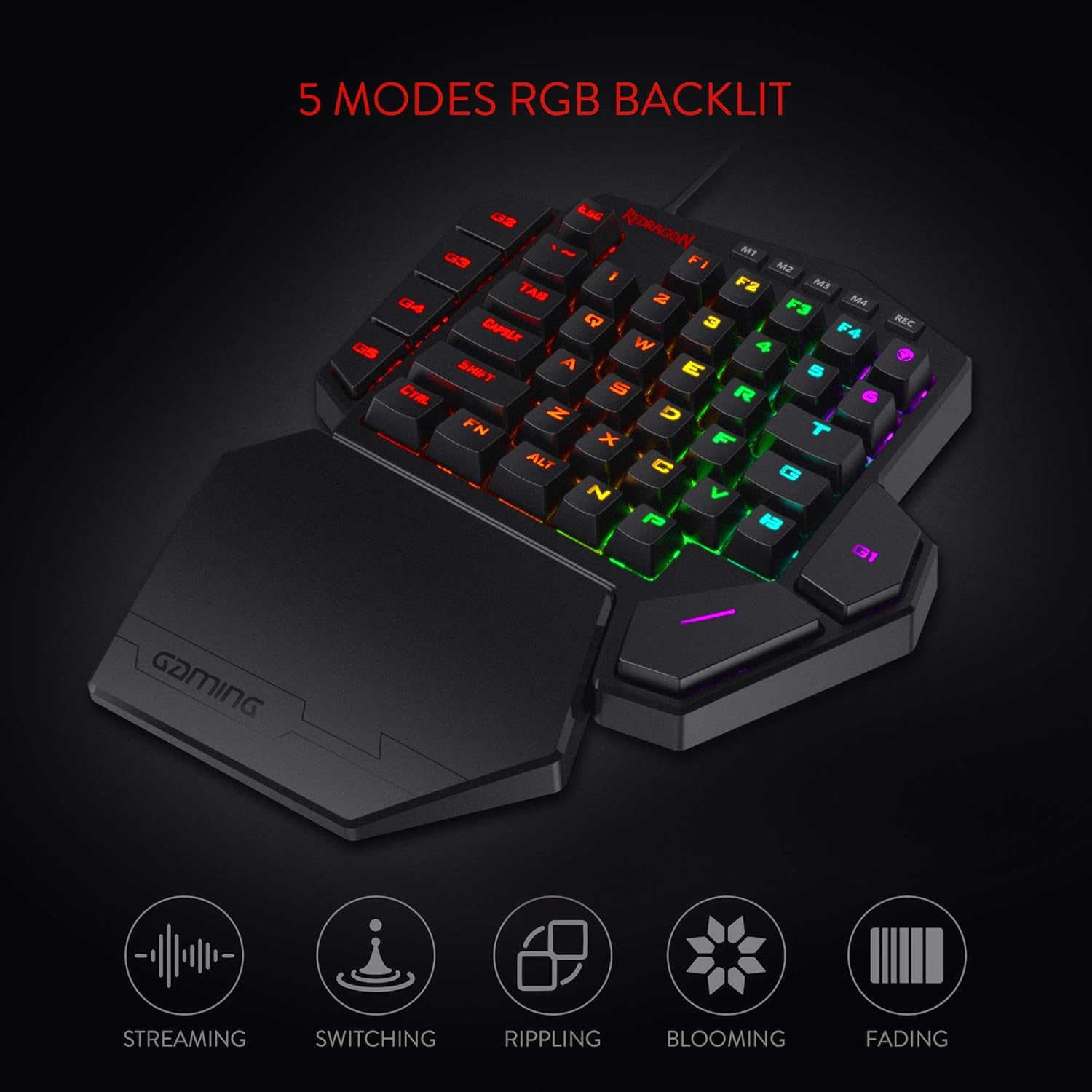
Different RGB lighting modes available on the K585 DITI keyboard.

Detailed view of the vibrant RGB backlighting on the keyboard keys.
4.3. Hot-Swappable Switches
The K585 DITI features upgraded hot-swappable sockets, allowing users to easily change mechanical switches without soldering. The keyboard comes equipped with iconic Redragon Blue Switches, known for their audible clicky sound and clear tactile feedback, providing an original mechanical feel.

Detailed view of the dustproof blue mechanical switches.
4.4. USB Pass-Through Port
A convenient USB pass-through port is positioned on the keyboard for uninterrupted gameplay. This port can be used to connect your mouse, headset adapter, or other USB devices directly through the keyboard.
5. Maintenance
- Cleaning: Regularly clean the keyboard with a soft, dry cloth to remove dust and debris. For deeper cleaning, use compressed air to clear particles from between the keycaps.
- Switch Replacement: Utilize the provided keycap/switch puller to carefully remove keycaps and switches for cleaning or replacement. Ensure proper alignment when reinserting switches to avoid damage.
- Cable Care: Avoid sharp bends or excessive pulling on the Type-C cable to prevent internal wire damage.
6. Troubleshooting
- Keyboard Not Responding: Ensure the USB Type-C cable is securely connected to both the keyboard and your computer. Try connecting to a different USB port.
- RGB Lights Not Working: Check the lighting modes using the FN + Spacebar combination. If issues persist, ensure the latest software and firmware are installed.
- Macro Keys Not Functioning: Verify that macros are correctly programmed and assigned within the Redragon software. Ensure the correct profile is active.
- Keys Not Registering: For individual keys, consider replacing the switch using the provided switch puller and spare switches.
7. Specifications
| Feature | Detail |
|---|---|
| Brand | Redragon |
| Model Number | K585 WIRED |
| Hardware Platform | PC |
| Operating System | Win/Mac/Linux/Unix |
| Item Weight | 1.3 pounds |
| Product Dimensions | 11 x 2 x 9 inches |
| Color | Black |
| Number of Keys | 42 |
| Keyboard Backlighting | RGB |
| Special Feature | 42 Keys One-Handed, Wrist Rest, Extra Onboard G Keys, Compact For Gaming |


