
Introduction
The KECHAODA A26 is a compact dual SIM mobile phone designed for essential communication. It features a small form factor, Bluetooth connectivity for use as a dialer with other smartphones, and an 800 mAh battery providing up to 4 hours of talk time. This manual will guide you through the setup, operation, and maintenance of your device.
Box Contents
Upon opening the package, ensure all the following items are present:
- KECHAODA A26 Mobile Phone
- Rechargeable Battery (800 mAh)
- Micro USB Charging Cable
- User Manual
- Warranty Card
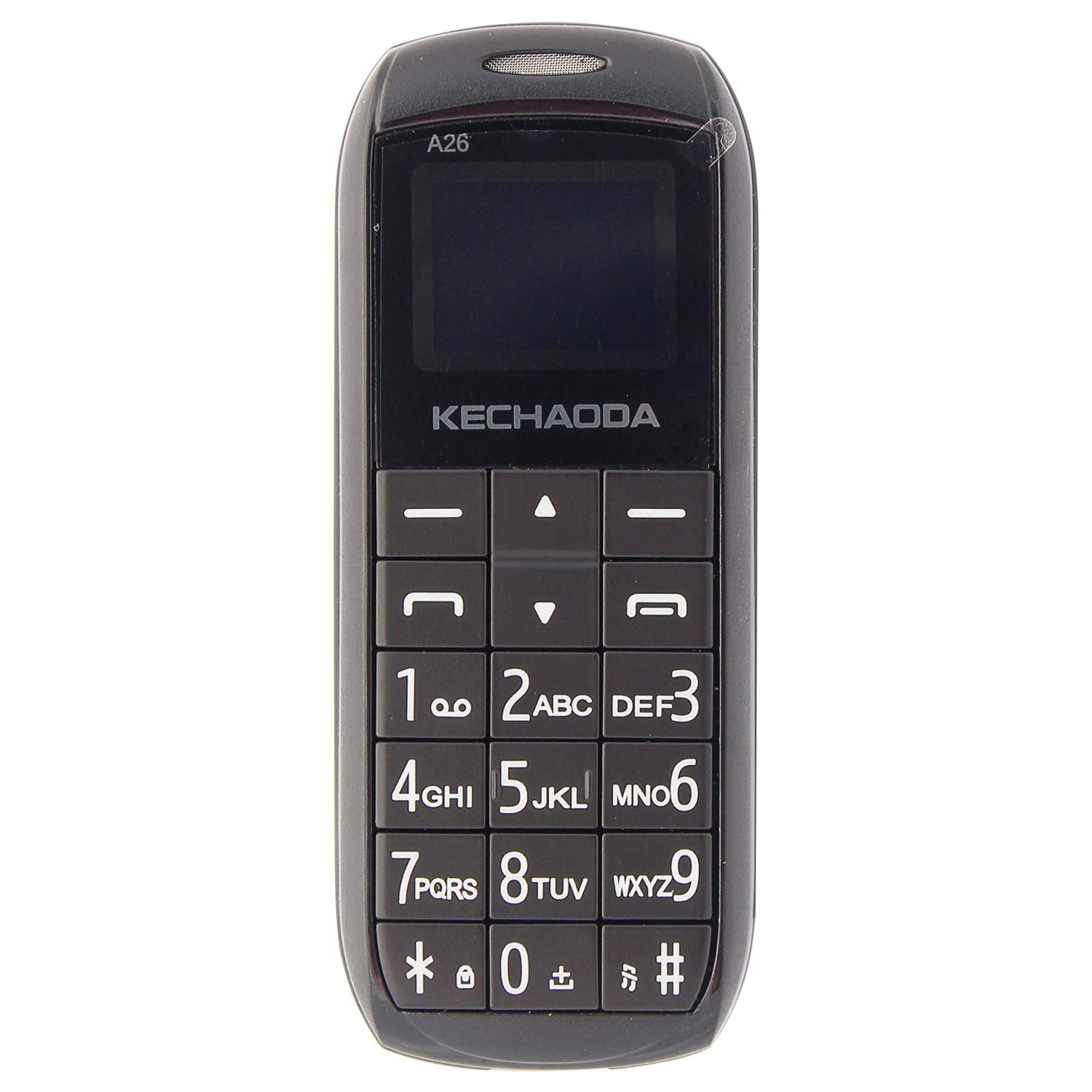
Image: Front view of the KECHAODA A26 Mobile Phone, showcasing its compact design and keypad.
Product Overview
The KECHAODA A26 is designed for portability and ease of use. Familiarize yourself with its physical features:
- Dimensions: Approximately 40 x 15 x 4 Millimeters
- Weight: Approximately 95 Grams
- Display: 1.6-inch black and white LCD screen
- SIM Support: Dual Micro SIM card slots
- Connectivity: Bluetooth, 2G GSM Network
- Ports: Micro USB for charging, 3.5mm headphone jack
- Material: Durable plastic construction

Image: Side view of the KECHAODA A26 Mobile Phone, highlighting its slim profile.

Image: Top view of the KECHAODA A26 Mobile Phone, showing the Micro USB charging port and headphone jack.
Setup
1. Inserting the Battery and SIM Cards
- Carefully remove the back cover of the phone.
- Insert the 800 mAh battery into its compartment, ensuring the contacts align correctly.
- Locate the dual Micro SIM card slots. Insert your SIM cards into the designated slots.
- Replace the back cover until it clicks securely into place.
2. Charging the Device
- Connect the Micro USB charging cable to the phone's charging port.
- Plug the other end of the cable into a compatible USB power adapter or computer USB port.
- Allow the phone to charge fully before initial use. The battery indicator on the screen will show charging status.
Operating Instructions
1. Power On/Off
- To power on, press and hold the Power/End Call button until the screen lights up.
- To power off, press and hold the Power/End Call button until the power-off prompt appears, then confirm.
2. Making Calls
- From the home screen, use the numeric keypad to dial the desired phone number.
- Press the Call button (usually a green phone icon) to initiate the call.
- To end a call, press the Power/End Call button (usually a red phone icon).
3. Sending Text Messages
- Navigate to the 'Messages' menu from the main screen.
- Select 'Write Message' or 'New Message'.
- Enter your message using the keypad. Multiple presses on a key cycle through letters and numbers.
- Enter the recipient's phone number or select from your contacts.
- Send the message.
4. Bluetooth Dialer Functionality
The KECHAODA A26 can connect to another smartphone via Bluetooth and act as a dialer, allowing you to make and receive calls through your primary phone's SIM while using the compact A26.
- Enable Bluetooth on both your KECHAODA A26 and your primary smartphone.
- On the A26, navigate to the Bluetooth settings and search for available devices.
- Select your primary smartphone from the list and pair the devices. Follow any on-screen prompts for pairing codes.
- Once paired, you can use the A26 to dial numbers and manage calls that are routed through your connected smartphone.
5. FM Radio
The phone includes an FM radio feature. To use it, ensure headphones are connected to the 3.5mm jack, as they often act as the antenna.
- Connect a pair of wired headphones to the phone.
- Navigate to the 'FM Radio' application in the menu.
- Use the navigation keys to scan for stations or manually tune to a frequency.
Specifications
| Brand | KECHAODA |
| Model | A26 |
| Operating System | Symbian 9.3 |
| CPU Model | ARMv7 |
| Memory Storage Capacity | 16 MB |
| Screen Size | 1.6 Inches (LCD) |
| Resolution | 720p |
| Colour | Black |
| SIM Card Slot Count | Dual SIM |
| Connector Type | Micro USB |
| Form Factor | Smartphone (Feature Phone) |
| Human Interface Types | Dial (Keypad) |
| Material Features | Plastic |
| Headphones Jack | Yes |
| Product Features | Bluetooth, Dual SIM |
| Battery Capacity | 800 Milliamp Hours (Lithium-Ion) |
| Phone Talk Time | 4 Hours |
| Item Weight | 95 Grams |
| Item Dimensions | 40 x 15 x 4 Millimeters |
| Wireless Provider | Unlocked for All Carriers |
| Cellular Technology | 2G |
| Network Connectivity Technology | GSM |
| Model Year | 2019 |
Troubleshooting
If you encounter issues with your KECHAODA A26, refer to the following common solutions:
- Phone not turning on: Ensure the battery is correctly inserted and fully charged. Connect the charger and try again.
- No network signal: Check if your SIM cards are properly inserted. Ensure you are in an area with 2G GSM network coverage.
- Battery not charging: Verify that the Micro USB cable and charger are working correctly. Try a different charging cable or power source. Ensure the charging port is clean and free of debris.
- Bluetooth connection issues: Ensure Bluetooth is enabled on both devices. Make sure both devices are within range and try re-pairing them.
- Keypad unresponsive: Power off the phone, remove the battery, wait a few seconds, then reinsert the battery and power on.
Warranty and Support
The KECHAODA A26 comes with a 1-year manufacturer warranty. For warranty claims or technical support, please contact the manufacturer or your retailer with your proof of purchase.
Manufacturer: Dharam & Company, SS Care
Manufacturer Contact Information: Dharam & Company


