
1. Introduction
This manual provides detailed instructions for the installation, operation, and maintenance of your Kaadas S8-5 Lever Smart Lock. Please read this manual thoroughly before installation and use to ensure proper function and longevity of the product. Retain this manual for future reference.
2. Product Overview
The Kaadas S8-5 Lever Smart Lock offers multiple access methods and enhanced security features for residential and commercial applications. It is designed for ease of use and reliable performance.
Key Features:
- Multiple Access Methods: Fingerprint, Passwords, RF Card, Mechanical Override Key, and Smart Phone (via Bluetooth interface).
- Automatic Relock: The mortise automatically relocks within seconds after the door is opened.
- Auto Polling: RF cards are instantly authenticated without needing to press a wake-up button.
- Sweden FPC Fingerprint Sensor: Provides accurate and swift recognition in less than 1 second.
- Fake PIN Code Feature: Allows entry of random numbers before and after the actual password to prevent exposure.
- Double Authentication: Requires both a password and fingerprint/card for enhanced security.
- In-Home Security (Double-locking): Prevents external unlocking attempts when activated from inside.
- Voice & Keypad Volume Control: Adjustable volume settings, including a mute option.
- Low Battery Warning: Audible alert during door access indicates low battery.
- Emergency Power Supply: Micro USB port for temporary power in case of full battery depletion.
Components:
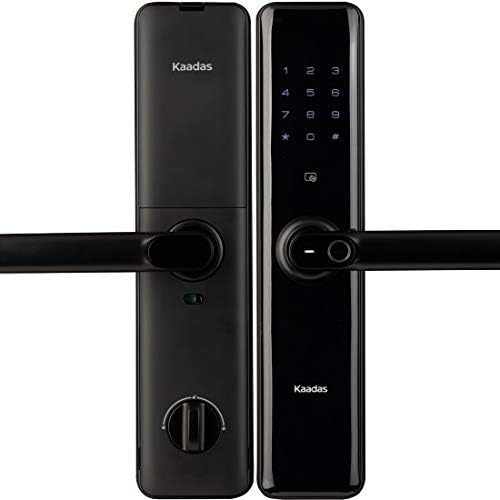
Figure 2.1: Front and back view of the Kaadas S8-5 Lever Smart Lock. The exterior unit features a keypad and fingerprint sensor, while the interior unit includes a thumb-turn knob and battery compartment.
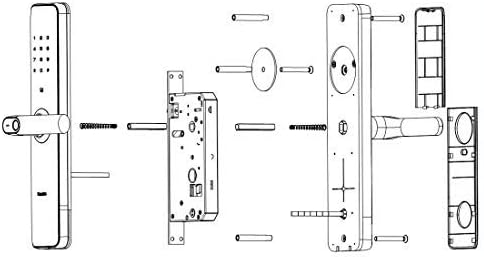
Figure 2.2: Exploded diagram illustrating the individual components of the Kaadas S8-5 Smart Lock, including the exterior and interior units, mortise, and mounting hardware.
3. Setup and Installation
The Kaadas S8-5 Smart Lock is designed for universal installation, accommodating various door opening directions. Professional installation is recommended to ensure optimal performance and security.
3.1 Pre-Installation Checks
- Verify door thickness is between 38mm and 60mm.
- Ensure the door frame is clear of obstructions.
- Confirm all components listed in the packaging are present.
3.2 Battery Installation
The lock requires 8 AA alkaline batteries (DC 6V). Ensure correct polarity when inserting batteries into the interior unit's battery compartment. Do not mix old and new batteries or different types of batteries.
3.3 Initial Configuration (Master Password)
Upon first power-up, the lock will prompt for master password registration. Follow the voice prompts to set a master password. This password is essential for accessing advanced settings and managing user credentials.
4. Operating Instructions
The Kaadas S8-5 Smart Lock offers multiple convenient ways to unlock your door.
4.1 Unlocking Methods
- Fingerprint: Place a registered finger on the fingerprint sensor. The lock will unlock upon successful recognition.
- Password: Enter your registered password on the keypad, followed by the '#' key.
- RF Card: Present a registered RF card to the card reader area on the exterior unit.
- Mechanical Key: In case of emergency or battery failure, insert the mechanical key into the keyhole and turn to unlock.
- Smart Phone (Bluetooth): Use the dedicated mobile application to unlock the door via Bluetooth connection. Refer to the app's instructions for pairing and usage.
4.2 Advanced Security Features
- Fake PIN Code: To prevent password exposure, you can enter random digits before or after your actual password. For example, if your password is '123456', you can enter '987123456321' and the lock will still recognize '123456'.
- Double Authentication: This mode requires two different authentication methods (e.g., password + fingerprint, or password + card) to unlock the door. This feature can be enabled in the lock's settings menu.
- In-Home Security (Double-locking): When inside, turn the thumb-turn knob on the interior unit to activate double-locking. This prevents the lock from being opened from the outside, even with valid credentials.
4.3 Volume Control
The voice prompts and keypad tones can be adjusted or muted through the lock's settings menu. Refer to the voice guidance for navigation.
5. Maintenance
5.1 Battery Replacement
When the low battery warning signal is activated, replace all 8 AA alkaline batteries promptly. Failure to do so may result in the lock becoming inoperable. Use the emergency power supply via the Micro USB port if batteries are fully depleted before replacement.
5.2 Cleaning
Clean the lock's exterior surfaces with a soft, dry cloth. Avoid using abrasive cleaners, solvents, or harsh chemicals, as these can damage the finish and electronic components. Keep the fingerprint sensor and keypad free from dirt and moisture.
6. Troubleshooting
- Lock not responding: Check battery levels. If batteries are depleted, use the emergency Micro USB power port or the mechanical key.
- Fingerprint not recognized: Ensure your finger is clean and dry. Re-register your fingerprint if issues persist.
- Password not working: Verify the correct password is being entered. Ensure the keypad is clean and responsive. Try the Fake PIN code feature.
- RF card not detected: Ensure the card is correctly positioned over the reader. Re-register the card if necessary.
- Voice prompts are too loud/quiet: Adjust the volume settings as described in Section 4.3.
If problems persist after attempting these solutions, contact customer support.
7. Specifications
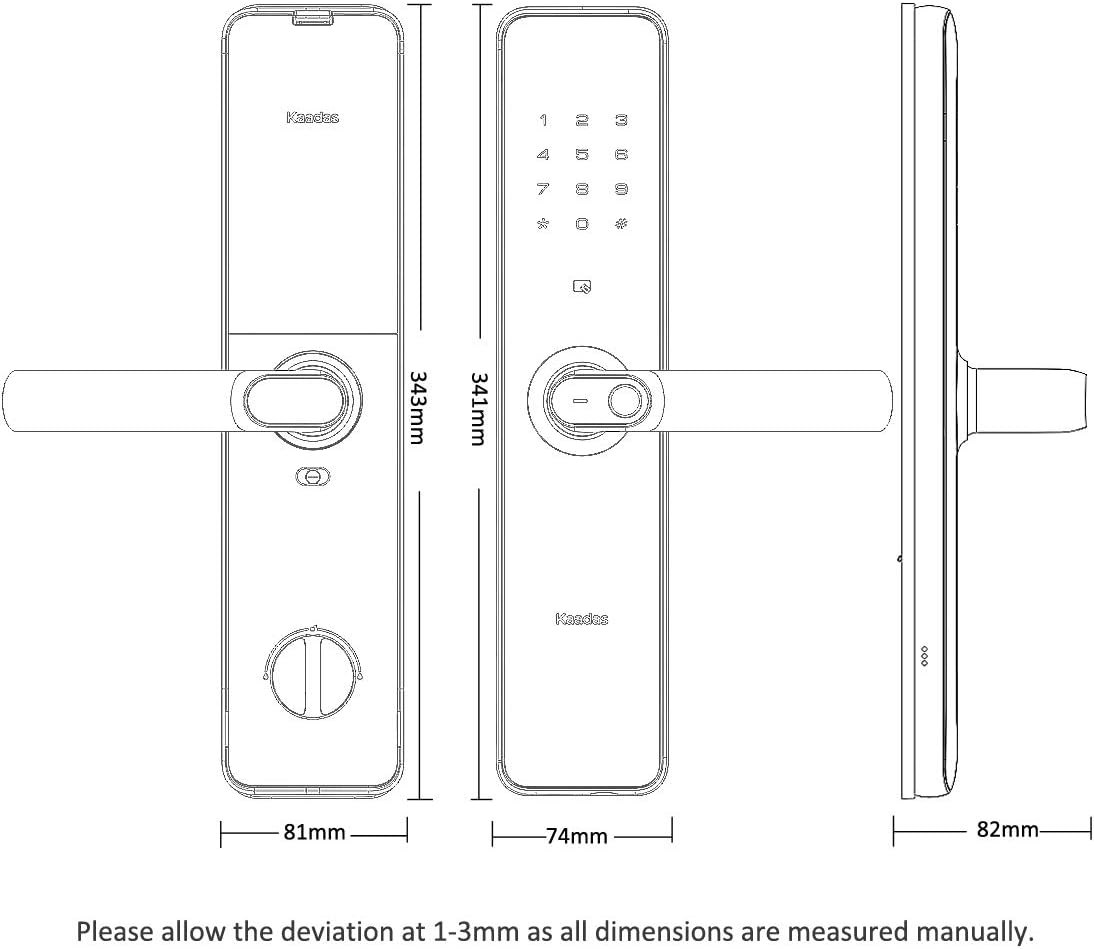
Figure 7.1: Dimensional drawing of the Kaadas S8-5 Smart Lock, showing key measurements for installation planning.
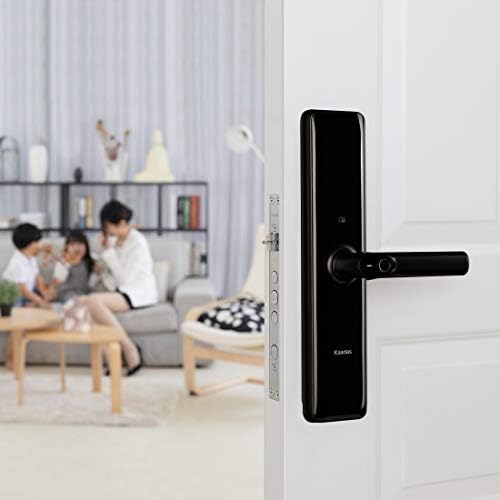
Figure 7.2: Detailed specifications table for the Kaadas S8-5 Smart Lock, outlining various technical parameters.
| Feature | Specification |
|---|---|
| Model | S8-5 |
| Material | Zinc alloy |
| Dimensions (Front) | 341 x 76 x 82 mm |
| Dimensions (Back) | 343 x 81 x 82 mm |
| Applicable Door Thickness | 38-60 mm |
| Color | Obsidian Black |
| Unlocking Methods | Fingerprint, Card, Password, Key |
| Master Password Capacity | 1 |
| User Password Capacity | 10 |
| Password Length | 6-12 digits |
| RF Card Type | RFID, Mifare, IC, S50, S70 |
| Card Capacity | 100 |
| Fingerprint Sensor Type | Semi-conductor |
| Fingerprint Identification Time | <0.5 sec |
| Fingerprint Capacity | 100 |
| Double Locking Mode | Automatic |
| Power Supply | DC 6V (8 AA Batteries) |
| Emergency Power Supply | Micro USB port |
| Battery Life | Approximately 12 months |
| Mechanical Cylinder & Key | Included |
| Working Temperature | -20°C to 55°C |
| Working Humidity | 15%-90% RH |
| Lockbody | S24A |
| Anti-Panic Function | Yes |
| Opening Direction | Universal |
| Center Distance | 68 mm |
| Backset | 60 mm |
8. Warranty and Support
For warranty information, please refer to the documentation provided at the time of purchase or contact your authorized Kaadas dealer. For technical support or service inquiries, please reach out to Kaadas customer service through their official channels.


