
1. Introduction
This manual provides essential instructions for the safe and efficient operation of your Nature's Generator 1800W Solar Powered Generator System. This system includes the main generator unit, a Power Pod for expanded capacity, and three solar panels for renewable energy charging. Please read this manual thoroughly before setup and use to ensure optimal performance and longevity of your product.
2. Product Overview
The Nature's Generator system is designed to provide portable, clean power for various applications, from home backup to outdoor activities. It features an 1800W output, multiple charging options, and a quiet operation.
2.1 Included Components
- Nature's Generator Main Unit
- Nature's Generator Power Pod
- 3 x Solar Panels
- Charging Controllers (integrated or external as required)
- Cart (integrated with generator)
- AC Charging Cable
- DC Charging Cable
- USB Ports
- Expansion Ports
- Smart Key for App Connectivity
- User Manual
2.2 Key Features
- 1800 Watts Output
- 120 Volts AC Output
- Multiple Power Outlets (AC, DC, USB)
- Solar and Wind Power Charging Capability
- Expandable Battery Capacity with Power Pod
- Super Quiet Operation
- Integrated Cart for Portability
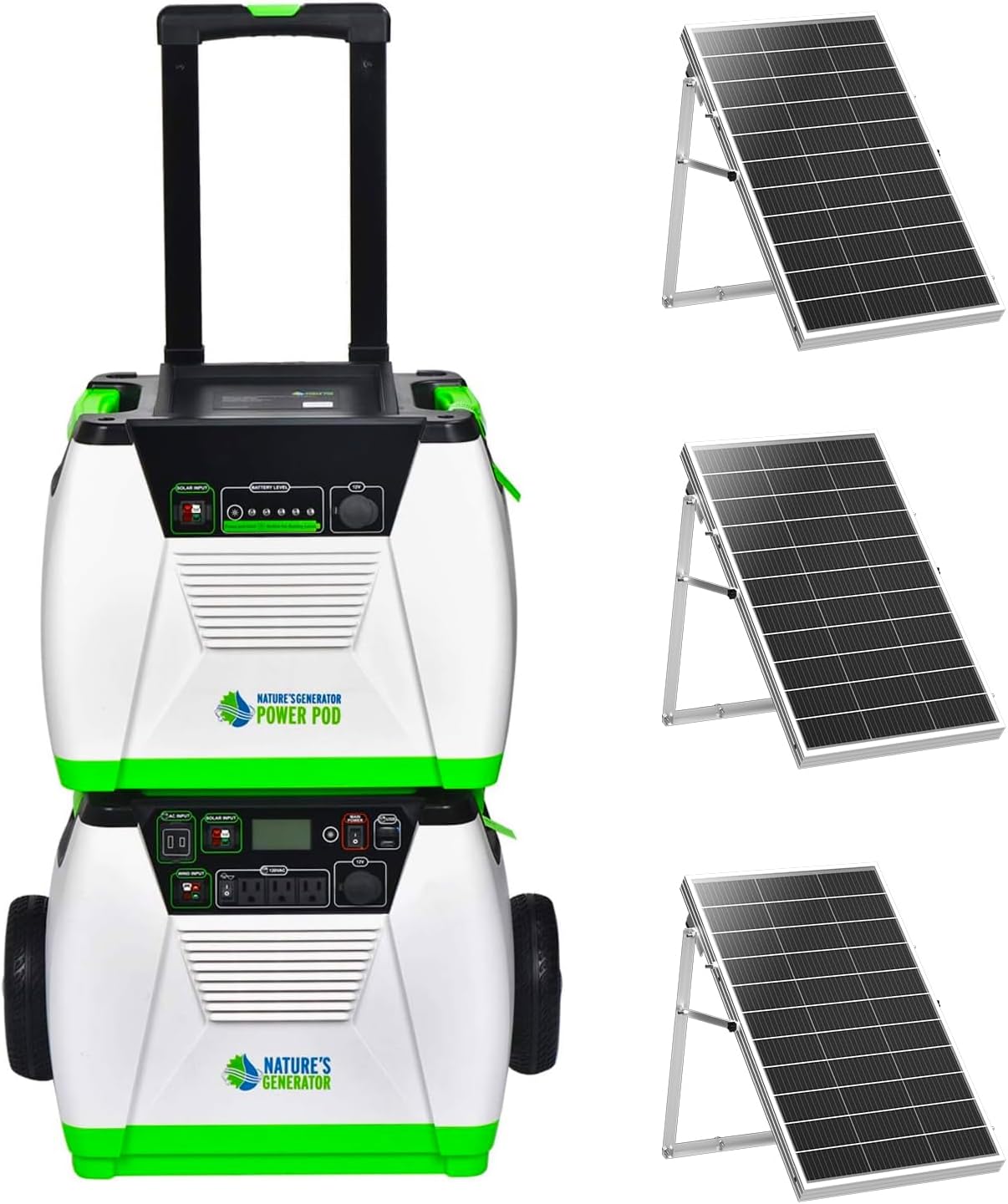
Figure 1: Nature's Generator 1800W Solar Powered Generator System, showing the main generator unit, the stacked Power Pod, and three solar panels.
3. Setup Instructions
3.1 Unpacking and Initial Inspection
Carefully remove all components from the packaging. Inspect for any visible damage. Retain packaging for future transport or storage.
3.2 Generator Unit Assembly
The main generator unit comes with an integrated cart and retractable handle for easy transport. Ensure the wheels are securely attached and the handle extends and retracts smoothly.

Figure 2: Dimensions of the Nature's Generator main unit, approximately 23 inches high (with handle retracted), 17 inches wide, and 22 inches deep. Weight is 83 lbs (37.6 kg).
3.3 Power Pod Connection
To expand the battery capacity, connect the Power Pod to the main generator unit using the provided expansion cable. The Power Pod is designed to stack directly onto the generator unit.
- Locate the expansion port on the top of the main generator unit and on the Power Pod.
- Connect the 35-inch expansion cable between these two ports. Ensure a secure connection.

Figure 3: Details of the expansion cable and daisy chain connectors for linking the Power Pod to the main generator.

Figure 4: Dimensions of the Nature's Generator Power Pod, approximately 15 inches high, 12 inches wide, and 18 inches deep. It weighs 92 lbs and contains an AGM Sealed Lead Acid battery with 100Ah (1200Wh) capacity.
3.4 Solar Panel Connection
The system includes three solar panels. Two panels connect directly to the main generator unit, and the third panel connects to the Power Pod.
- Position the solar panels in direct sunlight for maximum efficiency.
- Connect two solar panels to the designated solar input ports on the main Nature's Generator unit.
- Connect the third solar panel to the solar input port on the Nature's Generator Power Pod.
- Ensure all connections are firm and secure.

Figure 5: Dimensions of a Nature's Generator solar panel, approximately 33.07 inches (850mm) long, 26.37 inches (670mm) wide, and 1.37 inches (35mm) thick.
4. Operating Instructions
4.1 Charging the System
Your Nature's Generator system can be charged via solar panels, wind turbine (sold separately), or a standard wall outlet. When the main generator is being recharged, the connected Power Pod will also recharge simultaneously.
- Solar Charging: Connect the solar panels as described in Section 3.4. Ensure panels are positioned for maximum sun exposure.
- Wall Charging: Connect the AC charging cable to a standard wall outlet and the generator's AC input port.
- Wind Charging: If you have a Nature's Generator wind turbine, connect it to the designated wind input port.

Figure 6: Front and back views of the Nature's Generator and Power Pod, illustrating how the Power Pod recharges simultaneously with the main generator when connected.
4.2 Powering Devices
The generator provides 1800 watts of continuous power at 120 volts. It features various output ports:
- AC Outlets: For standard household appliances.
- DC Ports: 12V DC output for compatible devices.
- USB Ports: For charging mobile devices and other USB-powered electronics.
To use, simply plug your devices into the appropriate ports. Ensure the total wattage of connected devices does not exceed 1800W.
4.3 Using the Nature's Pulse App
The Nature's Pulse app allows you to monitor your generator's performance and electricity data. To enable app connectivity:
- Install the "Nature's Pulse" app on your smartphone or tablet.
- Plug the Smart Key (USB dongle) into the top USB port on the generator, located next to the Bluetooth icon.
- Follow the in-app instructions to connect to your generator and begin monitoring daily electricity data, battery status, and system tests.

Figure 7: Screenshots of the Nature's Pulse app interface, showing system test results, total power used, battery output, voltage, and internal temperature.

Figure 8: The Smart Key (USB dongle) is included for app connectivity, shown alongside other components like the generator, wheels, and user manual.
5. Maintenance
To ensure the longevity and optimal performance of your Nature's Generator system, regular maintenance is recommended.
- Battery Recharge: It is recommended to recharge the Power Pod and main generator unit at least every 4 months, even if not in use, to maintain battery health.
- Cleaning: Keep the generator and solar panels clean from dust and debris. Use a soft, dry cloth for the generator unit. For solar panels, a damp cloth can be used to wipe the surface.
- Storage: Store the system in a cool, dry place away from direct sunlight and extreme temperatures when not in use for extended periods.
- Cable Inspection: Periodically check all cables and connections for wear, fraying, or damage. Replace any damaged components immediately.
6. Troubleshooting
If you encounter issues with your Nature's Generator system, refer to the following common troubleshooting steps:
- No Power Output:
- Ensure the generator is sufficiently charged. Check the battery level indicator.
- Verify that the AC/DC output switches are turned on.
- Check if the connected device is working correctly by testing it with another power source.
- Ensure the total load does not exceed the 1800W output capacity.
- Charging Issues:
- For solar charging, ensure panels are in direct sunlight and connections are secure.
- For wall charging, verify the AC cable is properly connected to both the generator and a live outlet.
- Check for any error codes or indicators on the generator display.
- App Connectivity Problems:
- Ensure the Smart Key is securely plugged into the correct USB port.
- Verify Bluetooth is enabled on your mobile device.
- Restart the app and/or your mobile device.
For persistent issues or problems not covered here, please contact Nature's Generator customer support.
7. Specifications
| Feature | Specification |
|---|---|
| Brand | Nature's Generator |
| Model Number | HKNGGN |
| Wattage (Output) | 1800 Watts |
| Voltage (Output) | 120 Volts |
| Power Source | Solar Powered (also supports Wind) |
| Fuel Type | Solar and Wind |
| Special Feature | Super Quiet |
| Included Components | Solar Panels, Charging Controllers, Cart, AC, DC, USB, Expansion Ports |
| Color | Green |
| Item Weight (Generator) | 90 pounds |
| Item Weight (Power Pod) | 92 pounds |
| Power Pod Battery Type | AGM Sealed Lead Acid |
| Power Pod Capacity | 100Ah (1200Wh) |
| Total Power Outlets | 3 (AC) + DC + USB |
8. Warranty and Support
Nature's Generator products typically come with a manufacturer's warranty. Please refer to the warranty card included with your product for specific terms and conditions, including coverage duration and claim procedures.
Extended protection plans may be available for purchase to provide additional coverage beyond the standard warranty period. For technical assistance, troubleshooting, or warranty claims, please contact Nature's Generator customer support directly through their official website or the contact information provided in your product documentation.


