
SENSSUN B07MPB1ZXW
SENSSUN Smart Scale User Manual
Model: B07MPB1ZXW
Introduction
The SENSSUN Smart Scale is a sophisticated digital weighing and body composition monitor designed to help you track your health and fitness progress. Utilizing advanced Bio-electrical Impedance Analysis (BIA) technology, this scale provides comprehensive data on 14 key body measurements, seamlessly integrating with a dedicated mobile application for easy monitoring and goal setting. Its user-friendly design and accurate readings make it an essential tool for managing your well-being.
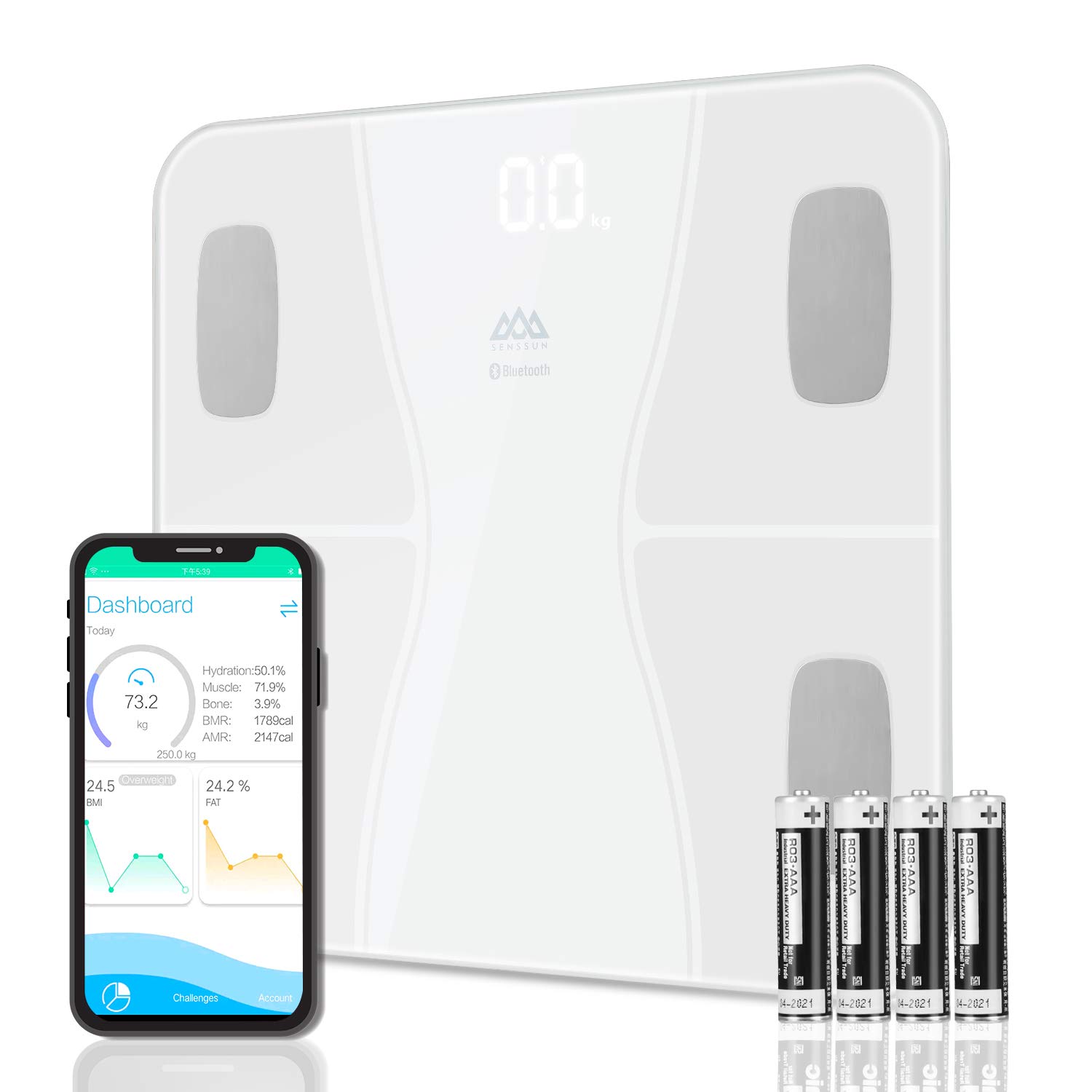
The SENSSUN Smart Scale, showing its sleek design, accompanying mobile application, and the required AAA batteries.
Safety Information
Please read all instructions carefully before using the SENSSUN Smart Scale. Improper use may result in injury or damage to the device.
- Place the scale on a hard, flat surface for accurate measurements. Avoid carpets or uneven floors.
- The scale features a sturdy 6mm tempered glass platform. Handle with care to prevent breakage.
- The surface of the scale can be slippery when wet. Ensure the scale and your feet are dry before stepping on.
- The scale is designed with anti-slip and anti-rollover rounded corners and anti-skid pads for enhanced safety.
- Do not jump on the scale or use it for purposes other than weighing.
- Keep the scale away from water and extreme temperatures.
- Individuals with pacemakers or other internal medical devices should not use this scale due to the Bio-electrical Impedance Analysis (BIA) technology. Consult a healthcare professional if you have concerns.
- Keep batteries out of reach of children.
Package Contents
Upon opening your SENSSUN Smart Scale package, you should find the following items:
- 1 x SENSSUN Smart Scale
- 4 x AAA Batteries
- 1 x User Manual (this document)
Setup
1. Battery Installation
Locate the battery compartment on the underside of the scale. Open the cover and insert the four (4) AAA batteries, ensuring correct polarity (+/-) as indicated inside the compartment. Close the battery cover securely.
2. App Download and Installation
The SENSSUN Smart Scale works in conjunction with the "SenssunLife" mobile application. This app is compatible with Bluetooth 4.0 and requires Android 4.3 or iOS 7.0 (or above) operating systems.
- For iOS devices, search for "SenssunLife" in the Apple App Store.
- For Android devices, search for "SenssunLife" in the Google Play Store.
Download and install the app on your smartphone or tablet.

The SenssunLife app seamlessly syncs with popular fitness applications like Fitbit, Google Fit, and Apple Health.
3. Bluetooth Pairing
- Ensure Bluetooth is enabled on your smartphone.
- Open the "SenssunLife" app.
- Step onto the scale to activate it. The LED display will light up.
- The app should automatically detect and connect to the scale. Follow any on-screen prompts within the app to complete the pairing process.
- Once paired, your measurements will automatically sync to the app when you weigh yourself with the app open. If you weigh yourself without the app open, the data will sync to the app once it is connected again.
Operating Instructions
Taking a Measurement
- Place the scale on a hard, flat surface.
- Step onto the scale barefoot. Ensure your feet are positioned on the four electrode pads for accurate body composition analysis.
- Stand still until your weight reading stabilizes on the LED display. The scale features a 3.1-inch large hidden backlit LED screen, visible even at night.
- If the app is open and connected, your full body composition data will be transmitted and recorded. The scale can also show body fat and water content directly on its LED screen without needing your phone.

The large 3.1-inch backlit LED display shows your body weight and other key metrics directly on the scale.
Multi-User Functionality
The SenssunLife app can automatically recognize and record data for up to 12 different users. Each user can create a profile within the app, and the scale will intelligently match measurements to the correct profile based on weight similarity. This allows the whole family to monitor their health with one device.
Understanding Your Data
The SENSSUN Smart Scale provides 14 essential body composition measurements to give you a comprehensive overview of your health. These measurements are displayed and tracked within the SenssunLife app.

An overview of the 14 essential body composition measurements provided by the SENSSUN Smart Scale.
- Body Weight: Your total weight.
- BMI (Body Mass Index): A measure of body fat based on height and weight.
- Body Fat %: The percentage of your total body weight that is fat.
- Water % (Hydration): The percentage of water in your body.
- Skeletal Muscle: The amount of muscle attached to bones, responsible for movement.
- Fat-free Body Weight: Your total body weight minus body fat.
- Muscle Mass: The total weight of muscle in your body.
- Bone Mass: The total weight of bone mineral in your body.
- Protein: The percentage of protein in your body.
- Basal Metabolism (BMR): The number of calories required to keep your body functioning at rest.
- Subcutaneous Fat: Fat stored directly under the skin.
- Visceral Fat: Fat stored around the organs in the abdomen.
- Body Age: An estimation of your body's biological age based on your health metrics.
- AMR (Active Metabolic Rate): The total number of calories burned in a day, including activity.
The SenssunLife app allows you to view these measurements as data graphs, set goals for weight, activity, sleep quality, BMI, and body fat, and track your progress over time.

Track your weight and body fat percentage trends over time using the SenssunLife app to monitor your progress.
Maintenance and Care
- Cleaning: Wipe the scale surface with a soft, damp cloth. Do not use abrasive cleaners or immerse the scale in water.
- Storage: Store the scale in a cool, dry place. Avoid direct sunlight and extreme temperatures.
- Battery Replacement: When the low battery indicator appears on the display, replace all four AAA batteries simultaneously.
- Calibration: The scale features auto-calibration. If you move the scale, step on it briefly to allow it to recalibrate before taking a measurement.
Troubleshooting
| Problem | Possible Cause | Solution |
|---|---|---|
| Scale does not turn on. | Batteries are dead or incorrectly installed. | Check battery polarity. Replace with new AAA batteries. |
| "Lo" or Low Battery indicator. | Batteries are low. | Replace all four AAA batteries. |
| "ERR" or Overload indicator. | Weight exceeds maximum capacity (180kg / 400lb). | Step off the scale. Ensure weight is within limits. |
| No body composition data (only weight). | Not barefoot, feet not on electrodes, or app not connected. | Ensure you are barefoot and standing correctly on all four electrode pads. Open the SenssunLife app and ensure Bluetooth is enabled and connected. |
| App not syncing data. | Bluetooth is off, app not open, or connection issue. | Ensure Bluetooth is on. Open the SenssunLife app before weighing. Try restarting the app or your phone's Bluetooth. Re-pair the scale if necessary. |
| Inconsistent readings. | Scale on uneven surface, or moved recently. | Place scale on a hard, flat surface. If moved, step on it briefly to allow auto-calibration before taking a measurement. |
Specifications
| Feature | Detail |
|---|---|
| Capacity | 180 kg / 400 lb |
| Division | 0.1 kg / 0.2 lb |
| Units | kg / lb |
| Dimensions (LxWxH) | 30.2 x 30.2 x 2.8 cm (approx. 12"x12"x1.1") |
| Material | 6mm Tempered Glass Platform |
| Display | 3.1" Backlit LED display |
| Power | 4 x AAA batteries (included) |
| Connectivity | Bluetooth 4.0 |
| App Compatibility | Android 4.3 & iOS 7.0 or above |
| Safety Features | Anti-slip, anti-rollover rounded corners, anti-skid pads |
| Indications | Low battery & overload indication |
| Certifications | FDA, CE, RoHS approved |

Physical dimensions and key technology points of the SENSSUN Smart Scale.
Warranty and Support
SENSSUN stands behind the quality of its products. This Smart Scale comes with a 12-month warranty from the date of purchase.
- Money Back Guarantee: Enjoy a 30-day money-back guarantee from the purchase date.
- Customer Support: For any inquiries, technical assistance, or warranty claims, please contact SENSSUN customer support. We aim for a 24-hour response time.
- Contact Information: Please refer to the contact details provided on the product packaging or the official SENSSUN website for the most up-to-date support information.
Ask a question about this manual
Ask about setup, troubleshooting, compatibility, parts, safety, or missing instructions. Manuals+ will review the question and use this page’s manual context to help answer it.