
Foseal FO-01
Foseal OBD2 Code Reader FO-01 User Manual
Model: FO-01 | Brand: Foseal
1. Introduction and Overview
The Foseal FO-01 OBD2 Code Reader is a professional diagnostic scan tool designed for automotive use. It allows users to quickly read and clear trouble codes, view live data, and perform various diagnostic tests on OBDII protocol compliant vehicles manufactured since 1996 (US-based) and 2000 (EU-based and Asian cars).
This device features a classic handheld design, ensuring ease of use for both professionals and beginners. Its large LCD display provides clear readability of test results.
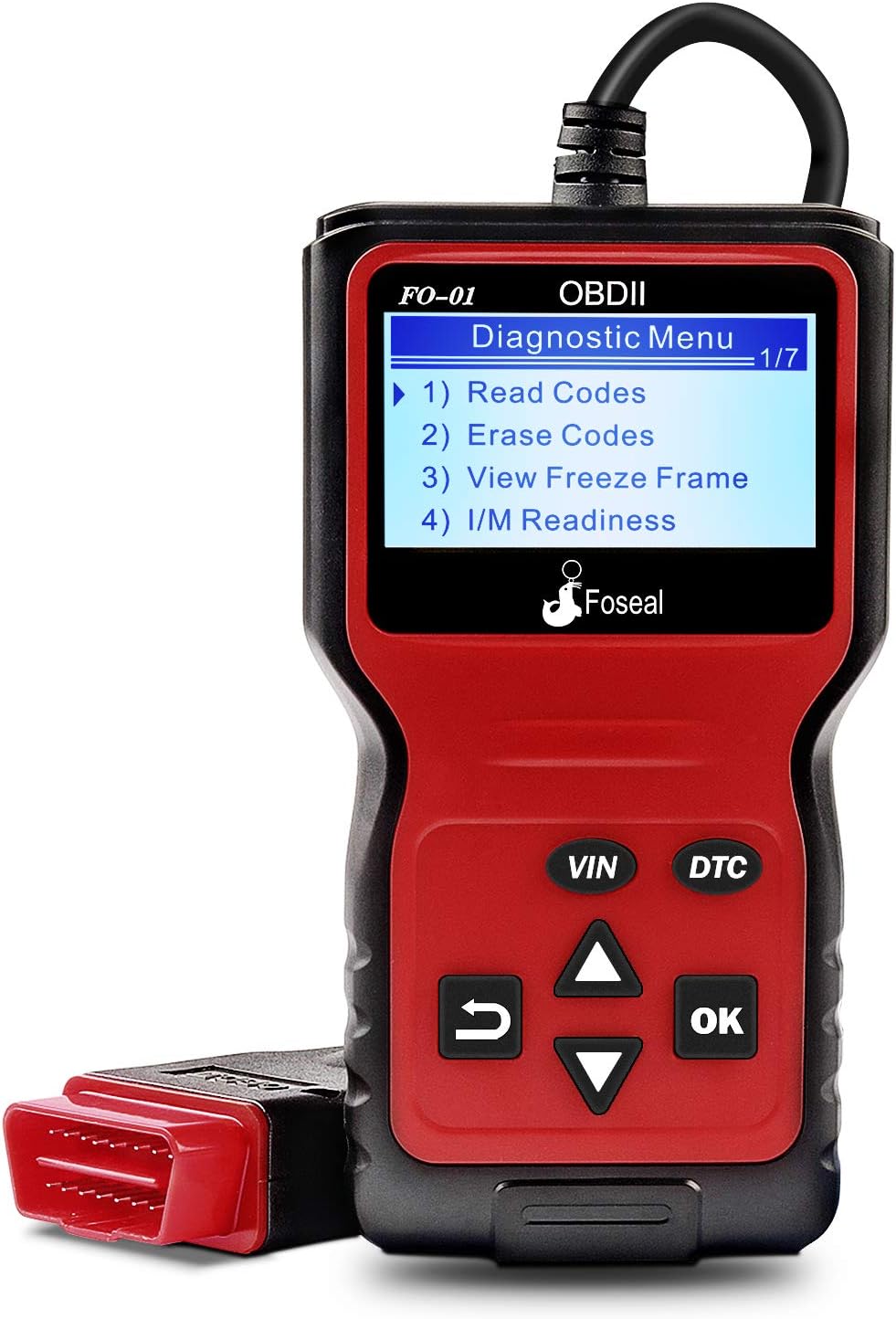
Figure 1: Foseal FO-01 OBD2 Code Reader displaying the diagnostic menu.
2. Product Features
- Classic Handheld Design: Plug and play operation for quick scanning and clearing of trouble codes.
- Comprehensive Diagnostic Functions: Reads and clears engine trouble codes, turns off Check Engine Light, performs I/M monitor readiness tests, views freeze frame data, and monitors engine coolant temperature.
- Wide Vehicle Compatibility: Works with most 1996 US-Based cars, SUVs, Light Trucks, and 2000 EU-Based and Asian cars supporting OBD2 protocols (CAN, ISO9141, J1850 VPW, J1850 PWM, KWP2000).
- Clear Display: Built-in 128 x 64 pixel LCD display with white backlight and contrast adjustment for direct reading of test results.
- DTC Lookup: Provides definitions for diagnostic trouble codes directly.
- Multiple Language Support: Supports 6 languages.

Figure 2: Overview of the Foseal FO-01's key functions.

Figure 3: Physical dimensions and labeled components of the Foseal FO-01.
3. Setup and Connection
The Foseal FO-01 OBD2 Code Reader is designed for simple plug-and-play operation. No batteries or external power supply are required as the device draws power directly from the vehicle's OBDII port.
3.1 Locating the OBDII Port
The OBDII (On-Board Diagnostics II) port is typically located under the dashboard on the driver's side of the vehicle. It is a 16-pin trapezoidal connector.
3.2 Connection Procedure
- Ensure the vehicle's ignition is in the "OFF" position.
- Locate the vehicle's 16-pin OBDII Data Link Connector (DLC).
- Firmly plug the Foseal FO-01's OBDII connector into the vehicle's DLC.
- Turn the vehicle's ignition to the "ON" position (engine can be off or running, depending on the test). The scanner will automatically power on and establish communication with the vehicle's ECU.

Figure 4: The Foseal FO-01 connected to a vehicle's OBDII port, displaying live data.
4. Operating Instructions
Once connected, the Foseal FO-01 will automatically power on and display the main diagnostic menu. Use the navigation buttons (UP/DOWN arrows, OK, RETURN) to navigate through the menus and select functions.
4.1 Reading Diagnostic Trouble Codes (DTCs)
- From the main menu, select "Read Codes" and press "OK".
- The scanner will display any stored DTCs (Pending, Confirmed, Permanent) along with their descriptions.
- Use the UP/DOWN arrows to scroll through multiple codes if present.

Figure 5: The FO-01 displaying a Diagnostic Trouble Code (DTC) and its corresponding definition.
4.2 Erasing Diagnostic Trouble Codes (DTCs)
Warning: Clearing DTCs will also clear the Freeze Frame data and reset the I/M Readiness Monitor Status. Ensure any underlying issues are resolved before clearing codes.
- From the main menu, select "Erase Codes" and press "OK".
- Confirm your selection when prompted.
- The scanner will attempt to clear all stored DTCs and turn off the Check Engine Light.
4.3 Viewing Freeze Frame Data
Freeze Frame Data records the vehicle's operating conditions at the moment a Diagnostic Trouble Code (DTC) is set. This information can help in diagnosing the cause of the fault.
- From the main menu, select "View Freeze Frame" and press "OK".
- The scanner will display various parameters such as engine RPM, vehicle speed, coolant temperature, fuel system status, etc., recorded at the time of the fault.
4.4 I/M Readiness Monitor Status
I/M Readiness Monitors are tests performed by the vehicle's onboard computer to ensure emissions-related components are functioning correctly. This function indicates if the monitors have run and completed their diagnostic testing.
- From the main menu, select "I/M Readiness" and press "OK".
- The display will show the status of various monitors (e.g., Misfire Monitor, Fuel System Monitor, Comprehensive Component Monitor) as "OK" (completed) or "INC" (incomplete).

Figure 6: The FO-01 displaying I/M Readiness status and a real-time data curve example.
4.5 Live Data Stream
The Live Data Stream function allows you to view real-time sensor data from the vehicle's engine control unit (ECU). This can be crucial for diagnosing intermittent problems or verifying repairs.
- From the main menu, select "Data Stream" (or similar option) and press "OK".
- The scanner will display a list of available live data parameters. Select the ones you wish to view.
- Parameters may include engine RPM, vehicle speed, coolant temperature, oxygen sensor readings, fuel pressure, etc.
4.6 DTC Lookup
The built-in DTC Lookup feature provides direct definitions for generic and manufacturer-specific diagnostic trouble codes, eliminating the need to consult external resources.
- From the main menu, select "DTC Lookup" and press "OK".
- Enter the DTC code using the navigation buttons.
- The scanner will display the definition of the entered code.
5. Maintenance
The Foseal FO-01 OBD2 Code Reader requires minimal maintenance to ensure its longevity and proper functioning.
- Cleaning: Use a soft, dry cloth to clean the device. Avoid using abrasive cleaners or solvents that could damage the casing or screen.
- Storage: Store the scanner in a clean, dry environment, away from extreme temperatures, direct sunlight, and excessive moisture.
- Cable Care: Do not bend or crimp the OBDII cable excessively. Always grasp the connector when plugging or unplugging, not the cable itself.
- Software Updates: Check the manufacturer's website periodically for any available firmware updates to ensure optimal performance and compatibility with newer vehicles.
6. Troubleshooting
If you encounter issues while using your Foseal FO-01 OBD2 Code Reader, refer to the following common troubleshooting steps:
| Problem | Possible Cause | Solution |
|---|---|---|
| Scanner does not power on. |
|
|
| "Link Error" or "Communication Error" message. |
|
|
| Cannot clear codes. |
|
|

Figure 7: The FO-01 assisting in diagnosing vehicle system status.
7. Specifications
| Feature | Detail |
|---|---|
| Model Number | FO-01 |
| Display | 128 x 64 pixel LCD with backlight |
| Operating Voltage | 9-16V (via vehicle OBDII port) |
| Supported Protocols | CAN, ISO9141, J1850 VPW, J1850 PWM, KWP2000 |
| Dimensions (Approx.) | 8.03 x 5.16 x 1.73 inches (Package Dimensions) |
| Item Weight | 10.6 ounces |
| Cable Length | 2.5 feet (approx. 0.76 meters) |
| Supported Languages | English, French, Spanish, Italian, Dutch, German |

Figure 8: The FO-01 supports multiple languages for global usability.
8. Warranty and Support
Foseal provides an 18-month quality insurance for the FO-01 OBD2 Code Reader. For any problems or inquiries, please contact Foseal customer support through the official channels or the retailer where the product was purchased.
For further assistance, you may refer to the official Foseal website or contact their customer service department.
Related documentsFO-01

Ask a question about this manual
Ask about setup, troubleshooting, compatibility, parts, safety, or missing instructions. Manuals+ will review the question and use this page’s manual context to help answer it.