1. Introduction
This manual provides detailed instructions for the setup, programming, operation, and maintenance of your XIHADA Universal Garage Door and Gate Remote Control, Model ML999-02. This device is designed to clone signals from various original remotes operating on frequencies between 280MHz and 868MHz, allowing you to consolidate multiple remotes into one compact unit.
2. Safety Information
- Keep the remote control out of reach of children to prevent accidental operation.
- Do not operate the garage door or gate if people or objects are in the path of its movement.
- Ensure the original remote is functioning correctly before attempting to clone its signal.
- Avoid exposing the remote to extreme temperatures, moisture, or direct sunlight for prolonged periods.
- Dispose of batteries responsibly according to local regulations.
3. Package Contents
- 1 x XIHADA Universal Remote Control (ML999-02)
- 1 x CR2 Battery (pre-installed)
- 1 x Keychain attachment
4. Product Overview
The XIHADA Universal Remote Control is a compact, 4-button device designed for convenience and versatility. Each button can be programmed independently to control different garage doors or gates.

Figure 1: Front view of the XIHADA Universal Remote Control.

Figure 2: Labeled buttons on the XIHADA Universal Remote Control.
5. Compatibility
The XIHADA Universal Remote Control is designed to clone signals from a wide range of original remotes. However, it is crucial to verify compatibility before attempting to program the device.
5.1. Incompatible Brands and Models
The following brands and models are not compatible with the XIHADA Universal Remote Control:

Figure 3: List of brands and models not compatible with the XIHADA remote.
- Chamberlain / Liftmaster Security 2.0, 2.0+ Garage Door Opener
- Chamberlain / Liftmaster Garage Door Opener with MYQ system
- LiftMaster 8500W, 892LT, 811LMX, 893LM
- Chamberlain B6713T, B6753T Smart Garage Opener
- Genie Pro Screw Drive, AccessMaster garage with MyQ
- Doorking/DKS Gate Opener, Stanley, Ryobi, Softens Doors, Blue Sea
- Allister, Amarr, Atoms, Lynx, Merik, Skylink, Wayne Dalton, Martin, Saco Gate Opener
- Condo's garage door opener (general)
5.2. Compatible Brands and Models
The XIHADA Universal Remote Control is compatible with a wide range of brands and models. Please refer to the detailed compatibility list provided in Figure 4 to ensure your original remote is supported.

Figure 4: Detailed list of compatible brands and models for cloning.
Important Note:
You must have a working original remote control to clone its codes into the XIHADA Universal Remote. The XIHADA remote cannot be programmed without an original, functional remote.
6. Setup and Programming
Follow these steps carefully to program your XIHADA Universal Remote Control. There are two main methods: standard cloning for most remotes (e.g., gate remotes) and a method involving the 'LEARN' button for garage door openers. A specific method for BFT brand remotes is also detailed.
6.1. Programming Video Guide
For a visual guide, please watch the official programming video below:
Video: XIHADA Universal Remote Programming & Duplication Guide. This video demonstrates the step-by-step process for cloning your original remote to the XIHADA Universal Remote, including methods for both gate and garage door openers.
6.2. Standard Cloning Process (for Gate Remotes)
- Clear Existing Codes: Hold down Button 1 and then press Button 2 four times. Release both buttons. The LED on the universal remote will emit a quick flash every 2 seconds, indicating it is ready to learn codes.
- Position Remotes: Place your original remote very close to the universal remote (about 2-3 cm apart), or have them back-to-back/face-to-face.
- Initiate Cloning: Hold down the button on your original remote that you wish to copy. Simultaneously, the LED on the universal remote will start to flash quickly.
- Store Code: While the universal remote's LED is flashing quickly, press any button on the universal remote where you want to store the copied code. The LED will turn off once the code is successfully copied.
6.3. Cloning Process for Garage Door Openers (with LEARN button)
For garage door openers, an additional step is required after cloning the remote:
- Perform Standard Cloning: Follow steps 1-4 of the "Standard Cloning Process" (Section 6.2) to copy the code from your original garage door remote to the XIHADA Universal Remote.
- Activate LEARN Button: On your garage door opener's mechanical unit, locate and press the 'LEARN' button. The LED on your garage door opener should turn ON.
- Finalize Programming: Within 30 seconds of pressing the 'LEARN' button, press the same button you programmed on the XIHADA Universal Remote. The lights on your garage door opener should either flash or go on/off, depending on the brand of the opener, indicating successful programming.
- Test Operation: You can now use the programmed button on your XIHADA Universal Remote to open and close your garage door.
6.4. Programming for BFT Brand Remotes
For BFT brand remotes, a slightly different seed code transmission method is used:
- Clear Existing Codes: Hold down Button 1 and then press Button 2 four times. Release both buttons. The LED on the universal remote will emit a quick flash every 2 seconds.
- Position Remotes: Place the original BFT remote in front of the universal remote.
- Transmit Seed Code: Press the button on the original BFT remote that you want to copy. The universal remote's LED will turn on with a fixed light and then emit a double flash every 2 seconds.
- Activate Seed Code: Transmit the seed code of the original BFT remote by pressing buttons 1 and 2 simultaneously on the original BFT remote.
- Store Code: Now, the LED on the universal remote will flash quickly. Press the button on the universal remote where you want to store the copied code. The LED will turn off once the code is successfully copied.
- Finalize Programming (Receiver): Take the universal remote to your garage door opener receiver. Activate the 'LEARN' button on the receiver to insert the new remote.
7. Operating Instructions
Once programmed, operating the XIHADA Universal Remote is straightforward:
- Press the corresponding button on the remote that you have programmed for your specific garage door or gate.
- The remote will transmit the signal, and the door/gate should activate.
- Ensure you are within range of the receiver for reliable operation.
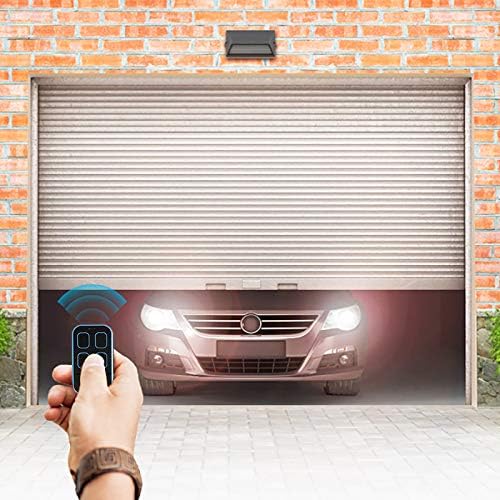
Figure 5: Operating the remote to open a garage door.

Figure 6: Versatile applications of the XIHADA Universal Remote.
8. Troubleshooting
- Remote not programming: Ensure your original remote is working and is compatible (check Section 5). Make sure the remotes are positioned correctly and close enough during the cloning process. Try clearing existing codes and repeating the programming steps.
- LED not flashing as expected: This may indicate a low battery in the universal remote or an issue with the programming sequence. Replace the battery if necessary and re-attempt programming.
- Garage door/gate not responding: Verify that the programming was successful by checking the opener's indicator lights. Ensure the remote has a fresh battery and you are within the operational range.
- Interference: Strong radio frequency interference can affect remote performance. Try operating the remote from a different location or away from potential sources of interference.
9. Maintenance
9.1. Battery Replacement
The XIHADA Universal Remote uses one CR2 battery. When the remote's range decreases or the LED indicator becomes dim, it's time to replace the battery.
- Carefully open the remote casing.
- Remove the old CR2 battery.
- Insert a new CR2 battery, ensuring correct polarity.
- Close the remote casing securely.
9.2. Cleaning
Wipe the remote with a soft, dry cloth. Do not use abrasive cleaners or allow moisture to enter the device.
10. Specifications
- Model Number: ML999-02
- Product Dimensions: 2.36 x 1.38 x 0.39 inches (6.0 x 3.5 x 1.0 cm)
- Item Weight: 0.81 ounces (23 grams)
- Batteries: 1 CR2 battery (included)
- Max Number of Supported Devices: 4
- Frequency Range: 280MHz - 868MHz
- Special Feature: Universal cloning capability

Figure 7: Physical dimensions of the remote control.
11. Warranty and Support
For warranty information and customer support, please refer to the documentation included with your purchase or contact the manufacturer directly through their official channels. Keep your proof of purchase for any warranty claims.