
Introduction
Thank you for choosing the Hoco Bluetooth Headset E11. This manual provides essential information for setting up, operating, maintaining, and troubleshooting your new headset. Please read it carefully before use to ensure optimal performance and longevity of your device.
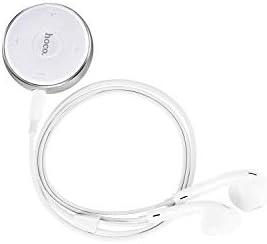
Image: The Hoco Bluetooth Headset E11, featuring a compact circular control unit and white wired earbuds.
Package Contents
- Hoco Bluetooth Headset E11
- USB Charging Cable
- User Manual
Setup
Charging the Headset
Before first use, fully charge the headset. Connect the provided USB charging cable to the charging port on the headset and the other end to a USB power source (e.g., computer USB port, wall adapter). The indicator light will show charging status and turn off or change color when fully charged.
Pairing with a Device
- Ensure the headset is turned off.
- Press and hold the multi-function button on the headset until the indicator light flashes red and blue alternately, indicating pairing mode.
- On your device (smartphone, tablet, etc.), enable Bluetooth and search for available devices.
- Select "Hoco E11" from the list of found devices.
- If prompted, enter "0000" as the passcode.
- Once successfully paired, the indicator light will flash blue slowly or turn off, and you will hear a confirmation tone.
Operating
Power On/Off
- Power On: Press and hold the multi-function button for approximately 3 seconds until the blue indicator light flashes.
- Power Off: Press and hold the multi-function button for approximately 5 seconds until the red indicator light flashes and then turns off.
Call Management
- Answer/End Call: Press the multi-function button once.
- Reject Call: Press and hold the multi-function button for 2 seconds.
- Redial Last Number: Double-press the multi-function button.
Music Playback
- Play/Pause: Press the multi-function button once.
- Next Track: Press and hold the Volume + button.
- Previous Track: Press and hold the Volume - button.
- Volume Up: Press the Volume + button.
- Volume Down: Press the Volume - button.
Maintenance
To ensure the longevity and optimal performance of your Hoco E11 headset, follow these maintenance guidelines:
- Cleaning: Use a soft, dry, lint-free cloth to clean the headset. Do not use abrasive cleaners, solvents, or strong chemicals.
- Storage: Store the headset in a cool, dry place away from direct sunlight and extreme temperatures. Avoid storing in dusty or humid environments.
- Battery Care: Avoid fully discharging the battery frequently. Charge the headset regularly, even if not in use for extended periods, to maintain battery health.
Troubleshooting
| Problem | Solution |
|---|---|
| Headset won't turn on. | Ensure the headset is fully charged. Connect to a power source and try again. |
| Cannot pair with device. | Ensure the headset is in pairing mode (flashing red and blue). Turn off and on Bluetooth on your device. Move closer to the headset. |
| No sound or low volume. | Check the volume levels on both the headset and your connected device. Ensure the headset is properly connected. |
| Connection drops frequently. | Ensure there are no obstacles between the headset and your device. Move closer to your device. Avoid strong electromagnetic interference. |
Specifications
- Model: E11
- Brand: Hoco
- Package Dimensions: 17 x 12 x 5.6 cm
- Weight: 240 g
- ASIN: B07M82BT9Q
- Note: Specific Bluetooth version, battery capacity, and playtime may vary. Refer to product packaging for precise details.
Warranty and Support
Hoco products are designed and manufactured to the highest quality standards. This product is covered by a limited warranty against manufacturing defects from the date of purchase. Please retain your proof of purchase for warranty claims.
For technical support, warranty inquiries, or further assistance, please contact your local Hoco distributor or the retailer from whom you purchased the product. You may also visit the official Hoco website for more information.
