
1. Introduction
Thank you for choosing the AWEI A950BL ANC Noise Reduction Headset. This manual provides detailed instructions on how to set up, operate, and maintain your new headphones. Please read this manual thoroughly before use to ensure optimal performance and longevity of your device.

Image: Front view of the AWEI A950BL ANC Noise Reduction Headset.
2. Product Features
- Active Noise Cancellation (ANC): Reduces ambient noise for an immersive audio experience.
- Wireless & Wired Connectivity: Bluetooth V4.1 for wireless freedom and a 3.5mm jack for wired connection.
- Integrated Microphone: For hands-free calls and voice commands.
- Long Battery Life: Up to 10 hours of talk or music time on a single charge.
- Foldable Design: For easy storage and portability.

Image: The AWEI A950BL headset featuring a convenient folding design for portability.
3. Package Contents
- AWEI A950BL ANC Noise Reduction Headset
- USB Charging Cable
- 3.5mm Audio Cable
- User Manual
4. Controls and Components
Familiarize yourself with the various buttons and ports on your AWEI A950BL headset:
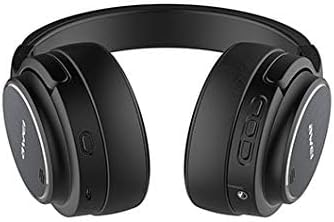
Image: Side view of the headset highlighting the control panel.
- Power On/Off Button: Located on the right earcup. Press and hold to power on or off.
- Volume Up / Previous Song Button: Short press for Volume+, Long press for Previous song.
- Volume Down / Next Song Button: Short press for Volume-, Long press for Next song.
- Multi-function Button (MFB): Used for Play/Pause, Answer/End calls, and Reject calls.
- ANC Button: Activates or deactivates Active Noise Cancellation.
- Microphone: Integrated for voice input.
- AUX Jack (3.5mm): For wired audio connection.
- USB Charging Port: For charging the headset.
- LED Indicator Light: Displays power, pairing, and charging status.
5. Setup
5.1 Charging the Headset
- Connect the USB charging cable to the headset's USB charging port.
- Connect the other end of the cable to a USB power source (e.g., computer USB port, wall adapter).
- The LED indicator will show charging status (e.g., red while charging, off or blue when fully charged).
- A full charge takes approximately 2-3 hours.
5.2 Bluetooth Pairing
- Ensure the headset is turned off.
- Press and hold the Power On/Off button until the LED indicator flashes blue and red alternately, indicating pairing mode.
- On your device (smartphone, tablet, computer), enable Bluetooth and search for available devices.
- Select "AWEI A950BL" from the list of found devices.
- Once connected, the LED indicator will flash blue slowly or turn solid blue.
5.3 Wired Connection
To use the headset in wired mode:
- Connect one end of the 3.5mm audio cable to the AUX jack on the headset.
- Connect the other end to the audio output jack of your device.
- The headset can be used in wired mode even if the battery is depleted.
6. Operating Instructions
6.1 Power On/Off
- Power On: Press and hold the Power On/Off button for approximately 3 seconds until the LED indicator lights up.
- Power Off: Press and hold the Power On/Off button for approximately 3 seconds until the LED indicator turns off.
6.2 Music Playback
- Play/Pause: Short press the Multi-function Button (MFB).
- Volume Up: Short press the Volume Up button.
- Volume Down: Short press the Volume Down button.
- Next Song: Long press the Volume Down button.
- Previous Song: Long press the Volume Up button.
6.3 Call Management
- Answer Call: Short press the Multi-function Button (MFB) when a call comes in.
- End Call: Short press the Multi-function Button (MFB) during a call.
- Reject Call: Long press the Multi-function Button (MFB) when a call comes in.
6.4 Active Noise Cancellation (ANC)
The ANC feature reduces ambient noise, providing a clearer audio experience.

Image: Diagram illustrating the concept of Active Noise Cancellation.
- Activate ANC: Press the ANC button. The LED indicator for ANC will light up (usually green).
- Deactivate ANC: Press the ANC button again. The ANC LED indicator will turn off.
7. Maintenance
- Clean the headset regularly with a soft, dry cloth.
- Avoid using harsh chemicals or abrasive materials.
- Store the headset in a cool, dry place away from direct sunlight and extreme temperatures.
- Do not expose the headset to water or excessive moisture.
- Avoid dropping or subjecting the headset to strong impacts.
8. Troubleshooting
| Problem | Possible Cause | Solution |
|---|---|---|
| Headset does not power on | Low battery | Charge the headset fully. |
| Cannot pair with device | Headset not in pairing mode / Device Bluetooth off | Ensure headset is in pairing mode (flashing red/blue). Turn on Bluetooth on your device. Move headset closer to device. |
| No sound | Volume too low / Not connected / Wrong audio source | Increase volume on headset and device. Reconnect Bluetooth or check 3.5mm cable. Ensure correct audio output is selected on your device. |
| ANC not working effectively | ANC not activated / Environmental noise too high | Press the ANC button to activate. ANC is most effective against low-frequency, constant noise. |
9. Specifications
| Model Name | A950BL |
| Connectivity Technology | Wireless (Bluetooth V4.1), Wired (3.5 mm Jack) |
| Headphones Form Factor | Over Ear |
| Noise Control | Active Noise Cancellation |
| Battery Capacity | 1050mAh (Lithium Ion) |
| Talk Time | Up to 10 hours |
| Music Time | Up to 10 hours |
| Product Dimensions | 22 x 6 x 23 cm |
| Item Weight | 165 g |
| Color | Black |
10. Warranty and Support
AWEI products are manufactured to the highest quality standards. For warranty information or technical support, please refer to the warranty card included with your purchase or contact your local retailer or AWEI customer service. Keep your proof of purchase for warranty claims.