
1. Introduction
Thank you for choosing the VENTION Magnetic Wireless Power Bank. This device is designed to provide efficient and convenient charging for your mobile devices, featuring both magnetic wireless charging and PD 20W fast wired charging. With its compact design and 5000mAh capacity, it is an ideal companion for on-the-go power needs.
This manual provides essential information for the safe and effective use of your power bank. Please read it thoroughly before operation and retain it for future reference.
2. Product Overview
The VENTION Magnetic Wireless Power Bank combines portability with powerful charging capabilities. Key features include:
- Rapid Charging: Supports PD 20W fast wired charging and 15W wireless charging.
- High Capacity: Equipped with a 5000mAh battery for reliable power.
- Magnetic Design: Ensures secure attachment for wireless charging with compatible devices.
- Intuitive Display: LED indicators provide real-time battery level information.
- Built-in Foldable Stand: Offers convenience for media viewing while charging.

Figure 2.1: Front view of the VENTION Magnetic Wireless Power Bank. This image shows the compact, white design with the magnetic charging pad prominently displayed.
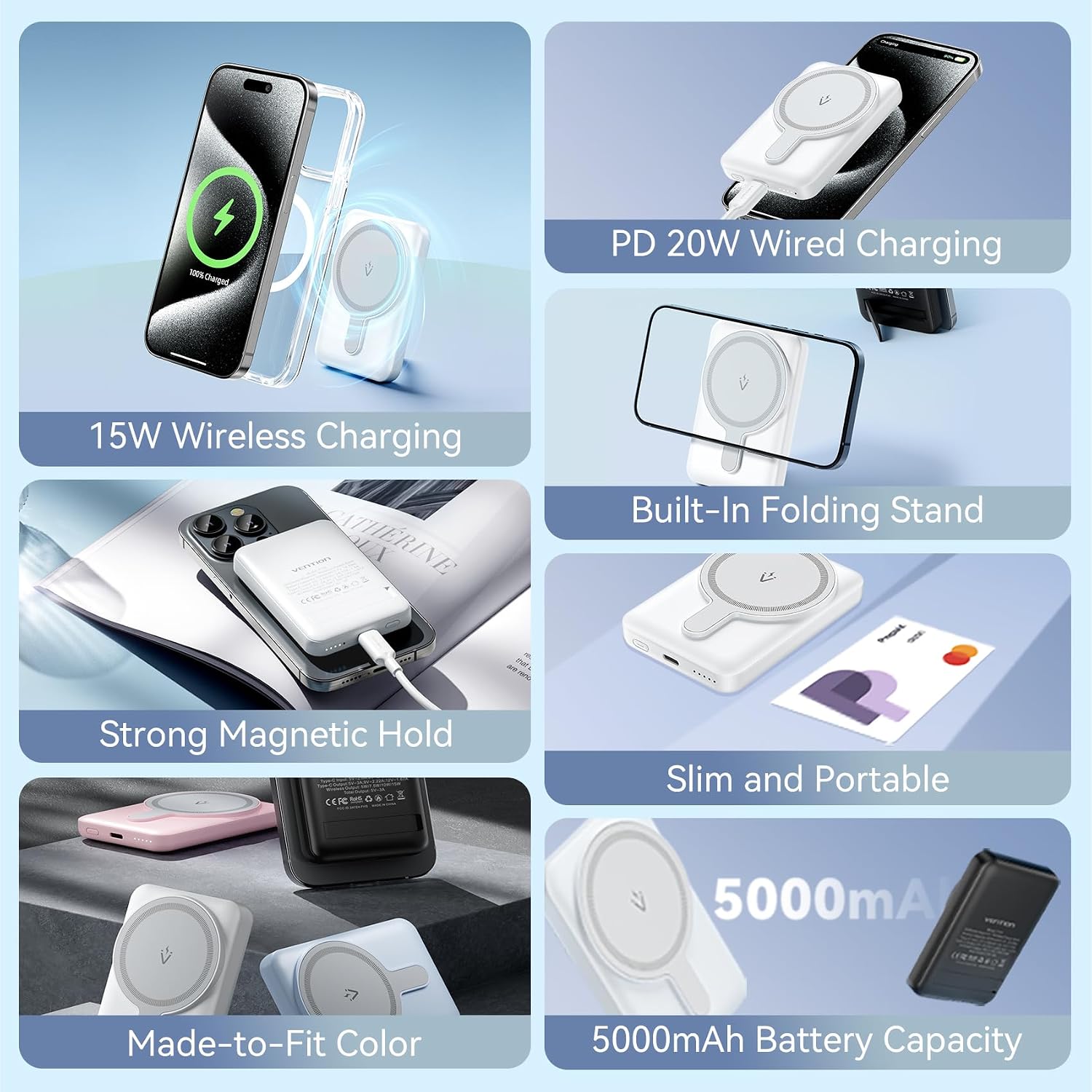
Figure 2.2: Overview of key features including PD 20W wired charging, 15W wireless charging, built-in folding stand, strong magnetic hold, slim and portable design, color options, and 5000mAh battery capacity.
3. Setup
3.1 Package Contents
Before using your power bank, please verify that all items are present in the package:
- 1 x VENTION Magnetic Wireless Power Bank
- 1 x USB-A to USB-C Cable (0.3 m)
- 1 x User Manual (this document)

Figure 3.1: Illustration of the power bank, USB-A to USB-C cable, and color box packaging.
3.2 Initial Charging of the Power Bank
For optimal performance, fully charge your power bank before first use.
- Connect the provided USB-A to USB-C cable to the USB-C input port on the power bank.
- Connect the other end of the cable to a compatible USB power adapter (not included). For fastest charging, use a PD (Power Delivery) compatible adapter.
- The LED indicator lights on the power bank will illuminate to show the charging status. All lights will be solid when fully charged.

Figure 3.2: The power bank connected via USB-C for PD 20W fast charging. This demonstrates the speed advantage over standard 10W chargers.
4. Operating Instructions
4.1 Charging Your Device Wirelessly
The power bank supports magnetic wireless charging for compatible devices (e.g., iPhone 12-15 series).
- Ensure your device supports wireless charging and has a magnetic alignment feature (e.g., MagSafe).
- Align the back of your device with the magnetic charging pad on the power bank. The magnets will securely snap into place.
- Wireless charging will begin automatically. The LED indicators on the power bank may show activity.
Note: For optimal magnetic attachment and charging, it is recommended to use devices without a case or with a MagSafe-compatible case. Standard phone cases may interfere with the magnetic connection.

Figure 4.1: Demonstrates the "Just Snap to Charge" feature, showing how the power bank magnetically attaches to a compatible smartphone for wireless charging.
4.2 Charging Your Device Via Cable
The power bank can also charge devices via its USB-C port.
- Connect one end of a compatible charging cable (e.g., USB-C to USB-C, or USB-C to Lightning) to your device.
- Connect the other end of the cable to the USB-C port on the power bank.
- Charging will commence automatically. The power bank supports PD 20W fast charging via this port.

Figure 4.2: The power bank simultaneously charging a phone wirelessly and another device via a USB-C cable, demonstrating its dual-charging capability.
4.3 Checking Battery Level
The power bank features LED indicator lights to show its remaining battery capacity:
- Press the power button once to activate the LED indicators.
- Each illuminated LED typically represents a percentage of the battery charge. Refer to the specific pattern on your device for exact interpretation (e.g., 4 LEDs for 100%, 3 for 75%, etc.).
4.4 Using the Foldable Stand
The integrated foldable stand allows you to prop up your phone while it's attached to the power bank, ideal for hands-free viewing.
- Locate the foldable stand on the back of the power bank.
- Gently pull out the stand until it locks into position.
- Place your magnetically attached phone onto the stand for stable viewing.
- When not in use, fold the stand back into its recess until it is flush with the power bank's body.

Figure 4.3: The power bank with its foldable stand extended, supporting a smartphone in both portrait and landscape orientations.
4.5 Device Compatibility
The VENTION Magnetic Wireless Power Bank offers broad compatibility:
- Wired Fast Charging: Compatible with various smartphones and tablets that support USB-C charging, including iPhone (with appropriate cable), OPPO, Xiaomi, etc.
- Wireless Charging: Optimized for iPhone 12-15 Series and other devices supporting magnetic wireless charging.
- Low-Current Mode: Suitable for charging low-power devices such as Bluetooth earbuds and small USB fans.

Figure 4.4: A visual representation of the power bank's compatibility with various devices for wired fast charging, wireless charging, and low-current mode.
5. Care and Maintenance
- Cleaning: Use a soft, dry cloth to clean the surface of the power bank. Avoid using harsh chemicals or abrasive materials.
- Storage: Store the power bank in a cool, dry place away from direct sunlight and extreme temperatures.
- Handling: Avoid dropping, impacting, or disassembling the device. This can damage internal components and void the warranty.
- Water Exposure: Keep the power bank away from water and other liquids. It is not waterproof.
- Charging Cycles: To prolong battery life, it is recommended to fully discharge and recharge the power bank periodically.
6. Troubleshooting
| Problem | Possible Cause | Solution |
|---|---|---|
| Power bank not charging | Cable not connected properly; Faulty cable/adapter; Power bank fully charged. | Ensure cable is securely connected. Try a different cable or power adapter. Check LED indicators; if all are solid, it's fully charged. |
| Device not charging wirelessly | Misalignment; Non-compatible device/case; Power bank low on charge. | Realign device on the magnetic pad. Ensure device/case is wireless charging compatible. Charge the power bank. |
| Device not charging via cable | Cable not connected properly; Faulty cable; Power bank low on charge. | Ensure cable is securely connected. Try a different cable. Charge the power bank. |
| Slow charging speed | Using a non-fast charging adapter/cable; Device not supporting fast charging. | Use a PD 20W compatible adapter and cable. Ensure your device supports fast charging protocols. |
| LED indicators not working | Power bank is off; Malfunction. | Press the power button to activate. If still unresponsive, contact customer support. |
7. Technical Specifications
| Brand | VENTION |
| Model | FHSW0 |
| Battery Capacity | 5000mAh (3.7V/18.5Wh) |
| Input (USB-C) | 5V∷2.6A; 9V∷2A; 12V∷1.5A |
| Output (USB-C) | 5V∷2.4A; 9V∷2.22A; 12V∷1.67A |
| Output (Wireless) | 5W/7.5W/10W/15W |
| Total Output | 5V∷3A |
| Color | White (also available in Pink, Blue, Black) |
| Material | PC + ABS |
| Interface | USB-C |
| Dimensions | 15.6 x 8.8 x 2.9 cm (Package) |
| Weight | 150 g (Product) |

Figure 7.1: A visual table summarizing the technical specifications of the VENTION Magnetic Wireless Power Bank.
8. Safety Information
To ensure safe operation and prevent damage to the device or injury, please observe the following safety precautions:
- Do not expose the power bank to extreme temperatures (above 45°C or below 0°C).
- Do not expose to direct sunlight for prolonged periods.
- Do not disassemble, modify, or attempt to repair the device. This will void the warranty and may cause safety hazards.
- Keep away from water, moisture, and flammable materials.
- Do not use if the power bank is visibly damaged, swollen, or leaking.
- Keep out of reach of children.
- Dispose of the power bank responsibly according to local regulations for electronic waste.
The power bank is equipped with multiple safety protections:
- Short Circuit Protection
- Over-Voltage Protection
- Over-Charge Protection
- Over-Discharge Protection
- Restore Protection
- Over-Power Protection

Figure 8.1: Visual representation of the multiple safety protection mechanisms integrated into the power bank.
9. Warranty and Support
9.1 Warranty Information
This VENTION Magnetic Wireless Power Bank comes with a 1-Year Warranty from the date of purchase. The warranty covers manufacturing defects and malfunctions under normal use. It does not cover damage caused by misuse, accidents, unauthorized modifications, or natural disasters.
Please retain your proof of purchase for warranty claims.
9.2 Customer Support
If you encounter any issues or have questions regarding your VENTION Magnetic Wireless Power Bank, please contact VENTION customer support. Refer to the product packaging or the official VENTION website for the most up-to-date contact information.
For further assistance, you may visit the official VENTION store online: VENTION Store


