
1. Introduction
This manual provides detailed instructions for the installation, operation, and maintenance of the Majestic RC400 Intellifire Touch Remote Control with its accompanying docking station. The RC400 offers intuitive control over your fireplace system, functioning as both a handheld remote and a wall-mounted thermostat.
2. Package Contents
Verify that all components are present in your package:
- IFT-RC400 Remote Control (SRV2326-110)
- Wall Mount Radio Frequency Module (IFT-RFM) (SRV2326-120)
- AAA Batteries (4)
- IntelliFire Touch Auxiliary Control Module (IFT-ACM) (SRV2326-150)
- Power cable that connects AC receptacle to IFT-ACM (SRV2326-152)
- Installation Instructions (RC400 Remote Install Manual)

Image 1: Majestic RC400 Remote Control and its Wall Mount Docking Station.

Image 2: Front and back view of the IFT-RFM Wall Mount Radio Frequency Module (PN: 2326-120).
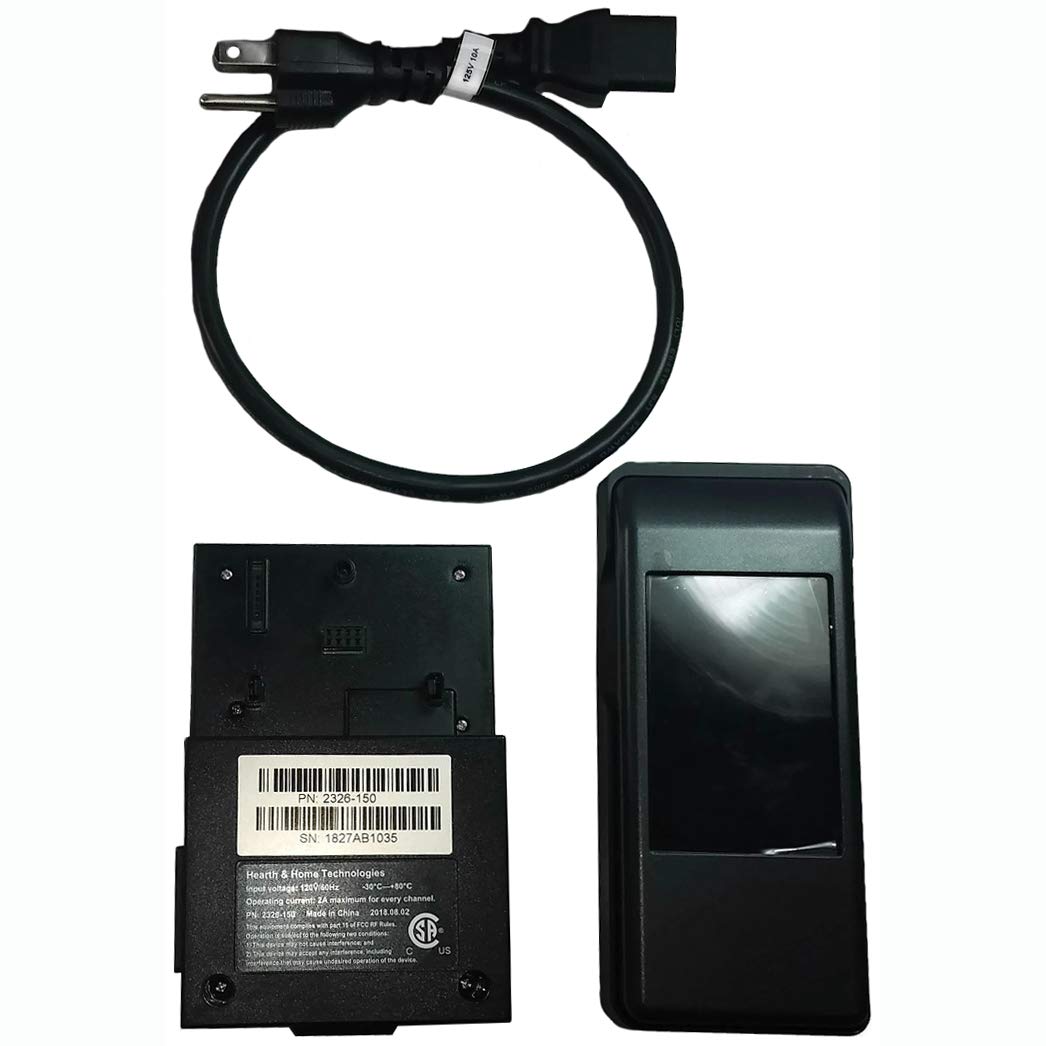
Image 3: IFT-ACM Auxiliary Control Module (PN: 2326-150) and its power cable.
3. Setup and Installation
3.1. Remote Control Battery Installation
- Locate the battery compartment on the back of the RC400 remote control.
- Open the compartment cover.
- Insert four (4) AAA batteries, ensuring correct polarity.
- Close the battery compartment cover securely.
3.2. Module Installation
The IFT-RFM (Wall Mount Radio Frequency Module) and IFT-ACM (Auxiliary Control Module) are integral to the system's operation. Refer to the separate 'RC400 Remote Install Manual' included in your package for detailed instructions on installing these modules and connecting them to your fireplace system. Proper installation is crucial for functionality.
3.3. Pairing the Remote Control
After installing the modules and batteries, the remote control must be paired with your fireplace system. The pairing process establishes communication between the remote and the fireplace. Consult the 'RC400 Remote Install Manual' for specific pairing instructions for your Majestic, Heat N Glo, or Quadra-Fire unit.
4. Operating Instructions
The RC400 remote control features a large touch LCD screen for easy navigation and operation.

Image 4: Main screen of the Majestic RC400 Remote Control showing various options.
4.1. Basic Functions
- Turn Flame On/Off: Select this option to ignite or extinguish the fireplace flame.
- Flame Height Adjustment: Allows you to set the flame height to your desired level, influencing both ambiance and heat output.
- Lights Adjustment: If applicable to your fireplace model, this feature allows you to adjust the intensity of internal lights.
- Room Temperature Readout: Displays the current room temperature. You can toggle the display between °F (Fahrenheit) and °C (Celsius).

Image 5: Remote screen displaying 'Turn Flame ON' and 'Thermostat' options with room temperature.
4.2. Advanced Modes and Features
- Thermostat Mode: Set your desired room temperature, and the system will automatically adjust the flame to maintain it.
- Cold Climate Mode: Activates a small pilot flame to keep the air inside your appliance warm when not in use, preventing cold drafts.
- Timer Mode: Set a timer for up to 180 minutes for the appliance to automatically turn off.
- Child Lock: Engages a lock function to prevent unintended operation of the fireplace.
- Power Vent Technology: Enables installation of a gas appliance in various locations by assisting with exhaust.
- Automatic Battery Backup: Designed to operate the appliance in the event of a power failure. Note: This feature is not available if a Power Vent is installed.

Image 6: Remote screen displaying advanced settings like Cold Climate, Battery status, and Pairing options.
5. Maintenance
5.1. Remote Control Battery Replacement
When the remote control's battery indicator shows low power, replace the four (4) AAA batteries promptly to ensure continuous operation. Refer to section 3.1 for battery installation steps.
5.2. Cleaning
Wipe the remote control and docking station with a soft, dry cloth. Avoid using abrasive cleaners or solvents, as these can damage the finish and electronic components.
6. Troubleshooting
If you encounter issues with your RC400 remote control, consider the following:
- No Response from Fireplace:
- Check remote control batteries and replace if necessary.
- Ensure the remote is properly paired with the fireplace system. Refer to the 'RC400 Remote Install Manual' for pairing instructions.
- Verify that the IFT-RFM and IFT-ACM modules are correctly installed and powered.
- Inaccurate Temperature Reading:
- Ensure the remote is not placed near heat sources or in direct sunlight, which can affect sensor accuracy.
- Difficulty Pairing:
- Follow the pairing instructions in the 'RC400 Remote Install Manual' carefully. Multiple attempts may be required.
- Connection Pins Don't Match (for existing systems):
- Verify compatibility with your specific fireplace model. The RC400 is compatible with Heat N Glo, Quadra-Fire, and Majestic units. If pins do not match, consult your fireplace manufacturer or a qualified technician.
For complex issues or if troubleshooting steps do not resolve the problem, contact a qualified service technician or Majestic Fireplaces customer support.
7. Specifications
| Model Number | IFTRC400 |
| Product Dimensions | 5.2 x 4.2 x 12.3 inches |
| Item Weight | 1.76 Pounds |
| Manufacturer | Majestic Fireplaces |
| Controller Type | Remote Control |
| Color | Black |
8. Warranty and Support
For information regarding product warranty, please refer to the documentation provided with your original purchase or visit the official Majestic Fireplaces website. For technical support, replacement parts, or further assistance, please contact Majestic Fireplaces customer service directly.
