
Introduction
Thank you for choosing the PowerSmith PWLR108S 800 Lumen Rechargeable LED Work Light. This manual provides essential information for the safe and efficient operation, maintenance, and care of your new work light. Please read these instructions thoroughly before use and retain them for future reference.

Figure 1: PowerSmith PWLR108S 800 Lumen Rechargeable LED Work Light. This image shows the overall design of the work light with its green metal stand and black LED housing.
Safety Instructions
Always observe basic safety precautions when using electrical appliances to reduce the risk of fire, electric shock, and personal injury. This product contains a Lithium-ion battery. Improper use may result in fire, explosion, or chemical burns.
- Do not stare directly into the LED light. The intense light can cause eye damage.
- Keep the work light away from flammable materials.
- Do not immerse the work light in water. While weatherproof, it is not designed for submersion.
- Do not attempt to open, disassemble, or service the battery or light housing. Refer all servicing to qualified personnel.
- Use only the provided charging cables or compatible replacements.
- Do not operate the work light if it has been damaged in any way.
- CALIFORNIA PROPOSITION 65 WARNING: This product can expose you to chemicals which are known to the State of California to cause cancer and birth defects or other reproductive harm. For more information go to www.P65Warnings.ca.gov.
Package Contents
Verify that all items are present upon unpacking:
- PowerSmith PWLR108S LED Work Light with Metal Stand
- Cushioned Metal Carrying Handle
- USB Power Cable
- 12V DC Car Charger
- Owner's Manual (this document)
Assembly
The PowerSmith PWLR108S work light requires minimal assembly. The light head needs to be attached to the metal stand.
- Carefully remove all components from the packaging.
- Align the light head with the stand.
- Secure the light head to the stand using the provided knob. Tighten the knob to ensure stability, but do not overtighten.
- The carrying handle is pre-attached. Ensure it is securely fastened.
Video 1: PowerSmith PWLR108S 360 View. This video provides a comprehensive 360-degree view of the PowerSmith PWLR108S work light, demonstrating its design and features from all angles.
Charging the Work Light
The PowerSmith PWLR108S features a high-capacity rechargeable Lithium-ion battery. It comes partially charged, but it is recommended to fully charge it before first use.
- Locate the charging ports on the back of the light housing, protected by a clear cover.
- To charge using the USB Power Cable: Connect the micro-USB end of the cable to the light's input port and the standard USB end to a compatible USB power adapter (not included) or computer USB port.
- To charge using the 12V DC Car Charger: Connect the car charger to your vehicle's 12V accessory outlet and the micro-USB end to the light's input port.
- The charging indicator light (if present) will show the charging status. Refer to the light's specific indicator behavior for details.
- A full charge can provide up to 20 hours of run time, depending on the selected light mode. The battery holds its charge for up to 18 months in storage.


Figure 2: USB Power Cable and 12V DC Car Charger. These images display the included USB power cable and the 12V DC car charger, used for recharging the work light's internal battery.
Operating the Work Light
The PowerSmith PWLR108S offers four distinct lighting modes for various applications.
- Power On/Off: Press the power button (typically red, located near the charging ports) to turn the light on.
- Cycle Modes: Press the power button repeatedly to cycle through the four modes:
High > Medium > Low > Red-Blue Emergency Strobe. - Adjusting Light Angle: Loosen the knobs on either side of the light housing to tilt the light up or down (up to 135° vertically). Tighten the knobs to secure the desired angle.

Figure 3: Emergency Strobe Mode. This graphic illustrates the red and blue flashing lights, indicating the emergency strobe mode feature of the work light.
The work light features long-lasting, super-bright LEDs that do not require replacement and are rated for 50,000 hours of use. The impact-resistant glass lens provides durability.

Figure 4: Weatherproof Design. This image shows the PowerSmith work light being exposed to water, demonstrating its weatherproof construction suitable for various environments.
USB Power Bank Function
The PowerSmith PWLR108S includes a USB power output port, allowing you to charge other portable devices such as smartphones or tablets.
- Ensure the work light has sufficient battery charge.
- Open the protective cover on the back of the light housing.
- Connect your device's USB charging cable to the USB output port on the work light.
- Your device should begin charging automatically.
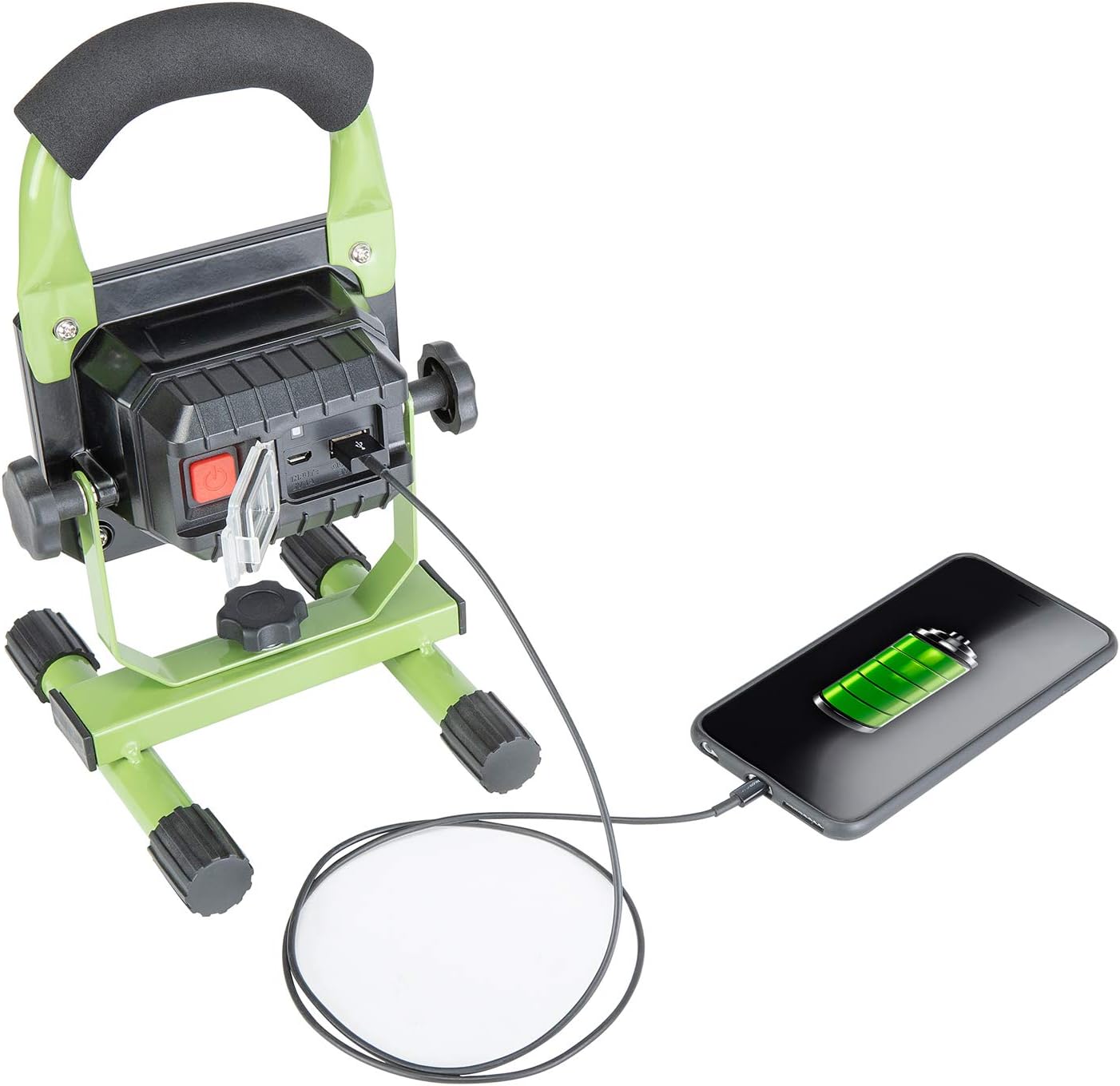
Figure 5: USB Device Charging. This image shows the PowerSmith work light connected via a USB cable to a smartphone, illustrating its capability to function as a power bank.
Maintenance
Proper maintenance ensures the longevity and optimal performance of your work light.
- Cleaning: Wipe the light with a soft, damp cloth. Do not use abrasive cleaners or solvents.
- Storage: Store the work light in a cool, dry place away from direct sunlight and extreme temperatures. For long-term storage, ensure the battery is partially charged (around 50%) to maintain battery health.
- Battery Care: Avoid fully discharging the battery frequently. Recharge the battery regularly, even if the light is not in constant use, to prevent deep discharge.
Troubleshooting
If you encounter issues with your PowerSmith PWLR108S work light, refer to the following common solutions:
- Light does not turn on: Ensure the battery is charged. Connect the light to a power source and allow it to charge for at least 30 minutes before attempting to turn it on again.
- Light is dim or flickers: The battery may be low. Recharge the work light fully.
- Device not charging via USB output: Verify that the work light has sufficient battery power. Ensure the USB cable is securely connected to both the work light and your device. Try a different USB cable or device to rule out cable/device issues.
- Charging not working: Check if the charging cable and adapter are functioning correctly. Ensure the charging port on the light is clean and free of debris.
If problems persist after attempting these steps, please contact customer support.
Specifications
| Feature | Specification |
|---|---|
| Model Number | PWLR108S |
| Brightness | 800 Lumens |
| Power Source | Battery Powered |
| Battery Type | Lithium Ion (1 required, included) |
| Run Time | Up to 20 Hours |
| Voltage | 3.7 Volts |
| Light Source Type | LED |
| Color Temperature | 5000 Kelvin |
| Color Rendering Index (CRI) | 80 |
| Material | Metal, Plastic |
| Finish Type | Brushed |
| Product Dimensions (L x W x H) | 6.5" x 3.1" x 7.45" |
| Item Weight | 1.9 Pounds |
| Special Features | Cordless, Weatherproof, USB Power Output, Emergency SOS Mode |
Warranty and Customer Support
The PowerSmith PWLR108S LED Work Light is backed by a 2-year manufacturer warranty. This warranty covers defects in materials and workmanship under normal use.

Figure 6: 2-Year Warranty. This image displays a badge indicating the product comes with a 2-year warranty and US-based seller support.
For warranty claims, technical assistance, or any questions regarding your product, please contact PowerSmith customer support. Our US-based customer support team is available to assist you.
Please have your model number (PWLR108S) and proof of purchase ready when contacting support.


