
Introduction
Thank you for choosing the Goodyear GY900017 Portable Digital Tire Inflator. This device is designed for convenient and efficient inflation of various items, including vehicle tires and other inflatables. Please read this manual thoroughly before operation to ensure safe and proper use.

Image: The Goodyear GY900017 Portable Digital Tire Inflator, showcasing its compact design, digital display, and integrated LED light.
Safety Information
Always observe the following safety precautions to prevent injury or damage to the product:
- Ensure the vehicle engine is running when operating the inflator to prevent draining the vehicle's battery.
- Do not leave the inflator unattended during operation.
- Keep the device away from children and pets.
- Avoid operating the inflator in wet conditions or near flammable liquids/gases.
- The unit features an overheat protector that will automatically shut off the device if the internal temperature exceeds 167°F (75°C). Allow the unit to cool down before resuming operation.
- Do not over-inflate. Always refer to the manufacturer's recommended pressure for the item being inflated.
- Disconnect the power cable from the 12V socket when not in use.
Package Contents
Verify that all items are present in the package:
- Goodyear GY900017 Portable Digital Tire Inflator
- 3-meter power cable with 15A fuse
- Spare 15A fuse
- Air chuck (valve connector)
- Multiple adapters for various inflatables (e.g., sports balls, air beds)
- Storage bag

Image: The Goodyear GY900017 inflator, its storage bag, and included adapters for different inflation needs.
Product Features
- Convenient Power Source: Plugs directly into your vehicle's 12V cigarette lighter socket.
- Versatile Use: Suitable for inflating tires on cars, SUVs, motorcycles, and bicycles, as well as various sports equipment and inflatable items. Note: Not suitable for heavy-duty truck tires.
- Digital Display: Easy-to-read digital gauge with selectable units (PSI, KPA, BAR, KG/CM).
- Integrated LED Light: Super bright LED flashlight for nighttime use or low-light conditions.
- Automatic Shut-off: Automatically stops inflation once the preset target pressure is reached, preventing over-inflation.
- Overheat Protection: Built-in safety feature to prevent damage from excessive heat.
- Long Reach: Equipped with a 3-meter power cable for extended accessibility.

Image: The inflator's LED light in use, providing illumination for tire inflation in dark environments.
Specifications
| Specification | Value |
|---|---|
| Operating Voltage | DC 12V |
| Power Rating | 120W |
| Inflation Speed | 1.06 CFM (minimum) |
| Amperage | 10A (minimum), 15A (maximum) |
| LED Light | Super bright LED flashlight |
| Display Units | KPA, PSI, BAR, KG/CM |
| Max Operating Pressure | 100 PSI |
| Power Cable Length | 3 meters |
| Fuse | 15A (with spare fuse) |
| Overheat Protection | Shuts off above 167°F (75°C) |
| Dimensions | 24.4 x 19.9 x 13.7 cm |
| Weight | 1.65 kg |
Setup
Before using your Goodyear GY900017 inflator, follow these initial setup steps:
- Ensure the power switch on the inflator is in the OFF position.
- Start your vehicle's engine. This provides sufficient power to the inflator and prevents draining your car battery.
- Connect the inflator's power cable plug firmly into your vehicle's 12V cigarette lighter socket.
Operating Instructions
Follow these steps to inflate your tires or other items:
- Prepare the Valve: Remove the dust cap from the tire valve stem.
- Connect Air Chuck: Connect the air chuck (valve connector) to the tire valve stem. Screw it on securely to ensure a tight seal.
- Select Pressure Unit: Press the (M) button on the digital display to cycle through the available pressure units (PSI, KPA, BAR, KG/CM) until your desired unit is selected.
- Set Target Pressure: Use the (-) or (+) buttons to adjust the target inflation pressure. Once the desired pressure is set, wait for the display to stop flashing.
- Start Inflation: Turn the power switch to the ON position. The compressor will begin inflating.
- Automatic Shut-off: The inflator will automatically stop once the preset target pressure is reached.
- Turn Off Power: After inflation is complete, turn the power switch to the OFF position.
- Disconnect: Unscrew the valve connector from the tire valve stem and replace the dust cap. Finally, disconnect the power cable from the 12V cigarette lighter socket.

Image: The inflator connected to a car tire, demonstrating its use for tire maintenance.
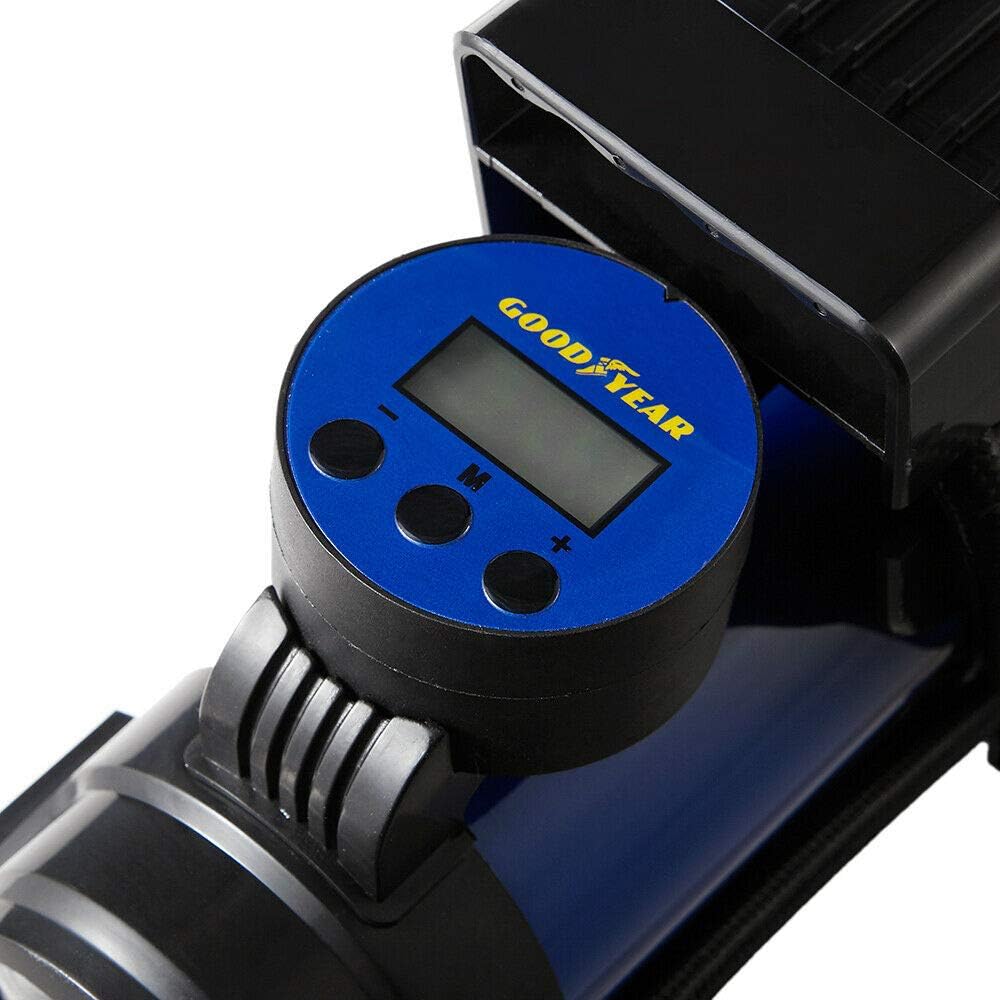
Image: A detailed view of the digital display and control buttons for setting and monitoring tire pressure.
Maintenance
To ensure the longevity and optimal performance of your Goodyear GY900017 inflator, follow these maintenance guidelines:
- Cleaning: Wipe the unit with a dry or slightly damp cloth after each use. Do not use harsh chemicals or abrasive cleaners.
- Storage: Store the inflator in its provided storage bag in a cool, dry place, away from direct sunlight and extreme temperatures.
- Cable Care: Ensure the power cable and air hose are not kinked or damaged during storage. Wrap them neatly around the unit if possible.
- Fuse Replacement: If the unit stops working, check the 15A fuse in the power cable plug. Replace it with the spare fuse provided if necessary.
Troubleshooting
If you encounter issues with your inflator, refer to the following common problems and solutions:
| Problem | Possible Cause | Solution |
|---|---|---|
| Inflator does not turn on. | No power from 12V socket; Blown fuse in power plug; Vehicle engine not running. | Ensure 12V socket is functional. Check and replace the 15A fuse if blown. Start the vehicle engine. |
| Inflator runs but no air is supplied. | Air chuck not securely connected; Internal compressor issue. | Ensure the air chuck is tightly screwed onto the valve stem. If the issue persists, contact customer support. |
| Inflator stops unexpectedly during use. | Overheat protection activated; Desired pressure reached. | Allow the unit to cool down for 15-20 minutes. Check if the preset pressure has been reached. |
| Inaccurate pressure reading. | Loose connection; Sensor malfunction. | Ensure the air chuck is securely connected. Compare reading with a known accurate gauge. |
Warranty and Support
Goodyear stands behind the quality of its products. For warranty information, technical support, or service inquiries, please refer to the contact details provided on the product packaging or visit the official Goodyear website. Please have your model number (GY900017) and purchase date available when contacting support.

