
WMF 1100S
WMF 1100S Super Automatic Coffee Machine
User Manual
Introduction
Thank you for choosing the WMF 1100S Super Automatic Coffee Machine. This machine is designed for office environments, offering a wide variety of coffee beverages with ease of use and high performance. This manual provides essential information for the safe and efficient operation, maintenance, and troubleshooting of your WMF 1100S.

Figure 1: Front view of the WMF 1100S Super Automatic Coffee Machine.
Safety Instructions
Please read all safety instructions carefully before operating the appliance to prevent injury or damage. Keep this manual for future reference.
- Ensure the machine is connected to a grounded power outlet with the correct voltage (230V).
- Do not immerse the machine, power cord, or plug in water or other liquids.
- Keep hands and fingers away from moving parts and hot surfaces during operation.
- Unplug the machine before cleaning or performing any maintenance.
- Do not operate the machine with a damaged cord or plug. Contact authorized service personnel for repairs.
- This appliance is intended for office use and not for household use.
Setup
1. Unpacking
Carefully remove the coffee machine and all accessories from the packaging. Retain the packaging for future transport or storage.
2. Placement
Place the machine on a stable, level, and heat-resistant surface. Ensure adequate ventilation around the machine. The compact dimensions allow for flexible installation.

Figure 2: The WMF 1100S is designed for compact installation, fitting under standard kitchen units.
3. Power Connection
Connect the power cord to the machine and then to a suitable 230V / 10amp / Single Phase grounded electrical outlet.
4. Water Supply
The WMF 1100S features a removable 4.5-liter water tank. Fill the tank with fresh, cold water. The machine also includes an integrated water filter. Optionally, the machine can be connected to a mains water supply.

Figure 3: Overview of machine features, including the water tank and optional hopper enhancements.
5. Filling Hoppers
Fill the coffee bean hopper(s) with fresh coffee beans (capacity 550g, with optional extension 1100g). If applicable, fill the choc or topping container (capacity 450g, with optional extension 1250g).

Figure 4: Top view of the WMF 1100S, illustrating the coffee bean hoppers.
The machine supports "Plug&Play" for easy self-setup.
Operating Instructions
1. Intuitive Touch Display
The WMF 1100S features a 7-inch touch display with vertical swipe functionality. Navigate through the menus to select your desired beverage. Animated descriptions provide service support, and favorite recipes can be easily recorded.

Figure 5: The intuitive touch display for beverage selection.
2. Beverage Selection
The machine offers 8 coffee types, including Espresso, Ristretto, Cappuccino, Café Crème, Espresso Macchiato, and Caffè Latte. Simply touch the icon of your desired beverage on the display to start brewing.
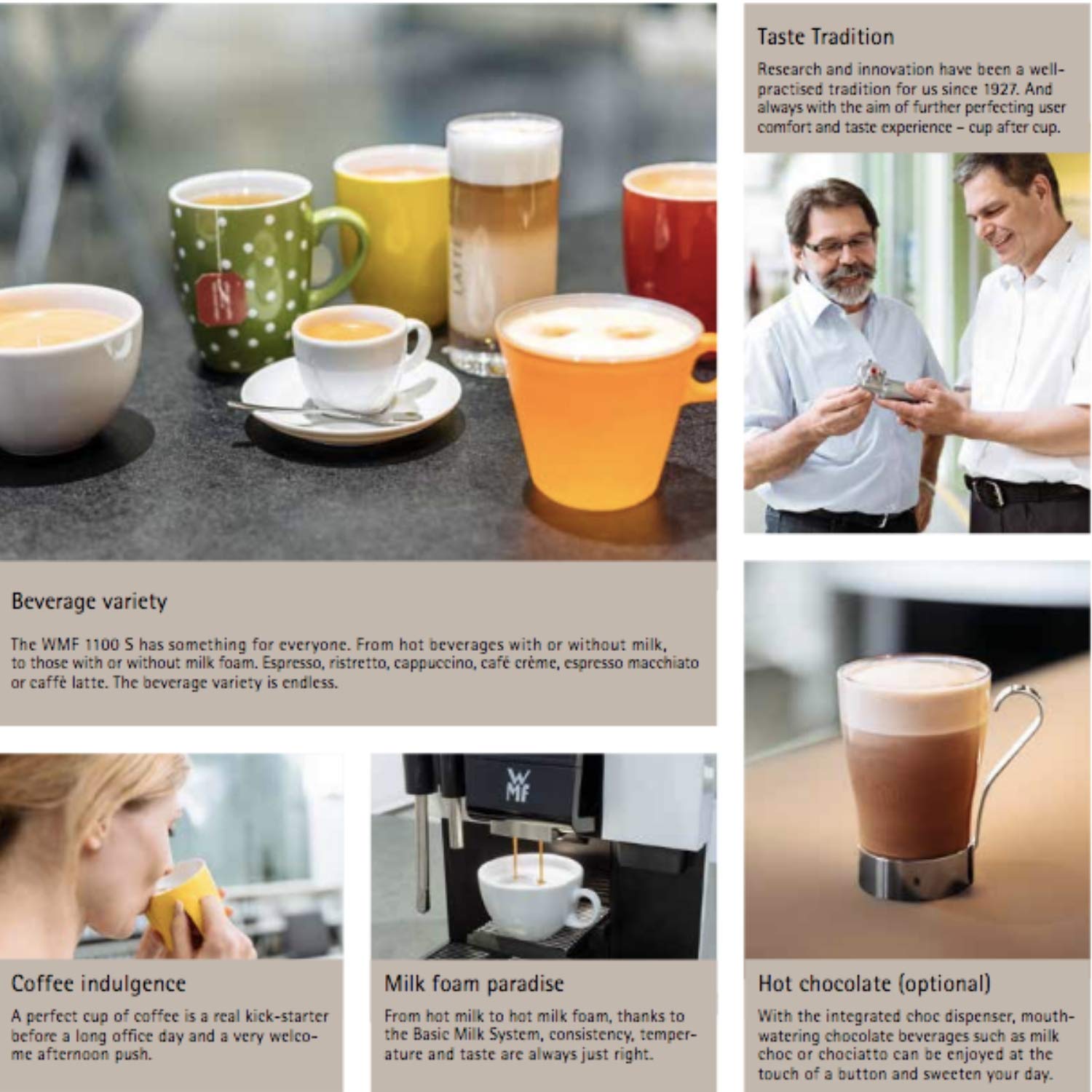
Figure 6: Examples of the wide beverage variety available from the WMF 1100S.
3. Milk Foam Paradise
Thanks to the Basic Milk System, you can enjoy perfect milk foam for beverages like Cappuccino and Latte Macchiato. Consistency, temperature, and taste are always just right.
4. Hot Chocolate (Optional)
With the integrated choc dispenser, you can prepare delicious hot chocolate beverages by touching a button.
5. Hot Water Spout
The machine includes a hot water spout for tea preparation or other hot water needs.
6. Eco Mode
Activate Eco mode to reduce energy consumption when the workload decreases, contributing to energy efficiency.
7. Cup Table
The fold-out cup table guarantees optimal clearance height, even for small cups.
Maintenance
1. Easy Cleaning (Click&Clean)
The patented Click&Clean function makes cleaning the milk system easy. Soaking the milk foamer daily is no longer necessary; manual cleaning is required just once a week. Animated step-by-step cleaning instructions are available on the touch display.
Figure 7: Illustration of the easy cleaning feature and the machine's compact design.
2. Grounds Container
The grounds container is designed for comfortable size, easy access, emptying, and cleaning.
3. Overflow Protection
The drip tray has a liquid level sensor for overflow protection. There is also an option for a drainage connection.
4. Data Security
The machine supports data backup (e.g., cleaning protocols for HACCP documentation) and software updates via a USB stick.
Troubleshooting
This section provides solutions to common issues you might encounter. For problems not listed here, please contact customer support.
| Problem | Possible Cause | Solution |
|---|---|---|
| Machine not turning on | No power supply; power cord not connected. | Check power cord connection; ensure outlet is functional. |
| Coffee not brewing | Water tank empty; coffee beans empty; brewing unit clogged. | Refill water tank; refill coffee beans; clean brewing unit as per maintenance instructions. |
| Milk not frothing properly | Milk system dirty; milk type unsuitable. | Perform milk system cleaning (Click&Clean); use fresh, cold milk. |
| Error message on display | Specific internal issue. | Refer to the specific error code on the display for detailed instructions or contact support. |
Specifications
Detailed technical specifications for the WMF 1100S Super Automatic Coffee Machine:

Figure 8: Official technical specifications for the WMF 1100S.
| Feature | Detail |
|---|---|
| Brand | WMF |
| Model | 1100S |
| Colour | Stainless Steel |
| Special Feature | Removable Tank, Water Filter |
| Coffee Maker Type | Espresso Machine |
| Filter Type | Reusable |
| Style | Modern |
| Specific Uses For Product | Office |
| Operation Mode | Fully Automatic |
| Number of Items | 1 |
| Nominal Power Rating | 2.2 kW |
| Recommended Max. Daily Output | Up to 80 cups |
| Max. Hourly Output | Up to 50 cups |
| Coffee Bean Hopper(s) | 550 g (With Ext. 1100g) |
| Choc or Topping Container | 450 g (With Ext. 1250g) |
| Mains Power Connection | 230 V / 10amp / Single Phase |
| Dimensions (width / height / depth) | 325 mm / 500 mm / 561 mm |
| Empty Weight (depending on fittings) | Approx. 25.5 kg |
| Continuous Sound Pressure Level (LpA) | < 70 dB (A) |
| UPC | 787099806811 |
| ASIN | B07KWB73HN |
Warranty and Support
WMF products are manufactured to the highest quality standards. For warranty information, please refer to the warranty card included with your purchase or visit the official WMF website.
For technical support, spare parts, or service inquiries, please contact your local WMF service center or authorized dealer. Always provide the model number (WMF 1100S) and serial number of your machine when contacting support.
You can also find more information and support resources on the official WMF website: www.wmf.com
Related documents1100S


Ask a question about this manual
Ask about setup, troubleshooting, compatibility, parts, safety, or missing instructions. Manuals+ will review the question and use this page’s manual context to help answer it.