1. Introduction
Thank you for choosing the JVC SI43FS 43-inch Full HD Smart LED TV. This manual provides essential information for the safe and efficient operation of your television. Please read it thoroughly before using the product and retain it for future reference.
2. Safety Information
Observe the following safety precautions to prevent fire, electric shock, or injury:
- Do not expose the TV to rain or moisture.
- Do not open the TV casing; refer all servicing to qualified personnel.
- Ensure proper ventilation around the TV.
- Use only the power cord supplied with the TV.
- Keep the TV away from direct sunlight, heat sources, and strong magnetic fields.
- Unplug the TV during lightning storms or when unused for long periods.
3. Package Contents
Verify that all items are present in the box:
- JVC SI43FS 43-inch Full HD Smart LED TV
- Remote Control with Batteries
- Power Cord
- TV Stand (2 pieces)
- Screws for TV Stand
- User Manual (this document)
4. Setup
4.1 Attaching the TV Stand
To attach the stand to your JVC SI43FS TV:
- Carefully place the TV screen-down on a soft, flat surface to prevent damage.
- Align each stand piece with the corresponding screw holes on the bottom of the TV.
- Secure each stand piece using the provided screws. Ensure they are tightened firmly.
- Carefully lift the TV to its upright position on a stable, level surface.

Figure 1: JVC SI43FS TV with its table stand attached, viewed from an angle, showing the two support legs.
4.2 Wall Mounting (Optional)
If you choose to wall-mount your TV, ensure you use a VESA-compatible wall mount kit (not included) that supports the TV's weight and VESA pattern. Consult a professional for wall mounting installation.
4.3 Connecting Power
Plug the power cord into the TV's power input, then plug the other end into a wall outlet. The TV will enter standby mode.
4.4 Connecting External Devices
Your JVC SI43FS TV features multiple input ports for various devices:
- HDMI Ports: Connect Blu-ray players, game consoles, cable/satellite boxes, etc.
- USB Port: Connect USB storage devices for media playback.
- Antenna/Cable Input: Connect an antenna or cable for broadcast TV.
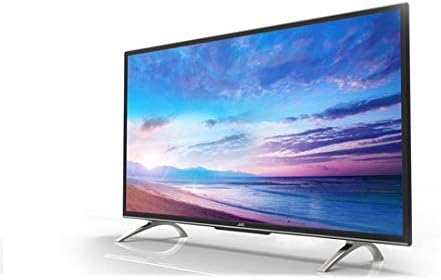
Figure 2: Side profile of the JVC SI43FS TV, highlighting the slim design and potential location of side-facing input ports.
4.5 Initial Setup Wizard
Upon first power-on, the TV will guide you through an initial setup process, including language selection, network connection, and channel scanning.
5. Operating Instructions
5.1 Power On/Off
Press the POWER button on the remote control or the TV to turn the TV on or off (standby mode).
5.2 Basic Functions
- Volume Control: Use the VOL +/- buttons to adjust the sound level.
- Channel Selection: Use the CH +/- buttons to change channels or enter channel numbers directly.
- Input Source: Press the SOURCE or INPUT button to select connected devices (HDMI 1, HDMI 2, USB, TV, etc.).
- Menu Navigation: Use the arrow buttons (UP, DOWN, LEFT, RIGHT) and OK/ENTER button to navigate menus.

Figure 3: Front view of the JVC SI43FS TV, showcasing its display with a colorful landscape image.
6. Smart TV Features
6.1 Network Connection
To access Smart TV features, connect your TV to the internet:
- Go to Settings > Network.
- Select Wi-Fi and choose your network from the list.
- Enter your Wi-Fi password and confirm.
6.2 Using Applications
Access pre-installed applications or download new ones from the app store (if available). Navigate to the Smart TV home screen to view and launch applications.
6.3 Media Playback via USB
Insert a USB storage device into the USB port. The TV's media player will typically detect the device, allowing you to browse and play photos, music, or videos.
7. Maintenance
7.1 Cleaning the Screen
Gently wipe the screen with a soft, lint-free cloth. For stubborn marks, slightly dampen the cloth with water or a specialized screen cleaner. Do not spray liquid directly onto the screen.
7.2 General Care
- Keep the TV free from dust by regularly wiping the casing with a dry, soft cloth.
- Ensure ventilation openings are not blocked.
- Avoid placing heavy objects on top of the TV.
8. Troubleshooting
| Problem | Possible Cause | Solution |
|---|---|---|
| No power | Power cord not connected; outlet not working. | Check power cord connection; test outlet with another device. |
| No picture, but sound is present | Incorrect input source selected; backlight issue. | Press the SOURCE button to select the correct input; contact support if issue persists. |
| No sound, but picture is present | Volume muted or too low; external audio device issue. | Unmute or increase volume; check audio connections to external devices. |
| Remote control not working | Batteries depleted; obstruction between remote and TV. | Replace batteries; remove obstructions; ensure remote is pointed at the TV's sensor. |
| Cannot connect to Wi-Fi | Incorrect password; router issue; TV too far from router. | Verify password; restart router; move TV closer or use a Wi-Fi extender. |
9. Specifications
| Feature | Detail |
|---|---|
| Brand | JVC |
| Model Name | SI43FS |
| Screen Size | 43 Inches |
| Display Technology | LED |
| Resolution | 1080p (Full HD, 1920 x 1080) |
| Aspect Ratio | 16:9 |
| Special Features | Smart TV, USB Input, Full HD |
| Hardware Interface | USB, HDMI |
| Connectivity Technology | HDMI |
| Mounting Type | Table Mount |
10. Warranty and Support
For warranty information and technical support, please refer to the warranty card included with your product or visit the official JVC website for your region. Keep your purchase receipt as proof of purchase.
For further assistance, you may contact JVC customer service.


