
Casio TQ-159-7JF
CASIO TQ-159-7JF Analog Alarm Clock User Manual
Model: TQ-159-7JF
1. Introduction
Thank you for choosing the CASIO TQ-159-7JF Analog Alarm Clock. This clock features a classic analog display, an electronic sound alarm, a snooze function, and a built-in light for nighttime visibility. Its simple design and essential functions make it suitable for various settings.
2. Safety Precautions
- Do not expose the clock to extreme temperatures, direct sunlight, or high humidity.
- Avoid strong impacts or dropping the clock.
- Keep batteries out of reach of children. If swallowed, seek medical attention immediately.
- Dispose of used batteries according to local regulations. Do not incinerate batteries.
- Do not attempt to disassemble or repair the clock yourself. Contact qualified service personnel.
3. Package Contents
- CASIO TQ-159-7JF Analog Alarm Clock
- AA Manganese Battery (x1)
- Instruction Manual
4. Product Overview
Familiarize yourself with the main components of your alarm clock.

Figure 4.1: Front View - Displays the analog clock face with clear numerals and hands.

Figure 4.2: Rear View - Shows the controls for setting time and alarm, and the battery compartment.
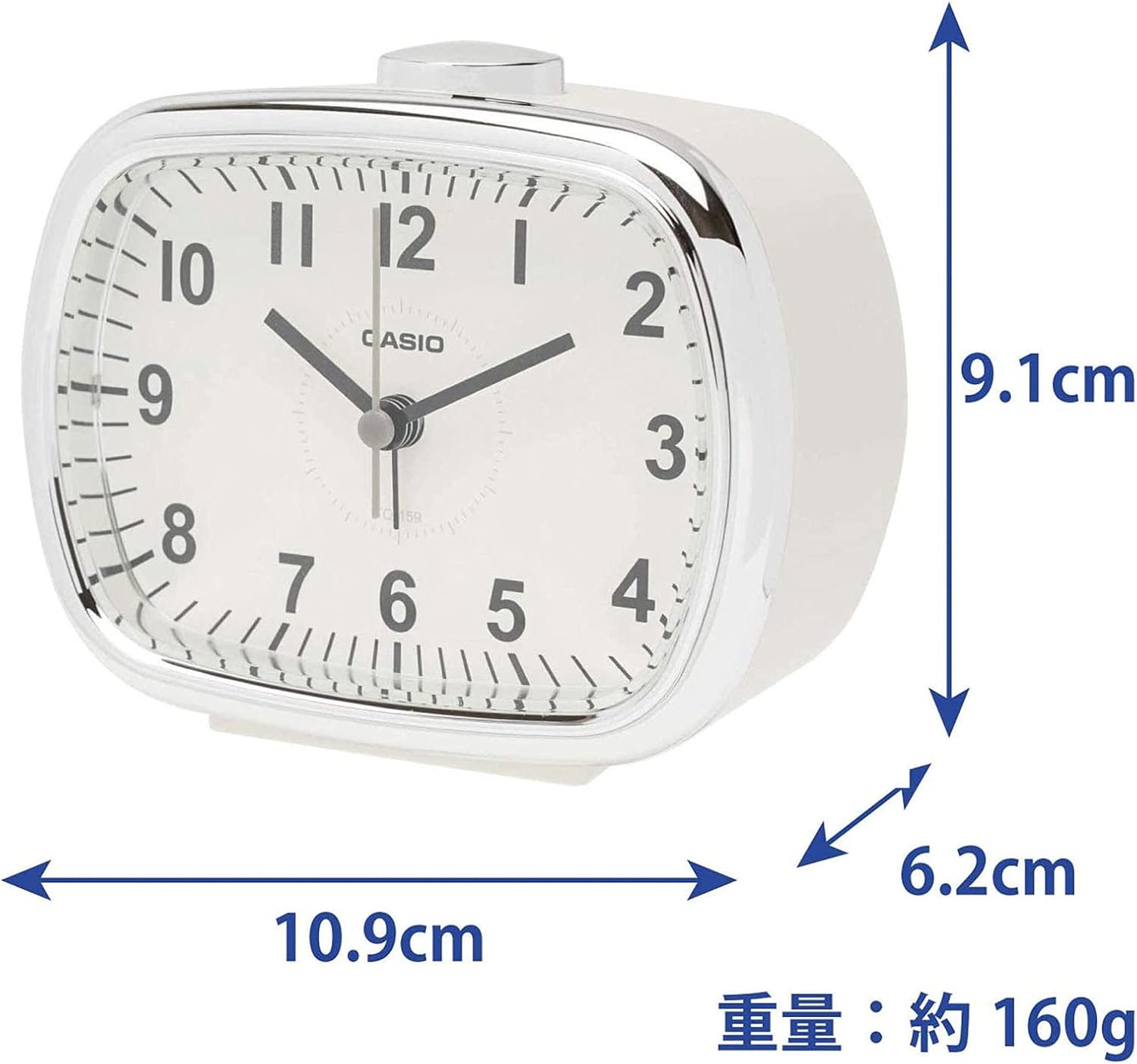
Figure 4.3: Side View - Illustrates the overall shape and the snooze/light button located on top.
5. Setup
5.1 Battery Installation
- Open the battery compartment cover located on the back of the clock (refer to Figure 4.2).
- Insert one AA manganese battery, ensuring the positive (+) and negative (-) terminals are aligned correctly according to the diagram inside the compartment.
- Close the battery compartment cover securely.
5.2 Setting the Time
- Locate the Time Setting Knob on the back of the clock (refer to Figure 4.2).
- Rotate the knob in either direction to move the hour and minute hands to the current time.
- Ensure the time is set accurately.
5.3 Setting the Alarm
- Locate the Alarm Setting Knob on the back of the clock (refer to Figure 4.2).
- Rotate the knob to move the alarm hand to your desired alarm time.
- To activate the alarm, slide the Alarm ON/OFF Switch (refer to Figure 4.2) to the 'ON' position.
6. Operating Instructions
6.1 Using the Alarm
- When the alarm is set to 'ON', it will sound at the designated time.
- To stop the alarm, slide the Alarm ON/OFF Switch to the 'OFF' position.
6.2 Using the Snooze Function
- When the alarm sounds, press the large button on the top of the clock (refer to Figure 4.3). This will temporarily stop the alarm.
- The alarm will sound again after approximately 5 minutes.
- To fully deactivate the alarm, slide the Alarm ON/OFF Switch to the 'OFF' position.
6.3 Using the Light
- To illuminate the clock face in the dark, press the large button on the top of the clock (refer to Figure 4.3).
- The light will remain on as long as the button is pressed.
7. Maintenance
- Cleaning: Wipe the clock with a soft, dry cloth. Do not use abrasive cleaners or solvents.
- Battery Replacement: Replace the AA battery when the clock's timekeeping becomes inaccurate or the alarm/light functions weaken. Always use a fresh AA manganese battery.
- Storage: If not using the clock for an extended period, remove the battery to prevent leakage and damage.
8. Troubleshooting
| Problem | Solution |
|---|---|
| Clock hands do not move or move slowly. | Replace the AA battery with a new one. Ensure the battery is inserted with correct polarity. |
| Alarm does not sound. | Check if the Alarm ON/OFF Switch is in the 'ON' position. Ensure the battery has sufficient power. |
| Light does not work. | Check if the battery has sufficient power. |
9. Specifications
- Model: TQ-159-7JF
- Brand: Casio
- Display Type: Analog
- Functions: Electronic Sound Alarm, Snooze, Light, Step Second Hand
- Power Source: 1 x AA Manganese Battery (included)
- Product Dimensions (H x W x D): Approximately 9.1 cm x 10.9 cm x 6.2 cm (3.6 in x 4.3 in x 2.4 in)
- Item Weight: Approximately 160 grams
- Color: Cream

Figure 9.1: Product Dimensions - Visual representation of the clock's size and weight.
10. Warranty and Support
This product comes with an instruction manual. For warranty information or further support, please refer to the documentation included in your package or contact your local Casio authorized dealer or service center. Please retain your purchase receipt for warranty claims.
11. No Official Product Videos Available
Based on the provided product data, there are no official product videos from the seller available for embedding in this manual.
Related documentsTQ-159-7JF


Ask a question about this manual
Ask about setup, troubleshooting, compatibility, parts, safety, or missing instructions. Manuals+ will review the question and use this page’s manual context to help answer it.