1. Product Overview
The SMALLRIG BMPCC 4K & 6K Camera Cage (Model 2203) is a custom-designed accessory for the Blackmagic Design Pocket Cinema Camera 4K and 6K. It provides enhanced protection, multiple mounting points for accessories, and maintains full access to camera controls and ports. This cage is engineered to integrate seamlessly with your camera, offering a robust framework for professional video production setups.

Image 1.1: Overview of the SMALLRIG BMPCC 4K & 6K Camera Cage, highlighting its various features including 1/4" threads, cold shoe mount, ARRI locating points, SSD mount thread, strap slot, rubber cushion, anti-twist pins, built-in NATO rail, and M4 thread for lens adapter.
2. Key Features
- High Customization: Specifically designed for Blackmagic Design Pocket Cinema Camera 4K & 6K, ensuring no obstruction to camera buttons, battery access, or SD card slot. Compatible with gimbals like DJI Ronin S or Zhiyun Crane 2.
- Perfect Protection: Securely attaches via two screws on the top and bottom. Features two detachable small pins to prevent camera twisting. Rubber pads on the bottom protect the camera body from scratches.
- Multiple Mounting Points: Equipped with 1/4'' & 3/8'' threaded holes, a cold shoe, and 3/8'' locating holes for ARRI standard accessories, allowing attachment of microphones, articulating arms, and more.
- Built-in NATO Rail: Facilitates quick release of accessories with NATO clamps, such as the SmallRig Side Handle - 2187 for handheld shooting.

Image 2.1: The camera cage demonstrating multiple mounting options for accessories like a shoe mount, SSD mounts (BSH2343, 2245), NATO handle (2187), lens adapter (2247), and HDMI cable clamp (2246).
3. Package Contents
The package for the SMALLRIG BMPCC 4K & 6K Camera Cage (Model 2203) includes the following components:
- 1 x Camera Cage
- 3 x 1/4 Screw
- 1 x Hex Spanner (built-in)
4. Setup and Installation
Follow these steps to properly install your camera into the SMALLRIG BMPCC 4K & 6K Camera Cage:
- Prepare the Camera: Ensure your Blackmagic Design Pocket Cinema Camera 4K or 6K is powered off.
- Insert Camera: Carefully slide the camera into the cage, aligning the bottom 1/4"-20 screw hole on the camera with the corresponding screw on the cage base.
- Secure Bottom Screw: Use the provided 1/4"-20 screw to firmly attach the camera to the base of the cage. The cage features anti-twist pins that engage with the camera body to prevent rotation.
- Secure Top Screw: Locate the additional 1/4"-20 screw point on the top right side of the cage and secure it to the camera. This dual-point attachment ensures maximum stability and prevents twisting.
- Verify Access: Confirm that all camera buttons, the battery compartment, and the SD card slot remain unobstructed and fully accessible.
Video 4.1: This video demonstrates the step-by-step installation process of the SMALLRIG Cage onto the BMPCC 4K camera, showing how to secure the camera with the provided screws and ensuring proper fit.
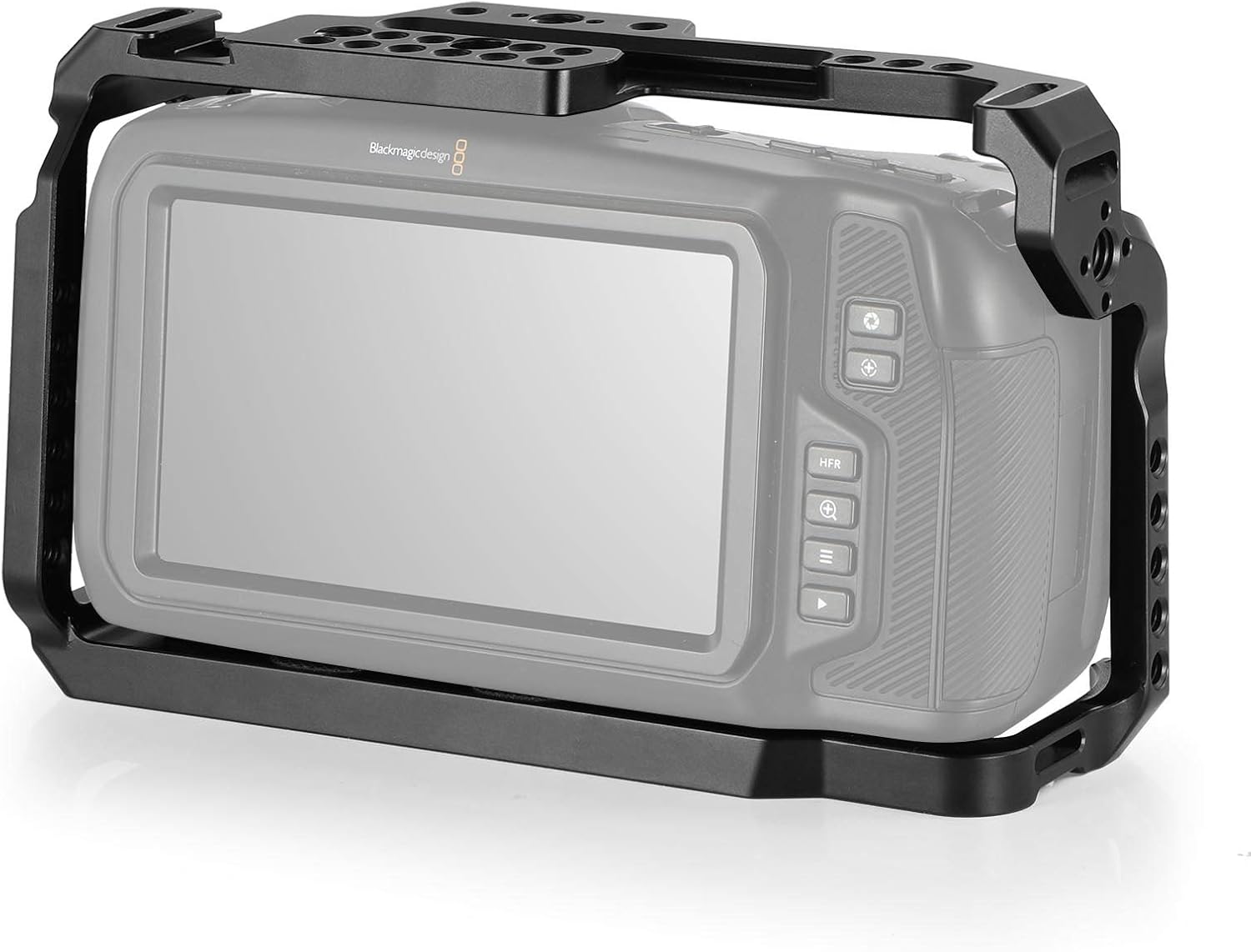
Image 4.2: The Blackmagic Design Pocket Cinema Camera 4K is shown fully enclosed and secured within the SMALLRIG cage, illustrating the precise fit and access to the camera's screen.

Image 4.3: Detailed view of the anti-twisting mechanism, showing how the camera is locked via the bottom 1/4"-20 screw and two small pins, preventing unwanted rotation.
5. Operating Instructions
The SMALLRIG BMPCC 4K & 6K Camera Cage is designed to enhance your camera's functionality by providing versatile mounting options:
- Attaching Accessories: Utilize the numerous 1/4'' and 3/8'' threaded holes, cold shoe, and ARRI locating points to attach external monitors, microphones, LED lights, articulating arms, and other essential accessories.
- NATO Rail System: The built-in NATO rail allows for quick attachment and detachment of NATO clamp-compatible accessories, such as side handles for improved ergonomics during handheld shooting.
- SSD Mount Integration: Dedicated threads are available for attaching SSD mounts (e.g., SmallRig Mount for Samsung T5 SSD 2245) to record directly to external drives.
- Lens Adapter Support: The cage includes M4 threads for attaching lens adapter supports (e.g., SmallRig lens adapter support for Metabones 2247) to reduce strain on the camera's lens mount.
- Cable Management: Use the HDMI cable clamp (e.g., SmallRig HDMI cable clamp 2246) to secure cables and prevent accidental disconnections or damage to ports.

Image 5.1: The cage design ensures the battery compartment remains unobstructed for free battery replacement. A built-in hex spanner is also shown for convenient adjustments.
Video 5.2: This video provides a general overview of the SMALLRIG Cage for Blackmagic Design Pocket Cinema Camera 4K 2203, showcasing its features and how it integrates with the camera.
Video 5.3: A demonstration of the SMALLRIG Cage for BMPCC 4K & 6K, highlighting its design and compatibility with the camera models.
Video 5.4: This video showcases the SMALLRIG Camera Cage for BMCC 6K, illustrating its features and how it enhances the camera setup.
6. Maintenance
To ensure the longevity and optimal performance of your SMALLRIG BMPCC 4K & 6K Camera Cage, follow these maintenance guidelines:
- Regular Cleaning: Wipe the cage with a soft, dry cloth to remove dust and debris. For stubborn dirt, use a slightly damp cloth and mild soap, then dry thoroughly.
- Inspect Screws and Connections: Periodically check all screws and connection points to ensure they are tight and secure. Loose connections can lead to instability or damage.
- Avoid Harsh Chemicals: Do not use abrasive cleaners, solvents, or harsh chemicals, as these can damage the finish or material of the cage.
- Proper Storage: Store the cage in a dry, clean environment when not in use, preferably in a protective bag or case to prevent scratches and impacts.
7. Troubleshooting
If you encounter any issues with your SMALLRIG BMPCC 4K & 6K Camera Cage, consider the following troubleshooting steps:
- Camera Not Fitting Securely: Double-check that the camera model is compatible (BMPCC 4K or 6K, not 6K Pro). Ensure all screws are properly aligned and tightened. Verify that no foreign objects are obstructing the camera's placement.
- Accessories Not Attaching Firmly: Ensure the accessory's mounting screw or clamp is compatible with the cage's mounting points (1/4'', 3/8'', ARRI locating holes, NATO rail). Tighten all screws and levers securely.
- Difficulty Accessing Camera Controls: Confirm the camera is correctly seated within the cage. The cage is designed to provide full access; if obstructed, re-installation may be necessary.
- Unusual Movement or Play: This may indicate loose screws. Use the built-in hex spanner to tighten all attachment points, especially the main camera screws.
For further assistance, please contact SMALLRIG customer support.
8. Specifications
| Attribute | Value |
|---|---|
| Product Dimensions | 7.56 x 4.53 x 2.95 inches (192 x 115 x 75mm) |
| Item Weight | 12.7 ounces (360 Grams) |
| ASIN | B07KLYGGV7 |
| Item Model Number | SR#2203 |
| Brand | SMALLRIG |
| Color | Black |
| Compatible Devices | Blackmagic Design Pocket Cinema Camera 4K & 6K |
| UPC | 687765620010 |
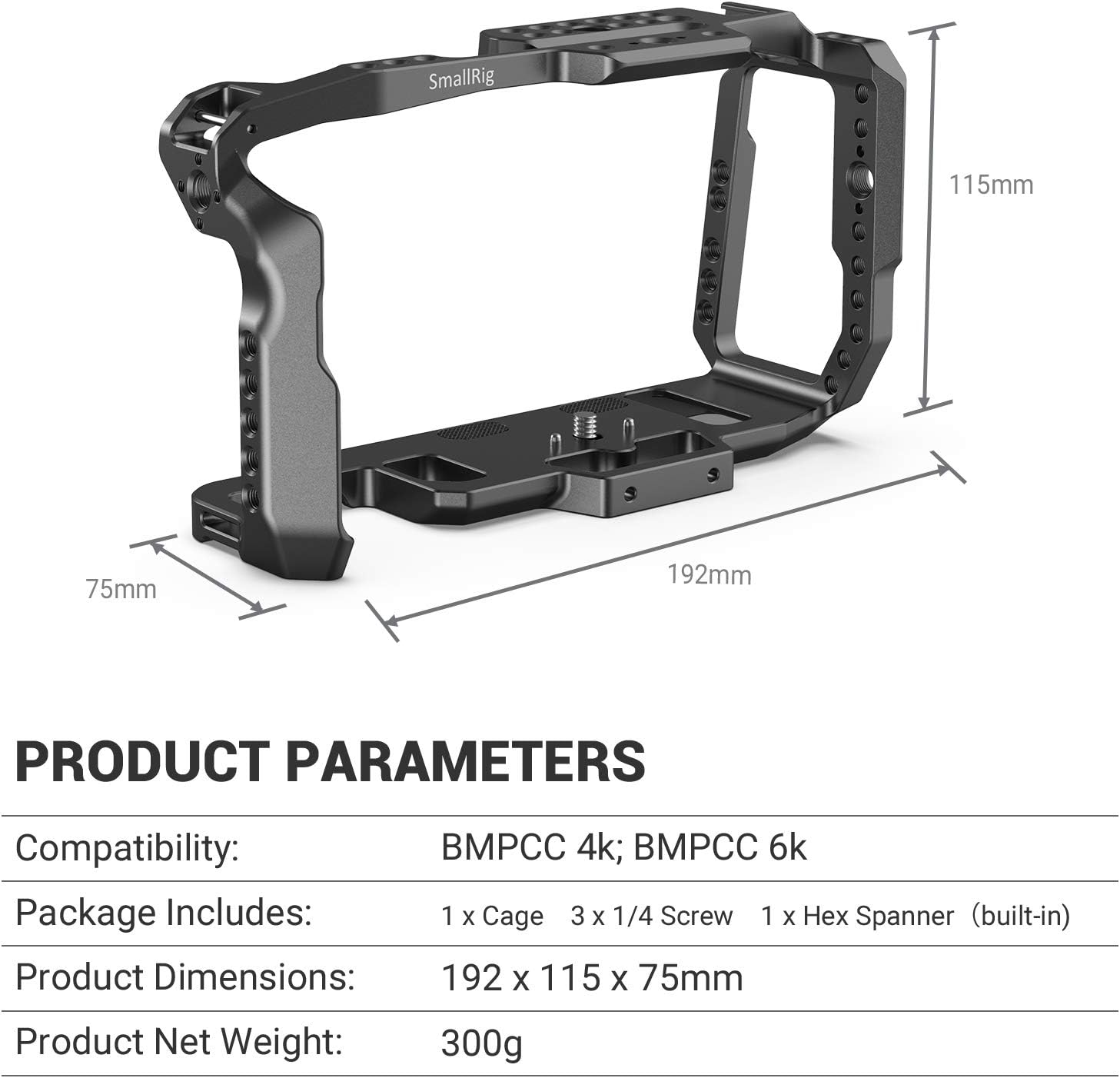
Image 8.1: Visual representation of the product parameters, including compatibility, package contents, product dimensions (192 x 115 x 75mm), and net weight (300g).
9. Warranty and Support
SMALLRIG products are manufactured to high-quality standards. For specific warranty information, please refer to the product packaging or the official SMALLRIG website. If you require technical support, have questions about product functionality, or need assistance with troubleshooting, please contact SMALLRIG customer service through their official channels. Keep your purchase receipt as proof of purchase for any warranty claims.


