
MYHGRC BN59-01247A
MYHGRC Replacement Remote Control User Manual
Model: BN59-01247A
Product Overview
The MYHGRC replacement remote control is designed to be a direct and fully functional substitute for your original Samsung Smart TV remote. It offers 100% compatibility with various Samsung TV models and requires no complex setup, allowing for immediate use upon battery insertion.
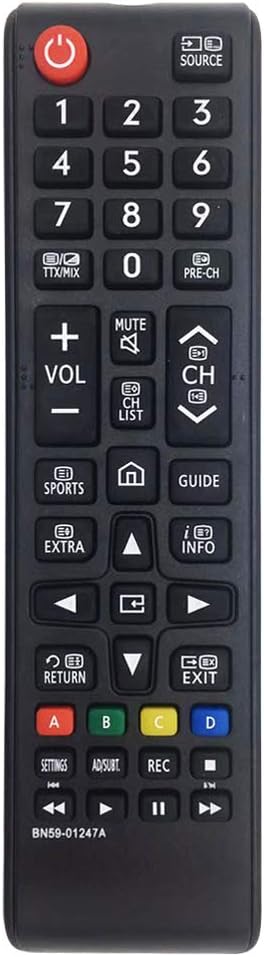
Image: Front view of the MYHGRC replacement remote control, showing all buttons and its ergonomic design.
Setup Guide
This remote control is designed for immediate use without any programming or pairing. Simply insert the batteries, and it will be ready to operate your compatible Samsung Smart TV.
Battery Installation
The remote requires two AAA batteries (not included). Follow these steps to install them correctly:
- Remove Battery Cover: Locate the battery compartment on the back of the remote control and slide the cover downwards to open it.
- Insert Batteries: Insert two AAA batteries, ensuring the positive (+) and negative (-) terminals align correctly with the indicators inside the compartment.
- Close Battery Cover: Slide the battery cover back into place until it clicks securely.

Image: A four-panel diagram illustrating the steps for battery installation: 1. Removing the battery cover, 2. Distinguishing positive and negative electrodes, 3. Inserting batteries, and 4. Closing the cover.

Image: A hand holding the remote control, with an inset showing the open battery compartment. Text overlay emphasizes "NO SETUP REQUIRED".
Operating Instructions
Once batteries are installed, the MYHGRC remote control is ready to operate your Samsung Smart TV. Point the remote directly at your television and press the desired buttons.
Key Functions
- Power Button (⏵): Turns the TV on or off.
- Source Button: Selects input sources (HDMI, AV, etc.).
- Number Buttons (0-9): Directly input channel numbers.
- Volume Control (VOL +/-): Adjusts the TV volume.
- Channel Control (CH +/-): Changes TV channels.
- Mute Button: Mutes or unmutes the TV sound.
- Smart Hub/Home Button (🏠): Accesses the Smart Hub or home menu for apps and smart features.
- Navigation Buttons (Up, Down, Left, Right, Enter): Navigate through menus and select options.
- Return/Back Button: Returns to the previous screen or menu.
- Exit Button: Exits the current menu or application.
- Color Buttons (Red, Green, Yellow, Blue): Used for specific functions within certain applications or menus, as indicated on screen.
- Playback Controls (Play, Pause, Stop, Fast Forward, Rewind): Control media playback.

Image: A family watching television, with the MYHGRC remote control prominently displayed in the foreground, illustrating typical usage.

Image: The remote control shown alongside multiple small screens displaying various Samsung TV interfaces, indicating broad compatibility.
Maintenance
Battery Replacement
When the remote control's performance degrades or it stops responding, it is likely time to replace the batteries. Follow the battery installation steps outlined in the "Setup Guide" section.
Cleaning
To clean the remote control, use a soft, dry cloth. For stubborn dirt, slightly dampen the cloth with water or a mild, non-abrasive cleaner. Avoid using harsh chemicals or abrasive materials, as these can damage the remote's surface or internal components.
Troubleshooting
| Problem | Possible Cause | Solution |
|---|---|---|
| Remote not responding. | Dead or incorrectly inserted batteries. Obstruction between remote and TV. | Replace batteries, ensuring correct polarity. Remove any obstructions. Ensure direct line of sight to the TV's IR receiver. |
| Buttons are slow to respond. | Low battery power. | Replace batteries with fresh ones. |
| Certain functions do not work. | Remote not fully compatible with specific TV model features. | While highly compatible, some advanced or model-specific functions might not be supported. Verify your TV model against the remote's listed compatibilities. |
Specifications
| Feature | Detail |
|---|---|
| Brand | MYHGRC |
| Model Number | BN59-01247A (Replacement for) |
| Dimensions | Approx. 17.4 x 4.5 x 3 cm (6.85 x 1.77 x 1.18 inches) |
| Package Dimensions | 18.3 x 5.6 x 2.5 cm |
| Weight | Approx. 70 g (0.15 lbs) |
| Material | ABS |
| Power Source | 2 x AAA Batteries (not included) |
| Connectivity Technology | Infrared (IR) |
| Maximum Range | Approx. 10 meters (33 feet) |
| Compatible Devices | Samsung Smart TVs (various models including UE55KU6500U, UA78KS9500W, UA88KS9800, UE40KU6000, UE49KU6500U) |

Image: Side and front views of the remote control with dimensions (17.4cm length, 2cm thickness, 4.5cm width) indicated.
Warranty and Support
MYHGRC offers a lifetime warranty program for this replacement remote control, ensuring high quality and customer satisfaction. For any issues, questions, or support needs, please refer to the seller's contact information on the platform where the product was purchased.
For further assistance, you may also visit the MYHGRC Brand Store.
Related documentsBN59-01247A


Ask a question about this manual
Ask about setup, troubleshooting, compatibility, parts, safety, or missing instructions. Manuals+ will review the question and use this page’s manual context to help answer it.