
1. Introduction
This manual provides detailed instructions for the setup, operation, and maintenance of your Xiaomi Mi Home Security Camera 360 1080P (Model MYSXJ02M). Please read this manual thoroughly before using the product to ensure proper functionality and safety.
2. Product Overview
2.1 Key Features
- Full HD 1080p video capture resolution for clear imaging.
- 360-degree panoramic viewing angle for comprehensive coverage.
- Advanced night vision with a range of up to 9 meters.
- Motion detection capabilities with instant alerts.
- Local recording to a microSDXC card (up to 64GB recommended).
- Two-way audio communication.
- Wireless Wi-Fi connectivity for remote access via the Mi Home app.
- Compact and durable design, suitable for indoor use.
2.2 Package Contents
- Xiaomi Mi Home Security Camera 360 1080P
- USB Power Cable (approx. 2 meters)
- Mounting Accessories (for ceiling/wall installation)
- User Manual
Note: A power adapter (USB charger) is not included and must be supplied by the user. A 5V/2A adapter is recommended for optimal performance.
2.3 Product Components

Figure 1: Front view of the camera, showing the lens and indicator light.

Figure 2: Angled view of the camera, highlighting its dome shape and base.

Figure 3: Rear view of the camera, showing the speaker grille and USB power port.
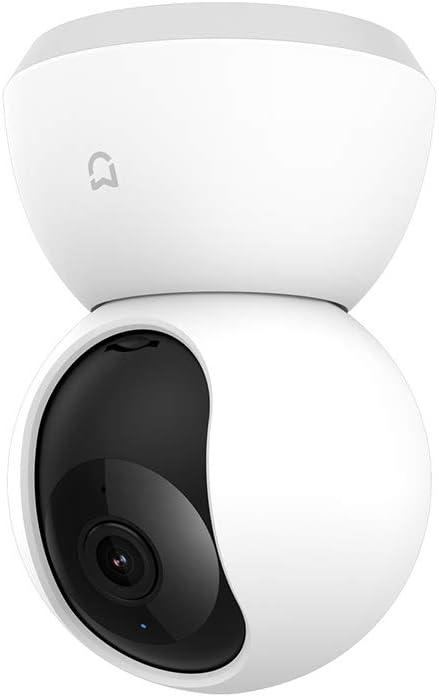
Figure 4: The camera with its lens rotated upwards, revealing the microSD card slot underneath.
3. Setup Guide
3.1 Powering On the Camera
- Connect the provided USB cable to the camera's micro-USB port located at the rear base.
- Plug the other end of the USB cable into a 5V/2A USB power adapter (not included) and then into a power outlet.
- The camera will power on, and the indicator light will flash orange, indicating it is ready for connection.
3.2 Installing the Mi Home App
- Download the Mi Home app from the Google Play Store (for Android devices) or the Apple App Store (for iOS devices).
- Open the app and create a Mi account or log in with an existing one.
3.3 Pairing the Camera with the App
- Ensure your smartphone is connected to a 2.4 GHz Wi-Fi network. The camera does not support 5 GHz Wi-Fi.
- In the Mi Home app, tap the "+" icon in the top right corner to add a new device.
- Select "Mi Home Security Camera 360 1080P" from the list of available devices.
- Follow the on-screen instructions to reset the camera if prompted (usually by pressing a reset button, often located near the microSD slot, for a few seconds until the indicator light flashes orange).
- Scan the QR code displayed on your phone screen using the camera's lens. Hold the phone approximately 15-20 cm (6-8 inches) from the camera.
- Once the QR code is successfully scanned, the camera will emit a voice prompt indicating successful connection. The indicator light will turn blue.
- Name your camera and assign it to a room for easier management within the app.
3.4 Installing a MicroSD Card (Optional)
For local video recording, a microSD card is required. The camera supports cards up to 64GB. A High Endurance microSD card is recommended for continuous recording.
- Power off the camera by unplugging the USB cable.
- Gently push the camera lens upwards until the microSD card slot is revealed (refer to Figure 4).
- Insert the microSD card into the slot with the contacts facing down until it clicks into place.
- Return the camera lens to its original position.
- Reconnect the power cable. The camera will automatically detect the card. You may need to format the card via the Mi Home app settings.
3.5 Mounting the Camera (Optional)
The camera can be placed on a flat surface or mounted on a wall or ceiling using the included mounting accessories.
- Desktop Placement: Simply place the camera on a stable, flat surface.
- Wall/Ceiling Mounting: Use the mounting base as a template to mark and drill holes. Secure the base with screws, then attach the camera to the base. Ensure the camera is securely fastened. In the Mi Home app settings, you can enable "Invert Image" if the camera is mounted upside down.

Figure 5: The camera positioned on a table, demonstrating typical indoor placement.
4. Operating Instructions
All primary functions of the Xiaomi Mi Home Security Camera are controlled via the Mi Home app.
4.1 Live View and Pan/Tilt Control
- Open the Mi Home app and select your camera from the device list.
- The live video feed will appear.
- Swipe your finger across the screen to pan (horizontal movement) and tilt (vertical movement) the camera lens, utilizing its 360-degree viewing capability.
- Use the pinch-to-zoom gesture to digitally zoom into the live feed.
4.2 Two-Way Audio
- While in live view, tap the microphone icon to enable two-way audio.
- Speak into your phone's microphone to transmit your voice through the camera's speaker.
- The camera's built-in microphone will capture audio from its surroundings, which will be played through your phone's speaker.
4.3 Recording and Playback
- Manual Recording: Tap the record icon in the live view interface to start or stop manual video recording directly to your phone.
- Local Recording (MicroSD): If a microSD card is installed, the camera can record continuously or based on motion detection. Configure these settings in the camera's settings within the Mi Home app.
- Playback: Access recorded footage by tapping the "Playback" or "History" icon in the camera's interface within the app. You can browse by date and time.
4.4 Motion Detection and Alerts
- Enable motion detection in the camera settings within the Mi Home app.
- Adjust sensitivity levels and set detection zones as needed.
- When motion is detected, the camera will automatically record a short video clip and send a notification to your smartphone.
4.5 Night Vision
- The camera automatically switches to infrared night vision mode in low-light conditions.
- Night vision provides clear black and white video up to 9 meters.
- Settings for night vision (auto, on, off) can be adjusted in the Mi Home app.
5. Maintenance
5.1 Cleaning the Camera
- Ensure the camera is powered off before cleaning.
- Use a soft, dry cloth to wipe the camera body.
- For the lens, use a lens cleaning cloth specifically designed for optics to avoid scratches. Do not use harsh chemicals or abrasive materials.
5.2 MicroSD Card Management
- Regularly check the status of your microSD card in the Mi Home app.
- If the card is full, older recordings will be overwritten automatically (loop recording).
- Format the microSD card periodically through the app settings to maintain optimal performance and prevent data corruption.
6. Troubleshooting
| Problem | Possible Cause | Solution |
|---|---|---|
| Camera fails to connect to Wi-Fi. | Incorrect Wi-Fi password, 5 GHz network, weak signal, camera too far from router. | Ensure correct 2.4 GHz Wi-Fi password. Move camera closer to router. Reset camera and try pairing again. |
| Indicator light is not blue after setup. | Connection failed or camera is offline. | Check Wi-Fi connection. Restart camera and router. Reset camera and re-pair. |
| No video recording to microSD card. | No microSD card, card full, card not formatted, faulty card. | Ensure card is inserted correctly. Format card via app. Replace card if faulty (High Endurance recommended). |
| Poor image quality. | Dirty lens, low network bandwidth, insufficient lighting. | Clean the camera lens. Ensure stable internet connection. Adjust lighting conditions. |
| Camera is unresponsive. | Power issue, software glitch. | Unplug and replug the power cable to restart. If issue persists, perform a factory reset. |
7. Specifications
| Feature | Detail |
|---|---|
| Model Number | MYSXJ02M |
| Video Resolution | 1080p Full HD |
| Viewing Angle | 360 Degrees (Pan/Tilt) |
| Night Vision Range | Up to 9 meters |
| Connectivity | Wi-Fi (2.4 GHz) |
| Storage | MicroSDXC card (up to 64GB) |
| Power Input | 5V/2A (USB) |
| Dimensions (L x W x H) | 16 x 9 x 8 cm |
| Weight | 260 grams |
| Indoor/Outdoor Use | Indoor |
| Compatible Devices | Smartphone, Tablet (Android, iOS) |
8. Warranty and Support
For warranty information, please refer to the warranty card included with your purchase or visit the official Xiaomi website for your region. If you encounter any issues not covered in this manual, please contact Xiaomi customer support for assistance.
Official Xiaomi Website: www.mi.com


