
Bluefin Fitness Vibration Plate 4D Triple Motor (Model: 5060840909586)
Bluefin Fitness 4D Triple Motor Vibration Plate User Manual
Model: Vibration Plate 4D Triple Motor (5060840909586)
1. Introduction
Thank you for choosing the Bluefin Fitness 4D Triple Motor Vibration Plate. This manual provides essential information for the safe and effective use, setup, operation, and maintenance of your vibration plate. Please read it thoroughly before first use and retain it for future reference.
Product Overview
The Bluefin Fitness 4D Triple Motor Vibration Plate is designed to provide a comprehensive workout experience through its unique combination of three silent drive motors. These motors deliver Vibration, Oscillation, and Micro Vibration, which can be used separately, together, or all three simultaneously. The unit features a curved surface, magnetic therapy sensors, an intuitive LED display, Bluetooth 4.0 speakers, and a wearable remote control for a versatile and engaging fitness routine.
Safety Information
- Consult a physician before starting any new exercise program, especially if you have pre-existing medical conditions.
- The maximum user weight recommendation for this device is 150 Kilograms. Do not exceed this limit.
- Ensure the vibration plate is placed on a stable, level surface during use.
- Keep children and pets away from the equipment during operation.
- Do not use the device if you are pregnant, have a pacemaker, or suffer from severe osteoporosis, epilepsy, or acute thrombosis.
- Always hold onto a stable support if you feel unsteady during use.
- Unplug the unit from the power outlet when not in use or before cleaning.
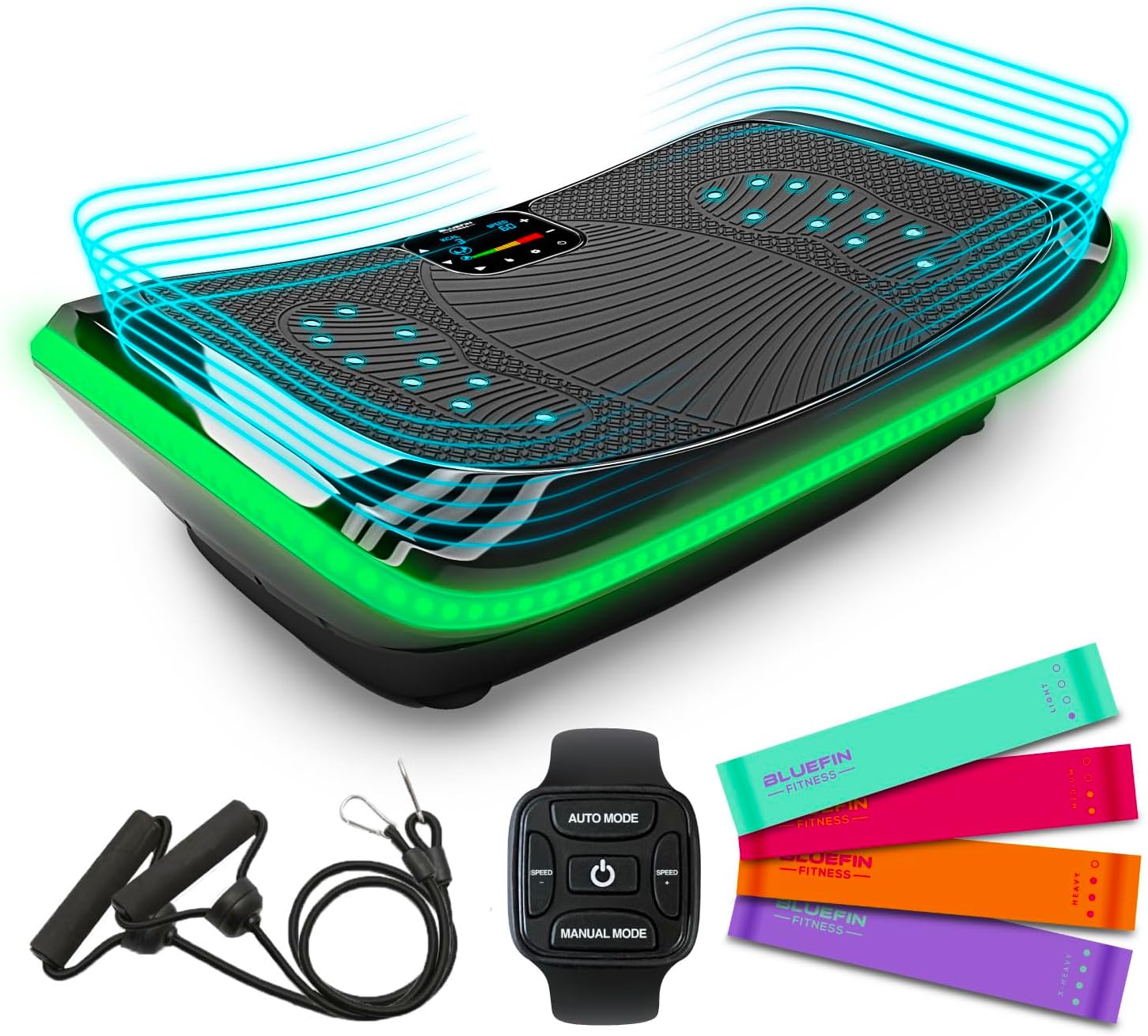
Image: The Bluefin Fitness 4D Triple Motor Vibration Plate, showcasing its sleek design and included accessories like resistance bands and a remote control.
2. Package Contents
Please check the box for the following items:
- 1 x 4D Triple Motor Vibration Plate
- 1 x Exercise Bands (set)
- 1 x Remote Control (wearable wrist remote)
- 1 x Power Cord
- 1 x User Manual (this document)
- 1 x Workout Guide + Poster
- 1 x PVC Foam Mat (Non-Slip Floor Protector)

Image: Resistance bands and cords, which are included accessories to enhance workouts with the vibration plate.

Image: The workout guide and poster, providing exercise suggestions and nutritional advice.

Image: A rolled-up PVC foam mat, designed to protect floors and reduce noise during use.
3. Setup
- Unpacking: Carefully remove all components from the packaging. Retain packaging for future storage or transport.
- Placement: Place the vibration plate on a firm, level, and non-slip surface. Ensure there is adequate space around the unit for safe exercise. The included PVC foam mat can be placed underneath for floor protection and noise reduction.
- Power Connection: Insert the power cord into the power inlet on the vibration plate and then plug it into a standard electrical outlet.
- Remote Control Setup: The wearable wrist remote control requires a CR2032 battery. If the remote is not functioning, open the battery compartment (often by removing the rubber casing and accessing the back) and remove any plastic insulating tab that may be present. Insert the CR2032 battery with the correct polarity and close the compartment.

Image: A side view of the Bluefin Fitness 4D Triple Motor Vibration Plate, illustrating its compact design suitable for home setup.
4. Operating Instructions
Powering On/Off
- To power on, press the power button on the main control panel or the remote control. The LED display will illuminate.
- To power off, press and hold the power button on the control panel or remote until the unit shuts down.
Understanding the 4D Motion
The Bluefin Fitness 4D Vibration Plate utilizes three distinct motors to create various vibration types:
- Vertical Linear Vibration (Motor 1): Up and down motion.
- Micro Oscillation (Motor 2): High-frequency, low-amplitude vibration.
- Horizontal Oscillation (Motor 3): Side-to-side motion.
These can be combined for a total of 4 advanced vibration modes, offering a comprehensive workout.

Image: An internal diagram illustrating the three silent drive motors responsible for Vertical Vibrations, Micro Oscillation, and Horizontal Vibrations.

Image: A visual representation of the vertical linear vibration mode, highlighting the up-and-down motion.

Image: A visual representation of the horizontal oscillation mode, showing the side-to-side movement.

Image: A visual representation of the combined 4D mode, indicating the simultaneous activation of multiple vibration types.
Workout Programs and Manual Modes
The vibration plate offers a variety of workout options:
- Pre-set Programs: Choose from 3 carefully designed automatic programs for varied routines.
- Manual Modes: Select from 7 challenging manual combinations, allowing you to customize the vibration type and intensity (60 intensity levels).
A typical workout duration is 10 minutes, which is sufficient for a full 4D workout.

Image: The control panel displaying the available 60 intensity levels, 3 pre-set programs, and 7 manual modes for diverse workout options.
Using the Remote Control
The ergonomic wearable wrist remote control allows you to adjust settings without interrupting your workout:
- Power Button: Turns the unit on/off and starts/stops programs.
- Auto Mode: Cycles through pre-set programs.
- Manual Mode: Selects manual vibration combinations.
- Speed/Intensity Buttons: Adjusts the intensity levels within manual modes.

Image: The wearable wrist remote control, designed for convenient adjustment of settings during exercise.
Bluetooth Speakers
Connect your Bluetooth-enabled device to the vibration plate to play audio during your workout:
- Ensure Bluetooth is enabled on your device.
- Search for available Bluetooth devices and select "Bluefin Fitness" (or similar name).
- Once paired, audio will play through the integrated speakers.

Image: A smartphone connected via Bluetooth to the vibration plate, demonstrating the integrated speaker functionality for playing music.
Magnetic Therapy Sensors
The curved surface of the plate incorporates magnetic therapy sensors. These provide a reflexology-like massage, which can be beneficial for soothing tired feet and legs during or after a workout, or while seated.
LED Stop Light System
The ultra-bright LEDs on the unit provide visual feedback on your workout intensity:
- Red: Indicates higher intensity.
- Orange: Indicates medium intensity.
- Green: Indicates lower intensity.
Health Benefits
Regular use of the Bluefin Fitness 4D Triple Motor Vibration Plate can contribute to various health and fitness goals:
- Burn Fat + Lose Weight: Vibrations enhance simple exercise routines, significantly improving weight loss targets and reducing the timeframes for achieving goals.
- Increases Muscle Power: Muscles contract up to 50 times more than usual, providing rapid results without the intensity of a heavy workout and targeting specific muscle groups for definition.
- Improves Core Strength: Vibrations force muscles to work harder, improving core strength and athletic power, and making physical activity easier over time.
- Tones and Shapes: Helps sharpen balance and stability, and can be combined with exercises for visible and rewarding results.

Image: An illustration highlighting the benefit of burning fat and losing weight through enhanced exercise routines with the vibration plate.

Image: An illustration detailing how the vibration plate increases muscle power by stimulating muscle contractions.

Image: An illustration demonstrating how the vibration plate improves core strength and athletic power.

Image: An illustration showing how the vibration plate helps in toning and shaping the body, improving balance and stability.
5. Maintenance
Cleaning
- Always unplug the vibration plate before cleaning.
- Wipe the surface of the unit with a soft, damp cloth. Do not use abrasive cleaners or solvents, as these may damage the finish.
- Ensure no liquid enters the internal components.
Storage
- Store the vibration plate in a cool, dry place away from direct sunlight and extreme temperatures.
- Avoid placing heavy objects on top of the unit.
- If storing for an extended period, it is recommended to cover the unit to protect it from dust.
Image: The Bluefin Fitness 4D Triple Motor Vibration Plate, illustrating its robust construction for long-term use and maintenance.
6. Troubleshooting
| Problem | Possible Cause | Solution |
|---|---|---|
| Unit does not power on. | Power cord not properly connected; Power outlet not functioning. | Ensure the power cord is securely plugged into both the unit and a working electrical outlet. Check the outlet with another device. |
| Remote control is not working. | Battery is dead or incorrectly inserted; Plastic insulating tab still present. | Replace the CR2032 battery, ensuring correct polarity. Remove any plastic tab from the battery compartment. |
| Unit unexpectedly shuts off during use. | Loose power cord connection; Overload protection activated. | Check the power cord connection. Ensure the unit is not being accidentally touched or moved in a way that disconnects power. If the unit overheats, it may shut off; allow it to cool down before restarting. |
| Bluetooth speakers not connecting. | Bluetooth not enabled on device; Unit not in pairing mode; Incorrect device selected. | Ensure Bluetooth is active on your device. Restart the vibration plate and your device. Select the correct device name (e.g., "Bluefin Fitness") from your device's Bluetooth settings. |
7. Specifications
| Feature | Detail |
|---|---|
| Model Name | Vibration Plate 4D Triple Motor |
| Model Number | 5060840909586 |
| Maximum Weight Recommendation | 150 Kilograms |
| Controls Type | Remote, Control Panel |
| Display Type | LED |
| Number of Resistance Levels | 10 (for included bands) / 60 (intensity levels for vibration) |
| Operation Mode | Automatic, Manual |
| Power Source | Corded Electric |
| Item Package Dimensions (L x W x H) | 33.5 x 21 x 10 inches |
| Item Dimensions (L x W x H) | 10.24 x 31.1 x 8.27 inches |
| Item Weight | 21 Kilograms |
| Material | Plastic |
| Included Components | 4D Triple Motor Vibration Plate, Exercise Bands, Remote Control |
| Battery for Remote | 1 x CR2032 battery required |
8. Warranty and Support
Warranty Information
The Bluefin Fitness 4D Triple Motor Vibration Plate comes with a 12-month warranty from the date of purchase. This warranty covers manufacturing defects and faults under normal use. Please retain your proof of purchase for any warranty claims.
Customer Support
For technical assistance, troubleshooting beyond this manual, or warranty inquiries, please contact Bluefin Fitness customer support. Refer to the official Bluefin Fitness website for the most up-to-date contact information and support resources.
Related documentsVibration Plate 4D Triple Motor (Model: 5060840909586)


Ask a question about this manual
Ask about setup, troubleshooting, compatibility, parts, safety, or missing instructions. Manuals+ will review the question and use this page’s manual context to help answer it.