
1. Introduction
Welcome to your new Cecotec ProClean 3030 Microwave Oven. This manual provides essential information for the safe and efficient operation, maintenance, and troubleshooting of your appliance. Please read it thoroughly before using the microwave oven and keep it for future reference.
The Cecotec ProClean 3030 is a 20-liter, 700W microwave oven designed for convenient food preparation. It features a Ready2Clean coating for easy maintenance and 3DWave technology for efficient heating.
2. Safety Instructions
Always follow basic safety precautions when using electrical appliances to reduce the risk of fire, electric shock, injury to persons, or exposure to excessive microwave energy.
- Read all instructions before use.
- Do not attempt to operate this oven with the door open, as this can result in harmful exposure to microwave energy.
- Do not place any object between the oven front face and the door or allow soil or cleaner residue to accumulate on sealing surfaces.
- Do not operate the oven if it is damaged. It is particularly important that the oven door closes properly and that there is no damage to the: (1) door (bent), (2) hinges and latches (broken or loosened), (3) door seals and sealing surfaces.
- The oven should not be adjusted or repaired by anyone except properly qualified service personnel.
- Ensure adequate ventilation around the appliance. Do not block ventilation openings.
- Do not heat liquids or other foods in sealed containers since they are liable to explode.
- Only use utensils suitable for microwave ovens.
- Do not use corrosive chemicals or vapors in this appliance.
- This appliance is intended for household use only.
3. Product Overview
The Cecotec ProClean 3030 microwave oven combines functionality with an elegant design, featuring a black finish with a FullCrystal door and metallic details.

Figure 1: Front view of the Cecotec ProClean 3030 Microwave Oven.
3.1. Components
- Oven Cavity: 20-liter capacity with Ready2Clean coating.
- Turntable: Glass plate for even heating.
- Door: FullCrystal door with a handle.
- Control Panel: Manual rotary controls for time and power settings.
- Ventilation Openings: Located on the sides and back for proper airflow.
3.2. Control Panel
The control panel features two manual rotary knobs:

Figure 2: Detailed view of the manual rotary controls.
- Top Knob (Timer): Used to set the cooking time, up to 30 minutes.
- Bottom Knob (Power/Function): Used to select the desired power level or function (e.g., Defrost). The microwave offers 6 power levels.
4. Setup
4.1. Unpacking
Carefully remove the microwave oven and all packing materials from the carton. Check the oven for any damage, such as dents or a misaligned door. If any damage is found, do not operate the oven and contact customer support.
4.2. Placement
- Place the microwave oven on a flat, stable surface that can support its weight and the heaviest food likely to be cooked in the oven.
- Ensure there is at least 20 cm (8 inches) of space above the oven, 10 cm (4 inches) at the rear, and 5 cm (2 inches) on both sides for proper ventilation. Do not block any ventilation openings.
- Keep the oven away from heat sources and strong magnetic fields.
4.3. Electrical Connection
Plug the power cord into a standard 220V, 50Hz grounded electrical outlet. Ensure the outlet is easily accessible.
4.4. Turntable Installation
Place the turntable ring inside the oven cavity, then place the glass turntable plate securely on top of the ring. Ensure it rotates freely.
5. Operating Instructions
Your Cecotec ProClean 3030 microwave oven uses 3DWave technology to ensure food is heated efficiently and evenly by completely surrounding it with microwaves.
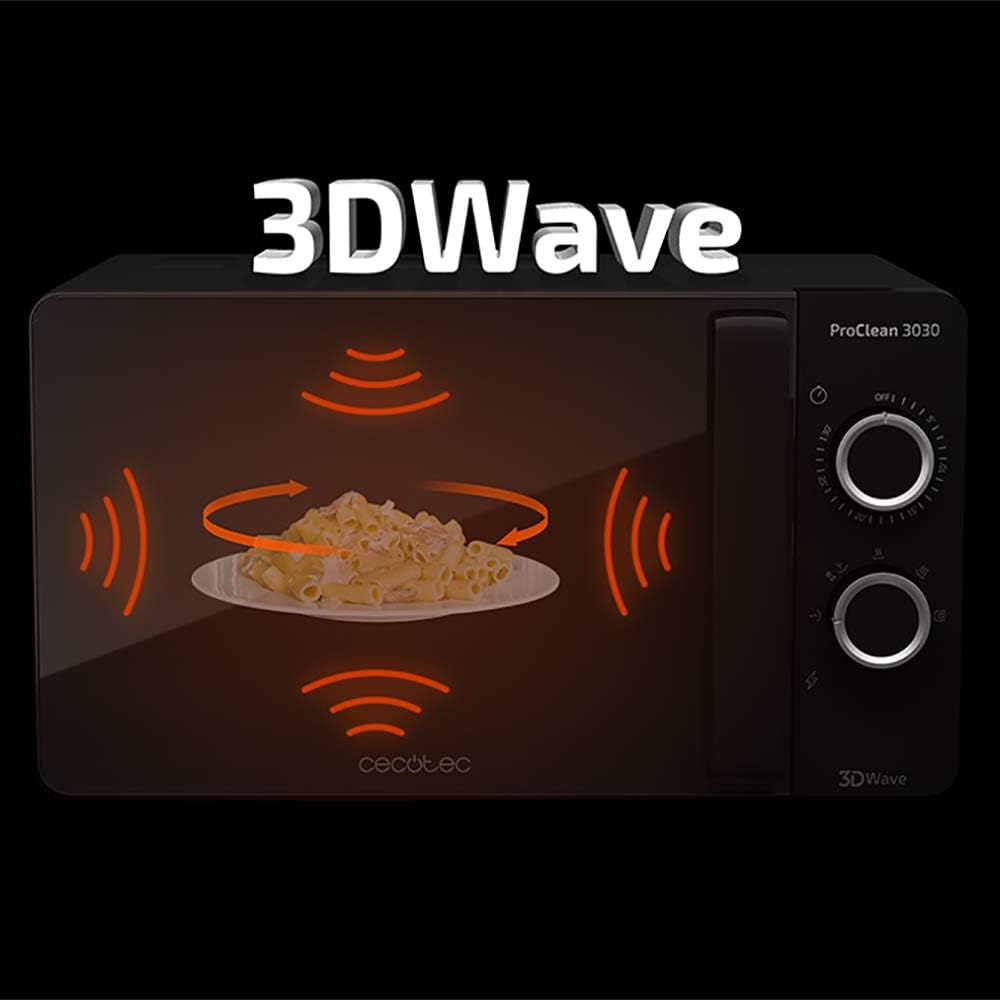
Figure 3: 3DWave technology ensures even heating.
5.1. General Microwave Cooking
- Place the food in a microwave-safe container on the glass turntable.
- Close the oven door securely.
- Turn the bottom knob (Power/Function) to select the desired power level (e.g., High, Medium, Low). The microwave has 6 power levels, with 700W being the maximum cooking power.
- Turn the top knob (Timer) to set the desired cooking time, up to 30 minutes.
- The oven will start automatically. When the set time expires, an acoustic signal will sound, and the oven will turn off.
5.2. Defrost Mode
The defrost mode allows you to thaw frozen foods quickly and efficiently.
- Place the frozen food in a microwave-safe container on the turntable.
- Close the oven door.
- Turn the bottom knob (Power/Function) to the defrost setting (indicated by a snowflake symbol).
- Turn the top knob (Timer) to set the desired defrosting time. Defrosting times vary depending on the type and weight of the food. Refer to food packaging for recommended defrosting times or use your judgment.
- The oven will start defrosting. You may need to turn the food periodically for even thawing. An acoustic signal will sound when the time is up.
6. Maintenance and Cleaning
Regular cleaning helps maintain the performance and longevity of your microwave oven. The Ready2Clean coating in the oven cavity makes cleaning easier by repelling dirt.

Figure 4: Ready2Clean coating for easy cleaning.
6.1. Cleaning the Oven Interior
- Always unplug the microwave oven before cleaning.
- Wipe the interior cavity with a damp cloth after each use. For stubborn stains, use a mild detergent.
- The Ready2Clean coating helps prevent food residue from sticking, making cleaning simpler.
- Remove the glass turntable and turntable ring for separate cleaning with warm, soapy water. Rinse and dry thoroughly before placing them back in the oven.
6.2. Cleaning the Exterior
- Wipe the exterior surfaces with a soft, damp cloth. Do not use abrasive cleaners or harsh chemicals.
- Clean the door and door seals regularly to ensure proper closure and prevent microwave energy leakage.
7. Troubleshooting
If you encounter any issues with your microwave oven, refer to the following table for common problems and solutions. If the problem persists, contact customer support.
| Problem | Possible Cause | Solution |
|---|---|---|
| Oven does not start | Power cord not plugged in; Door not closed properly; Fuse blown or circuit breaker tripped. | Plug in power cord; Close door securely; Check fuse or reset circuit breaker. |
| Food not heating | Power level set too low; Cooking time too short. | Increase power level; Increase cooking time. |
| Turntable not rotating | Turntable not properly placed on the ring; Obstruction under the turntable. | Ensure turntable is correctly seated; Remove any obstructions. |
| Excessive steam inside oven | High moisture content in food. | This is normal for foods with high moisture. Wipe interior after use. |
8. Specifications
| Feature | Specification |
|---|---|
| Brand | Cecotec |
| Model | ProClean 3030 (01524) |
| Capacity | 20 Liters |
| Color | Black |
| Product Dimensions (DxWxH) | 38P x 48l x 28.5H cm |
| Item Weight | 11.14 Kilograms |
| Electrical Power (Input) | 1150 Watts |
| Cooking Power (Energy Consumption) | 700 Watts |
| Number of Power Levels | 6 |
| Control Type | Mechanical Knob |
| Timer Function | Up to 30 minutes |
| Special Features | Defrost Mode, Ready2Clean Coating, 3DWave Technology |
| Interior Material | Stainless Steel |
| Voltage / Frequency | 220V / 50Hz |
9. Warranty and Support
9.1. Product Warranty
This Cecotec ProClean 3030 Microwave Oven comes with a 2-year warranty from the date of purchase. This warranty covers manufacturing defects and material faults under normal household use. Please retain your proof of purchase for warranty claims.
9.2. Spare Parts Availability
Spare parts for this appliance will be available for a period of 10 years within the EU, ensuring long-term support and repairability.
9.3. Customer Support
For technical assistance, warranty claims, or any questions regarding your Cecotec ProClean 3030 Microwave Oven, please contact Cecotec customer service through their official website or the retailer where you purchased the product. Always provide your product model number (ProClean 3030 or 01524) and proof of purchase when seeking support.


