
1. Introduction
The BOYA BY-CWM1 is a compact wireless microphone system designed to provide reliable and high-quality audio for a wide range of devices, including smartphones, DSLR cameras, camcorders, audio recorders, and PCs. This system includes a gooseneck microphone (BY-UM2) for versatile placement. It is ideal for content creators, journalists, and anyone requiring a portable and easy-to-use wireless audio solution for interviews, vlogs, livestreams, and video production.
2. Package Contents
Please verify that all items listed below are included in your package:
- 1 x BY-CWM1 Transmitter Unit
- 1 x BY-CWM1 Receiver Unit
- 1 x Gooseneck Microphone (BY-UM2)
- 1 x Standard Camera Shoe Mount
- 1 x Lapel Clip for Gooseneck Microphone
- 2 x Foam Windscreens
- 1 x Furry Windshield
- 1 x User Manual
- 1 x Warranty Card
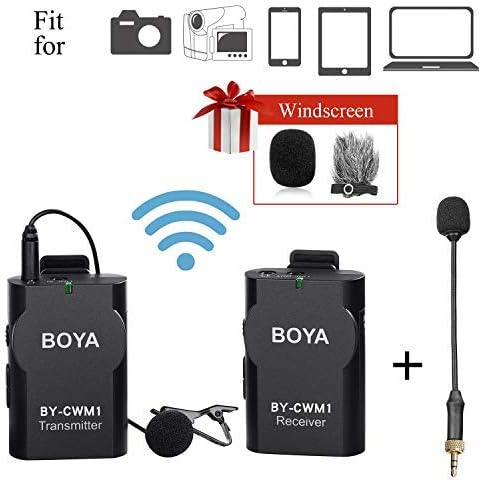
Image 1: Overview of the BOYA BY-CWM1 wireless microphone system and its included accessories. This image displays the transmitter, receiver, gooseneck microphone, lapel clip, foam windscreens, and furry windshield, along with icons indicating compatibility with cameras, camcorders, smartphones, tablets, and laptops.
3. Product Overview
The BY-CWM1 system consists of two main units: a transmitter and a receiver, designed for ease of use and portability.
3.1 Transmitter Unit
The transmitter unit is responsible for capturing audio via the connected gooseneck microphone and wirelessly sending it to the receiver. It typically features a power indicator, a microphone input jack, and a clip for attachment to clothing.
3.2 Receiver Unit
The receiver unit receives the audio signal from the transmitter and outputs it to your recording device (smartphone, camera, etc.). It includes a power indicator, an audio output jack, and a shoe mount for attaching to cameras.
3.3 Gooseneck Microphone (BY-UM2)
The included gooseneck microphone is an omnidirectional lavalier microphone designed for clear voice capture. It connects directly to the transmitter and can be discreetly clipped to clothing. Foam and furry windscreens are provided to reduce environmental noise.

Image 2: Detailed view of the BOYA BY-CWM1 transmitter and receiver units, highlighting their compact design and branding.
4. Setup Guide
Follow these steps to set up your BOYA BY-CWM1 wireless microphone system:
- Install Batteries: Open the battery compartments on both the transmitter and receiver units. Insert fresh batteries (type not specified in product data, typically AAA or AA) according to the polarity indicators. Close the compartments securely.
- Connect Gooseneck Microphone: Plug the 3.5mm connector of the gooseneck microphone into the microphone input jack on the transmitter unit. Ensure it is fully inserted.
- Attach Microphone: Use the provided lapel clip to attach the gooseneck microphone to the speaker's clothing, approximately 6-8 inches (15-20 cm) from the mouth for optimal sound capture. Apply a foam windscreen for indoor use or the furry windshield for outdoor use to minimize wind noise.
- Mount Receiver: If using with a DSLR camera or camcorder, slide the receiver unit onto the camera's hot shoe mount. For smartphones or other devices, the receiver can be placed nearby.
- Connect Receiver to Recording Device: Use the appropriate audio cable (not explicitly listed but implied for connectivity) to connect the receiver's audio output jack to the microphone input of your smartphone, camera, camcorder, or PC. Ensure the cable is securely connected to both devices.
- Power On: Turn on both the transmitter and receiver units. Observe the power indicator lights; they should illuminate, indicating a successful connection.
- Test Audio: Before recording, perform a sound test. Speak into the microphone and monitor the audio on your recording device to ensure proper signal reception and audio quality. Adjust recording levels on your device as needed.
Image 3: Illustrative diagram demonstrating the compatibility of the BOYA BY-CWM1 system with different recording devices, including cameras, camcorders, smartphones, tablets, and laptops, indicating where the system can be connected.
5. Operating Instructions
Once the system is set up, operating the BOYA BY-CWM1 is straightforward:
- Power On/Off: Use the power buttons on both the transmitter and receiver to turn them on or off. Always ensure both units are powered on for operation.
- Monitoring: If your recording device allows, use headphones to monitor the audio output from the receiver in real-time. This helps in identifying and resolving any audio issues during recording.
- Wireless Range: Maintain the transmitter and receiver within the specified operating range of up to 15 meters (49 feet) for optimal signal stability. Obstacles and interference can reduce this range.
- Battery Life: Monitor the battery indicators on both units. Replace batteries promptly when they show low power to avoid interruptions during recording.
6. Maintenance
Proper maintenance ensures the longevity and optimal performance of your BOYA BY-CWM1 system:
- Cleaning: Use a soft, dry cloth to clean the exterior of the transmitter, receiver, and microphone. Avoid using harsh chemicals or abrasive materials.
- Storage: When not in use, store the microphone system in a cool, dry place, away from direct sunlight and extreme temperatures. Remove batteries if storing for extended periods to prevent leakage.
- Cable Care: Handle all cables gently. Avoid sharp bends or kinks that can damage the internal wiring.
- Windscreens: Regularly clean or replace foam and furry windscreens as they can accumulate dust and debris, affecting sound quality.
7. Troubleshooting
If you encounter issues with your BOYA BY-CWM1, refer to the following troubleshooting tips:
- No Sound or Low Volume:
- Ensure both transmitter and receiver are powered on and have fresh batteries.
- Verify all cables are securely connected between the microphone, transmitter, receiver, and recording device.
- Check the microphone input settings and volume levels on your recording device.
- Confirm the gooseneck microphone is fully plugged into the transmitter.
- Intermittent Audio / Signal Drops:
- Ensure the transmitter and receiver are within the 15-meter (49-foot) operating range.
- Minimize physical obstructions (walls, large objects) between the transmitter and receiver.
- Avoid areas with strong Wi-Fi signals, other wireless devices, or heavy electromagnetic interference.
- Replace batteries in both units, as low power can affect signal stability.
- Poor Audio Quality / Static:
- Ensure windscreens are properly installed to reduce environmental noise.
- Check for sources of interference as mentioned above.
- Verify the microphone is positioned correctly, not too far or too close to the sound source.
- Test with a different recording device to rule out device-specific issues.
- Device Compatibility Issues:
- Ensure your device's microphone input is compatible with the receiver's output. Some smartphones may require a TRRS adapter (not included) if the receiver uses a TRS output.
- For PCs, ensure the correct audio input device is selected in your sound settings.
8. Specifications
| Brand | BOYA |
| Model Number | BY-CWM1 |
| Connectivity Technology | Wireless (USB for power/charging, if applicable, but primarily wireless audio transmission) |
| Wireless Range | Up to 15m (49ft) |
| Microphone Form Factor | Microphone System (Lavalier with Gooseneck) |
| Polar Pattern | Omnidirectional |
| Compatible Devices | Camcorder, Camera, Smartphone, Audio Recorder, PC, Tablet |
| Power Source | Battery Powered |
| Item Weight | 9.6 ounces (approx. 272g) |
| Package Dimensions | 6.6 x 4.6 x 2.1 inches (approx. 16.8 x 11.7 x 5.3 cm) |
| Material Type | Foam (for windscreens) |
| Number of Channels | 1 |
9. Warranty and Support
The BOYA BY-CWM1 Wireless Lavalier Microphone system comes with a One Year BOYA warranty. For warranty claims, technical support, or further assistance, please refer to the contact information provided on the warranty card included in your package or visit the official BOYA website.


