
1. Introduction
This manual provides essential information for the safe and efficient use of your Cecotec Ready Warm 6770 Crystal Connection Electric Radiator. Please read these instructions carefully before installation and operation, and retain them for future reference.
The Cecotec Ready Warm 6770 Crystal Connection is a 2000W electric convector heater designed for rapid and efficient heating of spaces up to 20 m². It features a modern design with tempered glass, a regulable thermostat, a timer, and Wi-Fi connectivity for control via a smartphone app. It is suitable for bathrooms due to its IP24 splash protection.
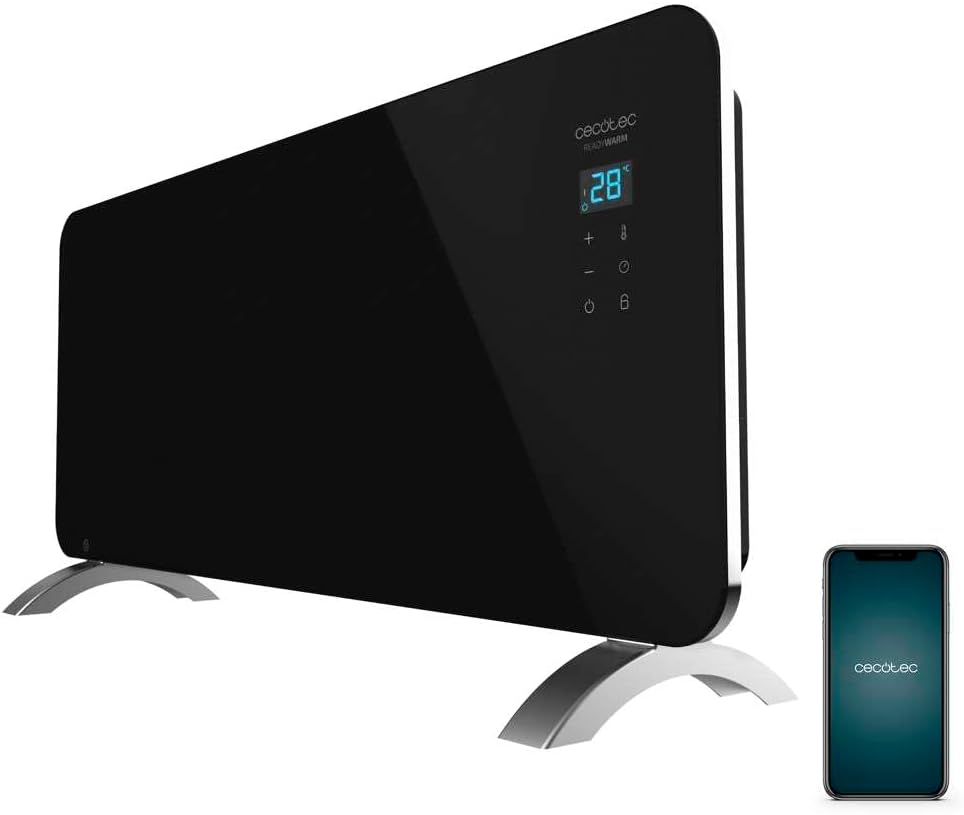
Image 1.1: The Cecotec Ready Warm 6770 Crystal Connection Electric Radiator, shown with its stand and a smartphone illustrating its connectivity features.
2. Important Safety Instructions
WARNING: To reduce the risk of fire, electric shock, or injury, observe the following:
- Read all instructions before using this heater.
- Do not use this heater in the immediate surroundings of a bath, a shower or a swimming pool.
- Do not cover the heater. Covering the heater presents a fire risk.
- Keep combustible materials, such as furniture, pillows, bedding, papers, clothes, and curtains at least 1 meter (3 feet) from the front of the heater and keep them away from the sides and rear.
- Do not insert or allow foreign objects to enter any ventilation or exhaust opening as this may cause an electric shock or fire, or damage the heater.
- This appliance is not intended for use by persons (including children) with reduced physical, sensory or mental capabilities, or lack of experience and knowledge, unless they have been given supervision or instruction concerning use of the appliance by a person responsible for their safety.
- Children should be supervised to ensure that they do not play with the appliance.
- Ensure the voltage indicated on the rating label corresponds to the mains voltage in your home.
- The heater is equipped with an overheating protection system. If the heater overheats, it will automatically shut off.
3. Product Components
The Cecotec Ready Warm 6770 Crystal Connection Electric Radiator includes the following main components:
- Electric Radiator Unit with Tempered Glass Panel
- LED Display and Touch Control Panel
- Adjustable Thermostat
- Wi-Fi Module for Smart Control
- Aluminum Heating Element
- Feet for Freestanding Installation
- Wall Mount Bracket (for wall installation)
- Power Cable

Image 3.1: Detail of the LED display and touch control panel on the radiator.
4. Setup and Installation
The radiator can be installed freestanding with its feet or mounted on a wall using the provided bracket.
4.1 Freestanding Installation
- Carefully unpack the radiator and all accessories.
- Attach the two feet to the bottom of the radiator using the provided screws. Ensure they are securely fastened.
- Place the radiator on a stable, flat surface, ensuring it is at least 1 meter (3 feet) away from any combustible materials.

Image 4.1: The radiator with its feet attached, ready for freestanding placement.
4.2 Wall Mounting (Optional)
- Identify a suitable wall location, ensuring adequate clearance from ceilings, floors, and side walls (refer to safety instructions).
- Use the wall mount bracket as a template to mark drilling points on the wall.
- Drill holes and insert appropriate wall plugs (not always included, depending on wall type).
- Securely attach the wall mount bracket to the wall.
- Carefully hang the radiator onto the wall mount bracket, ensuring it is stable and locked into place.
4.3 Power Connection
Once installed, plug the power cable into a suitable electrical outlet. Ensure the outlet meets the voltage requirements specified in the product specifications.
5. Operation
The Cecotec Ready Warm 6770 can be controlled via its touch panel or through the "Tuya Smart" smartphone application.
5.1 Touch Control Panel
The radiator features an LED display and a touch control panel for direct operation. The panel typically includes:
- Power Button: To turn the unit On/Off.
- Temperature Adjustment (+/-): To increase or decrease the desired temperature.
- Mode Selection: To switch between power levels (e.g., Eco mode, Max mode).
- Timer Button: To set the programmable timer.
- Child Lock: To activate/deactivate, press and hold the designated button for 3 seconds.

Image 5.1: Front view of the radiator, highlighting the integrated control panel.
5.2 Wi-Fi and App Control ("Tuya Smart")
The radiator can be controlled remotely via Wi-Fi using the "Tuya Smart" application on your smartphone.
- Download the "Tuya Smart" app from your smartphone's app store (iOS or Android).
- Register or log in to your Tuya Smart account.
- Ensure your smartphone is connected to a 2.4 GHz Wi-Fi network (5 GHz networks are typically not supported by smart home devices).
- Follow the in-app instructions to add a new device. You may need to put the radiator into pairing mode (refer to the app or radiator's display for specific instructions, often involving holding a button).
- Once connected, you can control the radiator's power, temperature, modes, and set the 24/7 programmable timer from your smartphone.

Image 5.2: A user interacting with the smartphone app to control the radiator.
5.3 Power Modes
- Eco Mode (Low Power): Optimizes energy consumption for maintaining a comfortable temperature.
- Max Mode (High Power): Utilizes full 2000W for rapid heating of the room.
5.4 Timer Function
The integrated timer allows you to program the radiator to turn on and off at specific times, 24 hours a day, 7 days a week. This feature helps optimize energy usage and ensures your space is warm when needed.
6. Maintenance and Care
Regular cleaning and maintenance will ensure the longevity and efficient operation of your radiator.
- Always unplug the radiator from the power outlet and allow it to cool completely before cleaning.
- Wipe the exterior surfaces with a soft, damp cloth. Do not use abrasive cleaners or solvents.
- Do not immerse the radiator in water or spray it with liquids.
- Keep the air inlets and outlets free from dust and obstructions. You may use a vacuum cleaner with a brush attachment to gently clean these areas.
- Store the radiator in a cool, dry place during off-season use.
7. Troubleshooting
If you encounter issues with your radiator, refer to the following common problems and solutions:
| Problem | Possible Cause | Solution |
|---|---|---|
| Radiator does not turn on. | No power supply; Power button not pressed; Child lock active. | Check power connection; Press power button; Deactivate child lock (press and hold for 3 seconds). |
| Radiator is not heating sufficiently. | Temperature setting too low; Eco mode active; Room size exceeds capacity; Obstruction of air vents. | Increase temperature setting; Switch to Max mode; Ensure room size is within 20 m²; Clear any obstructions from air vents. |
| Wi-Fi connection fails. | Incorrect Wi-Fi password; Not connected to 2.4 GHz network; Radiator not in pairing mode; Router too far. | Verify Wi-Fi password; Connect to a 2.4 GHz network; Put radiator in pairing mode (refer to app/manual); Move radiator closer to router or use a Wi-Fi extender. |
| Radiator turns off unexpectedly. | Overheating protection activated; Timer setting. | Unplug, allow to cool, check for obstructions; Verify timer settings. |
8. Technical Specifications
| Brand | Cecotec |
| Model Number | 5352 |
| Product Name | Ready Warm 6770 Crystal Connection |
| Color | Black |
| Dimensions (L x W x H) | 96.5 x 13 x 47 cm (with feet) |
| Weight | 8.42 kg |
| Power | 2000 W |
| Voltage | 230 Volts |
| Material | Stainless Steel (Heating Element), Tempered Glass (Panel) |
| Special Features | Wi-Fi Control, Adjustable Thermostat, 24/7 Timer, Overheating Protection, Child Lock, IP24 Splash Protection |
| Heating Coverage | Up to 20 m² (215.28 sq ft) |

Image 8.1: Diagram showing the dimensions of the Cecotec Ready Warm 6770 radiator.
9. Warranty and Support
Cecotec products are manufactured to high-quality standards. For information regarding warranty terms and conditions, please refer to the warranty card included with your product or visit the official Cecotec website.
For technical support, spare parts, or any inquiries not covered in this manual, please contact Cecotec customer service. Contact details can typically be found on the official website or on your product packaging.
Online Resources:
- Official Cecotec Website: www.cecotec.com
- Tuya Smart App Support: Refer to the app's help section for Wi-Fi connectivity issues.


