
Dogtra 2700T&B
Dogtra 2700 T&B 1-Dog Remote Training and Beeper Collar User Manual
Model: 2700T&B
1. Introduction
The Dogtra 2700 T&B E-Collar is a remote training and beeper system designed for behavior modification and tracking of dogs. This system is suitable for dogs weighing 35 pounds and up, with neck sizes between 6 and 26 inches. It offers a 1-mile range and is fully waterproof, making it reliable in various environments.
Package Contents:
- Dogtra 2700T&B Collar Receiver
- Dogtra 2700T&B Collar Transmitter
- Battery Charger
- Splitter Cable
- Test Light
- Owner's Manual (this document)
- PetsTEK Training Clicker

Image 1.1: The Dogtra 2700 T&B system, including the remote transmitter, collar receiver with beeper, and a PetsTEK training clicker.
Important Warnings:
- This e-collar is designed for dogs only.
- Do not leave the collar on your dog for more than 10 hours per day.
- Keep away from children at all times.
- Not recommended for dogs younger than 4 months old.
- Seek professional help if your dog becomes aggressive during training.
- Observe your dog’s reaction to stimulation before leaving them alone with the collar.
- Consult your physician if you have medical devices and plan to use the e-collar.
- To prevent skin irritations, the collar should not be worn for more than 2 hours per day initially, and a maximum of 10 hours after 4 to 8 weeks of use.
2. Components Overview
The Dogtra 2700 T&B system consists of a handheld transmitter and a collar receiver with an integrated beeper horn.

Image 2.1: Diagram illustrating the key features and controls of the Dogtra 2700 T&B transmitter and receiver.
Transmitter Features:
- Rheostat/Volume Dial: Provides 0-127 levels of precise stimulation.
- LCD Screen: Displays stimulation level and battery status.
- "Nick" Button: Delivers a single, brief pulse of stimulation.
- "Constant" Button: Delivers continuous stimulation for up to 12 seconds.
- "Pager" Button: Activates non-stimulating high-performance pager vibration.
- "Locate" Button: Activates the beeper to locate your dog.
- On/Off & Mode Button: Controls power and switches between beeper modes.
Receiver Features:
- Contact Points: Deliver static stimulation.
- Beeper Horn: Unique single-body, downward-facing design for sound output.
- Waterproof Design: Both receiver and transmitter are fully waterproof.
- Rechargeable Batteries: Lithium Polymer batteries with 2-hour rapid charge.
3. Setup
3.1 Charging the Units
Before first use, fully charge both the transmitter and receiver for approximately 2 hours. The units use Lithium Polymer batteries that charge rapidly.
- Connect the splitter cable to the charger.
- Plug the small ends of the splitter cable into the charging ports on the transmitter and receiver.
- Plug the charger into a standard electrical outlet.
- The LED indicator on both units will glow red during charging and turn green when fully charged.
3.2 Attaching the Collar
Thread the collar strap through the receiver unit. Ensure the contact points are facing inwards towards the dog's neck.
3.3 Fitting the Collar
Proper collar fit is crucial for effective and safe operation. The contact points must make direct contact with the dog's skin.
- Place the receiver on the dog's neck, positioned below the ears, on the soft underside of the neck.
- The collar should be snug enough that two fingers cannot fit underneath it, but not so tight as to restrict breathing or cause discomfort.
- Trim any excess collar strap if necessary, ensuring the end is sealed to prevent fraying.
- Rotate the collar periodically to prevent pressure sores.
3.4 Testing the System
Before placing the collar on your dog, test the stimulation and beeper functions.
- Turn on both the transmitter and receiver.
- Place the test light (included) across the contact points of the receiver.
- Press the "Nick" or "Constant" button on the transmitter. The test light should illuminate, indicating stimulation is being delivered. The light will be brighter at higher stimulation levels.
- Press the "Pager" button to test the vibration function.
- Press the "Locate" button to test the beeper function.
4. Operating the 2700 T&B System
4.1 Turning On/Off and Setting Stimulation Level
- To Turn On: Press the On/Off button on the transmitter until the LCD screen illuminates. For the receiver, hold the On/Off button until the LED flashes green.
- To Turn Off: Hold the On/Off button on both units until the LED turns solid red and then off.
- Adjusting Stimulation: Use the Rheostat/Volume Dial on the transmitter to select a stimulation level from 0 (no stimulation) to 127 (maximum stimulation). Start at the lowest level and gradually increase until your dog responds.
4.2 Training Modes
- Momentary Nick: Press the "Nick" button for a single, quick pulse of static stimulation. This is typically used for immediate correction.
- Constant Stimulation: Press the "Constant" button for continuous static stimulation for up to 12 seconds. Release the button to stop stimulation. This is used for more persistent corrections or to reinforce commands.
- High Power Pager Vibration: Press the "Pager" button to activate a strong, non-stimulating vibration. This can be used as a warning or a gentle reminder.
4.3 Beeper Modes
The 2700 T&B features three distinct beeper modes to assist in tracking your dog, especially during hunting or field work. The beeper volume can be adjusted from high to low.
- Run and Point: The beeper emits a double beep every 7 seconds when the dog is moving and a rapid double beep every 2 seconds when the dog is on point.
- Point Only: The beeper remains silent while the dog is moving and emits a rapid double beep every 2 seconds when the dog is on point.
- Locate: Press the "Locate" button on the transmitter to activate the beeper on demand, helping you pinpoint your dog's location.

Image 4.1: Illustration of the Dogtra 2700 T&B system's 1-mile range capability.
4.4 General Training Guidelines
- Always introduce the collar in a positive manner.
- Begin training in a calm, distraction-free environment.
- Use the lowest effective stimulation level.
- Pair commands with stimulation or vibration for clear communication.
- Reward desired behaviors immediately.
- Consistency is key for effective training.
5. Maintenance
5.1 Cleaning
- Regularly clean the contact points and the area around them on the receiver to prevent dirt and debris buildup, which can affect performance and cause skin irritation.
- Wipe down the transmitter and receiver with a damp cloth. Do not use harsh chemicals or abrasive cleaners.
5.2 Battery Care
- Charge the units fully after each use or at least once a month if not in regular use to maintain battery health.
- Avoid storing the units in extreme temperatures.
- If the battery life significantly decreases, contact Dogtra customer service for replacement options.
5.3 Contact Point Inspection
Periodically inspect the contact points for wear or damage. Ensure they are securely attached to the receiver.
6. Troubleshooting
| Problem | Possible Cause | Solution |
|---|---|---|
| Receiver not activating/no stimulation. |
|
|
| Beeper not sounding. |
|
|
| Shortened range. |
|
|
| Skin irritation on dog's neck. |
|
|
7. Specifications
- Model: 2700T&B
- Range: Up to 1 mile
- Stimulation Levels: 0-127 (Rheostat Dial)
- Training Modes: Momentary Nick, Constant Stimulation, High Power Pager Vibration
- Beeper Modes: Run and Point, Point Only, Locate (Adjustable High/Low Tone)
- Waterproof: Fully waterproof transmitter and receiver
- Battery Type: 2-hour Rapid Charge Lithium Polymer Batteries
- Dog Size Recommendation: For dogs 35 pounds and up
- Collar Fit: Neck sizes between 6 - 26 inches
- Item Weight: Approximately 3.19 pounds (package weight)
- Manufacturer: Dogtra
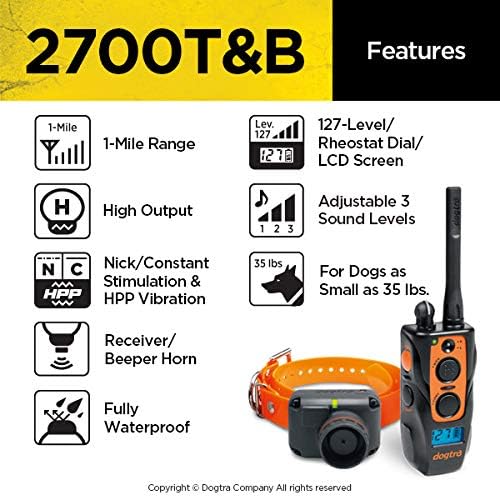
Image 7.1: Visual summary of the Dogtra 2700 T&B's key features, including range, stimulation levels, and waterproof design.
8. Warranty and Support
Dogtra products are known for their quality and reliability. For warranty information, product support, or to inquire about replacement parts, please contact Dogtra customer service.
- Customer Service: Based in the USA. Contact information can typically be found on the official Dogtra website or within the product packaging.
- Warranty: Refer to the official Dogtra warranty policy for details regarding coverage and terms.
For additional resources and training tips, visit the official Dogtra website: www.dogtra.com
Related documents2700T&B


Ask a question about this manual
Ask about setup, troubleshooting, compatibility, parts, safety, or missing instructions. Manuals+ will review the question and use this page’s manual context to help answer it.