
AWEI T5
AWEI T5 True Wireless Earbuds User Manual
Introduction
This manual provides detailed instructions for the AWEI T5 True Wireless Earbuds. Please read this guide carefully before using the product to ensure proper operation and to maximize your listening experience.
Package Contents
Verify that all items listed below are present in your package:
- AWEI T5 True Wireless Earbuds (Left and Right)
- Charging Case
- USB Charging Cable
- User Manual
- Multiple sizes of ear tips

Image: AWEI T5 True Wireless Earbuds retail packaging, showing the brand logo and product model.
Product Overview
Familiarize yourself with the components of your AWEI T5 True Wireless Earbuds and charging case.

Image: The AWEI T5 True Wireless Earbuds inside their charging case, with an additional image showing an earbud being worn by a user.

Image: A close-up view of the AWEI T5 True Wireless Earbuds and their charging case resting on a laptop keyboard.
The earbuds are designed for a secure and comfortable fit, and the charging case provides both protection and power on the go.
Setup
1. Initial Charging
Before first use, fully charge the earbuds and the charging case.
- Place both earbuds into the charging case.
- Connect the USB charging cable to the charging case and a power source.
- The indicator lights on the case and earbuds will show charging status.
- Once fully charged, disconnect the cable.
2. Pairing with a Device
To connect your AWEI T5 earbuds to a Bluetooth-enabled device:
- Ensure the earbuds are charged.
- Open the charging case and remove both earbuds. They will automatically enter pairing mode.
- On your device (smartphone, tablet, etc.), go to Bluetooth settings and enable Bluetooth.
- Search for available devices and select "AWEI T5" from the list.
- Once connected, you will hear a confirmation tone, and the indicator lights on the earbuds will change.
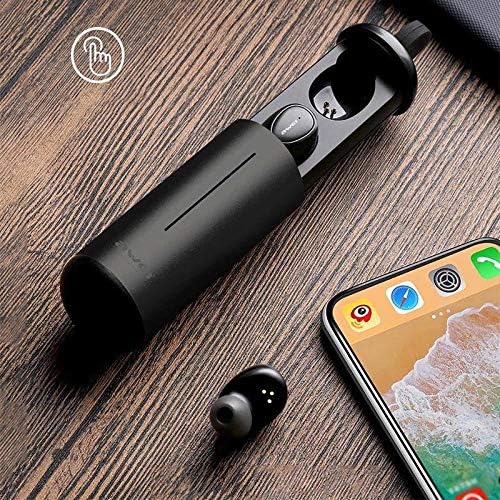
Image: AWEI T5 Earbuds in their charging case, positioned next to a smartphone, illustrating the pairing process.
Operating Instructions
Basic Controls
The AWEI T5 earbuds feature touch controls for various functions:
- Play/Pause: Tap once on either earbud.
- Next Track: Double-tap the right earbud.
- Previous Track: Double-tap the left earbud.
- Answer/End Call: Tap once on either earbud during an incoming call.
- Reject Call: Press and hold either earbud for 2 seconds during an incoming call.
- Activate Voice Assistant: Triple-tap either earbud.
Single Earbud Mode
You can use either the left or right earbud independently:
- Remove one earbud from the charging case. It will automatically connect to the last paired device.
- The other earbud can remain in the case or be turned off.
Dual Earbud Mode
For a stereo audio experience, use both earbuds:
- Remove both earbuds from the charging case. They will automatically connect to each other and then to the last paired device.
Maintenance and Care
To ensure the longevity and optimal performance of your AWEI T5 earbuds:
- Cleaning: Regularly clean the earbuds and charging case with a soft, dry, lint-free cloth. Do not use harsh chemicals or abrasive materials.
- Storage: When not in use, store the earbuds in their charging case to protect them from dust and damage.
- Battery Care: Avoid fully discharging the battery frequently. Charge the earbuds and case regularly, even if not used for extended periods.
- Water Resistance: The earbuds are rated IPX4, meaning they are resistant to splashing water from any direction. Do not submerge them in water or expose them to heavy rain.

Image: AWEI T5 Earbuds with water droplets, indicating their IPX4 splash-resistant rating.
Troubleshooting
If you encounter issues with your AWEI T5 earbuds, refer to the following common problems and solutions:
| Problem | Solution |
|---|---|
| Earbuds not pairing with device. | Ensure earbuds are charged. Turn off and on Bluetooth on your device. Forget "AWEI T5" from your device's Bluetooth list and re-pair. |
| Only one earbud is working. | Place both earbuds back into the charging case, close the lid, then open and remove them together. Ensure both are charged. |
| No sound or low volume. | Check volume levels on both your device and the earbuds. Ensure earbuds are properly connected. |
| Charging case not charging. | Verify the USB cable is securely connected to both the case and the power source. Try a different cable or power adapter. |
Specifications
Technical details for the AWEI T5 True Wireless Earbuds:
| Feature | Detail |
|---|---|
| Model Number | T5 |
| Connectivity | Bluetooth |
| Form Factor | In-Ear |
| Material | Plastic |
| Color | Black |
| Dimensions (Product) | 4 x 10 x 16.5 cm |
| Weight (Product) | 4.54 g |
| Battery Type | 1 Lithium Ion (per earbud, typically) |
| Water Resistance Rating | IPX4 (Splash-proof) |
Warranty and Support
For warranty information and customer support, please refer to the documentation provided with your purchase or contact the retailer. Keep your proof of purchase for any warranty claims.
Related documentsT5


Ask a question about this manual
Ask about setup, troubleshooting, compatibility, parts, safety, or missing instructions. Manuals+ will review the question and use this page’s manual context to help answer it.