

1. Important Safety Instructions
- Read all instructions before using the appliance.
- Always place the dehumidifier on a stable, level surface.
- Ensure the power cord is not damaged and is connected to a grounded outlet.
- Do not operate the unit near water or in excessively wet environments.
- Keep children and pets away from the appliance during operation.
- Unplug the unit before cleaning or performing any maintenance.
- Do not block air inlets or outlets. Maintain at least 4 inches (10 cm) clearance around the unit.
- Do not insert objects into the air vents.
- If the unit is damaged, do not attempt to repair it yourself. Contact customer support.
2. Product Overview
The Hysure T8 Plus is a compact and efficient electric dehumidifier designed to reduce humidity in small to medium-sized rooms. It features a 2000ml (70 oz) water tank, automatic shut-off, and quiet operation.

Figure 2.1: Hysure T8 Plus Dehumidifier, front view.
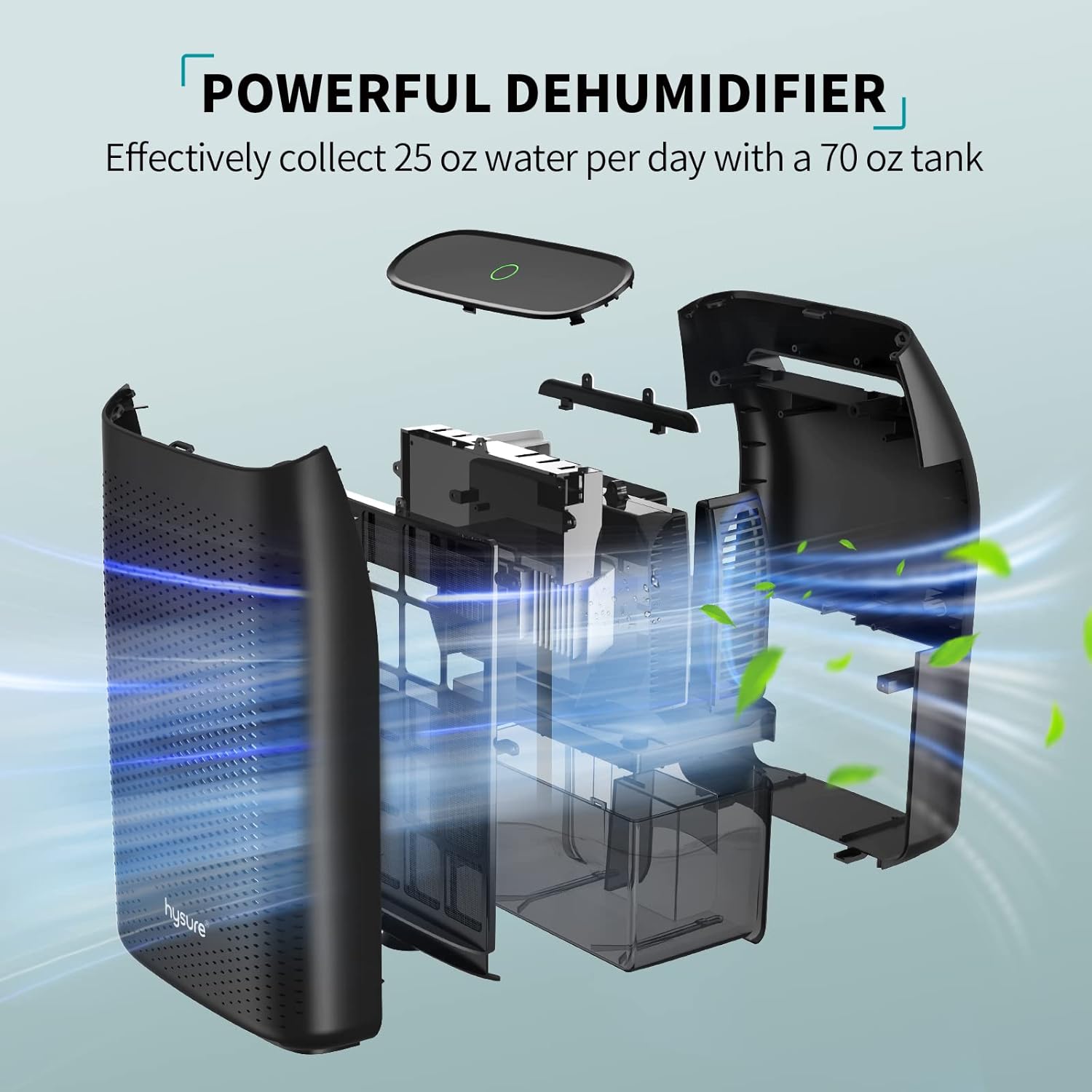
Figure 2.2: Internal components and airflow of the Hysure T8 Plus Dehumidifier.
Key Features:
- High Efficiency: Removes up to 25oz (750ml) of moisture per day in optimal conditions (86°F, 80% RH).
- Large Water Tank: Equipped with a 2000ml (70 oz) capacity water tank.
- Auto Shut-Off: Automatically turns off when the water tank is full to prevent overflow.
- Ultra-Quiet Operation: Utilizes Peltier technology for noise levels below 35dB, suitable for bedrooms and offices.
- Energy Efficient: Low power consumption of 40W/H.
- Portable Design: Compact and lightweight with an integrated handle for easy movement.
- Easy Clean Filter: Includes a washable filter to capture large particles.

Figure 2.3: The dehumidifier features a practical handle for easy portability.
3. Setup
- Unpacking: Carefully remove the dehumidifier from its packaging. Retain packaging for future storage or transport.
- Placement: Place the unit on a firm, level surface in the desired area. Ensure there is at least 4 inches (10 cm) of space around the air inlets and outlets for proper airflow. Avoid placing it directly against walls or furniture.
- Power Connection: Connect the power adapter to the dehumidifier's power port, then plug the adapter into a suitable electrical outlet. For safety, ensure the outlet is grounded and, if used in a bathroom, a GFCI outlet is recommended.
- Initial Check: Ensure the water tank is correctly inserted and empty before first use.
4. Operating Instructions
Power On/Off:
- To turn the dehumidifier ON, press the power button located on the top of the unit. The indicator light will illuminate green.
- To turn the dehumidifier OFF, press the power button again. The indicator light will turn off.
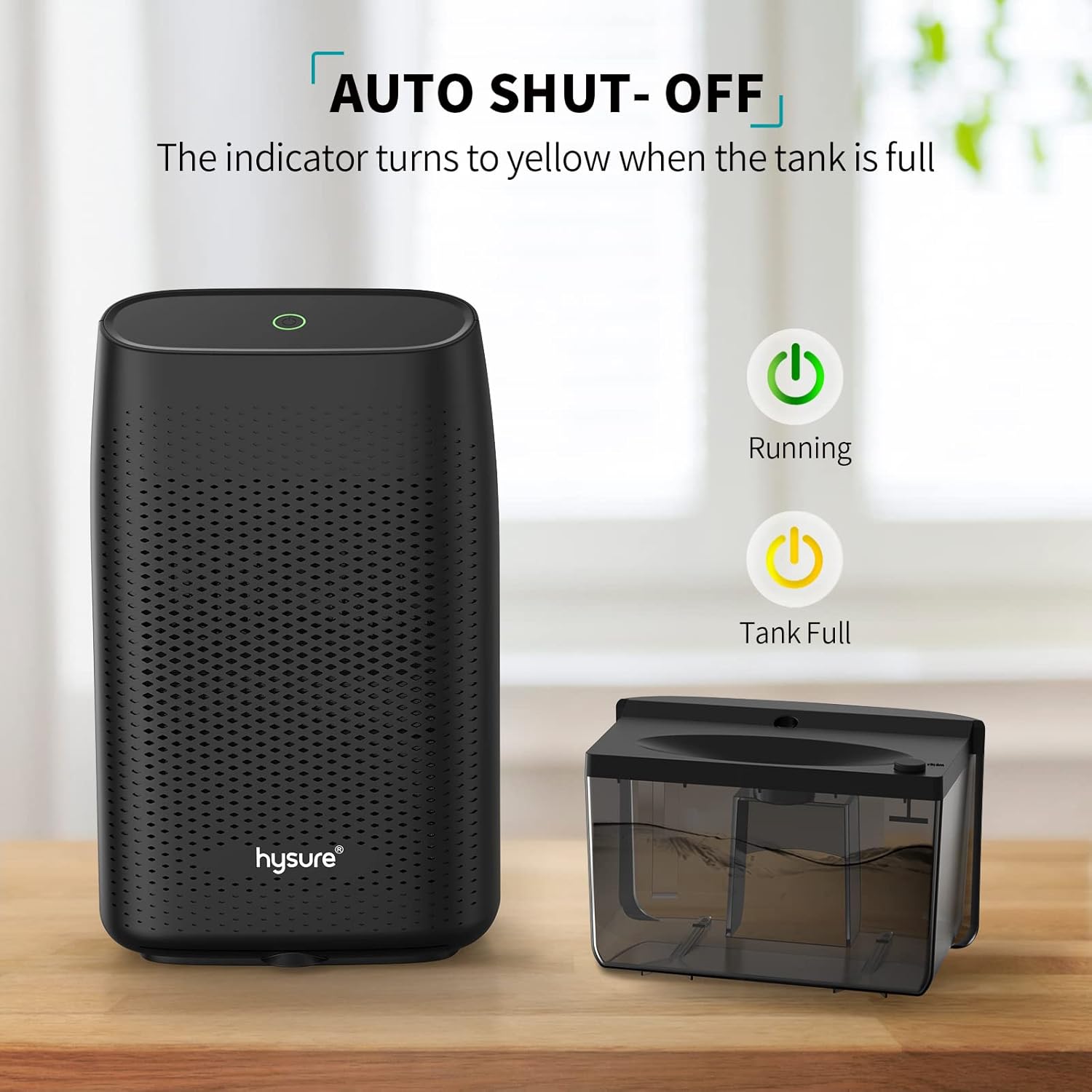
Figure 4.1: The power button and indicator lights for running and tank full status.
Automatic Shut-Off:
The Hysure T8 Plus is equipped with an automatic shut-off function. When the water tank reaches its maximum capacity, the unit will automatically power off, and the indicator light will change to yellow to alert you that the tank needs to be emptied.
Video 4.1: Demonstration of the Hysure T8 Plus Dehumidifier's high efficiency and auto-off feature. This video illustrates the unit's operation and how it automatically stops when the water tank is full, indicated by a change in the power light.
5. Maintenance
Emptying the Water Tank:
- When the indicator light turns yellow, the water tank is full.
- Turn off the dehumidifier and unplug it from the power outlet.
- Carefully slide out the water tank from the back of the unit.
- Pour out the collected water.
- Slide the empty water tank back into the unit until it clicks into place.
- Plug in the dehumidifier and press the power button to resume operation.
Cleaning the Air Filter:
The dehumidifier is equipped with an easy-clean filter to maintain optimal performance. Regular cleaning is recommended.
- Turn off and unplug the dehumidifier.
- Locate the air filter, typically behind the front grille.
- Remove the filter.
- Clean the filter using a soft brush or vacuum cleaner to remove dust and debris. For stubborn dirt, wash it gently with warm, soapy water.
- Ensure the filter is completely dry before reinserting it into the unit.
- Reattach the front grille and plug in the dehumidifier to resume operation.

Figure 5.1: The removable dust-proof filter helps maintain air quality and unit efficiency.
6. Troubleshooting
| Problem | Possible Cause | Solution |
|---|---|---|
| Dehumidifier not turning on. | No power, power button not pressed, water tank not properly inserted. | Check power connection, press power button, ensure water tank is securely in place. |
| Dehumidifier not collecting water. | Humidity level too low, ambient temperature too low, air inlets/outlets blocked, filter dirty. | Ensure room humidity is above 40% and temperature is above 59°F (15°C). Clear any obstructions. Clean the air filter. |
| Unit is noisy. | Unit not on a level surface, internal component vibration. | Place the unit on a flat, stable surface. If noise persists, contact customer support. |
| Indicator light is yellow. | Water tank is full. | Empty the water tank and reinsert it. |
7. Specifications
| Feature | Detail |
|---|---|
| Brand | Hysure |
| Model Name | T8 Plus |
| Dehumidification Capacity | Up to 25 oz (750ml) per day (at 86°F, 80% RH) |
| Water Tank Capacity | 2000 ml (70 oz) |
| Coverage Area | Up to 3000 cubic feet (269 sq ft) |
| Power Consumption | 40W |
| Noise Level | Less than 35dB |
| Product Dimensions | 6"D x 9"W x 15"H (15.24 cm D x 22.86 cm W x 38.1 cm H) |
| Item Weight | 5.26 pounds (2.39 kg) |
| Material | Plastic |
| Special Features | Automatic Moisture Removal, Automatic Shutoff, Continuous Draining, Portable, Quiet Operation, Washable Filter |
8. Warranty and Support
Hysure products are manufactured to high-quality standards. For warranty information, technical support, or customer service inquiries, please refer to the contact details provided on the product packaging or visit the official Hysure website.
Please retain your proof of purchase for warranty claims.