
1. Introduction
This manual provides essential information for the safe and effective use of your Masterplug SRGTOW102B-MPA Surge Tower Extension Lead. Please read these instructions carefully before use and retain them for future reference.
The Masterplug SRGTOW102B-MPA is a 13A surge-protected extension lead featuring 10 safety-shuttered sockets, designed to provide power and protection for multiple electronic devices.
2. Safety Information
WARNING: ELECTRIC SHOCK HAZARD
- Do not exceed the maximum load of 13 Amps.
- Ensure the product is used in a dry environment. Do not expose to moisture or liquids.
- Do not open or modify the unit. There are no user-serviceable parts inside.
- Always insert plugs fully into the sockets.
- Do not daisy-chain multiple extension leads.
- Keep out of reach of children.
- If the surge protection indicator light is off, the surge protection feature may no longer be active. Replace the unit to ensure continued protection.
3. Product Features
- 10 Safety Shuttered Sockets: Provides power for multiple devices with enhanced safety.
- Surge Protection: Protects connected equipment from power surges and spikes.
- LED Power Indicator: Illuminates when the unit is powered on.
- Horizontal Mounting Options: Allows for flexible placement.
- Tower Design: Space-saving vertical orientation.
4. Setup and Installation
- Unpack the Unit: Carefully remove the Masterplug Surge Tower Extension Lead from its packaging.
- Positioning: Place the extension lead on a stable, flat surface. The tower design allows for efficient use of space. Horizontal mounting options are also available if preferred.
- Connect to Power: Plug the extension lead's main power cord into a wall socket.
- Verify Power: The LED Power Indicator on the unit should illuminate, indicating that the extension lead is receiving power.
- Connect Devices: Plug your electronic devices into the 10 safety-shuttered sockets. Ensure all plugs are fully inserted.
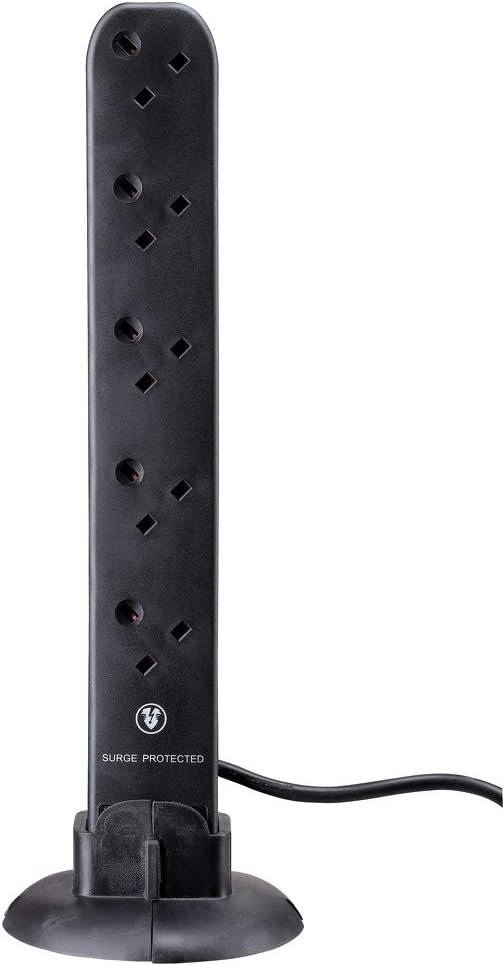
Image 1: Masterplug Surge Tower Extension Lead in its vertical orientation, showing multiple sockets and the 'SURGE PROTECTED' label.

Image 2: Masterplug Surge Tower Extension Lead positioned horizontally, demonstrating its alternative mounting configuration with integrated stands.
5. Operating Instructions
Once connected to a power source, the Masterplug Surge Tower Extension Lead is ready for use. The LED Power Indicator will confirm it is active.
- Connecting Devices: Insert the power plugs of your electronic devices into any of the 10 available sockets. The safety shutters will open as the plug is inserted.
- Surge Protection: The unit continuously monitors for power surges. In the event of a surge, the internal protection circuitry will activate to safeguard your connected devices.
- Power Indicator: A green LED light indicates that the unit is powered and the surge protection is active. If this light is off, the surge protection may have been compromised by a significant power event and the unit should be replaced.
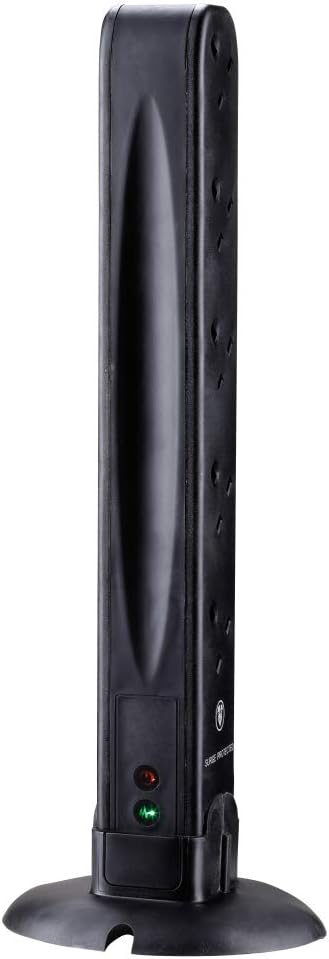
Image 3: Rear view of the Masterplug Surge Tower, highlighting the power and surge protection indicator lights.
6. Maintenance
- Cleaning: Disconnect the extension lead from the wall socket before cleaning. Wipe the unit with a dry, soft cloth. Do not use liquid cleaners or abrasive materials.
- Inspection: Periodically inspect the power cord and the unit for any signs of damage, such as cuts, fraying, or discoloration. If damage is found, discontinue use immediately and replace the unit.
- Storage: When not in use, store the extension lead in a cool, dry place, away from direct sunlight and extreme temperatures.
7. Troubleshooting
| Problem | Possible Cause | Solution |
|---|---|---|
| No power to connected devices. |
|
|
| Surge protection indicator light is off. | The surge protection component has absorbed a significant power surge and is no longer active. | Replace the extension lead to ensure continued surge protection for your devices. |
8. Specifications
- Brand: Masterplug
- Model: SRGTOW102B-MPA
- Number of Sockets: 10
- Current Rating: 13 Amps (AC adapter current)
- Product Dimensions: 13 x 5 x 42.3 cm (approximate)
- Weight: 0.6 Kilograms
- Colour: Black
- Shape: Tower
- Manufacturer: LUCECO
- Country of Origin: China
9. Warranty and Support
This Masterplug product comes with a 3 Year Manufacturer Warranty. Please retain your proof of purchase for warranty claims.
For technical support or warranty inquiries, please contact Masterplug customer service through their official website or the retailer where the product was purchased.


