
1. Introduction
This manual provides essential instructions for the safe and effective operation, maintenance, and troubleshooting of your Shark Navigator NV355 Lift Away Professional Vacuum. Please read this manual thoroughly before using the appliance and retain it for future reference.
The Shark Navigator NV355 is a lightweight 2-in-1 upright vacuum featuring Lift-Away technology, allowing the canister to detach for portable cleaning. It includes a completely sealed system with a HEPA filter to capture dust and allergens, and a brush roll shutoff button for seamless transition between carpet and bare floor cleaning.
2. Important Safety Instructions
When using an electrical appliance, basic precautions should always be observed, including the following:
- Read all instructions before using this vacuum cleaner.
- Always unplug the vacuum cleaner from the electrical outlet before cleaning or performing any maintenance.
- Do not use outdoors or on wet surfaces.
- Do not allow to be used as a toy. Close attention is necessary when used by or near children.
- Use only as described in this manual. Use only manufacturer’s recommended attachments.
- Do not handle plug or vacuum cleaner with wet hands.
- Do not put any object into openings. Do not use with any opening blocked; keep free of dust, lint, hair, and anything that may reduce airflow.
- Keep hair, loose clothing, fingers, and all parts of body away from openings and moving parts.
- Turn off all controls before unplugging.
- Use extra care when cleaning on stairs.
- Do not use to pick up flammable or combustible liquids, such as gasoline, or use in areas where they may be present.
- Do not pick up anything that is burning or smoking, such as cigarettes, matches, or hot ashes.
- Do not use without dust cup and/or filters in place.
3. Package Contents
Verify that all components are present in your package:
- Main Vacuum Unit (Motorized Floor Nozzle, Canister, Wand, Handle)
- Hard Floor Hero Attachment
- Wide Upholstery Tool
- Dusting Brush
- 8-inch Crevice Tool
4. Assembly and Setup
Follow these steps to assemble your Shark Navigator NV355 vacuum:
- Insert the wand into the motorized floor nozzle until it clicks securely into place.
- Place the canister onto the wand and slide it down until it clicks into place.
- Insert the handle into the top of the wand until it clicks securely.
- Attach the hose to the back of the canister by aligning the tabs and pushing until it clicks.
- Store accessories on the onboard posts for convenience.
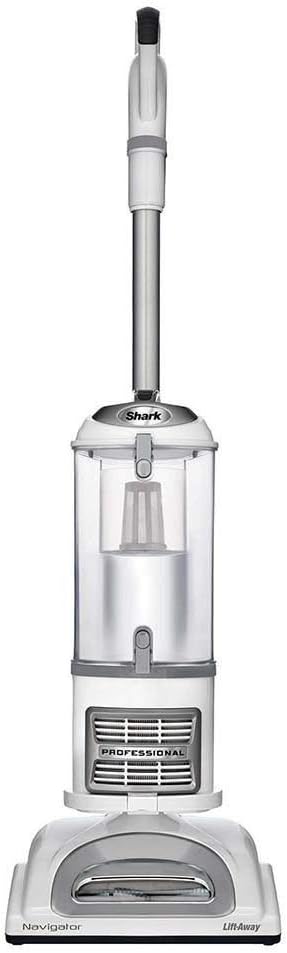
Figure 4.1: Fully assembled Shark Navigator NV355 Lift Away Professional Vacuum.
5. Operating Instructions
5.1 Powering On and Off
Plug the power cord into a suitable electrical outlet. Press the power button located on the canister to turn the vacuum on or off.
5.2 Surface Selection (Brush Roll Control)
The vacuum features a brush roll shutoff button to optimize cleaning for different surfaces:
- Hard Floor Setting: Press the brush roll button to turn off the brush roll. This setting is ideal for bare floors and delicate rugs to prevent scattering debris.
- Carpet Setting: Press the brush roll button to turn on the brush roll. The brush roll will spin to deep clean carpets.

Figure 5.1: The power nozzle of the Shark Navigator NV355, showing the brush roll indicator.
5.3 Using Lift-Away Mode
The Lift-Away feature allows for portable cleaning in hard-to-reach areas:
- Press the 'Lift-Away' button on the canister.
- Lift the canister away from the floor nozzle.
- You can now carry the canister and use the wand with attachments for above-floor cleaning, or connect the hose directly to the canister for handheld use.

Figure 5.2: A user demonstrating the Lift-Away mode for cleaning high areas with the wand and canister.

Figure 5.3: A user demonstrating the Lift-Away mode for cleaning stairs with the hose and canister.
5.4 Using Attachments
Connect the desired attachment to the end of the wand or directly to the hose for specialized cleaning tasks:
- Hard Floor Hero: Designed for superior bare floor cleaning.
- Wide Upholstery Tool: Effective for removing pet hair and lint from upholstery and fabrics.
- Dusting Brush: Gently cleans delicate surfaces.
- 8-inch Crevice Tool: Reaches into tight spaces and corners.
6. Maintenance
Regular maintenance ensures optimal performance of your vacuum cleaner.
6.1 Emptying the Dust Cup
Empty the dust cup after each use or when debris reaches the MAX FILL line. To empty:
- Ensure the vacuum is unplugged.
- Press the dust cup release latch and lift the dust cup off the canister.
- Hold the dust cup over a trash bin and press the bottom release latch to open the bottom lid.
- Close the lid and reattach the dust cup to the canister.
6.2 Cleaning Filters
The Shark Navigator NV355 has a completely sealed system with a HEPA filter and foam/felt filters. Clean filters regularly to maintain suction power.
- Pre-Motor Foam & Felt Filters: Rinse every 3 months. Locate these filters above the dust cup. Remove, rinse with water until clear, and air dry completely for at least 24 hours before reinstalling.
- Post-Motor HEPA Filter: Rinse once every 2 years. Locate this filter at the bottom of the canister. Remove, rinse with water until clear, and air dry completely for at least 24 hours before reinstalling.
Important: Do not operate the vacuum without all filters properly installed and completely dry.
6.3 Cleaning the Brush Roll
Periodically check the brush roll for hair, string, or debris. Use scissors to carefully cut away any wrapped material. Ensure the brush roll spins freely.
7. Troubleshooting
If your vacuum is not functioning as expected, consult the following guide:
| Problem | Possible Cause | Solution |
|---|---|---|
| Vacuum does not turn on. | Power cord not securely plugged in. | Check power cord connection. |
| No suction or low suction. | Dust cup is full. Filters need cleaning. Blockage in hose or nozzle. | Empty dust cup. Clean pre-motor and post-motor filters. Check hose, wand, and nozzle for blockages. |
| Brush roll does not spin. | Brush roll is off. Blockage in brush roll. Vacuum is in Lift-Away mode. | Ensure brush roll button is engaged. Clear any obstructions from brush roll. Ensure canister is attached to floor nozzle. |
| Vacuum picks up small debris, but pushes larger debris. | Brush roll is on for hard floors. | Turn off brush roll for bare floor cleaning. |
8. Specifications
- Brand: Shark
- Model Name: NV355
- Item Weight: 7.5 Pounds (detachable canister)
- Power Source: Corded Electric (Note: Product description mentions 'Battery Powered' but this is incorrect for this model, it is corded.)
- Form Factor: Upright / Lift-Away
- Filtration: Anti-Allergen Complete Seal Technology with HEPA filter
- Special Features: Swivel Steering, Brush Roll Shutoff
9. Warranty and Support
As this product is listed as 'Renewed', specific warranty terms may vary. Please refer to the warranty information provided at the time of purchase or contact the seller directly for details regarding your specific warranty coverage.
For further assistance or to purchase replacement parts, please contact Shark customer support or visit their official website.


