
1. Introduction
The Fujifilm GFX 50R is a mirrorless digital camera featuring a large 51.4MP G format CMOS image sensor and X-Processor Pro image processing engine. This camera delivers superior image quality in a compact and lightweight body, designed for street and documentary photography. It is equipped with a 0.77x 3.69M-dot organic OLED electronic viewfinder for accurate focusing and framing. Weighing approximately 145g less than the GFX 50S, the GFX 50R offers intuitive handling in a rugged, weather-sealed body, meeting the diverse needs of photographers.
2. Setup
2.1 Unboxing and Initial Inspection
Upon opening the package, ensure all components are present and undamaged. The box should contain the Camera Body, Battery, Battery Charger, Shoulder Strap, Body Cap, Manual, and U.S.A. Warranty information.
2.2 Attaching the Lens
Align the white dot on the lens with the white dot on the camera body's lens mount. Rotate the lens clockwise until it clicks into place. To remove, press the lens release button and rotate counter-clockwise.
2.3 Inserting the Battery and Memory Card
Open the battery compartment cover located at the bottom of the camera. Insert the battery with the correct orientation until it locks. Close the cover. Open the memory card slot cover (typically on the side). Insert compatible SDXC memory cards (UHS-II recommended) until they click. Close the cover.
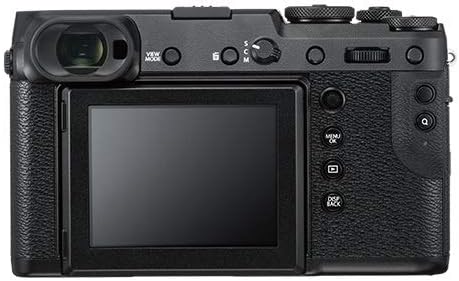
Figure 1: Front view of the Fujifilm GFX 50R camera with a lens attached. This image highlights the camera's compact design and the lens mount.

Figure 2: Rear view of the Fujifilm GFX 50R camera, showcasing the tilting LCD screen and various control buttons and dials.
3. Operating the Camera
3.1 Powering On/Off
Locate the ON/OFF switch, typically near the shutter button. Slide it to the 'ON' position to power on the camera. Slide it to 'OFF' to power off.
3.2 Basic Shooting Modes
The GFX 50R supports various shooting modes including Bulb Mode, Time Mode, Aperture Priority, Manual, Program, and Shutter Priority. These can typically be selected via a mode dial on the camera's top plate.
3.3 Image Quality Settings
The camera captures images with an effective still resolution of 51.4 MP. Supported file formats include JPEG, Raw, and TIFF. JPEG quality levels can be set to Basic, Fine, or Normal. The bit depth is 14 Bit for rich tonal information.
3.4 Focusing
The GFX 50R utilizes Contrast Detection for autofocus. It features 117 autofocus points. Focus types include Continuous-Servo AF (C), Manual Focus (M), and Single-Servo AF (S). Focus modes are Continuous-Servo AF (AF-C), Manual Focus (MF), and Single-Servo AF (AF-S).
3.5 Exposure and White Balance
Metering methods include Average, Center-Weighted Average, Multi-Zone, and Spot. Exposure control is managed via TTL 256-zone metering. White Balance settings offer Auto, Color Temperature, Custom, Daylight, Fluorescent, Incandescent, Shade, and Underwater options.
3.6 Video Recording
The camera supports video recording with a maximum resolution of 1080p and a recording capacity of 30 minutes per clip.
4. Maintenance
To ensure the longevity and optimal performance of your Fujifilm GFX 50R, regular maintenance is recommended:
- Cleaning the Camera Body: Use a soft, dry cloth to wipe the camera body. For stubborn dirt, a slightly damp cloth can be used, followed by a dry cloth. Avoid harsh chemicals.
- Cleaning the Lens: Use a lens brush or blower to remove dust. For smudges, use a specialized lens cleaning solution and a microfiber cloth.
- Sensor Cleaning: Sensor cleaning should be performed by authorized service personnel to avoid damage.
- Storage: Store the camera in a dry, cool place away from direct sunlight and extreme temperatures. Use a desiccant pack if storing in humid environments.
5. Troubleshooting
If you encounter issues with your Fujifilm GFX 50R, consider the following general troubleshooting steps:
- Camera Not Powering On: Ensure the battery is fully charged and correctly inserted. Check if the battery contacts are clean.
- Image Quality Issues: Verify lens cleanliness. Check shooting mode and exposure settings. Ensure sufficient lighting.
- Autofocus Problems: Ensure the lens is properly attached. Check the focus mode setting. Ensure there is enough contrast in the scene for the autofocus system.
- Memory Card Errors: Reinsert the memory card. Try a different, compatible memory card. Ensure the card is not full or corrupted.
For persistent issues, refer to the detailed troubleshooting section in the full user manual or contact Fujifilm customer support.
6. Specifications
| Feature | Specification |
|---|---|
| Compatible Mountings | Fujifilm G |
| Aspect Ratio | 4:3 |
| Photo Sensor Technology | CMOS |
| Supported File Format | JPEG, Raw, TIFF |
| Image Stabilization | Optical |
| Optical Zoom | 1 x |
| Maximum Aperture | 3.5 Millimeters |
| Expanded ISO Minimum | 50 |
| Metering Description | Average, Center-Weighted Average, Multi-Zone, Spot |
| Model Name | GFX 50R |
| Are Batteries Included | Yes |
| Model Number | GFX 50R Body |
| Remote Included | No |
| Model Series | GFX |
| UPC | 074101040128 |
| Connectivity Technology | 2.5mm Sub-Mini, 3.5mm Headphone, 3.5mm Microphone, DC Input, HDMI D (Micro), USB Type-C (USB 3.0) |
| Hardware Interface | AV Port |
| Wireless Technology | Wi-Fi, Bluetooth |
| HDMI Type | Type D Micro HDMI |
| Video Output | Micro-HDMI |
| Total USB 3.0 Ports | 1 |
| Total USB Ports | 1 |
| Total Video Out Ports | 1 |
| Shooting Modes | Bulb Mode, Time Mode, Aperture Priority, Manual, Program, Shutter Priority |
| Digital-Still | Yes |
| Movie Mode | Yes |
| Image Capture Type | Stills & Video |
| Night vision | No |
| Auto Focus Technology | Contrast Detection |
| Focus Features | Autofocus |
| Autofocus Points | 117 |
| Focus Type | Continuous-Servo AF (C), Manual Focus (M), Single-Servo AF (S) |
| Focus Mode | Continuous-Servo AF (AF-C), Manual Focus (MF), Single-Servo AF (AF-S) |
| Autofocus | No |
| File Format | JPEG, Raw, TIFF |
| Effective Still Resolution | 51.4 MP |
| JPEG Quality Level | Basic, Fine, Normal |
| Supported Image Format | JPEG, Raw, TIFF |
| Maximum Image Size | 36.5 MB |
| Bit Depth | 14 Bit |
| Total Still Resolution | 51 MP |
| Lens Type | G-mount lens |
| Lens Construction | G Mount |
| Metering Methods | Average, Center-Weighted Average, Multi-Zone, Spot |
| Exposure Control | TTL 256-zone metering Multi, Spot, Average, Center-Weighted |
| White Balance Settings | Auto, Color Temperature, Custom, Daylight, Fluorescent, Incandescent, Shade, Underwater |
| Self Timer | 10 Seconds |
| Screen Size | 3.2 Inches |
| Display Type | LCD |
| Dots Per Screen | 872742 |
| Display Fixture Type | Tilting |
| Touch Screen Type | No Touch |
| Display Resolution Maximum | 2,360,000 |
| Has Color Screen | Yes |
| Flash Memory Type | SDXC |
| Recording Capacity | 30 Minutes |
| Write Speed | > 250 MB/s |
| Flash Memory Speed Class | UHS-II |
| Flash Memory Bus Interface Type | SD (Secure Digital) card interface |
| Flash Memory Installed Size | 2000 GB |
| Sensor Type | CMOS |
| Image stabilization | Optical |
| Supported Media Type | ProductImage, Video |
| Photo Sensor Resolution | 51 MP |
| Photo Sensor Size | Medium Format (>35mm) |
| Minimum Shutter Speed | 1/4000 Seconds |
| Form Factor | Mirrorless |
| Special Feature | Interval Recording |
| Color | Black |
| Light Sensitivity | ISO 50 to ISO 102400 |
| Video Resolution | 1080p |
| Viewfinder | Electronic |
| ISO Range | 50-12800 |
| Flash Modes | TTL |
| Camera Flash | Hot Shoe, PC Terminal |
| Has Self-Timer | Yes |
| Compatible Devices | Fujifilm G mount devices |
| Continuous Shooting | 6 FPS |
| Aperture modes | Aperture Priority, Manual |
| Viewfinder Magnification | 0.77x |
7. Warranty and Support
Your Fujifilm GFX 50R comes with a U.S.A. Warranty. Please refer to the warranty card included in your product packaging for specific terms and conditions. For technical support, service, or further inquiries, please visit the official Fujifilm support website or contact their customer service.


