
Product Overview
The Dreamegg D1 Sound Machine is designed to create a relaxing atmosphere for improved sleep and concentration. It features a variety of sounds, an adjustable night light, and convenient timer functions.
Key Features:
- 24 High-Fidelity Sounds: Includes 7 white noises, 7 fan sounds, and 10 natural sounds (Bird, Sea Wave, Brook, Little Star, Lullaby, Music Box, Thunderstorm, Rain, Cricket, Fetal Tone).
- Warm Night Light: Optional nursery lamp with adjustable brightness for gentle illumination.
- Adjustable Timer: Set for 30, 60, or 90 minutes, or continuous play.
- Memory Function: Remembers previous settings for light, sound, volume, and timer.
- Volume Control: 32 levels of volume adjustment.
- Compact Design: Portable for home, office, or travel use.
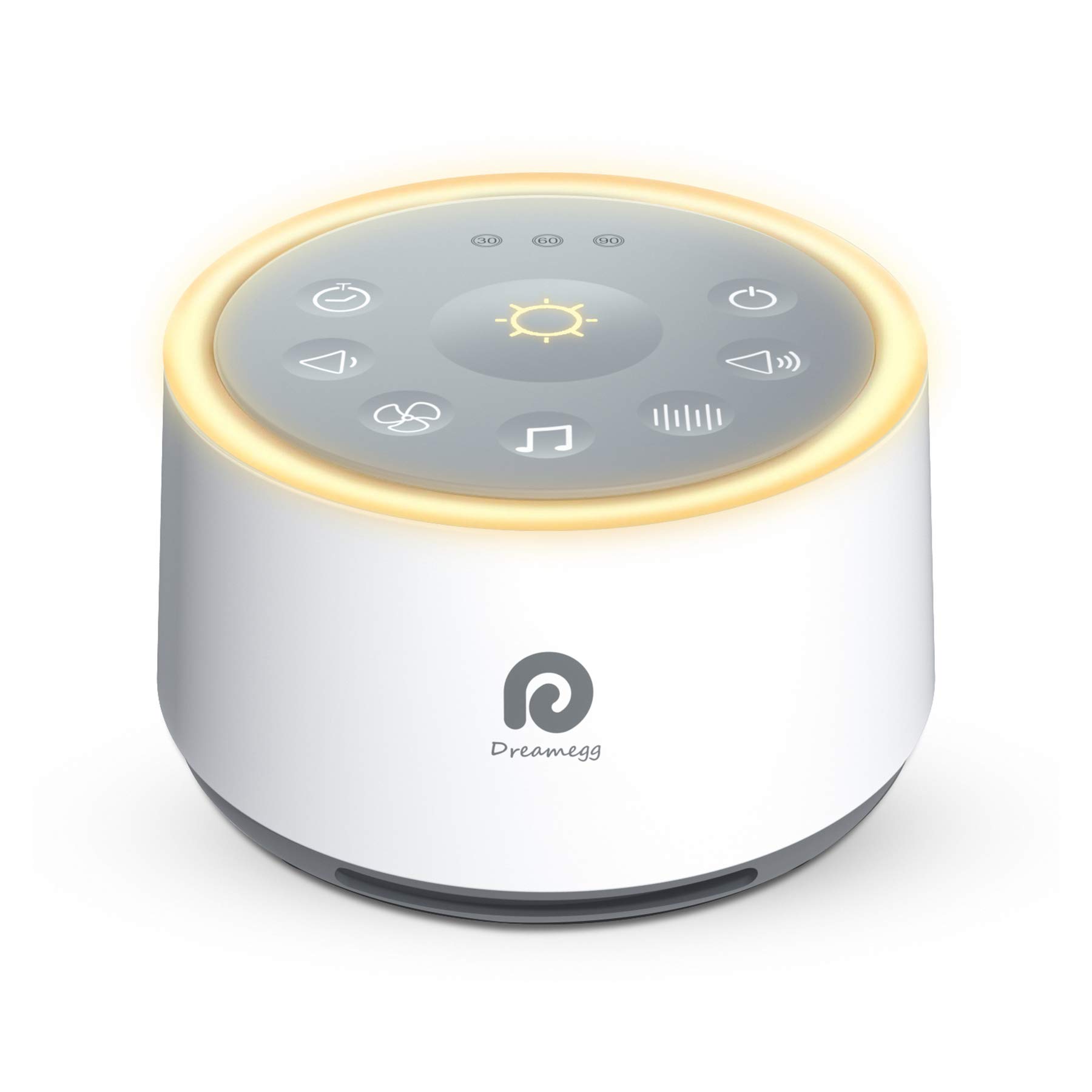
The Dreamegg D1 Sound Machine with its intuitive control panel and soft night light.
Important Safety Instructions
- Do not use in bath or near water.
- Do not use if the power cord is damaged.
- Not intended for use by children under 3 years old without supervision.
- Limit noise exposure to protect hearing.
- This model does not support batteries and requires AC power.
Package Contents
Ensure all items are present upon unboxing:
- Dreamegg D1 Sound Machine
- USB Power Cable
- Power Adapter
- User Manual
Setup
Getting Started:
- Unpack the Dreamegg D1 Sound Machine and all accessories.
- Connect the USB power cable to the sound machine's power input port.
- Plug the power adapter into a standard AC electrical outlet.
- Place the sound machine on a stable, flat surface away from water or heat sources.

Connect the power cable to the designated port on the side of the device.
Operating Instructions
Controls and Functions:
The control panel is located on the top surface of the device.

The intuitive touch control panel for easy operation.
Power On/Off:
Press the Power button (circle with vertical line) to turn the device on or off.
Sound Selection:
Press the respective buttons to cycle through sound categories:
- White Noise: Press the button with vertical lines.
- Fan Sounds: Press the fan icon button.
- Nature Sounds: Press the musical note icon button to cycle through 10 natural sounds.
Volume Adjustment:
Use the Volume Up (speaker with +) and Volume Down (speaker with -) buttons to adjust the sound level. There are 32 volume levels.
Night Light Operation:
Press the Light button (sun icon) to turn the night light on or off. The light offers adjustable brightness.

The night light provides gentle illumination, ideal for nighttime use.
Timer Settings:
Press the Timer button (clock icon) to set an auto-off timer for 30, 60, or 90 minutes. The corresponding indicator light will illuminate. Press again to cycle through options or turn off the timer for continuous play.

Set the timer for automatic shut-off to conserve energy.
Memory Function:
The device will automatically remember your last selected sound, volume, light, and timer settings when powered off and on again.
Product in Use
The Dreamegg D1 is versatile for various environments and users.

The sound machine provides a comforting background for infants.

Ideal for adults seeking a peaceful sleep environment.

Enhance focus during meditation or yoga with soothing sounds.
Maintenance
Care and Cleaning:
To maintain your Dreamegg D1 Sound Machine, wipe the exterior with a soft, dry cloth. Do not use liquid cleaners or abrasive materials. Ensure the device is unplugged before cleaning.
Troubleshooting
| Problem | Solution |
|---|---|
| Device does not power on. | Ensure the power cable is securely connected to both the device and a working electrical outlet. |
| No sound is playing. | Check if the volume is turned up. Ensure a sound mode (white noise, fan, or nature) is selected. |
| Night light is not working. | Press the Light button to activate the night light. Adjust brightness if necessary. |
| Sound quality is poor. | Ensure the device is placed on a stable surface and not obstructed. Adjust volume to an appropriate level. |
Technical Specifications
- Model Number: HFD-W02
- Product Dimensions: 4.3 x 4.3 x 2.7 inches
- Weight: 1 Pound
- Material: Plastic
- Power Source: AC
- Color: Classic White
Warranty and Support
The Dreamegg D1 Sound Machine comes with a 1-year warranty from the date of purchase. For technical support, warranty claims, or further assistance, please contact Dreamegg customer service through their official website or the retailer where the product was purchased.
Please retain your proof of purchase for warranty validation.