
Anker A1271032
Anker PowerCore 20100mAh Portable Charger User Manual
Model: A1271032
Introduction
The Anker PowerCore 20100 is a high-capacity portable charger designed to provide fast and reliable power for your mobile devices. Featuring Anker's exclusive PowerIQ and VoltageBoost technologies, it ensures efficient charging for a wide range of smartphones and tablets. Its robust design and advanced safety features make it an ideal companion for daily use and travel.

Figure 1: The Anker PowerCore 20100mAh Portable Charger, showcasing its sleek blue design and indicator lights.
What's in the Box
- Anker PowerCore 20100 Portable Charger
- Micro USB cable
- Travel Pouch
- Welcome Guide

Figure 2: Included accessories: the PowerCore unit, a micro USB cable, a travel pouch, and the welcome guide.
Setup
Initial Charging of PowerCore
Before first use, fully charge your PowerCore 20100. Connect the included Micro USB cable to the "Input" port on the PowerCore and the other end to a 2A wall charger (not included). A full charge typically takes about 10 hours with a 2A charger. Using a 1A phone charger may take up to 20 hours.
The LED indicators on the side of the PowerCore will light up to show the charging progress. All four LEDs will be solid blue when fully charged.

Figure 3: The PowerCore features two USB-A output ports and one Micro USB input port for charging the power bank itself.
Operating Instructions
Charging Your Devices
- Connect your device to one of the USB-A output ports on the PowerCore using your device's original cable, the included Micro USB cable, or a certified third-party cable (e.g., MFi certified for Apple devices).
- Press the power button on the side of the PowerCore to initiate charging. The blue LED indicators will illuminate, showing the remaining battery capacity.
- The PowerCore features PowerIQ and VoltageBoost technologies, which automatically detect and deliver the fastest possible charge speed for your device.
- You can charge two devices simultaneously using both USB-A output ports. The total output is 4.8A, with up to 2.4A per port.

Figure 4: The PowerCore can charge multiple devices, such as a smartphone and a tablet, simultaneously.
Checking Battery Level
Press the power button once to check the remaining battery level. The blue LED indicators will light up, with each light representing approximately 25% of the battery capacity.
- 4 LEDs: 75% - 100% charged
- 3 LEDs: 50% - 75% charged
- 2 LEDs: 25% - 50% charged
- 1 LED: 0% - 25% charged (recharge soon)
Maintenance
- Keep the PowerCore in a cool, dry place, away from direct sunlight and extreme temperatures.
- To maintain optimal battery health, fully charge the PowerCore at least once every three months if not in regular use.
- Clean the exterior with a soft, dry cloth. Avoid using harsh chemicals or abrasive materials. The matte finish helps resist smudges and fingerprints.
- Avoid dropping or subjecting the PowerCore to strong impacts, as this can damage internal components.
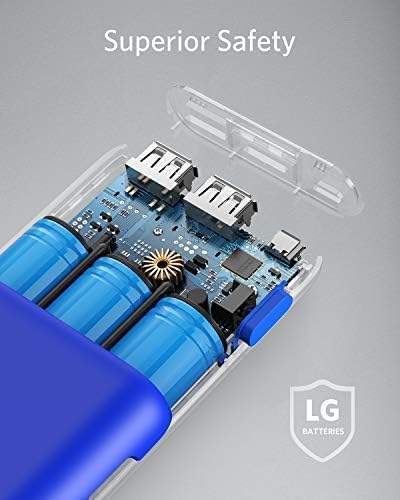
Figure 5: The internal components of the PowerCore, highlighting the high-quality LG battery cells and MultiProtect safety system.
Troubleshooting
- Device not charging:
- Ensure the PowerCore is sufficiently charged. Check the LED indicators.
- Verify that the charging cable is securely connected to both the PowerCore and your device.
- Try a different charging cable or a different USB-A output port on the PowerCore.
- Note: The PowerCore 20100 does not support Qualcomm Quick Charge. Devices requiring Quick Charge will charge at their standard speed.
- The PowerCore is not compatible with devices with an input below 50mA (e.g., some Bluetooth headsets and GPS devices).
- PowerCore not recharging:
- Ensure the Micro USB input cable is securely connected to the PowerCore and the wall charger.
- Use a 2A wall charger for optimal recharging speed (approximately 10 hours). Using a 1A charger will significantly increase recharge time (up to 20 hours).
- Try a different Micro USB cable or wall charger.
- Slow charging:
- Ensure you are using a high-quality, compatible charging cable.
- Some devices may have specific charging requirements. Refer to your device's manual.
Specifications
| Feature | Detail |
|---|---|
| Model Number | A1271032 |
| Battery Capacity | 20100mAh |
| Output | 4.8A total (up to 2.4A per port) |
| Input | 5V/2A (Micro USB) |
| Dimensions | 6.54 x 2.44 x 0.87 inches |
| Weight | 12.5 ounces |
| Technology | PowerIQ, VoltageBoost |
| Safety Features | MultiProtect Safety System (Surge protection, short circuit protection) |
Warranty and Support
Anker provides an 18-month warranty for the PowerCore 20100 Portable Charger. For any product inquiries or support, please refer to the contact information provided in your Welcome Guide or visit the official Anker website.
"At Anker, we believe in our products. That's why we back them all with an 18-month warranty and provide friendly, easy-to-reach support."
Related documentsA1271032

Ask a question about this manual
Ask about setup, troubleshooting, compatibility, parts, safety, or missing instructions. Manuals+ will review the question and use this page’s manual context to help answer it.