
1. Introduction
This manual provides detailed instructions for the proper use and maintenance of your Meike MK-MT24S Macro Twin Lite Flash. Please read this manual thoroughly before using the product to ensure optimal performance and safety. The Meike MK-MT24S is designed to provide versatile lighting solutions for macro photography with compatible Sony mirrorless cameras.
2. Package Contents
Verify that all items listed below are included in your package. If any items are missing or damaged, please contact your retailer.
- 1 x MK-GT620 TTL Transceiver
- 2 x MK-R200 Wireless Remote Flashes
- 2 x MK-R200 Soft Flash Diffusers
- 2 x Hot Shoe Mounts (MK-AS-R200A)
- 2 x Lamp Holders (MK-AS-R200B)
- 1 x Annular Lamp Holder
- 6 x Lens Adapter Rings (52mm, 55mm, 62mm, 67mm, 72mm, 77mm)
- 18 x Color Filters (MK-SB-R200)
- 1 x MK-MT24S Storage Pocket

Figure 2.1: Overview of the Meike MK-MT24S Macro Twin Lite Flash and its included accessories.
3. Safety Information
Please observe the following safety precautions to prevent injury or damage to the product:
- Do not disassemble or modify the flash unit.
- Keep the product away from water and high humidity.
- Avoid direct eye exposure to the flash, especially at close range.
- Use only recommended batteries and dispose of them properly.
- Do not operate in environments with extreme temperatures (-10°C to 50°C operating, -20°C to 70°C storage).
4. Setup
4.1 Battery Installation
The MK-R200 flashes require 2x AAA Ni-MH batteries each, and the MK-GT620S trigger requires 2x AA Ni-MH batteries. Ensure correct polarity when inserting batteries.

Figure 4.1: Rear view of the MK-R200 flashes, showing the battery compartment and hot shoe mount.
4.2 Mounting the Trigger (MK-GT620S)
Slide the MK-GT620S TTL transceiver onto your camera's hot shoe mount until it clicks into place. Secure it by tightening the locking mechanism if available.

Figure 4.2: The MK-GT620S trigger and MK-R200 flashes mounted on a Sony camera with a macro lens.
4.3 Attaching Lens Adapter Rings and Annular Lamp Holder
Select the appropriate lens adapter ring (52mm, 55mm, 62mm, 67mm, 72mm, or 77mm) for your camera lens. Screw the adapter ring onto the front filter thread of your lens. Then, attach the annular lamp holder to the adapter ring.
4.4 Mounting MK-R200 Flashes
The MK-R200 flashes can be attached to the annular lamp holder or positioned independently using the included lamp holders (MK-AS-R200B) and hot shoe mounts (MK-AS-R200A). Each R200 flash can rotate up to 60° horizontally and 45° vertically for flexible positioning.

Figure 4.3: The MK-R200 flashes attached to the annular lamp holder, along with various lens adapter rings.
5. Operation
5.1 Power On/Off
To power on the MK-GT620S trigger and MK-R200 flashes, slide the power switch to the 'ON' position. To power off, slide the switch to 'OFF'.
5.2 Flash Modes
The MK-MT24S supports various flash modes:
- TTL (Through-The-Lens) Mode: The camera automatically determines the flash output for correct exposure.
- Manual Flash (M) Mode: Allows manual adjustment of flash output from 1/1 to 1/64.
- S1/S2 Optical Slave Modes: The R200 flashes can be triggered by another flash. S1 mode triggers on the first flash, S2 mode ignores the pre-flash of a TTL system.
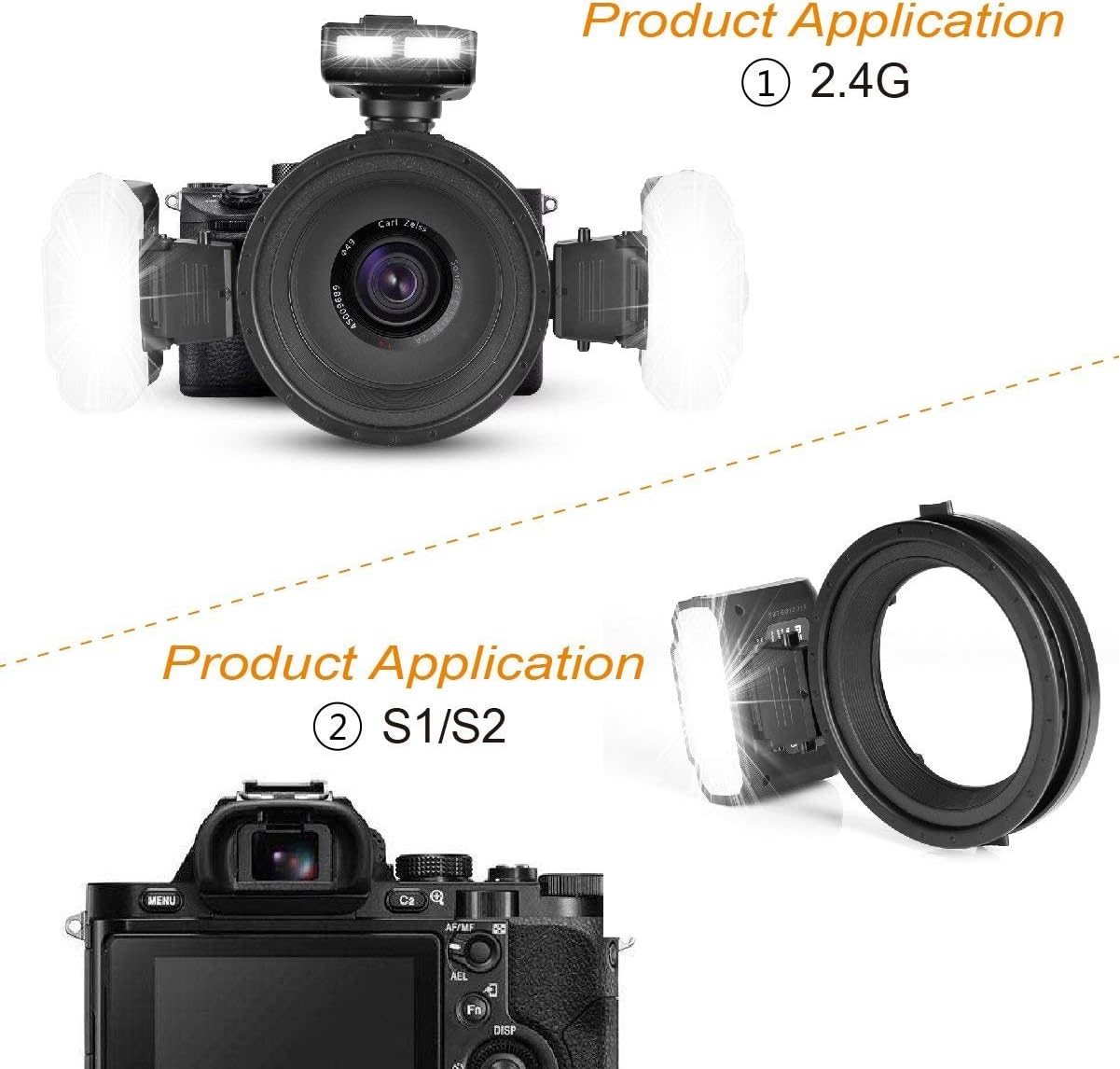
Figure 5.1: Illustration of 2.4G wireless triggering and S1/S2 optical slave modes.
5.3 2.4G Wireless Control
The MK-GT620S trigger communicates with the MK-R200 flashes via 2.4G wireless transmission. This system supports three groups (A/B/C) and four channels (1/2/3/4). The default ID is 0000. Ensure the trigger and flashes are set to the same group and channel for proper communication.
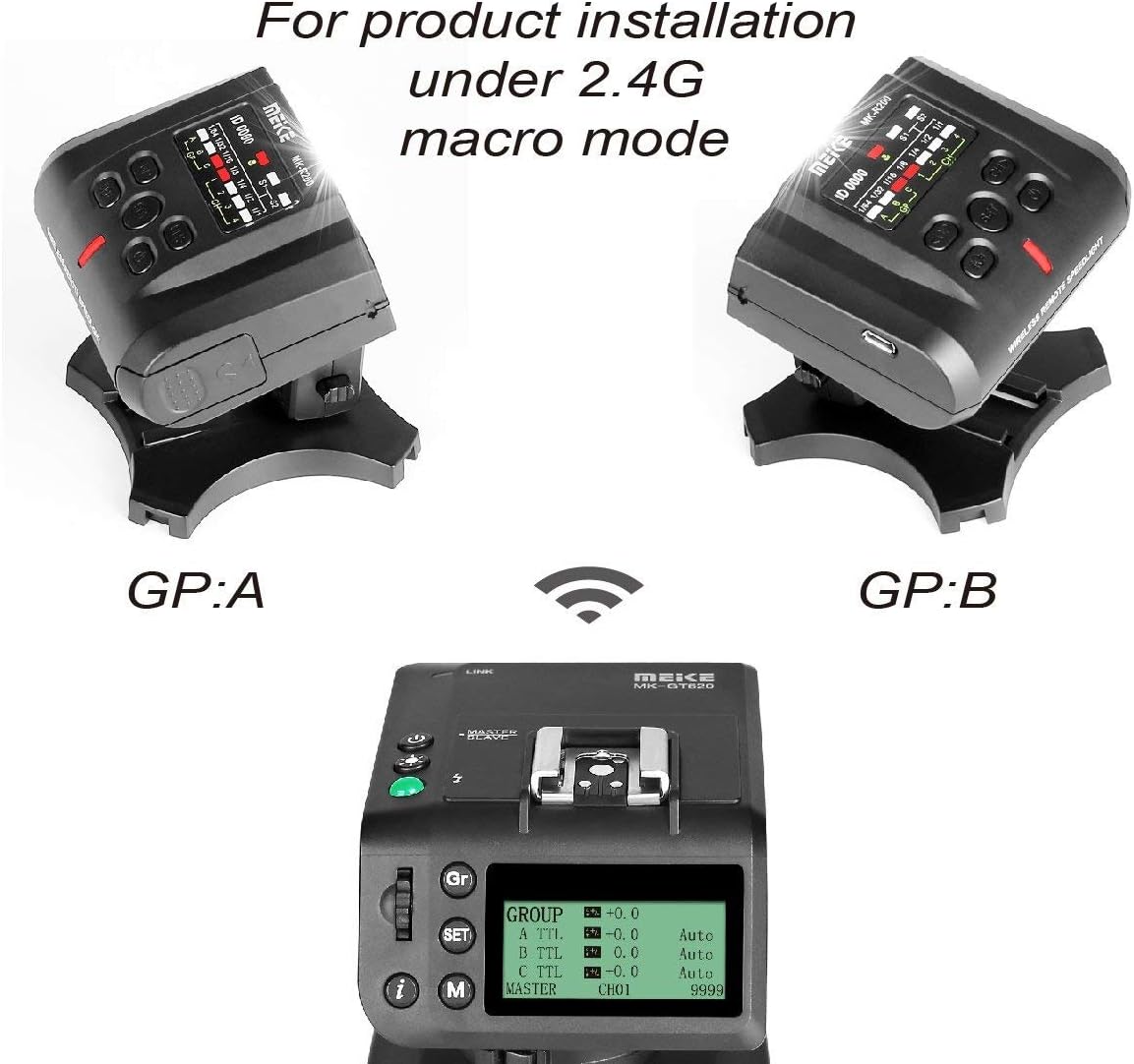
Figure 5.2: Configuration for 2.4G macro mode, displaying the trigger's interface and two R200 flashes set to groups A and B.
5.4 Flash Ratio Adjustment
The system supports flash ratio adjustment, allowing independent control of the output for each R200 flash within groups A/B/C. Flash intensity can be adjusted in 7 levels (1/64-1/1).
5.5 High Speed Sync (HSS)
The MK-MT24S supports High Speed Sync, Front-curtain Sync, FE lock, and Rear-curtain Sync, enabling flash photography at shutter speeds faster than the camera's native sync speed.
5.6 LED Assistive Preview Focus
The flashes are equipped with an LED light (0.5W, 5500K±200, Ra 90) to assist with focusing in low-light conditions.
5.7 Firmware Upgrading
The unit supports firmware upgrading online. Refer to the Meike official website for the latest firmware and instructions.
6. Maintenance
To ensure the longevity and proper functioning of your Meike MK-MT24S Macro Twin Lite Flash, follow these maintenance guidelines:
- Cleaning: Use a soft, dry cloth to clean the exterior of the flash units and trigger. For stubborn dirt, a slightly damp cloth can be used, followed by a dry cloth. Do not use solvents or abrasive cleaners.
- Storage: When not in use for extended periods, remove the batteries from all units to prevent leakage. Store the product in a cool, dry place, preferably in its original storage pocket, away from direct sunlight and extreme temperatures.
- Handling: Avoid dropping or subjecting the units to strong impacts, as this can damage internal components.
7. Troubleshooting
If you encounter issues with your Meike MK-MT24S, refer to the following common problems and solutions:
- Flash not firing:
- Check if batteries are correctly installed and charged.
- Ensure the trigger and flashes are powered on.
- Verify that the trigger is securely mounted on the camera's hot shoe.
- Confirm that the trigger and flashes are set to the same group and channel.
- Inconsistent flash output:
- Check battery levels; low batteries can affect performance.
- Ensure there are no obstructions between the trigger and flashes in wireless mode.
- Review camera and flash settings for correct exposure mode (TTL/Manual).
- Flash not syncing with shutter:
- Ensure High Speed Sync (HSS) is enabled if using shutter speeds above the camera's X-sync speed.
- Check camera flash settings.
If the problem persists, please contact Meike customer support.
8. Specifications
| Feature | Specification |
|---|---|
| Guide Number | 10 (ISO 100.m), 14 (ISO 200.m) |
| LED Light | 0.5W, 5500K±200, Ra 90 |
| Groups & Channels | Group A/B/C, Channels 1/2/3/4 |
| ID | Default as 0000 |
| S1/S2 Transmission Distance | Indoor >20m, Outdoor >10m |
| 2.4G Wireless Distance | Stable within 15m (any angle), Actual measurement >100m (open environment) |
| Cover Angle | Covers light of 24mm lens |
| Recycle Time | 4s (1/1 output) |
| Batteries | 2x AAA Ni-MH (for R200), 2x AA Ni-MH (for GT620) |
| Operating Temperature | -10°C to 50°C |
| Storage Temperature | -20°C to 70°C |
| TTL Flasher Size | 63 x 84 x 53.6 mm |
| Macro Flash Size | 80 x 60 x 75 mm |
| Weight | Approx. 1.1 KG (total package) |
9. Compatibility
The Meike MK-MT24S Macro Twin Lite Flash is compatible with Sony MI Hot Shoe Mount Mirrorless Cameras, including but not limited to:
- DSC-RX10M2, DSC-HX50, DSC-HX60, DSC-HX400, DSC-RX100M2, DSC-RX10, DSC-RX1R, DSC-RX1, DSC-RX10M4
- ILCE-9, ILCE-7RM2, ILCE-7SM2, ILCE-7M2, ILCE-6500, ILCA-99M2, ILCE-6000, ILCE-7, ILCE-7M2, ILCE-7R, ILCE-7S, ILCE-5100
- NEX-6, NEX-7, NEX-3, NEX-5
10. Warranty and Support
For warranty information, please refer to the warranty card included with your product or visit the official Meike website. For technical support or service inquiries, please contact Meike customer service through their official channels.