
1. Introduction
Thank you for choosing the MCombo Electric Power Recliner Chair Model 7050. This manual provides essential information for the safe and efficient use of your new recliner. Please read all instructions carefully before assembly and operation.
Important Safety Information
- Ensure the recliner is at least 15.7 inches (40 cm) away from any wall when reclining to prevent damage.
- This product is designed for indoor use only. Do not use outdoors or near water sources.
- Unplug the recliner from the power outlet when not in use or before cleaning.
- Do not allow children to play on or around the recliner unsupervised.
- Keep hands and feet clear of the reclining mechanism to avoid injury.
- Do not sit on the footrest when it is extended.
- Maximum weight recommendation: 320 pounds (145 kg).

2. Product Components
Before beginning assembly, ensure all parts are present and undamaged. If any parts are missing or damaged, please contact customer support.
Included Components:
- Backrest
- Armrests (Left and Right)
- Chair Base
- Massage Remote Control
- Reclining Remote Control
- Power Cord
3. Setup and Assembly
Assembly of the MCombo Electric Power Recliner Chair Model 7050 is designed to be straightforward and typically takes about 15 minutes with no additional tools required.
Assembly Steps:
- Attach the Backrest: Carefully align the backrest with the slots on the chair base. Slide the backrest down until it securely locks into place.
- Attach the Armrests: Similarly, align the left and right armrests with their respective slots on the chair base and slide them down until they lock.
- Connect the Cables: Locate the three cables extending from the backrest and armrests. Connect these to the corresponding cables on the chair base. Ensure all connections are firm.


4. Operating Instructions
Your MCombo recliner offers multiple functions for enhanced comfort.
4.1 Power Reclining Function
Use the reclining remote control to adjust the chair's position. Press the up arrow button to recline the chair back and raise the footrest. Press the down arrow button to return the chair to the upright, seated position.
- The chair does not have a lift function.
- Maximum reclining angle is approximately 140 degrees.


4.2 Full-Body Vibration and Lumbar Heat
The massage remote control operates the vibration and heat functions. The chair features 8 built-in vibrating points and 1 lumbar heating area.
- Vibration: Choose from various massage modes and intensities. The 8 vibrating points cover the back, lumbar, thighs, and legs.
- Lumbar Heat: Activate the heating function for the lumbar area. The heating function operates separately from the vibration.
- Timer Settings: Select from 3 timer settings to customize the duration of your massage and heat session.


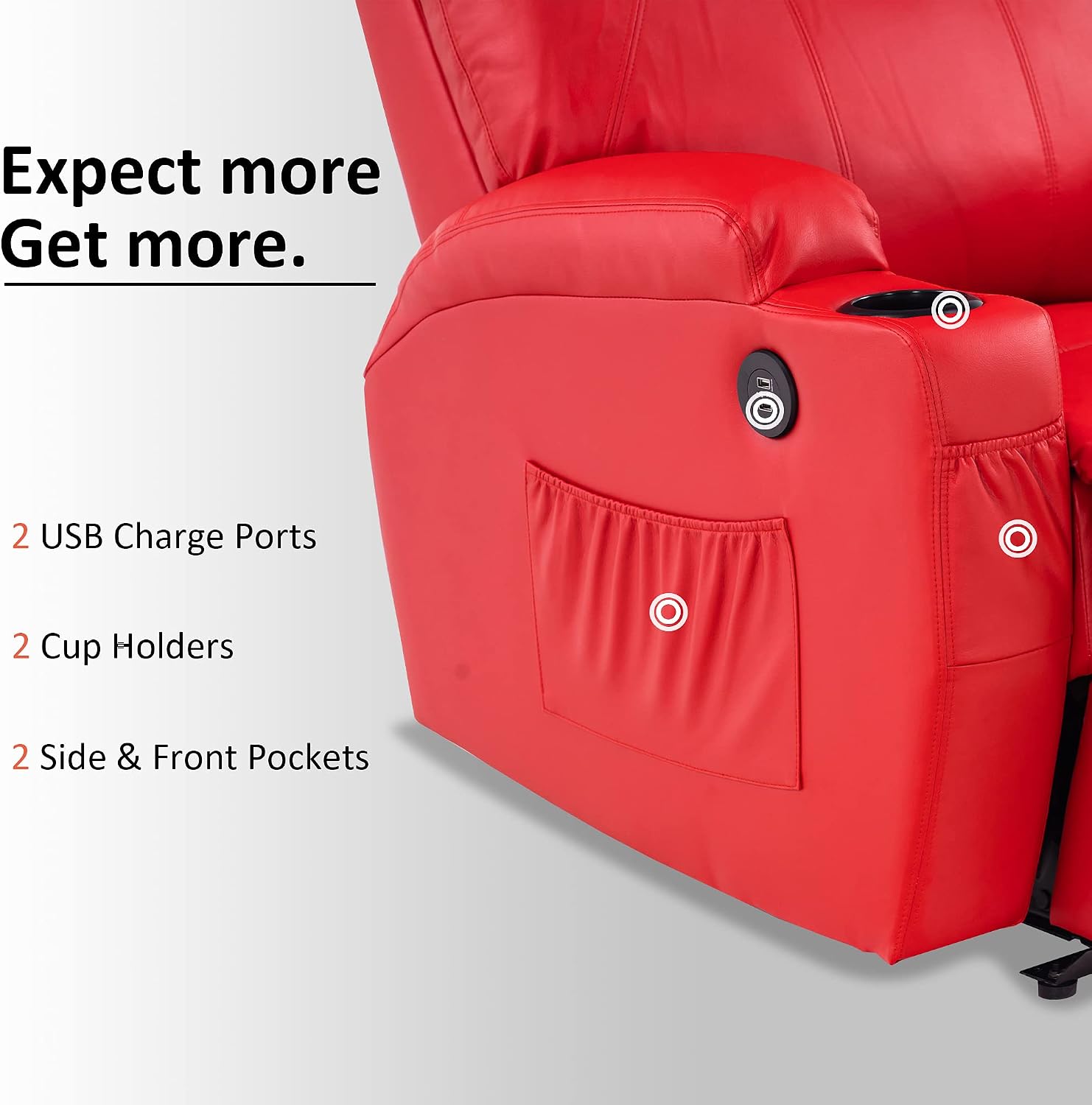
4.3 USB Charge Ports, Side Pockets, and Cup Holders
The recliner is equipped with convenient features for your comfort and utility.
- USB Charge Ports: Two USB ports are available to charge low-power devices such as mobile phones. These ports are not intended for high-power devices.
- Side Pockets: Use the side pockets to store small items, magazines, or remote controls.
- Cup Holders: Two cup holders are integrated into the armrests for beverages.
5. Maintenance
Proper care and maintenance will extend the life and appearance of your recliner.
Cleaning Instructions:
- For general cleaning, wipe the faux leather surface with a dry or damp lint-free cloth.
- Avoid using oils, waxes, harsh chemicals, or abrasive cleaners, as these can damage the faux leather.
- For spills, blot immediately with a clean, dry cloth.
- The manufacturer recommends dry cleaning for deeper cleaning, if necessary.
General Care:
- Regularly check all connections and fasteners to ensure they are secure.
- Avoid exposing the recliner to direct sunlight or extreme temperatures, which can cause material degradation.
- Keep pets away from the recliner to prevent scratches or damage to the upholstery.
6. Troubleshooting
If you encounter issues with your MCombo recliner, refer to the following common solutions.
Common Issues and Solutions:
- Recliner not operating:
- Ensure the power cord is securely plugged into a working electrical outlet.
- Check that all internal cables between the chair components are properly connected.
- Verify that the power outlet is functional by testing it with another appliance.
- Vibration or Heat not working:
- Confirm the massage remote control is properly connected and powered.
- Ensure the specific function (vibration or heat) is activated on the remote.
- Note that the heating function operates separately from vibration.
- Unusual noises during operation:
- Check for any obstructions around the reclining mechanism.
- Ensure all assembly bolts and connections are tightened.
- USB ports not charging devices:
- Confirm the recliner is powered on.
- Ensure the device being charged is a low-power device (e.g., mobile phone). High-power devices may not charge.
- Try a different USB cable or device to rule out cable or device issues.
If these steps do not resolve the issue, please contact MCombo customer support for further assistance.
7. Specifications
| Feature | Specification |
|---|---|
| Brand | MCombo |
| Model Name | MCombo 7050 |
| Product Dimensions (Upright) | 31"D x 35"W x 41"H (78.7cm D x 88.9cm W x 104.1cm H) |
| Maximum Weight Recommendation | 320 Pounds (145 kg) |
| Material | Faux Leather (Upholstery), Foam (Fill Material) |
| Item Weight | 90 pounds (40.8 kg) |
| Seat Height | 18 Inches (45.7 cm) |
| Seat Depth | 20 Inches (50.8 cm) |
| Arm Height | 25.6 Inches (65 cm) |
| Seat Back Interior Height | 28 Inches (71.1 cm) |
| Reclining Angle | Up to 140 degrees |
| Power Recline | Yes |
| Vibration Massage | 8 points (back, lumbar, thighs, legs) |
| Lumbar Heat | 1 area |
| USB Ports | 2 (for low-power devices) |
| Cup Holders | 2 |
| Side Pockets | Yes |

8. Warranty and Support
Warranty Information:
The MCombo Electric Power Recliner Chair Model 7050 comes with a 1-Year Limited Warranty. This warranty covers manufacturing defects under normal use. Please retain your proof of purchase for warranty claims.
Customer Support:
For any questions regarding assembly, operation, maintenance, or warranty claims, please contact MCombo customer support. Our team is dedicated to providing assistance and ensuring your satisfaction.
You can typically find contact information on the MCombo official website or through your purchase platform.


