Introduction
The Grundig Sonoclock 1500 is a versatile alarm clock radio designed to provide reliable timekeeping, FM radio entertainment, and convenient USB charging for your devices. This manual will guide you through the features and functions of your new Sonoclock 1500.

Image: Front view of the Grundig Sonoclock 1500, showing the digital display, control buttons on top, and the speaker grille.
Package Contents
- Grundig Sonoclock 1500 Alarm Clock Radio
- Integrated Power Adapter
- User Manual (this document)
Setup
1. Power Connection
Connect the power adapter to the DC input port on the back of the Sonoclock 1500. Plug the adapter into a standard wall outlet. The display will illuminate.
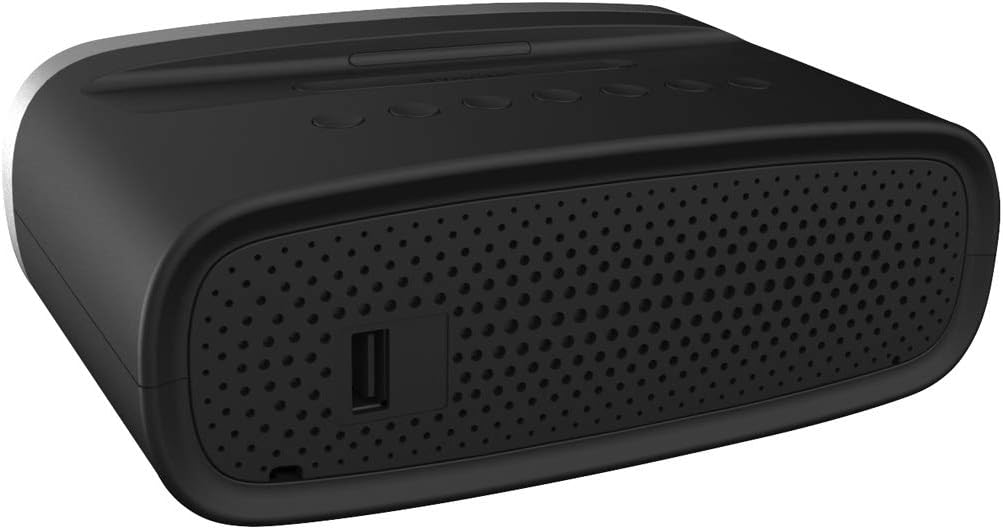
Image: Rear view of the Grundig Sonoclock 1500, highlighting the power input and USB charging port.
2. Setting the Time
- Press and hold the TIME button until the hour digits flash.
- Use the HR button to adjust the hour.
- Use the MIN button to adjust the minute.
- Press the TIME button again to confirm and exit time setting mode.
3. Setting FM Radio Presets
- Press the ON/OFF button to turn on the radio.
- Use the TUNING + or TUNING - buttons to manually tune to your desired FM station.
- To automatically scan and store stations, press and hold the PRESET button. The radio will scan and save available stations.
- To manually save a station: Tune to the desired station, then press and hold the PRESET button until a preset number flashes. Use TUNING + or TUNING - to select the preset number, then press PRESET again to confirm.
4. Setting Alarms (AL1 and AL2)
The Sonoclock 1500 features two independent alarms, AL1 and AL2.
- Press and hold the AL1 or AL2 button until the alarm hour digits flash.
- Use the HR button to adjust the alarm hour.
- Use the MIN button to adjust the alarm minute.
- Press the AL1 or AL2 button again to confirm the time.
- After setting the time, the display will show options for alarm source (Buzzer or FM Radio) and alarm frequency (Daily, Weekdays, Weekends). Use TUNING + or TUNING - to select, then press AL1 or AL2 to confirm each setting.
Operating Instructions
1. Display Brightness (Dimmer)
Press the DIMMER button repeatedly to cycle through the three brightness levels (High, Medium, Low) or to turn off the display.
2. Radio Operation
- Press ON/OFF to turn the radio on or off.
- Use VOLUME + or VOLUME - to adjust the sound level.
- Press PRESET repeatedly to cycle through saved FM radio stations.
- Use TUNING + or TUNING - for manual tuning.
3. Alarm Functions
- Activating/Deactivating Alarms: Press the AL1 or AL2 button briefly to toggle the respective alarm on or off. An alarm icon will appear on the display when active.
- Snooze Function: When an alarm sounds, press the large SNOOZE button to temporarily silence the alarm for approximately 9 minutes. The alarm will sound again after this period.
- Stopping an Alarm: To stop an alarm completely, press the ON/OFF button. The alarm will reset for the next scheduled activation.
- Sleep Timer: Press the SLEEP button repeatedly to set a sleep timer (up to 120 minutes). The radio will automatically turn off after the selected duration.
4. USB Charging
The USB port on the back of the Sonoclock 1500 allows you to charge compatible smartphones and other USB-powered devices. Connect your device's USB charging cable to the port. Charging will begin automatically.
Note: The USB port is for charging only and does not support data transfer or audio playback.
Maintenance
Cleaning
To clean the unit, use a soft, dry cloth. Do not use abrasive cleaners, waxes, or solvents as these may damage the surface. Ensure the unit is unplugged before cleaning.
Care
Avoid exposing the Sonoclock 1500 to extreme temperatures, direct sunlight, or high humidity. Do not disassemble the unit; refer servicing to qualified personnel.
Troubleshooting
| Problem | Possible Cause | Solution |
|---|---|---|
| Unit does not power on. | Power adapter not connected or outlet not active. | Ensure the power adapter is securely plugged into the unit and a working wall outlet. |
| Alarm does not sound. | Alarm is not activated, set incorrectly, or volume is too low. | Check if the alarm icon is displayed. Verify alarm time and source settings. Increase radio volume if alarm source is FM. |
| Poor FM radio reception. | Antenna not extended or interference. | Extend the FM wire antenna fully. Try repositioning the unit for better reception. Avoid placing near other electronic devices. |
| USB charging not working. | Device not compatible or cable faulty. | Ensure your device is compatible with USB charging. Try a different USB cable. |
| Difficulty setting time/alarm. | Incorrect button sequence or timing. | Refer to the "Setting the Time" and "Setting Alarms" sections. Ensure you press and hold buttons for the specified duration. |
Specifications
- Brand: Grundig
- Model: Sonoclock 1500
- Color: Black
- Dimensions (W x D x H): 16.5 x 6.5 x 10.2 cm (6.5 x 2.56 x 4.02 inches)
- Weight: 315 g (0.69 lbs)
- Power/Voltage: 1 Watt / 220V
- Display Type: Digital LED, 3-step dimmable
- Radio Tuner: FM
- Special Features: Alarm, Radio, Snooze, Sleep Timer, USB Charging Function
- Compatible Models (for charging): Smartphone
- Power Source: AC Power

Image: Side view of the Grundig Sonoclock 1500, illustrating its compact dimensions.
Warranty and Support
For warranty information and technical support, please refer to the documentation provided with your purchase or contact your retailer. You may also visit the official Grundig website for further assistance and product registration.
Please retain your proof of purchase for warranty claims.


